This Week In Security: Flock Cameras Are Old, Microsoft Patches Patches, And Researchers Attack SSH

Leak site Distributed Denial of Secrets has released a dump of the filesystems of a Flock camera, and Micah Lee has published a dive into the contents.  Apparently the Flock security model did not include “angry citizens with a hacksaw in the middle of the night” in the physical security category.

The first thing Micah notes is that the Flock hardware runs Android 8.1 (for those not keeping track, the current Android release is Android 17 released in June 2026).  The version of Android running on the Flock camera was last patched in June of 2018, and the Linux kernel (3.18.71) is over nine years out of date, and the 3.18 series went end-of-life in 2019.

You might assume “wouldn’t an operating system this old have known vulnerabilities?”, and you’d be completely right.  Micah calls out two in particular, one in the Qualcomm GPU which allows any program to manipulate kernel memory and gain root (similar, yet simpler, than the spate of kernel vulnerabilities this year that allowed manipulating memory via the disk IO cache), and the “WrongZone” vulnerability which allows a process to escalate to root via socket handling errors.  You might also guess both of these have been patched, and again, you’d be right, in 2021 and 2018 respectively.

Digging deeper, Micah discovers that API keys with access into the Flock infrastructure appear to be hard-coded into the binaries.  Each camera appears to request credentials from an authentication server, using the MAC address of the camera.  After obtaining the credentials from an Okta Auth0 sign-in service, the Flock stores them, in plain text.

Also stored on the camera unencrypted are logs and position data:  The camera dumped to Distributed Denial of Secrets came from a suburb of Milwaukee. Continue reading “This Week In Security: Flock Cameras Are Old, Microsoft Patches Patches, And Researchers Attack SSH”


Authenticate SSH With Your TPM

You probably don’t think about it much, but your PC probably has a TPM or Trusted Platform Module. Windows 11 requires one, and most often, it stores keys to validate your boot process. Most people use it for that, and nothing else. However, it is, in reality, a perfectly good hardware token. It can store secret data in a way that is very difficult to hack. Even you can’t export your own secrets from the TPM. [Remy] shows us how to store your SSH keys right on your TPM device.

Continue reading “Authenticate SSH With Your TPM”

The edge of a laptop is shown with a USB cable plugged into it. the other end of the cable is plugged into a Raspberry Pi Zero.

SSH Over USB On A Raspberry Pi

Setting up access to a headless Raspberry Pi is one of those tasks that should take a few minutes, but for some reason always seems to take much longer. The most common method is to configure Wi-Fi access and an SSH service on the Pi before starting it, which can go wrong in many different ways. This author, for example, recently spent a few hours failing to set up a headless Pi on a network secured with Protected EAP, and was eventually driven to using SSH over Bluetooth. This could thankfully soon be a thing of the past, as [Paul Oberosler] developed a package for SSH over USB, which is included in the latest versions of Raspberry Pi OS.

The idea behind rpi-usb-gadget is that a Raspberry Pi in gadget mode can be plugged into a host machine, which recognizes it as a network adapter. The Pi itself is presented as a host on that network, and the host machine can then SSH into it. Additionally, using Internet Connection Sharing (ICS), the Pi can use the host machine’s internet access. Gadget mode can be enabled and configured from the Raspberry Pi Imager. Setting up ICS is less plug-and-play, since an extra driver needs to be installed on Windows machines. Enabling gadget mode only lets the selected USB port work as a power input and USB network port, not as a host port for other peripherals.

An older way to get USB terminal access is using OTG mode, which we’ve seen used to simplify the configuration of a Pi as a simultaneous AP and client. If you want to set up headless access to Raspberry Pi desktop, we have a guide for that.

Thanks to [Gregg Levine] for the tip!

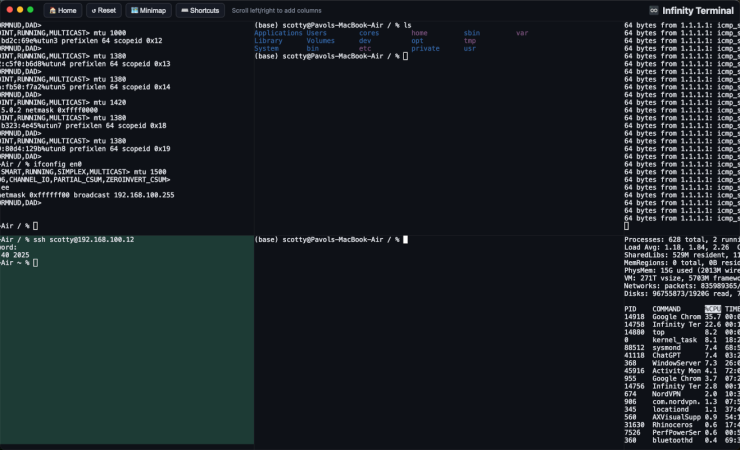
InfinityTerminal Brings Infinite Horizontal Scrolling

The creator of infinite vertical scrolling in social media, [Aza Raskin], infamously regrets his creation that has helped to waste a tremendous amount of human attention and time on the Internet. But that’s vertical scrolling. [bujna94] has created infinityTerminal, a program with infinite scrolling, but in the horizontal direction instead. This tool has had the opposite effect to go along with its opposite orientation: increased productivity and improved workflow.

The impetus for infinityTerminal is [bujna94]’s need for many simultaneous SSH sessions, and the fact that no other terminal program can support an indefinite number of visible terminal windows. This application starts with four terminal windows in a 2×2 grid, and allows the user to open more terminals, two at a time, to form a 2xN grid. As many terminals as needed will open in pairs in the horizontal direction with smooth, trackpad-compatible scrolling and automatic color-coded backgrounds for servers accessed by SSH.

For anyone with a similar dislike of tabs like [bujna94], this might be worth trying out. It’s built with Electron, xterm.js, and node-pty.

There are a few more details about the project on a Reddit post. [Bujna94] also made it completely open source and freely available with the files on a GitHub page, and welcomes anyone to try out his creation that wants to. For more terminal magic, we’d also recommend checking out Notcurses, a terminal application capable enough to output SNES-level detail natively.

Front view of blue bicycle with Raspberry Pi webserver

Pedaling Your Mobile Web Server Across The Globe

We tinkerers often have ideas we know are crazy, and we make them up in the most bizarre places, too. For example, just imagine hosting a website while pedaling across the world—who would (not) want that? Meet [Jelle Reith], a tinkerer on an epic cycling adventure, whose bicycle doubles as a mobile web server. [Jelle]’s project, jelle.bike, will from the 6th of December on showcase what he’s seeing in real time, powered by ingenuity and his hub dynamo. If you read this far, you’ll probably guess: this hack is done by a Dutchman. You couldn’t be more right.

At the heart of [Jelle]’s setup is a Raspberry Pi 4 in a watertight enclosure. The tiny powerhouse runs off energy generated by a Forumslader V3, a clever AC-to-DC converter optimized for bike dynamos. The Pi gets internet access via [Jelle]’s phone hotspot, but hosting a site over cellular networks isn’t as simple as it sounds. With no static IP available, [Jelle] routes web traffic through a VPS using an SSH tunnel. This crafty solution—expanded upon by Jeff Geerling—ensures seamless access to the site, even overcoming IPv6 quirks.

The system’s efficiency and modularity exemplify maker spirit: harnessing everyday tools to achieve the extraordinary. For more details, including a parts list and schematics, check out [Jelle]’s Hackaday.io project page.

Getting Root On Cheap WiFi Repeaters, The Long Way Around

What can you do with a cheap Linux machine with limited flash and only a single free GPIO line? Probably not much, but sometimes, just getting root to prove you can is the main goal of a project. If that happens to lead somewhere useful, well, that’s just icing on the cake.

Like many interesting stories, this one starts on AliExpress, where [Easton] spied some low-cost WiFi repeaters, the ones that plug directly into the wall and extend your wireless network another few meters or so. Unable to resist the siren song, a few of these dongles showed up in the mailbox, ripe for the hacking. Spoiler alert: although the attempt on the first device had some success by getting a console session through the UART port and resetting the root password, [Easton] ended up bricking the repeater while trying to install an OpenWRT image.

The second attempt, this time on a different but similar device, proved more fruitful. The rudimentary web UI provided no easy path in, although it did a pretty good job enumerating the hardware [Easton] was working with. With the UART route only likely to provide temptation to brick this one too, [Easton] turned to a security advisory about a vulnerability that allows remote code execution through a specially crafted SSID. That means getting root on these dongles is as simple as a curl command — no hardware hacks needed!

As for what to do with a bunch of little plug-in Linux boxes with WiFi, we’ll leave that up to your imagination. We like [Easton]’s idea of running something like Pi-Hole on them; maybe Home Assistant would be possible, but these are pretty resource-constrained machines. Still, the lessons learned here are valuable, and at this price point, let the games begin.

This Week In Security: Hide Yo SSH, Polyfill, And Packing It Up

The big news this week was that OpenSSH has an unauthorized Remote Code Execution exploit. Or more precisely, it had one that was fixed in 2006, that was unintentionally re-introduced in version 8.5p1 from 2021. The flaw is a signal handler race condition, where async-unsafe code gets called from within the SIGALARM handler. What does that mean?
Continue reading “This Week In Security: Hide Yo SSH, Polyfill, And Packing It Up”