LEDs Fade To The Music Using A Python Filter

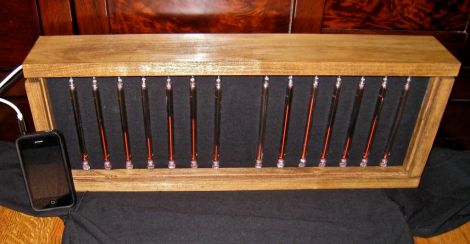
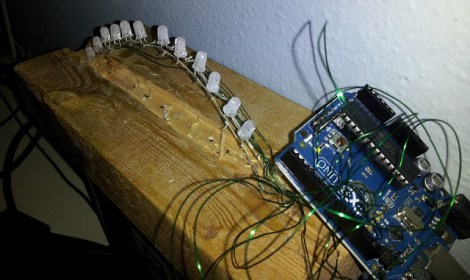
This little LED rig fades in time to music. The hardware itself is quite simple, some LEDs connected to the PWM pins of an Arduino. But the signal processing is happening on a computer using a Python script.

Many of the projects we see which pulse lights to music use the MSGEQ7 chip to perform hardware processing on the audio signal. But since [Zolmeister] is using a computer to play his tunes he took a different route. His Linux box uses PulseAudio to handle sound. This allows him to record from the audio playback which provides an internal source for the pyAudio package. His Python script saves snippets of the streaming audio to .wav files. I then normalizes the volume level and uses the amplitude to set a PWM value before deleting the sample and moving onto the next. These values are pushed to the Arduino at 115200 baud to achieve the results seen in the video after the break.

Continue reading “LEDs Fade To The Music Using A Python Filter”

Roll Your Own Parabolic Microphone

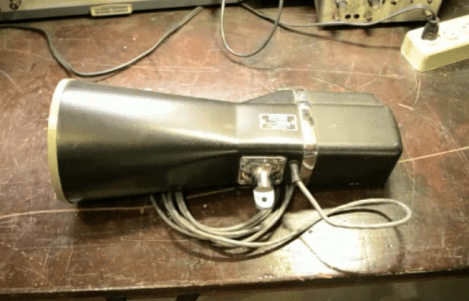
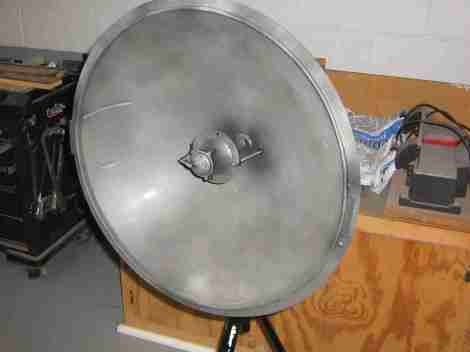
Parabolic microphones are used to listen in from a distance. You see them on the sidelines of NFL football games, but they’re part of the standard issue in detective and spy novels. Now you can build your own parabolic microphone by following this example.

The one component that may be hard to find is the parabolic reflector. You cannot simply use a bowl or other curved object as the precise parabolic shape ensures that sound waves are reflected onto one finite focal point. For this build the reflector was obtained from an eBay seller. But the other parts are scavenged from easy to find sources. The microphone itself is an inexpensive element from Radioshack. It is mounted in the shell from a tweeter speaker, which helps to gather the sound if the element isn’t exactly aligned with the focal point. The setup also needs a preamplification system, which uses many components. Luckily there’s a schematic and other reference material linked in the write up.

You can also build a laser microphone which detects sound waves on a pane of glass.

[Thanks Anonymous]

Making Your Anime Papercraft Move To The Music

This anime character is dancing to the music thanks to some animatronic tricks which [Scott Harden] put together. She dances perfectly, exhibiting different arm and head movements at just the right time. The secret to the synchronization is actually in the right channel of the audio being played.

The character in question is from an Internet meme called the Leekspin song. [Scott] reproduced it on some foam board, adding a servo to one arm to do the leek spinning, and another to move the head. These are both driven by an ATtiny44. All of the movements have been preprogrammed to go along with the audio track. But he needed a way to synchronize the beginning of each action set. The solution was to re-encode the audio with one track devoted to a set of sine wave pulses. The right audio channel feeds to the AVR chip via an LM741 opamp. Each sine wave triggers the AVR to execute the next dance move in the sequence. You can see the demo video for the project after the break.

Continue reading “Making Your Anime Papercraft Move To The Music”

How To Build Your Own Dedicated Pandora Radio

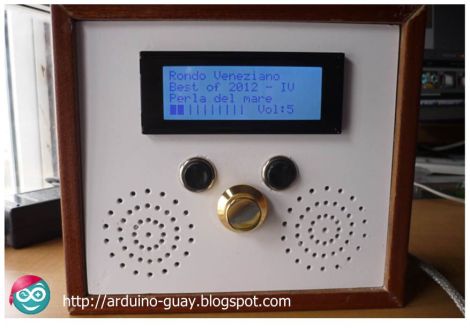
This mix of modern and retro acts as a standalone Pandora client. It’s certainly a radio upgrade, falling somewhere in between the passive listening of traditional broadcasts, and the complete control of music players that use playlists.

Inside the wooden case a BeagleBoard does most of the work. It’s running Ubuntu 12.04 on which pianobar, a command line interface package for Pandora is running. Those components alone would make a pretty nice listening experience, but since Pandora rolls different music into the mix it’s nice to be able to see what you’re listening to. The four-line LCD is wide enough to display plenty of information. It’s being controlled by a PIC24 microcontroller which also monitors the controls on the top. As you can see in the video after the break, the user interface offers almost everything you could want. It’s easy to switch stations, and you can still register your preferences on each track being played.

Continue reading “How To Build Your Own Dedicated Pandora Radio”

Ugly Upgrade Keeps The Tunes Playing Longer

[Sam] picked up a Sansa Clip audio player to listen to some tunes while working on projects. He liked the fact that he could run the Rockbox alternative firmware on the device, but thought the 15 hour battery life needed some improving. He swapped out the stock cell with a larger Lithium cell for a long life of 50-60 hours. It’s an upgrade fom 300 mAh to 1100 mAh, but as you can see, the size of the replacement made for some interesting case modification.

The battery swap required more than just taking one battery out and putting in the other. [Sam] is using a cellphone battery as the replacement and he didn’t want to have issues with the internal circuitry. He took the cell out of its plastic enclosure, removing the circuit board in the process. That PCB is the charging circuit, which he replaced with the one from the stock battery. After insulating the cell with a layer of Kapton tape he soldered it to the MP3 player and did his best to adhere all the parts to each other.

Sure, its ugly, but that makes it right at home on the work bench.

A Laser Audio Transmitter

Here’s a way of transmitting audio that makes it virtually impossible for someone else to listen in. Instead of sending radio waves bouncing all over creation, this uses the focused light of a laser to transmit audio. In the image above you can see the silver cylinder which houses the laser diode. It is focusing the beam on a light dependent resistor to the right which looks almost like a red LED due to the intensity of the light.

The simplicity of this circuit is fascinating. On the receiving end there is no more than the LDR, a 1.5V power source, and a headphone jack. The transmitter is not much more complicated than that. It includes an audio output transformer which boosts the resistance of the audio signal. This increase in resistance ensures that the laser diode modulates enough to affect the LDR on the receiving end. The transmitter uses a 3.3V supply. Check out the video after the break to hear the high quality of audio coming through the setup.

Once you’re done playing around with the transmitter you might try turning the laser into a remote control for your stereo.

Continue reading “A Laser Audio Transmitter”

Convert A Speaker To A Battery-powered Amplifying Party Box

[Matt the Gamer] loved his pair of Minimus 7 bookshelf speakers. That is until a tragic hacking accident burned out the driver and left him with a speaker-shaped paper weight. But the defunct audio hardware has been given new life as a single portable powered speaker. Now he can grab it and go, knowing that it contains everything he needs to play back audio from a phone or iPod.

The most surprising part of the build is the battery. [Matt] went with a sealed lead-acid battery. It just barely fits through the hole for the larger speaker, and provides 12V with 1.2 mAh of capacity. He uses an 18V laptop power supply when charging the battery. The PSU is just the source, his own circuit board handles the charging via an LM317 voltage regulator. Also on the board is an amplifier built around a TDA2003A chip. He added a back panel which hosts connections for the charger and the audio input. Two switches allow the speaker to be turned on and off, and select between battery mode and charging mode. As a final touch he added a power indicator LED to the front, and a drawer pull as a carrying handle.