Light Painting With The Raspi

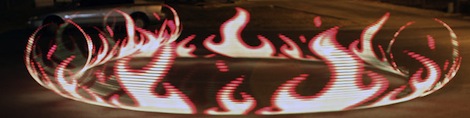
The art of taking long exposure photographs with blinking RGB LEDs has improved greatly over the years, mostly due to the extremely easy to use Arduino and hundreds of tutorials on the web. If there’s one problem with light painting with a ‘duino, it’s that large, full color images take up a ton of storage space, much more than the flash memory on an Arduino can provide. Wanting fancier and more colorful light painted images, [Phil] over at Adafruit used a Raspberry Pi to make some very awesome light painted images.

Like any Adafruit tutorial that uses LEDs, the build begins with a digital RGB LED strip wired to the GPIO pins on the Raspi. After loading up the Adafruit educational Raspi Linux distro for hardware SPI support, the only thing left to do was writing a Python script to display images in the air.

[Phil] says vertical, hand-held LED bars are old hat, so he took a hula hoop and a few bits of PVC pipe, attached the LED strip, and put it on his bike. The results are really impressive – we’re loving the flames in the title pic – and considering the Raspi is a full-fledged computer, light paintings larger than what [Phil] made are very possible.

Back Up The Band With Some RGB Stage Lights

Fresh off the 72-hour madness of the Red Bull Creation contest some of the folks a North Street Labs took on a stage lighting project. It’s for a local performing venue that just opened up, and despite the time crunch the team pulled off another great build.

Sixteen meters of LED strip make the electronics for the project a whole lot easier. The strips run up the center of a cabinets built as stand-alone columns which will end up at the back of the stage. Each cabinet has its own 5V 4A power supply (note the burnout issues they mention when using cheap eBay PSUs). Each column has its own Arduino Uno driving the LEDs, with an RS485 shield to connect back to a main Arduino Mega 2560 controller. It uses a PSX controller to switch between different lighting modes.

The seven towers boasting 688 LEDs isn’t all that’s shedding light on the show. There’s also about 300 feet of EL wire at work.

Continue reading “Back Up The Band With Some RGB Stage Lights”

How To Design Your Own LED Driver

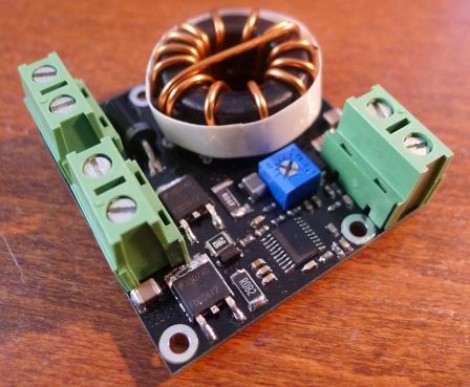
If you find yourself in need of a driver for a high power string of LEDs this is a must read. [Limpkin] just designed this driver as a contract job. He can’t show us the schematic, but he did share some tips on how to build an LED driver around a MAX16834 chip.

As you move to higher power designs the barriers to success pile up rather quickly. Using a chip like the MAX16834 really helps to simplify the task as it can be used as a boost or buck converter, it includes functionality that allows for dimming, and it’s a constant currents solution. There are board design issues that need to be accounted for in these designs. [Limkin] included links to a few calculators that will help you determine trace width based power levels used with the driver. He also recommends using copper pours on both sides of the board connected with vias to help dissipate heat. To that end he used an IR thermometer for feedback during testing.

It’s too bad he doesn’t have any photos of the device at work. If you build something similar please take some pictures and tip us off about it.

RGB Chandelier May Not Fly With The Wife

We understand where [Craig] is coming from, leaving no stone unturned when looking for new electronic projects to occupy his time. He tried to convince his wife that they needed a light show to accompany dinner, and while she was skeptical he went ahead and built this remote control RGB chandelier anyway.

He recently purchased fifteen feet of RGB LED strip and has since been trying to use it in his projects. What’s interesting is that he didn’t make direct use of the strip. Just 10 of the LED packages were used. He desoldered and extended each wire leads and used one of the driver chips to address them all. The main body of the light fixture is a triangle, and out of each side two test tubes host one LED each. To diffuse the light [Craig] mixed up some resin and laced it with glitter. Once hardened the resin holds the LEDs firmly in place. The glass shade in the center of the fixture hides four more LEDs.

[Craig] uses a remote control from a Roku box to control the chandelier. An IR receiver is monitored by an Arduino which drives the LEDs accordingly. After the break you can see a demonstration of the completed project. Unfortunately it doesn’t provide as much light as they need. We’d suggest an upgrade along these lines.

Continue reading “RGB Chandelier May Not Fly With The Wife”

Painting A Wall With Light Using Water As Ink

This art installation uses a fantastic concept. The wall can be painted using water as ink which lights up a huge grid of white LEDs. This offers a very wide range of interactive possibilities since water can be applied in so many ways. Grab a paint brush, wet your finger, use a squirt gun, or mist with a spray bottle and the lights will tell you where you hit the wall.

We’re hoping a reader who speaks both French and English might help out by posting a translation as a comment on the prototyping video. In it, [Antonin Fourneau] shows off the various prototypes that led to the final product and we’d love to know what he’s saying. But by seeing the prototypes, then watching the English promo video after the break we can make a pretty good guess.  The boards have a hole that fits the flat-lens LEDs perfectly. This creates a mostly water tight seal to keep the liquid on one side while the leads are safe on the other. The water side has squiggly pads which allow droplets of water to complete an electrical connection.

Continue reading “Painting A Wall With Light Using Water As Ink”

Summer And Tailgating DIY Projects Roundup

tiger-paw-cornhole

If you live in the Southeastern United States as I do, you’ve probably been enjoying a summer of grilling out and going to the beach or lake. You’re also may be getting ready to enjoy football tailgating season, especially if you attend or live near a college town. Here’s a couple of DIY items that should be welcome at any outdoor event you choose to attend.

How to Make a Cornhole Board:

cornhole toss board

Although there are no LEDs or an Arduino on this one (we’d love to see your pimped boards in the comments), these instructions should work well for making your basic cornhole set. Of course you can always add some folding legs to it, but they fit together pretty well as is.  As for the paint, there are many ways to do this, but check out the pic after the break to see the laser-cut stencil that the Tiger Paw in the first picture was made from.  Thanks [Essam]!

PVC Ladder Toss Set:

ladder toss game PVC

These instructions should tell you all you need to make your own ladder toss (or whatever less-PC name you decide call it). As for the golf ball “bolas,” you’ll have to figure out how to put a hole in the middle of them. This technique (as seen in a links post earlier) should cover it, but best to be careful that you’re not plunging into a liquid-core ball. Eye protection is recommended.

LED Glow Cubes:

solar LED glow cube

Although not a traditional tailgate item, these glowing solar LED cubes could serve as an alternative to the normal LED path lights. What’s in these instructions is how to simply take the parts source, a solar path light, apart and insert it into a translucent cube. We could see this made with several different colored LEDs and an Arduino for some other cool effects.  A logo of your favorite team could be added with a laser cutter or CNC router for tailgate use. Continue reading “Summer And Tailgating DIY Projects Roundup”

POV Bike Wheels With The MSP430

Being an intern a Texas Instruments isn’t all fun and games, but from [George], [Valerie], and [Ryan]’s TI intern design project, it sure looks like it. They built a persistence of vision display for a bicycle using the ever popular MSP430 Launchpad board.

The team of interns created a POV display by combining the power of the TI Launchpad with a row of 32 RGB LEDs soldered onto a booster pack. Once the whole circuit is fastened securely to the bike wheel, a hall effect sensor mounted to the bike frame allows the MSP430 to detect how fast it is going. From there, it’s just a matter of flashing LEDs at the right time to create a stationary display inside a rotating wheel.

Although the display will theoretically work with just one Launchpad/Booster pack combo, the team decided to use three of these circuits, totaling 96 LEDs per wheel, to create a really nice RGB display. The video (available after the break) shows a little bit of flicker but this is an artifact of the camera. In real life, the POV bike wheel display is simply stunning.

Continue reading “POV Bike Wheels With The MSP430”