Multi-channel Analog Input Module Is A Good Jumping-off Point For Many Projects

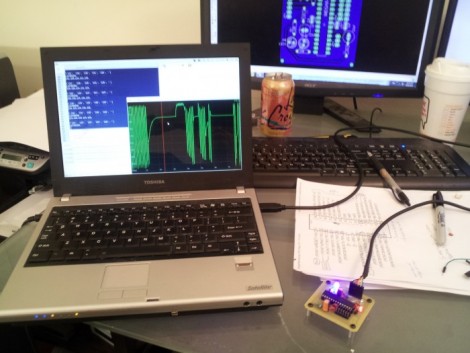
[Scott Harden] has already produced some projects which measure analog inputs. But he’s got plans for more and wanted a base system for graphing analog signals. You can see the small board next to his laptop which offers the ability to sample up to six signals and push them to a PC via USB.

The ATmega48 and a few supporting components are all you’ll find on that board. The USB connection is taken care of by an FTDI cable. He went that route because the cables are relatively cheap, easy to come by, and already have driver support on all the major operating systems. If you look at the screen you can see a window graphing one analog input in real-time. He wrote this in Python (which is once again a cross-platform tool) and it has no problem graphing all six inputs at once.

This is immediately useful as an upgrade to [Scott’s] ECG machine. His future plans include a Pulse Oximeter, EEG, and EEG.

DIY EMG Uses An Audio Recorder

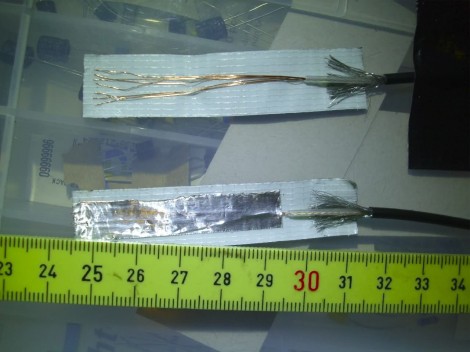
[Ericdsc] is looking to capture the electrical impulses of his muscles by using an EMG. He went through several prototypes to find the right recipe for sensors to pick up the electrical signal through his skin. Above you can see the version that worked best. Each sensor is made starting with a piece of duct tape and laying out a patch of stripped wire on it. A 5cmx1xm piece of aluminum foil then covers this, and second smaller piece of foil covers the cable’s shielding (not pictured here). This will stick to your skin to hold the sensor in place after applying a dab of sugar syrup to help make a good electrical connection.

In this case, an audio recorder is taking the measurements. [Ericdsc] had been having trouble sleeping and wanted to find out if he’s restless in bed. The audio recorder can log hours of data from the sensors which he can later analyze on the computer. Of course, it wouldn’t be hard to build your own amplifier circuit and process the signals in real-time. Maybe you want to convert that mind-controlled Pong game over to use abdominal control. You’ll have a six-pack in no time.

OpenCV Knows Where You’re Looking With Eye Tracking

[John] has been working on a video-based eye tracking solution using OpenCV, and we’re loving the progress. [John]’s pupil tracking software can tell anyone exactly where you’re looking and allows for free head movement.

The basic idea behind this build is simple; when looking straight ahead a pupil is perfectly circular. When an eye looks off to one side, a pupil looks more and more like an ellipse to a screen-mounted video camera. By measuring the dimensions of this ellipse, [John]’s software can make a very good guess where the eye is looking. If you want the extremely technical breakdown, here’s an ACM paper going over the technique.

Like the EyeWriter project this build was based on, [John]’s build uses IR LEDs around the edge of a monitor to increase the contrast between the pupil and the iris.

After the break are two videos showing the eyetracker in action. Watching [John]’s project at work is a little creepy, but the good news is a proper eye tracking setup doesn’t require the user to stare at their eye.

Continue reading “OpenCV Knows Where You’re Looking With Eye Tracking”

Building An X-ray Machine And Letting Everything Go To Your Head

It’s not every day one of the builds on Hackaday gets picked up by a big-name publication, and it’s even rarer to see a Hackaday contributor grace the pages of an actual print magazine. Such is the case with [Adam Munich] and his home-built x-ray machine.

We first saw [Adam]’s x-ray machine at the beginning of this year as an entry for the Buildlounge/Full Spectrum laser cutter contest. [Adam] won the contest, landed himself a new laser cutter, and started writing for Hackaday. Now that [Adam] is gracing the pages of Popular Science, we’re reminded of the story of Icarus, flying too close to the sun.

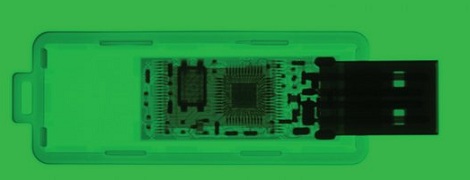
[Adam]’s x-ray machine is built around a Coolidge tube, the same type of vacuum tube found in dental x-ray machines. The device is housed in two suitcases – one used as a control panel and graced with beautiful dials and Nixies, the other housing the Coolidge tube and power supply. Proper x-ray images can be taken by pointing a camera at the scintillation screen, allowing [Adam] to see inside hard drives and other inanimate objects.

Sure, it’s a build we’ve seen before but it’s still very cool to see one of Hackaday’s own get some big name recognition.

Making A Miniature X-Ray Tube From Scratch

We know that most of you will have no reason to ever make a miniature X-ray tube. However, we also know that many of you will find this video mesmerizing like we did. [Glasslinger] does a fantastic job of explaining the entire process of creating the mini x-ray tube from, procuring the uranium glass and tungsten stem, creating the filament from scratch, all the glass work, and the testing.

Admittedly, most of us here at hackaday won’t go any further than admiring the craftsmanship, though we’re curious to see what [Adam Munich] has to say when he sees this story.

If you enjoyed the tube construction in the video, be sure to check out [Glasslinger’s] other videos. He makes all kinds of tubes in his shop and usually shares so much information along the process that each one has useful information beyond that particular project. Another crazy part is that he has made most of his own tools, including his glass lathe.

We really shouldn’t have to point out that X-Rays are dangerous. Don’t mess with them unless you have researched how to do it safely.

Monitor Your Heartbeat With A Webcam And A Flashlight

After seeing some heart rate monitor apps for Android which use the camera and flashlight features of the phones, [Tyson] took on the challenge of coding this for himself. But he’s not using a smart phone, instead he grabbed a headlamp and webcam for his heat rate monitor.

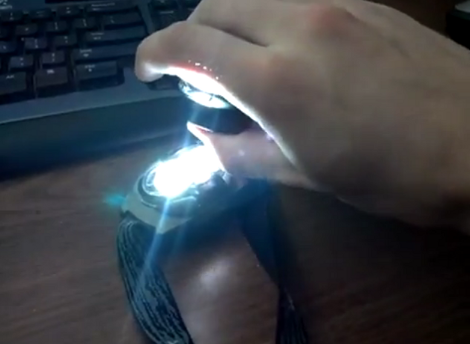
To start out he recorded a test video with his smart phone to see what it looks like to cover both the flash LED and camera module with his thumb. The picture is mainly pink, but there’s quite obviously a color gradient that pulses with each gush of blood through his skin. The next task was to write some filtering software that could make use of this type of image coming from a webcam. He used C# to write a GUI which shows the live feed, as well as a scrolling graph of the processed data. He took several tries at it, we’ve embedded one of the earlier efforts after the break.

Continue reading “Monitor Your Heartbeat With A Webcam And A Flashlight”

Digital Stethoscope Can Record, Playback, And Analyzer Heart Sounds

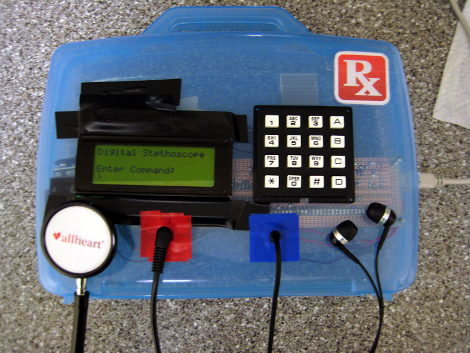
It’s somewhat amazing how these rather inexpensive electronics can augment the functionality of a common stethoscope. This digital stethoscope is using audio processing to add the features. A standard chest piece feeds a condenser microphone which is fed through a pretty standard OpAmp circuit which supplies the ADC of an ATmega644. After being digitized, the heart sound can be recorded in ten second increments to a 1 Mb flash memory chip. The data can also be fed to MATLAB via a USB cable in real-time. There it is displayed as a waveform and the heart rate is calculated on the fly. Check  out the video after the break for a great demo of the system.

The picture above shows a set of ear buds used as output. But this is a standard headphone jack, so the heart sounds can be played on speakers which we think would come in handy for teaching purposes. There’s also the option to hook it to a computer input which could be the audio used for a Skype session if a doctor is not close at hand. There is lots of potential here at a fairly low cost and we love that!

Continue reading “Digital Stethoscope Can Record, Playback, And Analyzer Heart Sounds”