Adventures In Resurrecting A No-name IP Webcam

webcam-repair

As many of us do, [Steaky] serves as a kind of on-call help desk for his family. His father in law recently contacted him because his pan and tilt webcam died, and he wanted to see if it could be fixed. Never turning down a challenge, [Steaky] decided to give it a shot.

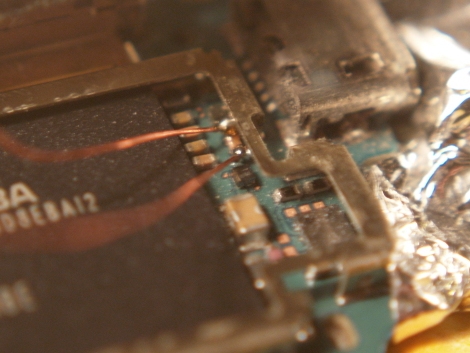
He ended up having to disassemble it since the camera was completely unresponsive, and what he found inside piqued his interest. The no-name camera sported an ARM microprocessor at its core, and it seems that some of its pins were damaged due to a poorly designed case. He figured resoldering the pins would do the trick, but that wasn’t the end of his adventures.

As he dug deeper into the device, he found that the camera essentially killed itself, reading and writing data to the wrong places due to the damaged pins on the processor. After plenty of searching around, he was able to find a somewhat compatible firmware image, though not everything worked properly.

His father in law was so impressed with his work that he asked for the camera back, even though [Steaky] hadn’t fully repaired it yet. While he bid the camera goodbye, we’re pretty sure he’d be more than happy to reclaim it for a few days if any of our readers had some additional insight or resources that might help him finish the job.

Simple Earphone Repair Saves A Big Chunk Of Cash

shure_earphone_repair

[Spode] has been rocking out with a pair of Shure E4C earphones for about six years now, and he has no intentions of buying another set any time soon. The earphones cost him £200, so when the right channel started acting up, he decided to fix them rather than toss them in the trash bin.

His first attempt was successful, but just barely so. He ended up damaging the earphone case pretty badly, and in time the same problem reappeared. Undeterred, he opted to fix them once again, but this time around he did things differently.

Upon disassembling them, he found that his repair job had become frayed over time. [Spode] desoldered both drivers from the wires and cut them back a bit to expose some nice clean (and structurally sound) cable. He spent a little more time carefully soldering things back together to mitigate the chances of having to repair them again before replacing both earphone shells with a bit of black Sugru.

Having saved himself £200, [Spode] is quite happy with the repair. We probably would have tied an underwriter’s knot in each cable before soldering them to the drivers in the name of strain relief, though the Sugru should help with that.

Recovering A Corrupted EEE PC BIOS

recovering_eeepc_bios

[Jeremy] had an ASUS EEE PC 1000HE netbook on his hands which had succumbed to a corrupted BIOS. In most situations, people replace a motherboard when the BIOS is damaged beyond repair, but considering the price of motherboards, especially those built for portable devices, he simply refused to go that route.

Instead, he took it apart and did a little investigation to find out what SPI flash chip ASUS used in the netbook. With that information in hand, he put together an SPI flash programmer using a breadboard and a DLP-USB1232H USB to UART module. He couldn’t program the flash chip in-circuit, so he had to desolder it and deadbugged it onto his programmer. Using a few Linux-based flashing tools, he was able to reprogram the chip with a functioning BIOS in short order, saving him from a costly motherboard replacement.

While some motherboard manufacturers have built in secondary BIOS chips to prevent the need for this sort of recovery, it’s nice to know that the process is relatively straightforward, provided you have some basic soldering and Linux skills.

This also isn’t the first time we’ve seen someone recover an EEE PC from the brink – if you’re looking for an Arduino-based alternative, be sure to check this out.

Unbricking And Upgrading An ASUS Wl520 Router

unbricking_upgrading_asus_wl520

[Andrew] has an ASUS wl520-gU router that he is pretty fond of, despite its numerous problems. CPU clock bug aside, the router only has 16MB or memory like many others on the market. While tooling around with the bootloader he bricked the device, so he decided it was time for an overhaul.

After some searching online, he found that the router could be unbricked by shorting out one of the pins on its flash chip. With an emergency unbrick button installed on the board, he can now reset it in seconds by power cycling the device.

Now that he had a working router again, he proceeded to remedy his initial gripe – the lackluster amount of memory. He soldered in a 512Mbit (64MB) module in the original chip’s place, crossed his fingers and booted the router. It started up just fine, so he ran a few commands to instruct the router to recognize the new memory capacity. After rebooting, he found that it only recognized 32MB of RAM, which was remedied by soldering a 22 Ohm resistor to one of the module’s pins.

It did take a bit of careful soldering to get things upgraded and working, but we think it was well worth the effort.

Baking An HP LaserJet 1522 Series Back To Life

resurrecting_hp_laserjet

[Thice] had himself a problem. As luck would have it his HP laser printer died shortly after the warranty period expired, and HP was ready to charge him €350 to repair it. Since that would pretty much buy [Thice] a new one, he decided to try fixing the problem himself. He scoured the Internet for a solution to his problem, and luckily discovered that his printer might be recoverable.

The entire LaserJet M1522 series is apparently pretty prone to breaking, with the formatter board being the usual point of failure. To fix his printer, he disassembled the outer shell, removing the formatter board from the unit. Once the onboard battery was removed, he constructed a set of standoffs using aluminum foil, and set the board in his oven at 180°C (~356°F) for about eight minutes.

After cooling, he reinstalled the board, and his printer behaved as good as new. [Thice] says that the only problem with his fix is that he needs to bake the board every 6 months or so, making this a great hack but not the most ideal solution in the long term.

Building Your Own Replacement Refrigerator Thermostat

refrigerator_thermostat_repair

[Ron’s] refrigerator broke shortly after he came home from his weekly grocery trip, and since this was his second dead fridge in three years, he wanted to fix it rather than buy a new one…again. It turns out that the thermostat was toast, and a replacement would cost him $80. That was well more than he was willing to pay, but his groceries were starting to get warm, so he had to do something.

Being the tinkerer he is, he figured he could rig up his own thermostat that would work at least as well as the one that died on him. He scavenged an ATmega328 from a failed project, and after digging around online, put together the most barebones Arduino setup he could find. The microcontroller is tucked away in the back of the refrigerator where the old thermostat used to live, and takes input from a TMP36 temperature sensor, triggering a relay to start the refrigerator’s compressor whenever the the temp goes above 4°C.

[Ron] says his fix is just about the “worst kludge ever”, but as he saved $80 in parts and $150 in labor, we’re inclined to think it’s a job well done.

Retrofitting A 60-year Old Electric Heater

electric_heater_retrofit

[John] found an old Kenmore electric heater at a junk store one day, and thought it would look great in his bathroom. The only problem with the unit is that it was built back in the 1940s/1950s, so it lacked any sort of modern safeguards that you would expect from an indoor heater. There was no on/off switch, no fuse, no thermostat, and no tip switch – though it did have a nice, flammable cloth-covered power cord.

Since [John] wasn’t too keen on burning his house down in the name of staying warm, he decided to retrofit the old unit’s shell with a new ceramic heater. He found a $20 unit that looked like it would fit, so he disassembled both heaters and got to work. The Kenmore’s innards were scrapped, then he gave the unit a nice fresh coat of high-temp paint. The new heater was cut to fit inside the old unit’s shell, controls and safety features intact.

He says that it works very well, and that it looks great in his bathroom. If you’re considering doing something similar, be sure to check out his writeup – it is very thorough and has plenty of details that will help you along the way.