pov_business_card

POV Business Card Is Guaranteed To Get You Noticed

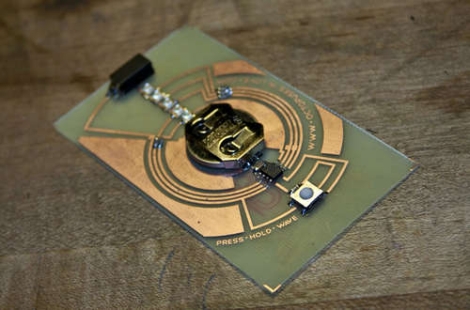
Some say that handing out business cards is an antiquated practice due to the ubiquity of smart phones which can be used to trade or record contact information in mere moments. Instructables user [sponges] however, doesn’t agree and is pushing a “business card renaissance” of sorts with his POV business card.

Hand-built in his basement, the cards feature a handful of SMD LEDs that display his name, followed by his phone number when waved back and forth. Constructed to be nearly the same size as a standard business card, his verison uses a PIC to manage the display as well as a tilt sensor to monitor the card’s motion. His walkthrough is quite thorough, and includes tutorials for each of the steps required to build the card. He discusses constructing your own etching tank, converting a laminator for PCB transfer purposes, building a solder reflow oven controller, as well as hacking an aquarium pump for use as a vacuum-powered pick and place.

The end result is a sharp looking business card that ensures you won’t forget meeting him. Keep reading to see a video of the card in action.

Continue reading “POV Business Card Is Guaranteed To Get You Noticed”
Building A Home Automation Mesh Network

[Ian Harris] designed a bunch of home automation for his parents using X10 hardware. He was a bit disappointed by the failure rate of the modules and the overall performance of the system so he set out to replace it with his own hardware. Lucky for use he’s documented the journey in a four-part series about mesh networks.

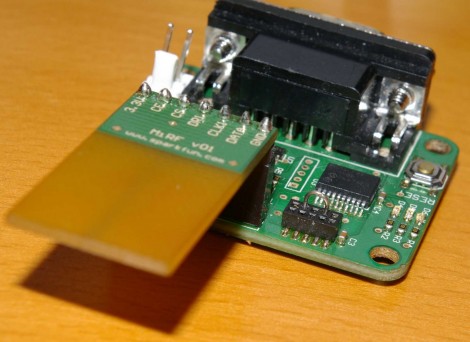
The hardware seen above is his test rig. He’s using a couple of Sparkfun breakout boards to develop for nrf2401a RF transceiver chips. These could be used as slave modules, with a central command device, but due to the home’s architecture wireless signals don’t propagate well from one end of the house to the other. The solution is to build a mesh network that will allow each module to act as a network node, receiving and passing on messages until they arrive at the target device. He’s trying to do this with cheap hardware, selecting the PIC 16F88 which boasts 7 KB or program memory and 368 bytes of ram. In the end it doesn’t take much code to get this running, it’s the concepts that take some time and research before you’ll be comfortable working with them.

[Thanks Oakkar7]

Pitch Shifter Makes Your Band Sing Higher

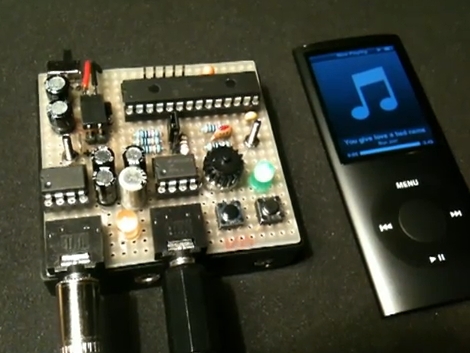
[Markus Gritsch] tipped us off about this little module he built to shift the pitch of audio playback. It uses a PIC 24FJ along with a couple of LM386 amplifier chips to manage the input and output signals. At the push of a button, audio being fed through the device can be modulated to a different key without changing the playback rate. Here it’s being used with a iPod but because this device just sits between an audio source and a signal input we wonder if you can have some fun on the cellphone with this circuit?

Check out the video after the break to hear it in action. We must compliment [Markus] on his layout. We haven’t seen the underside of that protoboard but he’s done a great job of fitting everything into a small area. You can find the schematic for the circuit by following the link at the top of this feature. He took a picture of his hand-drawn plans which saves him time from laying it out with something like KiCAD but still gives us the details that we love to see with your projects.

Continue reading “Pitch Shifter Makes Your Band Sing Higher”

AV Test Box Meets The Incredible Shrink Ray

mini_avtester

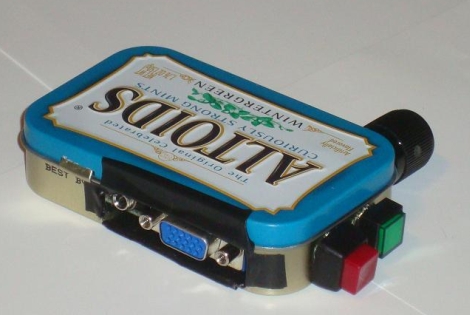
[Chris] recently finished building a miniscule AV Test Box, capable of fitting inside a standard Altoids tin. It is a revision of a project he constructed a few years ago. His previous test box worked well, but was large and cumbersome – definitely not something you would want to carry around from place to place with any frequency.

The new test box does everything its predecessor is capable of, which includes displaying an 800×600 VGA test pattern as well as generating sound signals for testing audio systems. He updated the circuit design a bit, employing a newer PIC processor to run the show, otherwise most of the design details have remained the same, form factor aside.

His build log is full to the brim with details as usual. You will find thorough descriptions of all the components he used, schematics, source code, as well as the theory behind the build.

Be sure to check out the video embedded below of his new AV tester in action.

Continue reading “AV Test Box Meets The Incredible Shrink Ray”

PWM-controlled LED Display Is Truly A Gift From The Heart

led_heart_panel

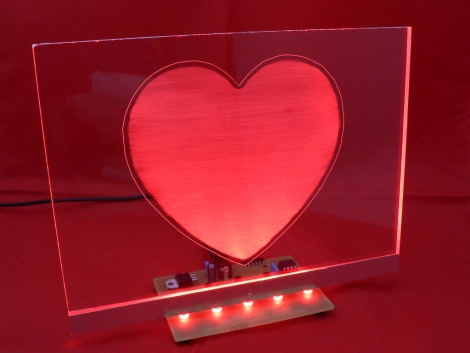
Instructables user [Simon] admits he addicted to electronics. Lucky for him, his wife of 15 years is pretty cool with, or at least tolerant of his need to fiddle with anything that plugs in. As a gift for their wedding anniversary, he decided it would be neat to combine his love for his wife with his love for electronics. The result is the the RGB LED “Love Heart” you see above. He built an RGB LED circuit controlled by a PIC12F683 microcontroller, which shines into a hand-etched plexi-glass panel.

The LED color is controlled using PWM, as you would expect. What you might not expect however, is the lengths [Simon] would travel to ensure nearly perfect color and brightness matching across the 5 LEDs he used in his project. Since RGB LEDs do not have a uniform output brightness, he used a Lux meter to precisely measure the white balance of each LED. He then plotted the results in Excel before coding the PWM driver. Now that’s devotion! Once the LEDs were settled, he went about constructing the rest of the LED panel.

If you are interested in building one for your sweetheart, [Simon] has you covered – he provides all of the schematics, templates, and source code required to get the job done.

Continue reading to see a video of his heart panel in action.

Continue reading “PWM-controlled LED Display Is Truly A Gift From The Heart”

Automated Harmonica Plays Simple Tunes

e-sharp_self_playing_harmonica

It seems that nearly everything is automated these days. Everywhere you look, people are being removed from processes in order to make them more efficient and less prone to mistakes. [Jon] however, saw one process that automation has yet to touch in a significant way – playing the harmonica.

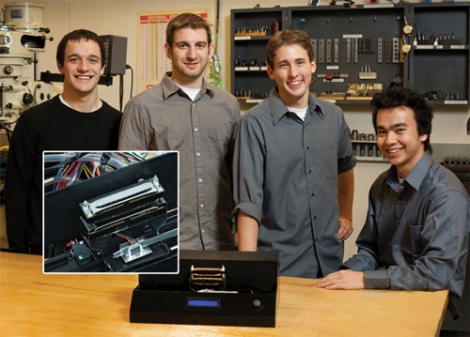
He constructed a harmonica-playing machine that can play a handful of simple songs with a few button presses. The machine was constructed using three PIC controllers, an air compressor, and a pair of harmonicas. A master PIC controller manages the whole operation, taking input from the PIC driving LCD, then handing off playing instructions to the PIC that manages the harmonicas.

Once the machine is started and a song is selected, the machine plays away, prompting for a new song once it has finished. The machine doesn’t quite play the harmonica like a human does, however. The reeds of one harmonica were reversed so that the player only needs to blow air, rather than require a vacuum to provide suction for the drawing motion typically used in harmonica playing.

As you can see in this video, the rig works decently, though it probably needs a bit more work to achieve that “human” feel.

[Thanks, Ben]

PIC Based Frequency Counter

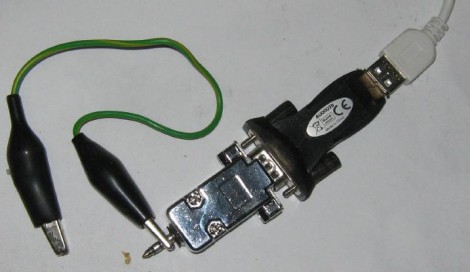
Here’s a PIC based frequency counter that outputs the count via an RS232 serial connection. [Oakkar7] tipped us off about it after seeing the AVR based counter we featured yesterday. This project is a bit older and a bit dirtier.

Inside the metal DB9 housing you’ll find just seven parts. The most important is a PIC 16F628 which handles both the counting and the serial communications. We’re not quite sure how it’s managing to talk to that USB-to-Serial converter without some type of level conversion. Since this microcontroller is not a dedicated counter chip a little bit of trimming must be done to bring the accuracy into spec. There’s also some physical trimming involved. In order to get everything to fit into the small enclosure the circuit was free-formed without a PCB or protoboard and the case of the DIP chip had to be ground down just a bit. As for the readout, a simple script can grab the data and display it in a terminal.

[via Piclist]