The PalmPilot Returns, This Time In Your Browser

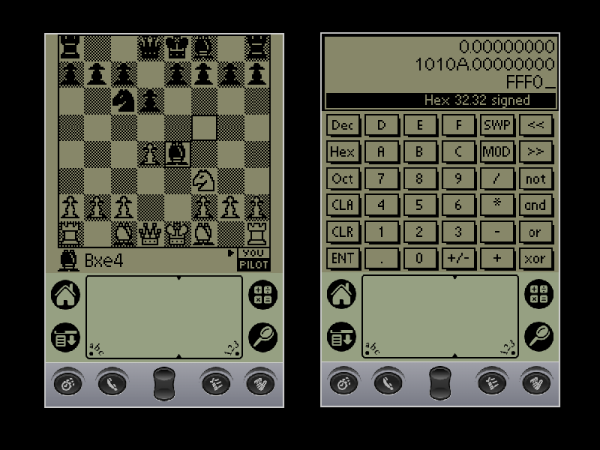
The PalmPilot doesn’t seem to get much retrocomputing love, but maybe it should. After all, it might not have been the very first handheld, but it was probably the most successful, and that ultimately led to the era of the smartphone. Whether you miss your old Palm applications, or never got to experience them the first time around, fear not. You can now relive them in all their glory in your browser thanks to the Internet Archive project.

There are over 500 applications and games all running in a browser-based emulator. Some of the programs don’t seem to work well, and some don’t make sense in the context of a virtual environment. But many work fine, and if you want the classic apps, just open up anything and press the home button. If you want a review of the Palm IIIe PDA from 1999, check out [VWestlife’s] video, below.

The Grafitti handwriting recognition system was state-of-the-art for the day. The key was the system could more easily recognize printing if it were mostly single strokes that always worked the same way. For example, the “A” had no crossbar and the “F” was missing the bottom horizontal line. As much as possible, you make letters with a single stroke and there was only one way to form each letter. Good times!

What was high tech back then you can now build out of spare parts. If you happen to have a Palm, you might consider giving it a much-needed backlight.

Continue reading “The PalmPilot Returns, This Time In Your Browser”
A Handy Guide To The Humble BBS

Some of us who’ve been online since the early days fondly remember the web of yore — with its flashing banners, wildly distracting backgrounds, and automatic side-scrolling text. But there was a time before the worldwide web and the Internet as we recognize it today, and the way of communicating in this before-time was through Bulletin Board Systems, or BBS. There are still some who can cite this deep magic today, and this page is perhaps the definitive guide to this style of retrocomputing.

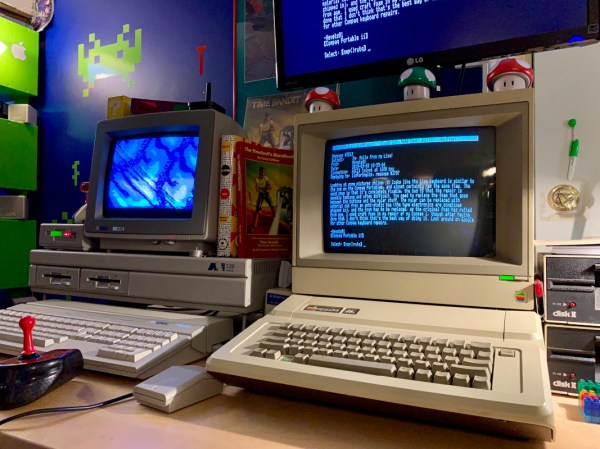
This how-to is managed by [Blake.Patterson] who is using a wide variety of antique machines and some modern hardware in order to access the BBSes still in service. He notes in this guide that it’s possible to use telnet and a modern computer to access them, but using something like an Amiga or Atari will give you the full experience. There are some tools that convert the telephone modem signals from that original hardware to something that modern networking equipment can understand, and while the experience might be slightly faster as a result, it does seem to preserve the nostalgia factor quite well.

For those looking for more specific guides, we’ve featured [Blake]’s work a few times in the past, once with an antique Epson PX-8 laptop and again with a modern ESP8266. It doesn’t take much computing power to get connected to these old services, so grab whatever you can and start BBSing!

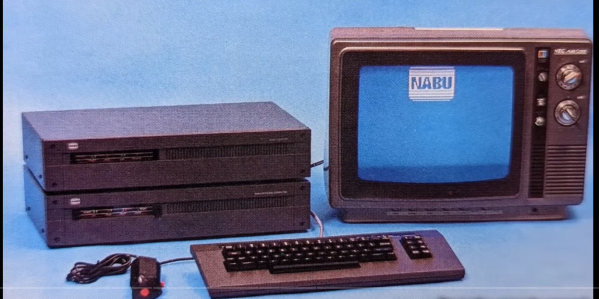
NABU PC – A 1984 Z-80 Computer You Can Buy Today

Want to hack on brand new 8-bit 1980s hardware? Until recently you needed a time machine, or deep pockets to do this. All that has recently changed with the NABU PC. A retro machine that can be bought brand new for $59.99, (plus shipping) no time machine needed.

[Adrian] has one in his Digital Basement, and breaks it all down for us. The NABU PC was a Canadian computer.  Designed to connect to the cable TV network, the standard system had no internal secondary storage. You read that right; the NABU used the cable network to download and play games, view documents — just about anything you’d want to do with a computer. Cable modems back in the 80s — maybe someone did have a time machine?

Unfortunately, the NABU network failed. Not due to the PC’s hardware, but because the cable system back then was not designed for bidirectional data. While the NABU PC did see a limited release in Canada, was never widely successful. When production was shut down, the machines couldn’t be liquidated, as they didn’t do anything without the network. So in the warehouse, they sat, until this month, where can find them being sold on eBay.

So what’s inside a NABU? It starts with a Z-80 CPU sporting 64 kB of RAM. A TMS9918 handles video, while a General Instrument AY-3-8910 does the sound.  There are also two UARTs. An 8251 for serial io to the keyboard and joysticks, and a high-performance UART chip to handle comms with the network adapter. The keyboard is loaded with good old ALPS switches, and [Adrian] found it rather impressive.

That’s all well and good, but what can you actually do with a NABU PC? Right now, not much. The ROM software comes up and looks for the network adapter, then complains when it doesn’t find it. This means it’s hacking time! An army of retrocomputing enthusiasts are already working on bringing back the NABU computer. Check [Adrian]’s video description for all the documentation links, and check here on Hackaday for the latest updates!

This isn’t our first time watching this sort of liquidation — remember the HP touchpad?

Continue reading “NABU PC – A 1984 Z-80 Computer You Can Buy Today”

Bringing Up An Old Motherboard Is A Delicate Process

If you were around for the early days of the personal computer revolution, you’ll no doubt recall the excitement every time IBM announced a new version of its beige boxes. For a lot of us, the excitement was purely vicarious, for despite the “personal” moniker, mere mortals could rarely afford a branded IBM machine. But it was still cool to keep track of the latest releases, and dream of the days when cheap clones would make it possible to play.

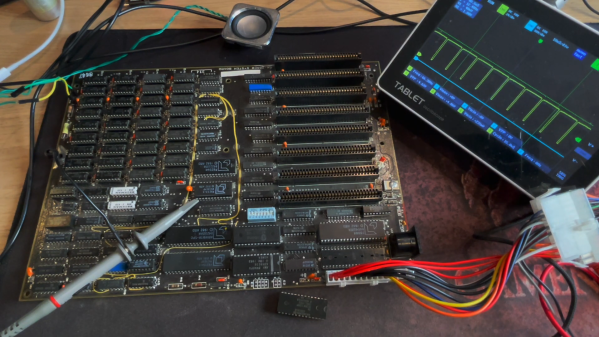
[Anders Nielsen]’s recent find of an original IBM Model 5160 motherboard sort of echoes that long-ago excitement, but in a different way. This board, from a PC XT built in 1984, was in unknown condition upon arrival, so [Anders] set about a careful process to try to bring the board back to life. A quick visual inspection leaves one with a sense of both how much things have changed, and how much they’ve stayed the same. Aside from the big 40-pin DIP 8088 CPU and the BIOS ROMs, the board is almost completely populated with discrete logic chips, but at the same time, the basic footprint of a motherboard has changed very little.

The bring-up process in the video below includes checks of all the power rails for shorts, which ended up being a good call — drat those tantalums. After fixing that issue, [Anders] had a bit of trouble getting the board to POST, and eventually resorted to dumping the BIOS ROMs and inspecting the contents. One of the chips had picked up a case of the scramblies at some point, which was easy enough to fix thanks to images of the 5160 ROMs available online. We thought the trick of using a 64k ROM and just writing the BIOS image twice was pretty clever.

In the end, the board came up, although without video or keyboard — that’s for another day. Can’t find your own PC XT motherboard to play with? Then maybe you can just build one.

Continue reading “Bringing Up An Old Motherboard Is A Delicate Process”

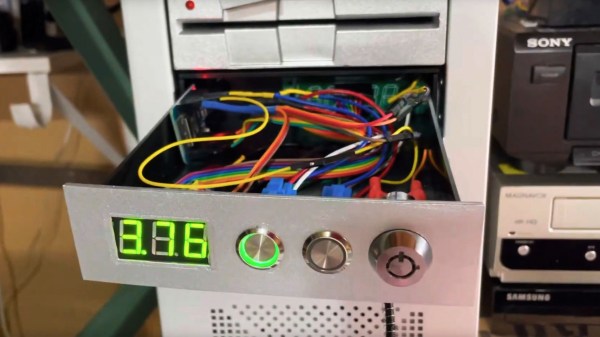
A personal computer drive bay with a glowing LED display

Turbo Button Pays Charming Homage To Early Personal Computers

The PC turbo button and LED clock speed display were common features on early personal computers. Wanting to add a little retro chic to his modern battle-station, [Matthew Frost] assembled a charming and functional homage to the turbo button control panel.

In days past, this automotive nomenclature implied a performance boost when activated. Instead, ‘turbo mode’ would clock your x86 processor at its rated speed. Disabling ‘turbo’ would throttle the CPU, often all the way down to 4.77MHz. Inherited from the original IBM PC, some early computer programs relied on this specific clock speed, and would otherwise run too fast (or not at all) on faster hardware. PC marketing teams and engineers alike stopped including the turbo button and glowing clock speed numbers around the Pentium era.

This modern re-imagining of the turbo button uses an Arduino microcontroller, seven-segment display and tactile switches to emulate the look and feel of the original hardware. Instead of directly adjusting the CPU clock speed, hitting turbo switches between balanced and high-performance Windows power plans. The seven-segment display measures this clock speed in GHz to two decimal places. We’ll admit that it’s pretty satisfying to see those numbers inch higher when switching to turbo.

The rightmost button switches between measuring CPU speed, GPU utilization, network load and memory utilization, which improves on its original inspiration. The tubular key lock, also a common sight on early PCs, enables and disables networking for the entire system, which is great for keeping the kids off the ‘net (at least until they figure out how to remove the 5.25″ drive bay from the system and hot-wire the network adapter with a paperclip).

There are more details on the GitHub page, in case you want to build your own. This project could look especially fetching in PC sleeper builds, where new components are ‘hidden’ in old case hardware. And if this has made you feel nostalgic at all, you may want to hear our thoughts on why it’s all about the Pentiums.

Continue reading “Turbo Button Pays Charming Homage To Early Personal Computers”

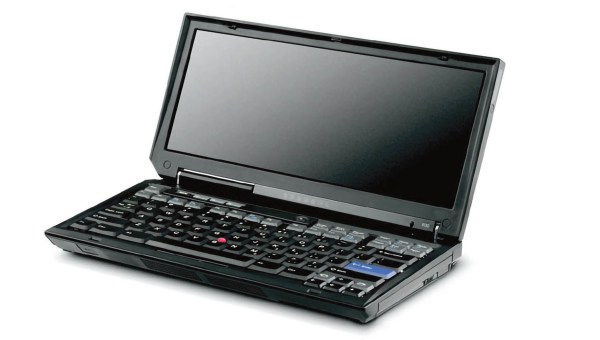
A small widescreen laptop repeating the ThinkPad style. It looks cute; sadly, it does not exist.

[Dana Sibera] Creates Devices That Don’t Exist

[Dana Sibera], known as [@NanoRaptor] on Twitter, makes us wonder about devices that could have been, and wince about devices that must never see the light of day – summoned into existence by her respectable photo editing and 3D modeling skills. Ever wanted to see a Model M with a small green-tinted CRT built into its side? Now you have. Perhaps, a “self-tapping” DE-9 plug with wood screws for pins? Tough luck, here it is anyway, but you can have a palate cleanser if it was too much to bear. Having started over a year ago with the classic “spicy pillows, but actually pillows” design, she keeps gracing us with portrayals of tech and tech-adjacent objects straight from the depths of her imagination.

None of the things she shows exist in real life, some regretfully and some thankfully so, but that’s not the first thing on your mind when you stumble upon a cube-shaped iPod with a built-in equalizer in your Twitter feed. Pictures like this “cassette ROM” or the deluxe woodgrain 386DX are quite apparent in what they are. On the other hand, devices like this “Mini VGA” dongle or the amber CRT-adorned TI92 Plus might have you reach for your wallet before you realize what’s up, and the photographic-proof-accompanied assertion about early floppy drives being punchcard-based might have you believe you are just not up to date on your retrocomputing trivia. Continue reading “[Dana Sibera] Creates Devices That Don’t Exist”
You Can Now Bootstrap Your Amiga Without A Floppy With This One Weird Trick

Traditionally, most Amigas were intended to boot from a floppy disk. . An Amiga can readily make its own boot floppy, but only once it’s already booted up. If you don’t have a floppy ready to go, you’re out of luck, as PCs can’t readily make them for Amigas. [Roc] whipped up the amigaXfer bootstrapping method to solve this very problem.

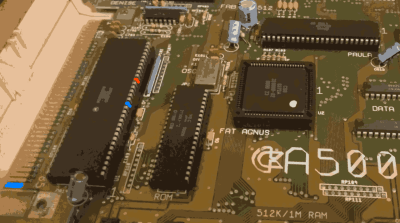
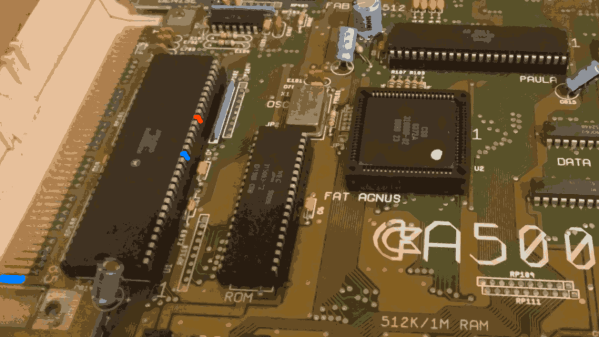
Shorting a couple of pins together can unlock a serial debug mode that can be used for bootstrapping the machine.

Available on Github, the amigaXfer tool is able to perform several tasks with an Amiga via its serial port. The Amiga must first be turned on while plugged into another computer running amigaXfer via serial connection. When the Workbench floppy prompt comes up, the CrashEntry feature on amigaXfer should be triggered, and the BERR and GND pins on the Amiga’s 68000 CPU should be connected just for a split second, triggering the Amiga to go into a special serial debug mode. This enables amigaXfer to take control, allowing a disk to be formatted and written with a debug bootblock, and this disk can then be used to boot the Amiga without the need for the hack.

It’s a nifty way to get your Amiga up and running if you’ve just bought it off eBay and it didn’t come with any disks. From here, you can use amigaXfer to load other programs onto the Amiga via the same serial cable you used for the bootstrapping process, too. The hack isn’t limited to just the Amiga 500, either. It should work on a range of machines, including AmigaOS versions 1.x, 2.x, and 3.x.

Unlike the Commodore 64, we probably won’t see brand new replica Amigas anytime soon, but we can dream. As always, if you’ve got ’em, send your hottest Amiga projects into the tipsline!