Ray Marching In Excel

3D graphics are made up of little more than very complicated math. With enough time, you could probably compute a ray marching by hand. Or, you could set up Excel to do it for you!

Ray marching is a form of ray tracing, where a ray is stepped along based on how close it is to the nearest surface. By taking advantage of signed distance functions, such an algorithm can be quite effective, and in some instances much more efficient than traditional ray marching algorithms. But the fact that ray marching is so mathematically well-defined is probably why [ExcelTABLE] used it to make a ray traced game in Excel.

Under the hood, the ray marching works by casting a ray out from the camera and measuring its distance from a set of three-dimensional functions. If that distance is below a certain value, this is considered a surface hit. On surface hits, a simple normal shader computes pixel brightness. This is then rendered out by variable formatting in the cells of the spreadsheet.

For those of you following along at home, the tutorial should work just fine in any modern spreadsheet software, including Google Sheets and LibreOffice Calc. It also provides a great explanation of the math and concepts of ray marching, so is worth a read regardless your opinions on Excel’s status as a so-called “programming language.”

This is not the first time we have come across a ray tracing tutorial. If computer graphics are your thing, make sure to check out this ray tracing in a weekend tutorial next!

Thanks [Niklas] for the tip!
Taking Distance Based CAD To The Next Level

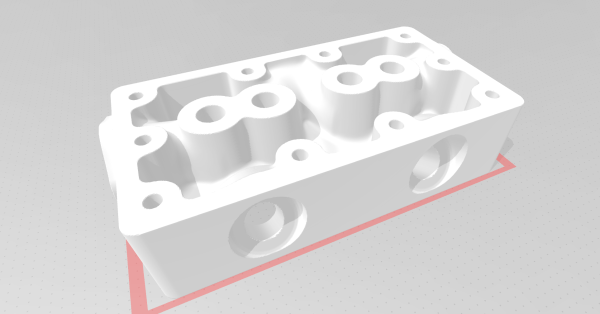
For those who model CAD models regularly, a pair of calipers is essential as it allows reasonably accurate measurements to fit a specific part. However, [Jason Harris] is taking that concept to the next level with a signed distance function-based CAD tool, SDFX.

For those who don’t know, Signed Distance Functions can tell you from a given point how close the nearest part of the model is. The model is represented as a single function that offers some exciting benefits. For instance, chamfering and fileting are often quite complex in traditional CAD programs and trivial in an SDF setting. SDFX is a golang library that allows you to write golang programs to describe the model. OpenSCAD is a favorite of Hackaday as it is a beautiful parametric code-first CAD package. But the syntax and language are somewhat cludgy, to say the best. The advantage of using golang rather than a DSL is that you can use all the niceties that a full-featured language brings. For example, you can export multiple objects, make network requests, and interface with GUI libraries to recreate something like the customizer for OpenSCAD.

Objects are rendered to STL using Marching squares. Then, they can be printed in whatever slicing software suits your fancy. It’s an excellent project with a great API and almost a hundred examples.

The code is available on GitHub under an MIT License.

OnShape To Robot Models Made Easier

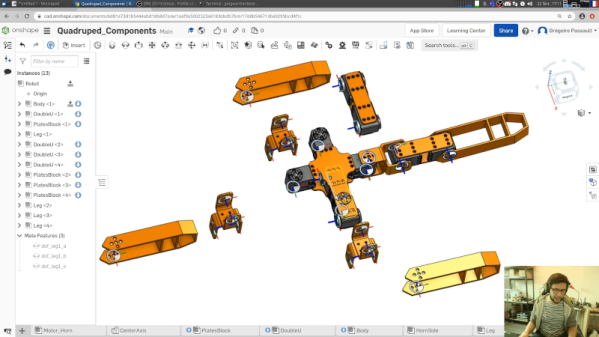
We live in a time where our phones have computing power that would have been the envy of NASA a few decades ago. So, in theory, we should be able to simulate just about anything. Thanks to [rhoban], robots you design in OnShape — a popular CAD tool — are now easier to simulate using several common simulation tools.

Electronic circuits are pretty easy to simulate, because we typically draw schematics and circuit simulators can capture those schematics readily. But simulating physics for robotic designs is a bit trickier. Gazebo and Pybullet both can use SDF files or URDF. However, building those files is often a separate process from actual physical design even though you probably did the design using a CAD tool. Even if you don’t use OnShape, you can probably import your preferred format and then bridge to the simulation file format without having to manually recreate your design. You can see the author walk through the process in the video below.

Continue reading “OnShape To Robot Models Made Easier”