posted Apr 26th 2011 12:25pm by
Mike Szczys
filed under:
Microcontrollers

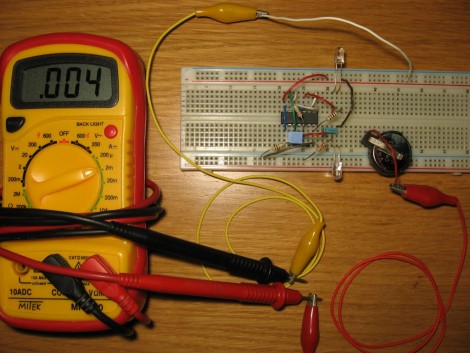
[Fede.tft] wrote in to tell us about some work he’s been doing to save battery life for LED dominoes. He originally got the idea after reading this post about the electronic gaming pieces. That project was aimed at the 555 timer contest and therefore, used a 555 timer. [Fede.tft] calculates the battery life for the CR2302 battery in the 555 circuit at no more than about 80 days. That’s if you never use them and the LEDs are never illuminated. It makes sense to remove the batteries from the device when not in use, but a redesign to increase efficiency is definitely worth the effort.
This rendition does away with the 555 chip in favor of a CMOS chip. By building a circuit around four NAND gates of a CD4011 chip, the standby lifetime of the battery is calculated to increase to about 4.5 years. Not bad! Add to this the fact that replacing the 555 timer didn’t increase the component count, the price for the chip is similar to the 555, and you didn’t need to resort to a microcontroller. Yep, we like it.
posted Apr 26th 2011 11:24am by
Mike Szczys
filed under:
misc hacks

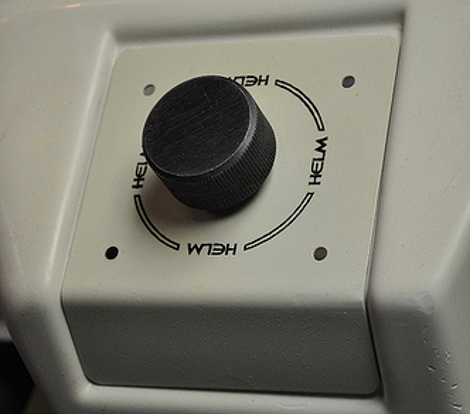
[Zitt] is sharing some methods he’s honed for color-matching powder coat paint. He developed these techniques while restoring a 1982 Star Trek coin-op machine. The image above shows a paddle used for the game. The plate that houses the control was beat up, and he needed to repaint it but wanted to make sure it didn’t look out-of-place with the molded plastic that surrounds it.
He gets his powder paints from Harbor Freight, a favorite depot for hackable goods (like drill motors, or metal carts). Usually these paints would be applied by attracting them to the piece using electrostatic charges. [Zitt's] not doing that, but applying them with a paint sprayer instead.
The first step is to match your color. He’s using an electronic color matching device which gives data to plug into a chart on the web for a color match. Once you’ve got a formula, mix up the powder coat, and then dissolve it into some Methyl Ethyl Ketone. This goes into the spray gun and is applied in an even coat. Before heading into an oven for curing, it’s important to wait for this coat to dry. [Zitt] observed some boiling MEK on a wet test piece that left an undesirable texture on the baked paint after curing. After running a few test pieces he picked the blend that was the best match and then painted all of his restored parts.
posted Apr 26th 2011 10:01am by
Mike Szczys
filed under:
led hacks

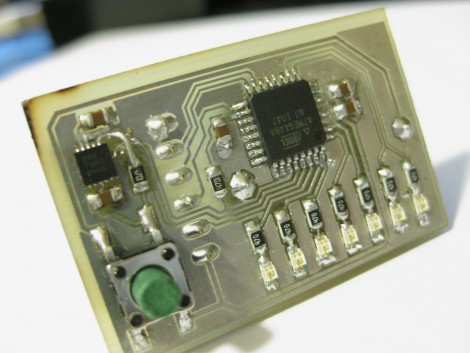
We’ve already added the components needed to build [Rucalgary's] tiny POV device to our next parts order. The little device sets a new standard for tiny persistence of vision boards. Instead of relying on the user to find the best speed and timing for swinging the board around, [Rucalgary] used an accelerometer. This is the point at which we’d usually groan because of the cost of accelerometers. We’re still groaning but this time it’s for a different reason.
The accelerometer used here is a Freescale MMA7660. It’s an i2c device at a super low cost of less than $1.50. The reason we’re still groaning is that it comes in a DFN-10 package that is a bit harder to solder than SOIC, but if you’ve got patience and a good iron it can be done. An ATmega48 drives the device, with 8 LEDs and one button for input. On the back of the board there’s a holder for a CR2032 coin cell battery and a female SIL pin header for programming the device.
Check out the video demonstration embedded after the break. We love it that the message spells and aligns correct no matter which way the little board is waved.
Read the rest of this entry »
posted Apr 26th 2011 8:42am by
Mike Szczys
filed under:
xbox hacks

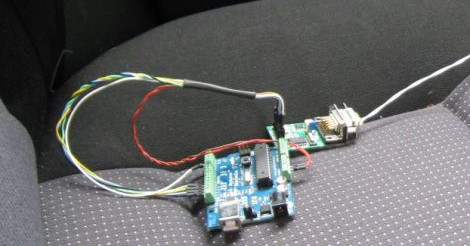
We’re sure there’s still a lot of folks using their original Xbox either for gaming or as an XBMC device. If you ever owned one yourself you’ll remember that you can’t turn it on with a remote control. If you have to get up and push a button on the front of the black box, as least this hack will take care of tuning the television to the correct channel. That is, if you are using a SCART adapter to connect it to your TV.
[Karl-Henrik] figured out that mapping a voltage to pin 8 of a SCART port tells a TV that the port is active, and allows it to select the proper aspect ratio. Check out the Wikipedia SCART page to see that pushing 5-8V is the signal for a 16:9 aspect ratio, and 9.5-12V translates to 4:3. So he added an audio jack to the back of his Xbox and a matching one on the plastic case of the adapter. Now just tap into the wires on the power connector for the hard drive inside, connecting them to the newly installed jack. There’s a 12V and a 5V line, just choose the one based on the aspect ratio you prefer. He uses a jumper wire with the appropriate plugs on each end to make the connection. Now the TV will automatically tune to the correct AV input when the Xbox powers up.
posted Apr 26th 2011 7:08am by
Kevin Dady
filed under:
classic hacks

Whenever you are working with infrared, you sometimes need to see it, and thats kind of hard. Most people would jump up and say “camera”, but that is not always the best solution. For instance my phone camera is so filtered its near useless for IR, and my DSLR will only take a full blast source and present a dim glow. Wanting something a bit easier [Candymanproducitons] whipped up a little IR tester that fits on top of a standard rectangle 9V battery.
A simple circuit containing nothing more than a LED, resistor, and a IR photo-transistor was assembled on some perforated circuit board, then mounted on top of a battery clip with some epoxy. The end result is a compact and robust tool that will be very handy in the shop, though we think a little spot for your scope probe would be super.
9 volt batteries, with their internal design and locking / polarized terminals are usually a mainstay of electronic tinkerers, and often pop up in cool and compact projects like my lm386 amp in a battery shell from last year. So what can you do with them?
posted Apr 26th 2011 6:07am by
Jason Komp
filed under:
led hacks,
Microcontrollers

Papydoo spends most of its time sleeping, but if startled by vibration it will wake up and stare you down with a cold and unnerving robo-gaze like you have not seen before. Or it might just do something crazy like display a scrolling Space Invaders character marquee. That’s the thing with Papydoo, you just never know.
Vibration sensing is accomplished with a piezo element harvested from an old horn speaker that is simply sandwiched between the project enclosure and the surface it is sitting on. A MCP601 op-amp is used to amplify the weak potentials from the piezo element and feed them to the ADC of a Zilog Z8F083A microcontroller. When sufficient vibration is detected, the MCU wakes up and displays one of a number of different animations on the front panel 32X8 LED matrix. The various display modes can also be manually selected using a small button on the back of the enclosure.
Power consumption is reduced to 150uA while sleeping by only briefly waking the MCU once per second to check the current vibration level. Nearly all of this power draw can be attributed to the op-amp, and although there are much more efficient models available, sometimes the best choice is just the one you already have on hand in your parts bin. Regardless, the power consumption is low enough to run the device off of a set of AA batteries.
We could imagine that similar setup could be used for a number of different low-powered messaging applications that would only “wake up” when someone was near enough to read and interact with. Add a loud speaker and this might even make a good alarm to keep pesky coworkers out of your “cube”. What would you do with a Papydoo?
Thanks for the tip [Laurence]! If you happen to read this, we are dying to know: why “Papydoo”?
Short video after the break.
Read the rest of this entry »
posted Apr 26th 2011 5:06am by
Mike Nathan
filed under:
classic hacks

Instructables user [knife141] enjoys restoring vintage electronics in his spare time, especially old radios. AM radios tend to pique his curiosity the most, and in this tutorial, he discusses the restoration of an old radio from the early 1940s.
While people would likely assume that the vacuum tubes in a radio this old are the source of poor performance, he has found that most units he repairs suffer from bad capacitors. He says that the old electrolytic, paper, and wax caps used in these radios were never meant to last more than a few decades, let alone 70 years.
He always starts the process off by discharging the caps and replacing the power cord, both as a safety measure. He was pretty sure the capacitors were bad in this radio, so he swapped all of them out, regardless of condition. All of the internal wiring was then checked over, and any damaged cables were replaced or covered with heat shrink tubing.
With that done, he powered on the radio and was happy to find that the distortion he previously experienced was completely eliminated. With the electronics taken care of, he tackled the radio’s asbestos insulation by encapsulating it with varnish. Attention was then turned to the exterior, where he cleaned and buffed the leather, refinished the face plate, and polished the dial’s cloudy glass.
While it’s not exactly a hack, we always like seeing vintage electronics given new life, and we’re always cool with saving these sorts of things from rotting in a landfill.
posted Apr 26th 2011 4:04am by
Mike Szczys
filed under:
home hacks

[Dino] didn’t want to keep the baby chickens cooped up when he was at work, but he didn’t want them to escape, or become a juicy treat, either. His solution was to build this chicken tractor. It’s a complete chicken ecosystem with wheels, kind of like a double-wide trailer for our feathered friends. On one end is a small coop that contains food, water, and an incandescent light bulb for heat. The other end is a chicken-wire box that lets the young birds stretch their legs and get some fresh air.
It’s easy to see the wheels which flip down when [Dino] needs to move the contraption. Like we said, he puts it out when he goes to work, selecting different parts of the yard so that the grass gets evenly fertilized. It’s a nice solution if you don’t have enough area to dedicate to an automated chicken coop.
We’ve embedded [Dino's] video after the break. He covers the beginning and end of the build, and fills the middle of the video with a time-lapse recording of the construction process.
Read the rest of this entry »