Kitchen Timer Makes Mario Your Sous-chef

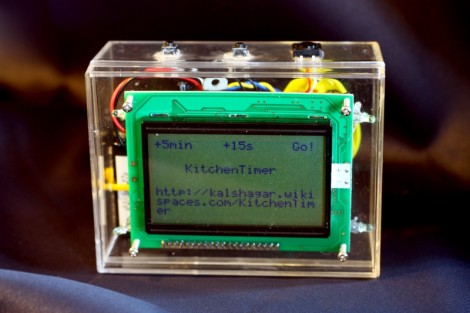
[Alan] was unimpressed by the cheap ticking egg timers that grace many of our kitchens. He decided this was an execllent opportunity to ply his skills with microcontrollers. He built this kitchen timer complete with an enclosure and audible alarm.

The device is Arduino based, which makes driving the graphic LCD quite easy thanks the libraries associated with that platform. As you can see above, his user interface makes use of virtual buttons – three tactile switches whose function is listed at the top of the display.

But we think the alarm sound really earns this a place in his kitchen. He used the same hardware as that that Super Mario Bros. Toilet project to play classic video game sounds when your soufflé needs come out of the oven. We haven’t come across them ourselves, but apparently there’s a line of key chains for sale in Japan (yes, we need to plan a trip there!) that have the tunes programmed into them. They’re easy to crack open and it beats dealing with a speaker and amp circuit.

Measure Radiation With Military Surplus

It’s really amazing what you can find at military surplus shops. [David] just built a radiation detector out of a DT-590A scintillation probe originally made to test if Air Force bases were contaminated with Plutonium. Who says nothing good came out of massive nuclear arsenals?

DT-590A / PDR-56 Gamma ray probes were made obsolete by the US Air Force a few years ago and they’re trickling into military surplus stores around the country and the Internet. [David] found the manual for this probe and put together a little circuit to drive this x-ray sensor. The build uses an ammeter as a simple dial, and includes a piezo speaker for the prerequisite Geiger counter ‘clicks.’

[David] also threw up a post on converting this x-ray probe into a general purpose Gamma probe, effectively making it a Geiger counter for the really dangerous radiation. You could always use your smart phone for the same task, but recycling military hardware imparts a good bit of geek cred.

Rapid Fire, Remote Controlled Ping Pong Ball Turret

remote-ping-pong-ball-turret

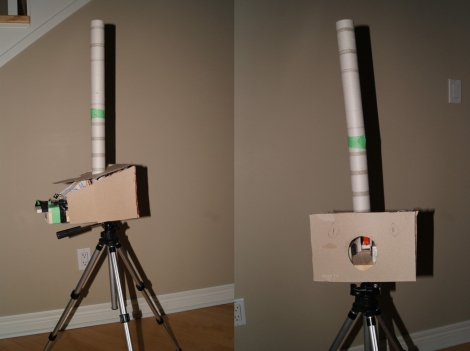
[Andrew] and his brother had some time (and a lot of ping pong balls) on their hands, so they decided to have some fun and built a remote-controlled ping pong ball turret.

Arduino aside, the turret is cheap and easy to build as [Andrew’s] writeup explains. The firing mechanism was constructed using a pair of foam wheels and motors, which is used to launch the ping pong balls much like a baseball pitching machine. The balls are stored above the wheels in a cardboard tube and released by a mechanical flap when triggered.

When [Andrew] is ready to release the turret’s payload, he sends a command to his computer over VNC, which relays the command to the Arduino over a serial connection, triggering the flap. While the control scheme could certainly benefit from direct, wireless phone-to-Arduino communications, it seems to work well enough for [Andrew’s] needs.

Check out the video dramatization below to see [Andrew] “surprise” his brother with a hail of ping pong balls after the jump.

Continue reading “Rapid Fire, Remote Controlled Ping Pong Ball Turret”

Creating A Game For The CoCo

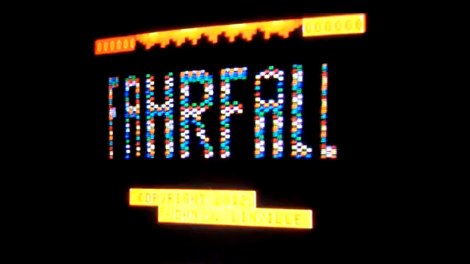
Retro is in the air today as [John] has tipped us off about a new game he has written for the Tandy Color Computer (CoCo), The game, inspired by the homebrew game DOWNFALL for the Atari Jaguar, features what looks like snappy game play, lots of bright colorful animation and has just entered the Alpha stages. The blog page above sheds some insight on what it takes to make a game for these old 8 bit wonders, cause no matter how easy it sounds, you do have to do some dancing to get even the simplest of things working correctly on such limited resources.

The game was part of this years Retrochallenge which is typically held in January, which we recommend checking out if you want your fill of random projects for old computers. From building an Apple I replica kit, to making a soccer game for a SGI system, getting a 5160 XT online or just noodling with a KIM, there is plenty of interesting projects to keep you occupied during the afternoon.

Join us after the break for a quick video of Fahrfall, the fun looking CoCo Game.

Continue reading “Creating A Game For The CoCo”

Kinect For Windows Released

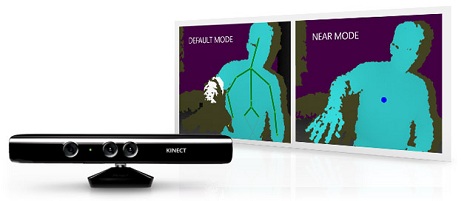
Even though we’ve seen dozens of Kinect hacks over the years, there are a few problems with the Kinect hardware itself. The range of the Kinect sensor starts at three feet, a fact not conducive to 3D scanner builds. Also, it’s not possible to connect more than one Kinect to a single computer – something that would lead to builds we can barely imagine right now.

Fear not, because Microsoft just released the Kinect for Windows. Basically, it’s designed expressly for hacking. The Kinect for Windows can reliably ‘see’ objects 40 cm (16 in) away, and supports up to four Kinects connected to the same computer.

Microsoft set the price of Kinect for Windows at $250. This is a deal breaker for us – a new Kinect for XBox sells for around half that. If you’re able to convince Microsoft you’re a student, the price of the Kinect for Windows comes down to $150. That’s not too shabby if you compare the price to that of a new XBox Kinect.

We expect most of the builders out there have already picked up a Kinect or two from their local Craigslist or Gamestop. If you haven’t (and have the all-important educational discount), this might be the one to buy.

Resurrecting A Mac LC For Server Duties

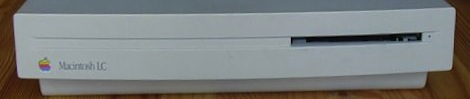
It might just be a case mod, but we love [Eduard]’s take on a modern Macintosh LC (translation). The donor motherboard came from a disused home server, and the LC came from [Eduard]’s childhood memories of playing Glider and The Incredible Machine.

The case was donated from a venerable Macintosh LC, manufactured circa 1990. The original LC had a Motorola 68020 CPU, which [Eduard] upgraded to an Intel Atom board. It was a somewhat tricky build – he adapted a 90 Watt power supply from a piece of old office equipment to power the new Intel board. With a great deal of very careful Dremel work, the old-school Apple logo was modified into a power button for the new computer.

For frequent readers of Hack a Day, it’s no surprise that we’ll grab up any old Apple or Mac build. [Kevin] built a weather station and analog joypad for his Apple IIc, We’ve seen custom Mac ROM SIMMS, and of course [Sprite_tm]’s amazing SE/30 emulation. If you’ve got something that will send our 68k senses tingling, send it on into the tip line.

Earning A Merit Badge With A Pinewood Derby Photo Finish

2/4 store-bought bodies

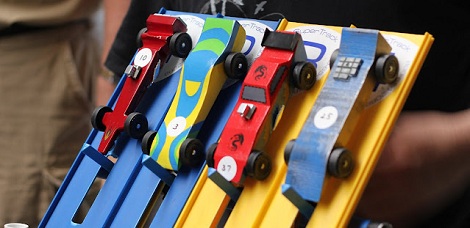
As a boy scout properly acculturated into the DIY philosophy, [Adam] really wanted to get his hands on the new Inventing merit badge. The merit badge required solving a problem, so of course a pinewood derby instant replay system was the obvious solution.

After thinking through a few solution paths like a radio-controlled camera that follows the cars, [Adam] settled on a system that would replay the pinewood derby cars crossing the finish line.  [Adam]’s father found a cheap and readily available Playstation Eye camera that can record 60fps video for this task. [Adam]  used a laser/photodiode/Arduino setup to detect when a car was crossing the finish line. A bit of Processing code supplied by his father records the relevant 60 frames of video and plays them at 5fps on a projector for the enthralled spectators.

We suspect that a similar setup could be used if [Adam]’s den wanted to try the rain gutter regatta or oft-forgotten space derby next year. Check out [Adam]’s instant replay system after the break, or join us in the comments for the inevitable argument over who had the best pinewood derby car.

Continue reading “Earning A Merit Badge With A Pinewood Derby Photo Finish”