When we last left off, I had just set up a new SLA resin printer and was on the verge of doing the initial round of printing to see just how resin printing in 2026 compares to way back in 2020. Surely SLA printing had to be easier and less fussy than it was in 2020?
During these weeks of printing, setting up printers and taking a gander at the various workflows that certain printers and their manufacturers try to push you into I have both produced a series of not too shabby prints and some delightful spaghetti. I also flipped a few proverbial tables and formed some strong opinions on 3D printing workflows, of which some can considered to be family-friendly.
Without further ado, let’s get into some updates, a bit of ranting, and even some printing results.
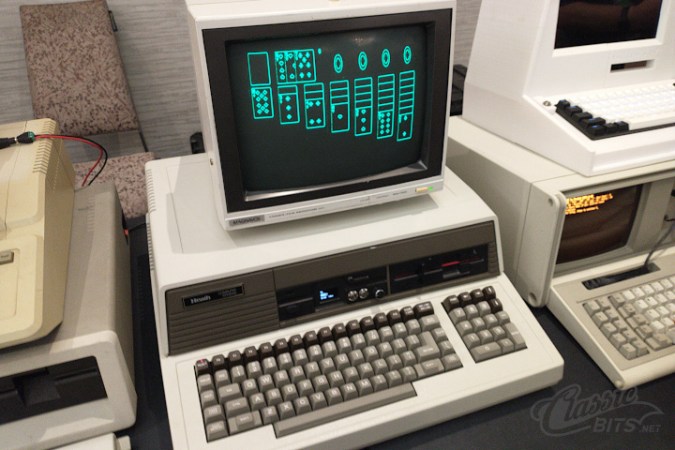
In these days of hundred-gigabyte-and-more monster games, it can be nice to stop and remember what a human can do with assembly language and very, very little storage space. In this case, only 3 KB — yes, three kilobytes — to play TinySol, a tiny solitaire game for DOS that’s compatible with the common CGA/EGA/VGA graphics modes. [ClassicBits] even fits the 640×400 AT&T 6300 mode that was used for some GRiD computers in that 3 KB.
The “full” version is actually 3.5 KB. That extra half kilobyte gets you the ability to load and save games, plus mouse support. The 3 KB version you must play through to the end using only the keyboard, but if you’re hitting this on the minimal-supported-hardware target of the IBM 5150, you probably don’t have a mouse. The smaller build can still score the game, auto-finish, congratulate you on a win, and even automatically detect the correct graphics mode for you. It can also be launched from a QR code, which [LGR] demonstrates in a video embedded below. Check it out for a play demo, but it’s Klondike Solitaire. If you don’t know what to expect by this point, you must not have used a PC in the last 30 years.
Even smaller versions of TinySol are available if you know you’re only going to need, say CGA, but even with 360 KB floppies we’re not sure we’d feel the need to save a kilobyte. If it doesn’t fit on the floppy, just print it onto the sleeve as a QR code, like [ClassicBits] did with the floppies he was giving away at Vintage Computer Festival Southwest 2026. Well, technically that’s the “Tiny” version on the QR code, but we have faith there’s some visual code that could hold the 3 KB “medium” game.
[ClassicBits] takes care to point out that his game is 100% human-written, which is something you cannot guarantee even for retro assembly-language products. We’ve already seen that Claude can code for the Z80, which means the 8088 won’t escape it either. Of course these old machines have a lot to recommend them if you want to escape modernity and learn to code without the help.
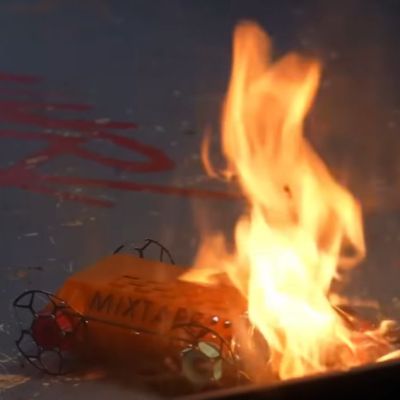
Although lighting 3D prints on fire is rarely the intended outcome, it’s possible that said print will at some point in its future come into contact with either an open flame or a significant source of heat. Once that happens, what will be the result and how worried should one be? This is basically the excuse behind [Maker’s Muse] recent decision to light some 3D prints on fire.
Crispy 3D printed combat robot. (Credit: NHRL)
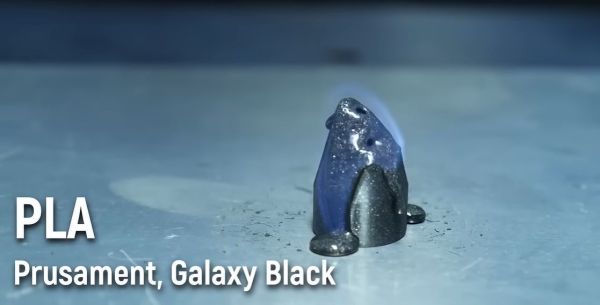
Materials exposed to an open flame in this experiment included various types of PLA, PETG, ABS, ASA, TPU and PEBA. Since PLA filaments have a significant amount of carbon in them it’s little wonder that these burned quite readily, though an interesting difference was immediately visible between an Elegoo PLA+ test cone and a Prusa Galaxy Black PLA cone. The latter required a blow torch to properly ignite, after which it burned rather hot whilst melting, unlike the dirty yellow flame of the PLA+.
So-called ‘high temperature’ PLA (HTPLA) seems to actively resist burning, self-extinguishing after a blowtorch treatment. Just these few samples of PLA already gave very different results, with very likely the additives being the defining factor since pure PLA is easy to burn as a way to dispose of it somewhat cleanly.
Moving on, black PETG didn’t really want to ignite, while ABS and ASA absolutely love to burn with a sooty yellow flame. HIPS was also tested, burning in a similar sooty manner as well.
Of all the materials tested, TPU was the least flammable with even the blowtorch not able to start ignition and only melting the sample. Foam TPU did however burn the most aggressive, followed by ABS, ASA and HIPS. Overall PETG and regular TPU seem to be your best bet if you do not want your 3D print to turn into a happily burning candle and potentially a general fire hazard.