
In the open source world we are used to software being compiled from source for our particular distro, so while in a few cases an ancient release may still be in use, it’s just going to run on the latest distro version. But in the Windows world it’s rare for software to come with the source, so you’re left with a binary that will only run if your Windows version has the right APIs for it. Since the more recent versions of Windows dropped 16-bit support a while back, that means there must be a hard date set on the earliest Windows GUI application that can still run today. [Enlyth] decided to investigate.
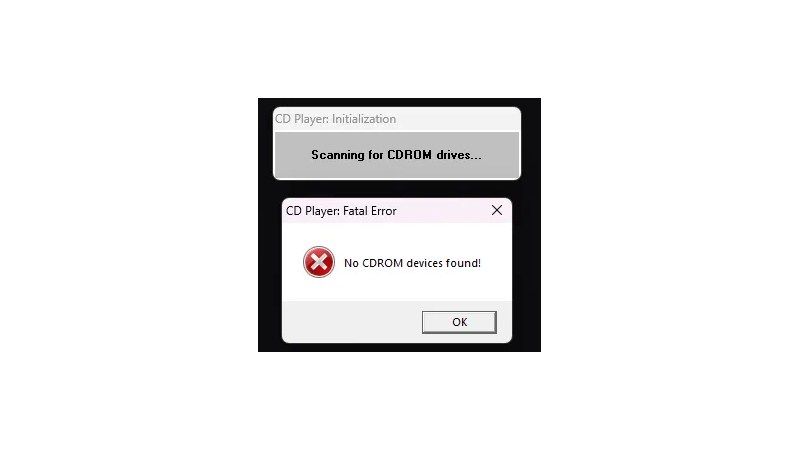
Given that the earliest API supported in WIndows 11 is the 32-bit version, the hunt led straight to either the first Windows NT release and ancestor of Windows 11, or the Win32s extension for WIndows 3.1. Thus a 1993 Win32S version of Freecell runs happily, but that want’s the end of the trail. Somewhere in the pre-release builds of Windows NT 3.1 would be the requisite binary, but there’s a snag. Early Windows NT 3.1 APIs were incompatible with later ones. This led through a lot of crashing binaries to a November 1992 version of the CD player app, that ran because it called a DLL which happens to still be present. The need for another DLL to emulate a CD drive speaks volumes about the progress of the PC world, back then they were the last word in storage but who’s got one now?
That’s the earliest official binary to run, but the story’s not quite over. Windows 11 may not have a VDM to run 16-bit apps, but there’s a WINE VDM for that. Behold, Reversi from Windows 1.01 in November 1985, in Windows 11. Your ancient software may yet be saved.











My late 90’s Delphi programs still run fine on Windows.
Borland was doing multiple things right, I think. Or Windows drags quite a bit of old history, like that SimCity-hack.
Windows runs a lot of corporate software so Microsoft takes backward compatibility pretty seriously. It’s still amazing that 30 year-old executables can run as-is on modern a Windows machine without installing additional emulators or compatibility layers.
It’s similar with DOS and OS/2 OSes, btw. They never dropped backwards compatibility when they advanced.
Both got 32-Bit support (DPMI, LX executables etc) without dropping original one (COM files, MZ executables, NE executables)..
So Linux and Mac OS X are the, um, “black sheep” here. ;)
https://m.youtube.com/watch?v=Fm3137KOIsE
A consequence of the assumption that source is generally available. The complexity moves to build time, and away from runtime. Both are justifiable choices, and each is superior for a subset of use cases.
I don’t remember when it was written, but I still use VUEPRINT. I think it was written for DOS 3.3, but I’m not sure. It’s my favorite photo viewer.
WinAPI is over 30 years of binary compatibility. People may bitch at Microslop but no Linux distro can come close to that.
Wrong, but believe what you want
Universal reply to anything
Wrong, but believe what you want
Wrong, but believe what you want
You can’t prove that Pope John Paul II wasn’t keen on pedophilia and molesting children.
does a bear enshittify the forest?
As our lord Jesus said, who should we be afraid of?
Not me, but then fakes are easy to do.
xterm is from the 70s.
I was wondering when someone would bring that up…..
As for the article, it was laborious to read due to all the spelling and grammer errors. The Hack A Day AI needs a revision.
Oh, “the ironing is delicious”, as the Simpsons put it.
Muphry’s [sic] law strikes again 😁
Thanks, bot. You should probably actually try using AI, so you don’t misspell “grammar” while complaining about other people misspelling things.
So what you are saying is that you don’t know the difference between binary and source. Got it. This article kind of depends on you knowing that for you to actually understand what the author was talking about.
Linux still runs a.out executables just fine.
…and yet it still works better for my use cases (which aren’t retro tech) than kitty, etc.
I recently tested some very old code (an ancient process-control system from the ’80s) against modern xterm (and for completeness, also tested the newest version of that code against a very early xterm running on an actual legacy hardware x11 client), and it almost all worked perfectly. This system uses almost all of xterm’s capabilities (including sixel graphics for embedded meters and gauges, and a tektronix alt-screen as a pseudo pen plotter for flows); some of the deep color extensions did not work correctly on the legacy xterm, of course, but it failed in the correct fashion (ignoring the unrecognized data).
Kitty, i have found, is not even reliably highly compatible with its own one to two year old self. And while xterm documentation is annoying and tedious, xterm (both the underlying VT architecture and the xterm extensions) are comprehensively documented and regression-tested. Assuming you’re not running someone’s weirdly patched version, your code either works today on the current stable xterm, or it probably has not worked for decades (if at all).
And the OSCs to support arbitrary extensions can be used by xterm as well; the main reason that (for example) the kitty image extensions aren’t available is simply that there is no efficient low-resource way to do that, and any environment that can run an xterm can perfectly well run a proper image viewer instead of trying to shove the image in the terminal escape stream. And many environments that can (and do) run an xterm cannot afford a backing buffer large enough to make the kitty image extension worthwhile. Not because they’re retro, because they’re embedded. and if you’re forwarding your display over a slow miles long copper link or frame relay, the kitty image protocol can block your terminal for tens of minutes. An x11 client that’s not trying to push truecolor pixel-perfect images around can be quite usable even over a high latency 2g cellular iot link, or a 9600 baud serial technology if you’re stuck on the wrong end of several miles of rusty barbwire masquerading as a digital network.
While technical endeavors are fun, I’ve got better things to be doing than constantly updating my code to adapt and support someone else’s arbitrary changes. LTS technology exists for a reason: get it working, expect it to stay working until you change it for a good reason, then debug the changes. Wack-a-mole is an annoying game, even more when it’s other people’s moles.
Clearly, other people have other needs (and opinions); after all, Kitty does exist. And that’s healthy. But, despite a lot of desire on my part, none of the alternatives I’ve tried in years of hunting for better options has actually worked better than xterm (for my specific needs). I really wish that wasn’t true, because there is a lot of clunkiness inherent in the xterm codebase.
But, just like cars, technology either dies quick, or it lives forever.
TFA refutes that.
So true. There’s one Linux distro that uses Win32/Win64 PE format because of this deficiency.
https://loss32.org/
It’s the future of Linux.
there are so many asterisks on both sides of that, i don’t know that the comparison is super meaningful. like, ‘binary compatibility’ is one thing, but old programs actually working on a new computer is a totally different thing. and then, desirability is an even higher barrier than working.
but my feeling is that generally linux is abi-compatible for statically linked binaries for, well, almost exactly 30 years, since ELF became the norm in 1996 (what a difficult upgrade that was for me!). seems like binfmt_aout has been dropped from the kernel in the last couple years, making that now a hard cutoff. for dynamically-linked binaries, the situation is more complicated but generally i expect things dynamically linked against glibc2 (1997) to still work today. i happen to have a Debian 3.0 Woody July 2002 qemu image handy, and I built a dynamically-linked ‘hello world’ with that, and that retro binary works fine on my PC today. That’s 24 years, which by my judgement is “close” to 30 years?
there’s a lot of interesting details and side stories but the simple fact of the matter is, i rate your claim as 100% false. i think you must have come to it by “i would never want to run an ancient linux binary, no one would ever ask me to do that, so it must be impossible.” which is exactly the same for windows as it is for linux so shrug.
for example, libraries have CDs from the late 1990s, and they are generally unable to retrieve the data using the old windows binaries on the CD. the ‘in principle’ compatibility in fact runs into one limit after another.
I have a couple of 32-bit a.out binaries (and one “very experimental” ELF binary) that I built in 1993. All three still work (and do useful things) in current debian stable, today.
I’ll give you a better answer than just “wrong”.
The ELF format has been around for almost 30 years (28, or about 7 years into when Linux was created). I think the issue you’re bringing up about binary compatibility has to do with libraries which do change frequently. If you have an application that’s either statically linked or have the older copies of the libraries or there’s sufficient compatibility in current libraries then the app should run without issue.
Given Linux is moving more to compiling at install time or providing application images with libraries already added this isn’t that big an issue. I have PHP code from 20 years ago that I’m still able to run today, albeit with some necessary changes for security reasons. The fact that source code for most applications usually makes recompiling for modern systems trivial.
We just spun up a WinXP VM on the Linux lab laptop at work to load some clunky software that interfaces with an instrument. There’s always a place for old operating systems in the lab. Cheaper to do this than to buy new equipment.
A bit ironic that software is the part that would degrade with age…
no it is inherent with the medium. software is like time. changes all the time. only some people dont sync their clocks that often as the machine they use likes the time it shows.
Software development us flawed, especially the modern one.
Here’s something to think about:
“The hope is that the progress in hardware will cure all software ills. However, a critical observer may observe that software manages to outgrow hardware in size and sluggishness.”
https://en.wikipedia.org/wiki/Wirth%27s_law
“Wirth’s law is an adage on computer performance which states that software is getting slower more rapidly than hardware is becoming faster.”
Linux distros used to run on 486 PCs, for example, now the Kernel itself doesn’t even fit into 16 MB of RAM anymore.
That used to be the whole main RAM capacity of those PCs.
I remember running SuSe Linux 6.x with XFree86 and KDE on a Pentium with 24 MB of RAM.
Now my Pentium MMX with 64 MB of RAM can’t even boot into Linux text-mode anymore.
Pentium MMX is a 1997 CPU and lucky teen me had it with 32MB of RAM which is 1000 times less than o my curent PC at work that is already few years old. I am more than sure you would not run ’97 kernel on late ’60 CPU with 32kB RAM. You wouldn’t even run it on i286 (only 15 years old CPU in 1997) no matter the RAM or even i386 with 1MB of RAM – and I don’t know how well it would run with full desktop environment not to mention what apps could you run. While today I easily can install PiDesktop or Slackware on my pre 2010 netbook with 1GB of RAM and use office suite or even browser. This is nowhere near to “software is getting slower more rapidly than hardware is becoming faster.”
I do agree that software is developed badly in terms of performance most of the time but let’s give some credit to developers. I believe that newest Slackware would boot to console (maybe even TWM) on your machine. Or in worst case – TinyCore Linux. At oeast that is what their minimum requirements suggest.
If it ain’t broke, don’t fix it. Because you don’t know what the fix will break, and you already know that the current solution is working well enough.
Of course, if you only use software as a toy, rather than depending on it for something critical, or even safety-of-life, new and shiny beats old and busted. But, if failure has a significant cost, better to use something that has had all of the failures beaten out of it, rather than something that has had so many shiny features added that it’s chock full of failures nobody has discovered yet.
All software is broken.
It’s less the software that is degrading, and more that the environments they run on no longer exist. There are isolated instances of software humming along happily running unique equipment for decades until the hardware it’s running on dies, an off the shelf replacement hasn’t existed since the 90s, and the source code evaporated along with the company that made in it the dot com crash of the 2000s.
New software can be written, but without technical documentation on the equipment, and a well paid engineer to translate that into code, its often not worth it to write a new app for a modern environment to keep a machine alive when a VM and duct tape will let you get a another decade out of the old girl.
There was a company that advertized on Dutch business news radio (and now I google “slim software nabouwen”, there is a slew of them) that promises to recreate older software. Probably at a cost, and I can not imagine the difficulties of recreating undocumented API’s.
My company currently goes through a “lasagna” project for all it’s business software, with documented API’s so you can exchange parts with software from other vendors, so-called because “our old software is spaghetti” and many core functionality is over 20 years old.
Not that difficult anymore. Everything a piece of software can possibly do is in the code, you don’t really need the API docs. We had some unotainum WinXP software for hardware built by a company that doesn’t exist anymore. Just used LLMs to reverse engineer everything and built a replacement in a week. Fixed a bunch of bugs, modern UI, and native Win/Linux/OS X builds + web interface.
Or… what are most machines anyway? A bunch of motors. Maybe a heating element. Some switches, some sensors…. Pull that dated, proprietary controller board and replace it with something easier to talk to.
Of course, in an industrial environment most of the time you just want to do whatever is the fastest to get your line producing again. And that probably IS a VM. But hey, at least take a second to see what benefits compatibility with modern systems might bring before making that decision. Maybe in the long run it will be worth the effort.
And in the home or hackerspace environment… pull that controller and get to building!
In the US or other easy going countries, likely.
Here in Germany, this is not enough, however. Predictability is a factor, as well.
It’s not only important that an environment runs, but also how.
There are safety and interopability standards, for example.
Some software/hardwarw combo might need a TÜV certificate, for example.
By switching software, the whole certification process has to be repeated, maybe.
You don’t want to move fast and break things when dealing with processes that can melt down. Even if the results don’t hurt any people, the equipment damage is often more expensive.
And that is many times more true if there are nuclear reactors involved, of course :)
Yeah, nah. Old lab equipment (think high rate data aquisition cards, high resolution AD converters, or equipment controlling ginormous magnets for ESR or NMR measurements) is really hard to replace for smaller research groups (not exactly loaded with money). Those things are not exactly easy to replace or easy to reverse engineer and in some cases it’s easiest to just have an air gapped Win98 machine (or even a DOS machine) that does whatever is needs to do. No, you cannot run this inside a VM, the hardware access needed is, let’s call it messy. If you can even find a modern machine where you want to run the VM on that has a mainboard that can actually talk to that hardware.
It’s not only this. Not seldomly, the original proprietary software was more sophsiticated or being written by someone who knew the needs of the customer/user.
The problem with Open Source is that there are many fighter jet pilots (C++ freaks) but few bus drivers (VB or Delphi programmers).
The latter might not be the best coders, but know the actual needs of the customer/user.
Probably because he/she/they is familiar with the topic and is working in a certain field in first place and the programming skills are a secondary thing.
This isn’t even a damn hack. The hell?
Wait. I thought Win32S was for running 32-bit applications on 16-bit Windows. Still gives me nightmares.
Hi, yes, it is. But There are also “Win32s applications”.
I have to go a bit further back to explain this..
Originally, there was Windows NT 3.1 beta programme which had the Win32 API (the real deal).
Then Windows 95 development (Chicago) had been started and Win95 was going to have Win32c API (c for compatibility, included compromises).
However, what about all the developers that needed 32-Bit?
Or wanted to get ready for Win32 development?
That’s how Win32s came to be.
It allowed developers to use a subset of Win32 on then-current Windows 3.1/Windows for Workgroups.
It was an early testbed for Win32 development and Win32s applications were Windows NT 3.1 compliant applications.
That means they they contained “relocation tables” like NT executables did at the time,
but din’t use advanced features such as threading or bezir courves (GDI).
So far so good. When Windows 95 programme advanced, Win32s switched focus from NT 3.1 to 95 compatibility.
That was rpughly when Win32s v1.25 or 1.30 was released.
Suddenly, Win32s could run certain new Win32 applications that NT 3.1 nolonger could (yup, NT 3.1 was dated prwtty soon).
The main criteria was, however, that the PE EXE files had reolocation tables.
So they could start at various addresses in RAM, which was important to Windows 3.1x because of the shared menory.
Win32s compatibility then quickly broke with new Windows applicatuons because new Win32 applications targeted Win95 rather than NT (which had relocation tables still recommended).
I forgot to mention, there are also some special cases.
Some Win32s applications do call 16-Bit and 32-Bit DLLs or even intermix them (DLLs calling DLLs).
Due to the nature of Windows 3.1+Win32s, -a 32-Bit subsystem running on a 16-Bit foundation-, this works on Win32s platform.:
Windows 3.x series uses co-operative multitasking (message based), has no memory protection* and a shared memory space.
On Windows NT or 9x, such specially written Win32s applications will fail,
because they don’t have a shared memory model.
They virtualize, each Win32 EXE is run preemptively in its own address space.
So instead of using relocation tables stored inside the Win32 PE files,
Windows NT/9x try to virtualize them and run them all at same fixed memory adress (the socalled “base address”):
For Win32 EXE files it is 0x400000 (Win64 EXE=0x140000000)
For Win32 DLLs it is 0x10000000 (Win64 DLL=0x180000000)
Information:
https://learn.microsoft.com/en-us/cpp/build/reference/base-base-address?view=msvc-170
By comparison, Win32s friendly EXEs/DLLs have a couple of base addresses to choose from.:
The aforementioned relocation tables, which are now optional but had been common in the days of the original Windows NT.
They’re still useful in case of DEP security feature is being used (Win XP+).
(*On an 80286 system, Windows 3.1x uses Standard Mode kernal.
Which in turn uses the 16-Bit Protected Mode and 64 KB segments – the default size of x86; 286 can use smaller ones.
Due to the nature of the 80286, this Protected Mode uses selectors/offsets and offers memory protection based on segmentation.)
So what IS the oldest Windows executable that can run on a STOCK Windows 11 install, with the only “non-out-of-the-box” things being those delivered from Windows Updates and the executable and the supporting software that shipped with the executable (DLLs, etc.)?
Blue Screen Of Death is very reliable on Windows. And General Failure reading your hard drive.
BSoD 😂
Technically, Windows 11 can still run Windows 3.x apps if a compatibility layer like OTVDM is installed.
Ref:
http://github.com/otya128/winevdm