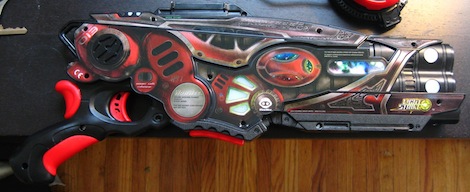
Hacking Laser Tag And Building Custom Guns

As [Brad] over at the LVL1 hackerspace watched his friend build a Laser tag/tazer mashup for Makerfaire Detroit 2012, he noticed these new laser tag guns were really cool. These Light Strike guns have an impressive array of electronics for a $30 toy, but there was still much to be desired. [Brad] decided to reverse engineer these guns and work on a drop-in replacement for the game’s electronics so people like his friend can hurt themselves more easily.

The Wowwee Light Strike guns operate with IR LEDs, so the obvious solution for decoding the laser tag protocol would be the Arduino IR remote library. [Brad] had a bit of trouble getting his Teensy to read the IR data correctly, but after connecting everything up to a logic analyzer he had the data format figured out.

Now [Brad] has the Light Strike data format figured out and is theoretically able to make his own guns that are compatible with the off-the-shelf laser tag system. It’s also possible for [Brad] to extend the capabilities of this laser tag system by using the ‘health’ function to create a medi gun, or build a gun with a larger magazine for a laser tag mini gun.

If you’d like to build your own version of laser tag compatible with the Wowwee Light Strike, you can grab all the code on [Brad]’s git.

Pwdr, The Open Source Powder Printer

Meet pwdr, the open source 3D printer that is a complete departure from the RepRaps and Makerbots we’ve come to love.

Instead of squirting plastic onto a build surface, pwdr operates just like the very, very expensive powder printers used in industrial settings. Pwdr uses gypsum, ceramics, and concrete for its raw stock and binds these powder granules together with water deposited from an inkjet cartridge.

Inside pwdr there are two bins, one for storing the raw material and another for building the part. The part to be printed is built one layer at a time, just like your regular desktop printer. After each layer is finished, a counter-rotating drum scrapes the raw material over the build area and another layer is printed.

There are a lot of advantages to pwdr versus the melted plastic method of printing used in the Makerbot; because each build is self-supporting, it’s possible to print objects that just couldn’t be made with an extruder-based printer. Pwdr also supports laser sintering, meaning it’s possible for pwdr to make objects out of ABS, Nylon, and even metal.

Right now, pwdr is still in the very early stages of development, but you can build your own powder printer from the files up on Thingiverse. Check out the video of pwdr printing after the break.

Continue reading “Pwdr, The Open Source Powder Printer”

Retrotechtacular: Simulating Weather Patterns With A Logic Chip Computer

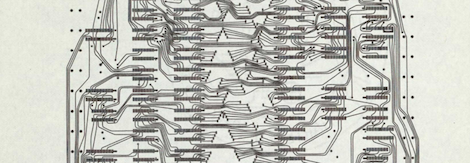
In 1975, [D. L. Slotnick], CS professor at University of Illinois at Urbana-Champaign faced a problem: meteorologists were collecting a lot more data than current weather simulations could handle. [Slotnick]’s solution was to build a faster computer to run these atmosphere circulation simulations. The only problem was the computer needed to be built quickly and cheaply, so that meant using off-the-shelf hardware which in 1975 meant TTL logic chips. [Ivan] found the technical report for this project (a massive PDF, you have been warned), and we’re in awe of the scale of this new computer.

One requirement of this computer was to roughly 100 times the computing ability of the IBM 360/95 at the Goddard Institute for Space Studies devoted to the same atmospheric computation tasks. In addition, the computer needed to be programmable in the “high-level” FORTRAN-like language that was used for this atmospheric research.

The result – not to overlook the amazing amount of work that went into the design of this machine – was a computer built out of 210,000 individual logic chips at a total cost of $2.7 Million dollars, or about $10 Million in 2012 dollars. The power consumption of this computer would be crazy – about 90 kilowatts, or enough to power two dozen American houses.

We couldn’t find much information if this computer was actually built, but all the work is right there in the report, ready for any properly funded agency to build an amazingly powerful computer out of logic chips.

Meet OSCAR, The Google Hangout Robot

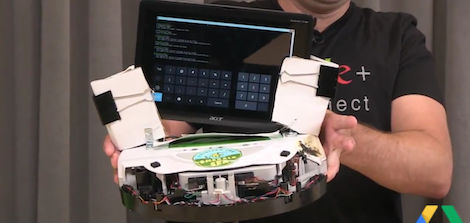
[Gus] made it to the Google+ developers vlog to show off his new Google+ hangout controlled robot. This robot, named OSCAR (Overly Simplified Collaboratively Actuated Robot), drives around according to the whims of everyone in a Google+ hangout. Not only is the robot under remote control through a Google+ hangout, it also features a camera, allowing a hangout audience to explore a space in real time.

[Gus] built OSCAR out of an old Roomba he found in his parent’s basement. After attaching an Android tablet to the Roomba with some binder clips, [Gus] put a web server on the tablet and wrote a Google+ hangout extension allowing all hangout viewers to remotely control OSCAR.

Right now, all the commands received on the hangout are put into a queue, meaning everyone on a hangout has control of OSCAR. The next version will change those commands to deltas, or changes in the current state, canceling out conflicting commands. If only we had one of these while we were streaming for the Red Bull competition

You can check out a demo of OSCAR after the break.

Continue reading “Meet OSCAR, The Google Hangout Robot”

Olympic Shot Machine Pours One Out For Every US Medal

What better way to watch the Olympics than having a robot pour you a shot every time the United States wins a medal? The folks behind SmartThings did just that, by creating a machine that pours some liquor for each American Olympic win.

From the behind the scenes video, we see the entire build is controlled by an Arduino with an XBee shield. The XBee is connected to a simple iPhone app where the current user watching the Olympics can select which medal the US won. Bronze dispenses a shot of Jack Daniels, Silver is a shot of Jose Cuervo, and Gold means someone in the room is getting a shot of Goldschläger.

Even though the build revolves around the SmartThings framework, we’re not really quite sure what this framework is. From the Facebook page (the best source of info for SmartThings, at least until they launch), it looks to be a piece of hardware that serves as an Internet to XBee bridge, along with a framework for easily whipping up a mobile app.

Whatever SmartThings is, it’s still a very cool build.

Continue reading “Olympic Shot Machine Pours One Out For Every US Medal”

Knock Lock Balks Knock, Uses CapSense Without Shock

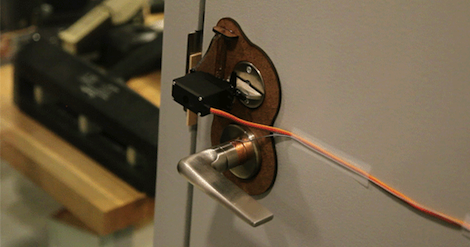
[Rob Hemsley] sent in an update to an RFID-based door lock. Previously, if you wanted to enter the MIT media lab, a RFID-enabled card was required to get in. Now, with [Rob]’s update, you only need to tap the door handle in a ‘secret’ pattern.

The earlier RFID-enabled build used about $80 in hardware, not a very economical solution. The new touch-based solution only uses an Arduino and servo, making the build much cheaper.

The touch sensitive lock uses the CapSense Arduino library. By turning the door handle into a touch sensor, [Rob] allowed a secret code to be saved in the EEPROM. Repeating this sequence when the door is locked sends power to the servo, unlocking the door.

A very cool build that’s also a little more secure than the traditional, audible knock lock. Check out the video after the break.

Continue reading “Knock Lock Balks Knock, Uses CapSense Without Shock”

Yet Another Arduino Blinkenlight Thing, Actually Pretty Cool

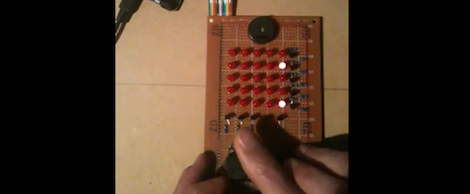
On the Tasmanian Linux User Group mailing list, [Hoolio] read someone complaining about the eventual downfall of their upcoming hackerspace as becoming a club of Arduino fanboys. [Hoolio] asked what was wrong with the Arduino, and this terrible, terrible Tasmanian replied, “there’s far too much boring blinkenlights and not enough actual cool stuff.” [Hoolio] took this as a challenge and created his own Arduino blinkenlight project that emulates Space Invaders on a 5×5 matrix of LEDs

The board is just a buzzer, 25 LEDs, 10 transistors, and a pot and button. Before the game begins, a LED chaser is traced out on the perimeter of the display, its speed controllable by the pot. When the button is pressed the game begins, allowing [Hoolio] to move his ship left and right with the pot and fire his lazor with the button.

Yes, it’s a game written for an array of blinkenlights for the Arduino. This doesn’t diminish the build, though. If this were put in a fabulous beige and transported back to 1978, we’d look on the LED version of Space Invaders as fondly as Mattel’s Football.

You can see [Hoolio]’s game demo after the break.

Continue reading “Yet Another Arduino Blinkenlight Thing, Actually Pretty Cool”