The Coming Age Of ARM Chips For The Hobbyist

The days of the 8 bit Arduino may be quickly coming to a close. Sure, there will always be a place for AVRs in blinking LEDs and turning on relays, but for doing anything cool – playing MP3s, driving LCD displays, or running a CNC machine – you need the power of a 32 bit chip. [Brian Carrigan] put up a great tutorial on getting started with these bigger, more powerful micros and moving beyond what is possible with an 8 bit PIC or AVR.

These new 32 bit chips are much more powerful, but aren’t exactly hobbyist friendly. Most of the ARM chips we’ve found are stuffed into very fine pitch QFN or QFP packages that require a reflow oven to solder to a board. In fact, we can only find one through-hole Cortex M0 chip that is suited for breadboard development. This doesn’t make it easy to whip up a circuit in a few hours, so builders needing a very powerful microcontroller will be more dependent on dev boards.

Already there are a good number of ARM-based 32 bit dev boards available including the offerings from Leaf Labs, the extremely inexpensive STM Discovery boardKinetis KL25Z Freedom Board, the outrageously powerful BeagleBone, and the perpetually delayed Arduino (over) Due.

None of these boards are particularly new developments; they’ve all been around the block once or twice. However, there are many more options for 32 bit development than the current 8 bit PIC and AVR holy war. We’re going to turn the comments over to Hackaday readers with the following questions: what supersized dev board are you rolling with? What’s good for a beginner, and what should they watch out for?
TangiBot And The Perils Of Open Source Hardware

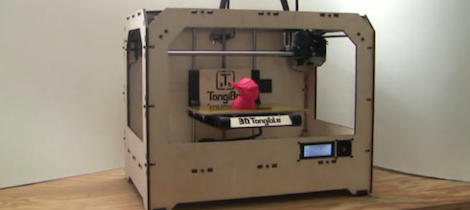
I’ve commented before on the terrible inefficiency and artificially high expense of the current crop of 3D printers. It simply doesn’t make sense to produce the plastic parts of 3D printer kits on a printer farm when there are literally thousands of Chinese injection molding companies that will make those parts cheaper. It looks like [Matt Strong] heeded my call and now has a Makerbot Replicator clone up on Kickstarter that costs $700 less than the official version. We assume the Makerbot lawyers are having a busy morning.

From the info on the Kickstarter page, [Matt] is used parts from his Makerbot Replicator to design a one-to-one copy. Every part and component on [Matt]’s TangiBot is 100% compatible – and seemingly 100% identical – with the Makerbot Replicator. Like the Replicator, [Matt] is offering a dual extruder version that allows you to print in two colors.

At the bottom of the Kickstarter page, under a section titled, “How is 3DTangible able to make a Replicator Clone?,” you’ll see [Matt]’s reasoning for cloning the MakerBot replicator. He says everything is open source, and, “MakerBot used other open source designs when designing and producing their 3D Printers.” We’ll agree that MakerBot used existing extruder designs (and improved upon them), but MakerBot was not this blatant in borrowing from the RepRap project.

For want of editorializing, I’ve complained about the stupid inefficiency of manufacturing 3D printers with 3D printers before. It was only a matter of time before someone realized current manufacturing techniques can be used to make 3D printers cheaper. [Matt] – dude – you were supposed to clone a RepRap. Makerbot has done some really incredible things for the community such as building Thingiverse and generally being an awesome cheerleader for the 3D printing community. Taking the flagship Makerbot printer and making it cheaper will not make [Matt] any friends on the Internet, but at least the laws of economics are coming to the world of 3D printers.

Thanks [Brad] for sending this in.

Largest CNC Router Is Controlled By Hand

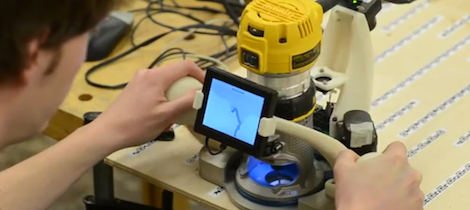
Fresh from this year’s SIGGRAPH is a very interesting take on the traditional X Y-table based CNC machine from [Alec], [Ilan] and [Frédo] at MIT. They created a computer-controlled CNC router that is theoretically unlimited in size. Instead of a gantry, this router uses a human to move the tool over the work piece and only makes fine corrections to the tool path with the help of a camera and stepper motor.

The entire device is built around a hand held router, with a base that contains a camera, electronics, stepper motors, and a very nice screen for displaying the current tool path. After a few strips of QR code-inspired tape, the camera looks down at the work piece and calculates the small changes the router has to make in order to make the correct shape. All the user needs to do is guide the router along the outline of the part to be cut with a margin of error of a half inch.

You can read the SIGGRAPH paper here (or get the PDF here and not melt [Alec]’s server), or check out the demo video after the break.

Anyone want to build their own?

Continue reading “Largest CNC Router Is Controlled By Hand”

Turning A 12 Year Old Mill Into A Modern Workhorse

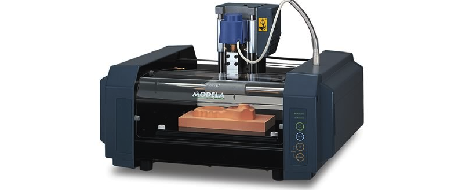
Even though the Roland MDX-20 CNC mill fetched a pretty penny when it was first made available 12 years ago, there were a few features that made any builder lucky enough to own one scratch their head. The only way for a computer to communicate with this mill was through an RS-232 connection, and instead of a normal control protocol such as GCode, the Roland mill uses a very proprietary software package.

[Johan] fixed these problems and at the same time turned this wonderful machine into a tool for the 21st century. Now, instead of running a very long serial cable to his mill with a serial to USB converter at the end, he can just plug a USB cable into his mill with the addition of an FTDI USB to serial chip wired directly to the mill’s circuit board.

Stock, the Roland mill used a very strange proprietary communications protocol. [Johan] was able to reverse engineer this protocol by tracing out a few simple shapes and curves and taking a highlighter to the printout of the resulting file. Instead of the outdated software package that shipped with his mill, [Johan] can now export tool paths directly from his CAD program and send them over a USB cable.

It really is a shame such a nice machine like [Johan]’s mill suffered from the glaring shortsightedness of Roland executives 12 years ago, but at least now [Johan] has a machine that should easily last another decade.

Exposing PCBs With A Home Made Laser Printer

Making your own printed circuit boards – as useful as it is – is a pain. Using the very popular toner transfer method requires a dozen steps that have to go perfectly the first time, and milling boards on a CNC machine creates a lot of mess. The most industrious hackers are able to bodge up a direct-to-board printer from an old inkjet printer, but these builds are usually a little kludgy. [Tixiv]’s LaserExposer board printer is one of the first builds we’ve seen that does away with all the negatives of the other techniques of PCB manufacturing and turns making your own boards into a very, very simple process.

The LaserExposer uses photosensitive copper board, like many of the other PCB printers we’ve seen. Instead of printing out the board artwork to a transparency or mask, [Tixiv] used a 1 Watt 445nm blue laser with a hexagonal mirror to directly expose the artwork onto the board, line by line.

The entire device is built around an old flatbed scanner that slowly crawls over the PCB, exposing the traces of copper to be etched away. This required reverse engineering the mirror motor control board from an 90s-era laser printer and building a circuit to precisely control the timing of the laser. [Tixiv] eventually got everything working and after etching had some of the most professional looking home-brew boards we’ve ever seen.

[Tixiv] put up a demo video of his build (after the break, German audio, YouTube has captions…). Anyone have an old flatbed scanner lying around?

Continue reading “Exposing PCBs With A Home Made Laser Printer”

Making A Game With Capacitive Touch

Hackaday has seen a ton of builds make use of the Arduino CapSense library of late, so it was only a matter of time before we posted a capacitive sensing game controller that is able to move sprites around a screen.

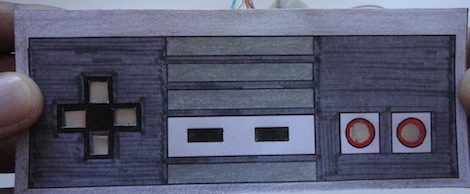
For this build, the controller is made out of small strips of Aluminum foil, wired straight to an Arduino with a few resistors. Once embedded inside a wonderful enclosure that brings about pangs of nostalgia it’s time tow write the game.

For the game portion of the build, Processing was brought into the mix to create a SpongeBob-themed ‘capture all the jellyfish in jellyfish fields’ game. By taping the contacts for the d-pad, the player can move SpongeBob around to catch jellyfish. If you’d like to give the game a go, you can play it in your browser on the project page.

This isn’t the first – or the last – CapSense build we’ll see on Hackaday, but it is the first one dedicated to making a DIY (albeit Nintendo inspired) video game controller. If six buttons aren’t enough, you’ll just have to wait for the PS3 version.


Adding A Serial Trigger To A Logic Analyzer

If you’re attempting to debug a serial bus with a bare-bones logic analyzer, you’re going to have a bad time. Most of the inexpensive analyzers available don’t have a serial pattern trigger, or a way to start recording data after a specific pattern of bits comes down the pipe. [Neil] sent in a great little project that adds a serial trigger to these analyzers, we’ve got to hand it to him for designing such a useful board.

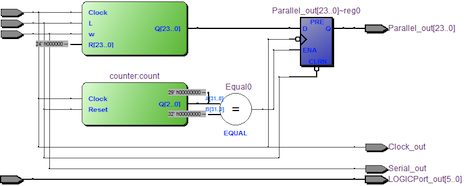
[Neil] designed a small board featuring a CLPD that converts serial data to parallel data. By setting the trigger condition of the logic analyzer to any 24-bit pattern he wants, it’s possible for [Neil] to sniff a serial bus exactly when he wants to.

The circuit is quite minimal, basically just a 100-pin CLPD and a bunch of 0.100″ header pins. It’s a useful tool, and although we couldn’t find the board file to make our own, we’re sure [Neil] will be providing that shortly.