Bad Apple On A Karaoke Machine

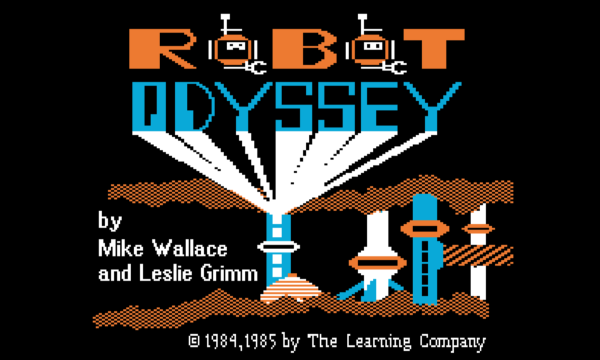
CD+Graphics was a format that never really caught on. It let music discs pack some graphics, maybe liner notes, and mostly song lyrics into the otherwise empty space on a CD. It was never intended for displaying full-motion video, but that didn’t stop [Adam Gashlin] from getting a Bad Apple, with lyrics, running on any device that will play CD+G.

The main challenge is that CD+G gives you 300 screen commands per second, which is plenty for updating text on the 48×16 blocks as the lyrics scroll by. But if you want to send custom blocks and draw images, that’s 2.5 seconds per screen: a lousy framerate.

[Adam]’s first trick is to drop the resolution way down, which gets him into the 8 FPS range. Only update the blocks that change pushes this up to a respectable 17-20 FPS. But you can see the updates, and that’s distracting. It really needed buffering.

If you don’t know Bad Apple, it’s in black and white. And like many old graphics engines of the day, CD+G uses a dynamic palette of colors. [Adam] uses this to pack four frames into one, switching between them using palette swapping. (Absolutely check out his “rainbow” version of the video to see how the palette-swapping trick works.)

In the end, his demo has audio, triple-buffered video, and lyrics at 16.3 FPS. It’s slower than the fastest video-only version, but it looks so good, and [Adam]’s explanation of all of the graphics tricks he uses to get there is the real star of the show.

If you want to see Bad Apple running on yet more minimal hardware, how about a 16×2 LCD? Or a much more ridiculous implementation? How’s regexes in Vim for absurd? Got any Bad Apple hacks of your own? Let us know in the comments or the tips line. You can never have too many.

2026 Hackaday Supercon: Call For Proposals

We are absolutely stoked to announce that the Hackaday Superconference is taking place this year November 6th through 8th in glorious Pasadena California, and we want to see you there!

If you’ve been to any of the previous nine Supercons, you know that it’s a fantastic gathering of the most motivated and interesting hackers around — but it’s also been a relatively small gathering. And while we love the very high signal-to-noise ratio of folks who show up, we’re always a little bit sad when the tickets sell out because it represents hackers who couldn’t be there.

So this year, we’re celebrating Supercon Ten by expanding out of our traditional location at the Design Lab so that we can accommodate 20% more hackers, while still keeping the cozy nature of the event intact. So if you’ve been wanting to come to Supercon, but procrastinated the ticket sales every year, this year is looking 20% better.

Continue reading “2026 Hackaday Supercon: Call For Proposals” →

When Changing Scale Isn’t Just More Of The Same

[Jenny] and I were talking about [Bitluni]’s experiment in scale, where he will take 65,536 cheap microcontrollers, network them all together, and give each one an RGB pixel. From there, antics will surely ensue. Right now, he’s only got 8,192 of them up and running, and already the novel problems and opportunities are rearing their heads.

We all know it from our own hacking. In theory, doing something ten times is ten times doing it once. But then in practice, entirely new phenomena appear as you scale up that were simply not there in the small. Maybe it happens when you repeat it one hundred times, or a thousand.

Viewed positively, this is the property of emergence: how the whole can be more than the sum of its parts, and how biology isn’t just chemistry multiplied by a few million interactions. In our blinky world, a massive wall of LEDs is a display, not just a bunch of pixels.

On the flip side, going from one microcontroller with a 10 mA current draw to 64 Ki controllers, with 655 A, is more than just a difference in scale. You need to learn a new skill set to handle the problem. Making a single prototype is a different problem from making a run of badges for a conference of 5,000 – you’ll need a team, and won’t be able to just hack it alone – not to even mention the parts sourcing woes.

So I loved watching [Bitluni] going through the upscaling. He certainly had an idea of what he was getting himself into, but as with the emerging properties of a big system, there are often emerging problems, and those you can’t always see ahead of time. Have you gotten into a project that scaled itself into something qualitatively different? Tell us about it.

Yesterday’s Technology, Re-engineered Today

Watching [sprite_tm]’s build of a handheld 486-based gaming computer, we got to thinking about retro computers and the eternal questions of how much of the computer needs to be actually “old” for it it be retro. Where is the soul of a retro computer? The CPU? The old yellowing plastic case? Maybe it depends on what you’re trying to get out of the hobby.

There is of course a spectrum of people playing around with old computers. For some people, let’s call them “vintage computer enthusiasts”, half of the fun is in keeping the actual old hardware running. This group tends to know what teletype lubricant smells like, and how to tell which capacitors need replacing.

For others, “team retro”, the joy is in using the machine itself, whether that be teaching the old dogs new tricks, or simply loading up nostalgic video games. Team retro is more content with emulations or emulations that are wrapped up neatly in hardware workalikes. They know which registers need POKEing, and whether or not Commander Keen is running at the right framerate.

I think [sprite_tm]’s project falls in with yet another camp, the retro-reengineers. Here, the idea is to step through the engineering lessons of the past by re-designing something from a bygone era. So when [sprite_tm] went with a period 486 CPU backed up by a modern FPGA, perhaps ironically borrowing code from the modern MiSTer project, it makes sense for his goals. Retro-reengineers know the bus architecture and the memory timings, and they are reinventing the wheel as a learning experience. Or in the case of [Voja Antonic]’s imaginary four-bit machine, it’s a teaching experience.

How you work often reflects what you’d like to get out of the project, and at Hackaday, of course, we love all of the above! We’ve identified at least three broad schools of fooling around with old computers. Are we missing any?

Hacking Routers Like It’s 2008

How long have we been hacking routers? To some of you who’ve been in the Hackaday audience for a while, the answer is “nearly forever”. In the early 2000s, they were one of the few consumer gadgets that had the trifecta of hackability: WiFi and networking built in, a user-friendly Linux operating system, and a few spare GPIOs that could control from the OS. Back when the Linksys WRT54GL was the king of the hill, we saw some pretty absurd hacks.

Take this example robot from October 2008. Link-rot hasn’t been kind to the original project, but from what we can tell, it used the GPIOs to drive servo motors hacked for continuous rotation, and features the equally anachronistic CD-ROM wheels. Where would you even get those today?

But the OS that this 18-year-old hack uses is still around: OpenWRT Linux. Although it still takes its name from the lovable purple router of old, it hasn’t supported that particular model in over a decade because of growing memory requirements. But it’s still the go-to distro for any modern router hacks, and it provides a lot more general-purpose Linux than you might expect on otherwise constrained platforms. As Tom pointed out in the podcast, if you see a used router for cheap, see if it’s supported by OpenWRT, and if it is, buy it.

While the project that got us thinking about routers again, Al’s recent networking hack, basically uses the router as a souped-up router, that’s by no means a given. OpenWRT is a real Linux OS, and can make use of most peripherals that your router find has available. Networking? Of course. USB? No problem. If you find a serial port and some GPIOs, you’re most of the way to a Linux SBC, although very likely a headless one.

There are a lot of hacks we see go in and out of style, and we see software projects come and go. But here we tip our hat to the router hacks, and to the plucky Linux OS that’s been ported to them all. Long may it keep old devices out of the landfill!

Featured image: My old baby, about a year or so before something in the radio modem finally gave up the ghost.

Home Automation: Simple Vs Easy

We’ve been talking a bunch of home automation on the Podcast lately, and this week, in the Mailbag segment, a reader asked us about our setups. Neither Kristina nor I are poster children for the home automation movement: she has absolutely no smart anything because she didn’t want her data up in “the cloud”, and I have an entirely local system that’s really nothing more than a bunch of ad-hoc scripts that talk to an MQTT broker, everything fully DIY but held together with metaphorical duct tape. Neither of us are doing it right, but we’re doing it wrong in interestingly different ways.

Kristina thought, probably because of the range of commercial devices out there that tie you into using their remote data storage services, that giving up control of her data was necessary to use it. And it might be, if you insist that setting up the system be as easy as possible. But the tradeoff for this ease is a drastic reduction in simplicity. You shouldn’t need a remote server in some foreign country to turn your lights on and off. Adding “the cloud” into the mix brings a lot of complexity, mostly in the form of servers that have to be paid for somehow by whatever company is providing the service. It needs to be secure. You might even have to create accounts, remember passwords, and manage that whole deal. Sure, that’s easy enough, but it’s a lot of moving parts, and you can’t blame her for rejecting that complexity.

My system is hosted on a now-ancient OrangePi in the corner, and the network in question is an old WiFi router that it sits on. Nothing needs to leave my four walls, but actually some of it does – I bridge some of the MQTT topics out to an external server for my own amusement. There is no protocol, and no real “system” frankly. Each device in the network has its own topic, and I’m responsible for knowing what it means. The thermometer in the basement has an ESP8266 that transmits on the home/basement/temperature topic, and it puts out its temperature in degrees Celsius. It was the simplest system I could think of, but I have to write whatever software I want to log, display, or act on the data. Of course, that’s simple if you can write some four-liner scripts on the OrangePi broker, but it’s not easy enough that my wife wants to hack on it.

So if the full-buy-in commercial systems are easy but overly complex, and my DIY network is transparently simple but requires a level of hands-on that isn’t easy for “normies”, is there a middle ground? I know half of you are already screaming Home Assistant or Domoticz, and you’re also thinking of which client device libraries you like the most for all your DIY applications: ESPHome vs Tasmota, for instance. And you’re all right!

We are living the in the golden age of the home automation projects. Open-source software and firmware, combined with an abundance of online tutorials and worked examples, have made huge strides toward bridging the gap between simplicity and ease of use. You can set up a hub for everything on a single-board computer, upload the software of your choice, and you don’t need the complexity or loss-of-support liability of a cloud provider. At the same time, setup is easy enough if you’re willing to roll up your sleeves a little bit, and when it’s not, chances are good that someone else has already figured it out for you. These days, interoperability with popular commercial products is shockingly easy to boot.

I need to spend some time and rationalize my system: given the state of the art, it’s simply too simple, and taking a step into an open-source solution would make it easier to use for the rest of the family, without overly complexifying things, adding sketchy dependencies, or losing our data sovereignty. I haven’t finished exploring my options yet, but from what I can see, the community has converged on some goldilocks setups: not too simple or too easy, but rather just right. Thanks, y’all!

Patterns Everywhere

I studied physics in college, and I’m always surprised how fundamental some of the concepts are. Take waves for example. You really wouldn’t expect the same underlying concept to be at work on surface of a pond, the string of a guitar, light passing through two slits, and then in the probabilistic behavior of electrons orbiting inside nuclei. But here we are, in a world filled with wave-like phenomena.

What little control theory I know, I’ve learned in the school of hard knocks. But it’s equally amazing that the same basic concepts govern the tuning of car shock absorbers, PID controllers, active audio filters, and other more complex systems where feedback matters. Crucial in all of these systems is the judicious balance of amplification and damping.

And last week on vacation, learning to drive a covered wagon pulled by a heavy draft horse, I saw the same patterns again. The horse likes to pull, and when the wagon comes over the crest of the top of a hill, it starts to roll forward into his harness, pushing him from behind. This makes the horse uneasy, and he slows down, the wagon pushes him harder, and positive feedback gets out of control.

The man who was teaching me to drive the wagon said, “it’s not like a car” in that you don’t tap the brakes to slow down and then let go. Rather, you hold on the brakes for a lot longer than you think is necessary – until the horse tells you that he feels like pulling again – and then you let up only a tiny bit at a time. Otherwise, you end up in the under-damped case, where you let the wagon go too much, it slows the horse, you slam the brakes, the horse pulls hard, and you let up on the brakes, and the cycle continues anew.

What he meant by “not like a car” was that the brakes aren’t just slowing down the wagon, they’re adding damping to keep the horse-wagon system from oscillating. Once that clicked in my mind, everything was smooth sailing. After a couple of days, I even started adding some feed-forward to my mental PID controller, letting the brakes go a little bit more when the horse was approaching the bottom of a hill, and he obviously wanted to pick up a little more speed before the grade ahead.

The horse seemed happy that I was finally getting it, but I don’t think he had any understanding of tuning PID loops. He did have me pondering, on a long stretch of rolling hills on a summer morning, if there were a good minimal set of patterns that explained a maximal breadth of phenomena. I’m starting with the physics of waves and the control of feedback systems, but what’s next?