2025 One Hertz Challenge: Blinking An LED With The Aid Of Radio Time

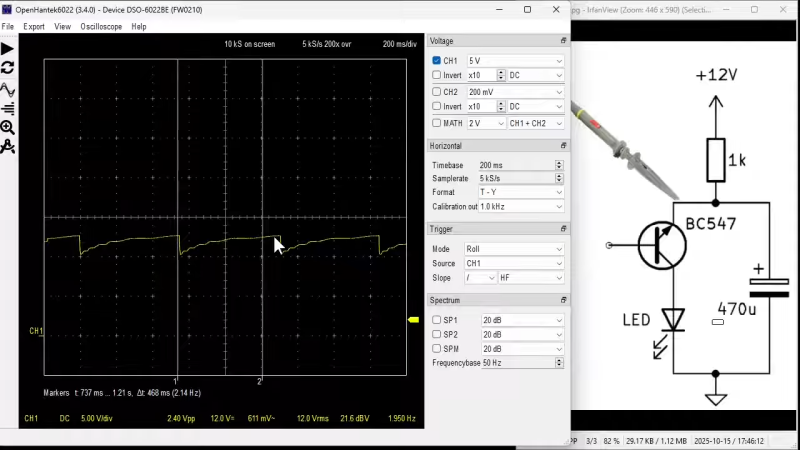
If you want to blink an LED once every second, you could use just about any old timer circuit to create a 1 Hz signal. Or, you could go the complicated route like [Anthony Vincz] and grab 1 Hz off a radio clock instead. 

The build is an entry for the 2025 One Hertz Challenge, with [Anthony] pushing himself to whip up a simple entry on a single Sunday morning. He started by grabbing a NE567 tone decoder IC, which uses a phase-locked loop to trigger an output when detecting a tone of a given frequency. [Anthony] had used this chip hooked up to an Arduino to act as a Morse decoder, which picked up sound from an electret mic and decoded it into readable output.

However, he realized he could repurpose the NE567 to blink in response to output from radio time stations like the 60 KHz British and 77.5 KHz German broadcasts. He thus grabbed a software-defined radio, tuned it into one of the time stations, and adjusted the signal to effectively sound a regular 800 Hz tone coming out of his computer’s speakers that cycled once every second. He then tweaked the NE567 so it would trigger off this repetitive tone every second, flashing an LED.

Is it the easiest way to flash an LED? No. It’s complicated, but it’s also creative. They say a one hertz signal is always in the last place you look.

Continue reading “2025 One Hertz Challenge: Blinking An LED With The Aid Of Radio Time”

How The Widget Revolutionized Canned Beer

Walk into any pub and order a pint of Guinness, and you’ll witness a mesmerizing ritual. The bartender pulls the tap, fills the glass two-thirds full, then sets it aside to settle before topping it off with that iconic creamy head. But crack open a can of Guinness at home, and something magical happens without any theatrical waiting period. Pour it out, and you get that same cascading foam effect that made the beer famous.

But how is it done? It’s all thanks to a tiny little device that is affectionately known as The Widget.

Continue reading “How The Widget Revolutionized Canned Beer”

2025 One Hertz Challenge: Digital Clock Built With Analog Timer

You can use a microcontroller to build a clock. After all, a clock is just something that counts the passage of time. The only problem is that microcontrollers can’t track time very accurately. They need some kind of external timing source that doesn’t drift as much as the microcontroller’s primary clock oscillator. To that end, [Josh] wanted to try using a rather famous IC with his Arduino to build a viable timepiece.

[Josh]’s idea was straightforward—employ a 555 timer IC to generate a square wave at 1 Hz. He set up an Arduino Uno to count the pulses using edge detection. This allowed for a reliable count which would serve as the timebase for a simple 24-hour clock. The time was then displayed on an OLED display attached over I2C, while raw pulses from the 555 were counted on a 7-segment display as a useful debugging measure. Setting the time is easy, with a few pushbuttons hooked up to the Arduino for this purpose.

[Josh] claims a drift of “only ~0.5 seconds” but does not state over what time period this drift occurs. In any case, 555s are not really used for timekeeping purposes in this way, because timers based on resistor-capacitor circuits tend to drift a lot and are highly susceptible to temperature changes. However, [Josh] could easily turn this into a highly accurate clock merely by replacing the 555 square wave input with a 1PPS clock source from another type of timer or GPS device.

We’ve had quite a few clocks entered into the One Hertz Competition already, including this hilariously easy Nixie clock build. You’ve got until August 19 to get your own entry in, so wow us with your project that does something once a second!

Digital Etch-A-Sketch Also Plays Snake

The Etch-A-Sketch has been a popular toy for decades. It can be fun to draw on, but you have to get things right the first time, because there’s no undo button. [Tekavou] decided to recreate this popular toy in digital form instead to give it more capabilities. 

The build relies on an Inkplate e-paper screen as a display, which is probably as close you can get in appearance to the aluminium dust and glass screen used in an Etch-a-Sketch. The display is hooked up to an ESP32 microcontroller, which is charged with reading inputs from a pair of rotary encoders. In standard drawing mode, it emulates the behavior of an Etch-A-Sketch, with the ESP32 drawing to the e-paper display as the user turns the encoders to move the cursor. However, it has a magical “undo” feature, where pressing the encoder undoes the last movement, allowing you to craft complex creations without having to get every move perfect on your first attempt. As a fun aside, [Tekavou] also included a fun Snake game. More specifically, it’s inspired by NIBBLES.BAS, a demo program included with Microsoft QBasic back in the day.

We’ve seen all kinds of Etch-A-Sketch builds around these parts, including this impressive roboticized version. Video after the break.

Continue reading “Digital Etch-A-Sketch Also Plays Snake”

2025 One Hertz Challenge: A Game Of Life

The 2025 One Hertz Challenge asks you to build a project that does something once every second. While that has inspired a lot of clock and timekeeping builds, we’re also seeing some that do entirely different things on a 1 Hz period. [junkdust] has entered the contest with a project that does something rather mathematical once every second.

[junkdust] wanted to get better acquainted with the venerable ATtiny85, so decided to implement Conway’s Game of Life on it. The microcontroller is hooked up to a 0.91″ OLED display with a resolution of 128 x 32 pixels, however, [junkdust] only elected to implement a 32 x 32 grid for the game itself, using the rest of the display area to report the vital statistics of the game. On power up, the grid is populated with a random population, and the game proceeds, updating once every second.

It’s a neat little desk toy, but more importantly than that, it served as a nicely complicated test project for [junkdust] to get familiar working inside the limitations of the ATtiny85. It may be a humble part, but it can do great things, as we’ve seen many times before!

Creating A New Keyboard Flex For An Old Calculator

[Menadue] had a vintage Compucorp 326 calculator with an aging problem. Specifically, the flex cable that connects the button pad had turned corroded over time. However, thanks to the modern PCB industrial complex, replacing the obscure part was relatively straightforward!

The basic idea was simple enough: measure the original flex cable, and recreate it with the flat-flex PCB options available at many modern PCB houses that cater to small orders and hobbyists. [Menadue] had some headaches, having slightly misjudged the pitch of the individual edge-connector contacts. However, he figured that if lined up just right, it was close enough to still work. With the new flex installed, the calculator sprung into life…only several keys weren’t working. Making a new version with the correct pitch made all the difference, however, and the calculator was restored to full functionality.

It goes to show that as long as your design skills are up to scratch, you can replace damaged flex-cables in old hardware with brand new replacements. There’s a ton of other cool stuff you can do with flex PCBs, too.

Continue reading “Creating A New Keyboard Flex For An Old Calculator”

3D-Printing A Full-Sized Kayak In Under A Day

If you want to get active out on the water, you could buy a new kayak, or hunt one down on Craigslist, Or, you could follow [Ivan Miranda]’s example, and print one out instead.

[Ivan] is uniquely well positioned to pursue a build like this. That’s because he has a massive 3D printer which uses a treadmill as a bed. It’s perfect for building long, thin things, and a kayak fits the bill perfectly. [Ivan] has actually printed a kayak before, but it took an excruciating 7 days to finish. This time, he wanted to go faster. He made some extruder tweaks that would allow his treadmill printer to go much faster, and improved the design to use as much of the belt width as possible. With the new setup capable of extruding over 800 grams of plastic per hour, [Ivan] then found a whole bunch of new issues thanks to the amount of heat involved. He steps through the issues one at a time until he has a setup capable of extruding an entire kayak in less than 24 hours.

This isn’t just a dive into 3D printer tech, though. It’s also about watercraft! [Ivan] finishes the print with a sander and a 3D pen to clean up some imperfections. The body is also filled with foam in key areas, and coated with epoxy to make it watertight. It’s not the easiest craft to handle, and probably isn’t what you’d choose for ocean use. It’s too narrow, and wounds [Ivan] when he tries to get in. It might be a floating and functional kayak, just barely, for a smaller individual, but [Ivan] suggests he’ll need to make changes if he were to actually use this thing properly.

Overall, it’s a project that shows you can 3D print big things quite quickly with the right printer, and that maritime engineering principles are key for producing viable watercraft. Video after the break.

Continue reading “3D-Printing A Full-Sized Kayak In Under A Day”