Game Dodecahedron Runs AArch64 Assembly

Operating systems are great things to have for general purpose computing, but sometimes they can just get in the way. There’s RAM overhead and processor cycles required for all that operating, after all. For something like a game system, it seems unnecessary. The NES certainly did well enough without an OS, as did its various successors for several console generations.

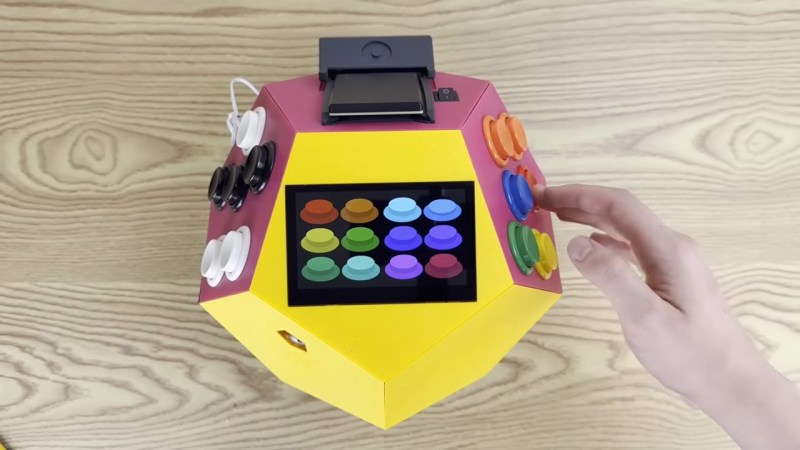
[Inkbox] wanted to get back to those heady days by programming bare-metal games for a Rasberry Pi 3 that had sat unused since 2016. Games are on cartridge, running bare metal, in assembly — as God and Masayuki Uemura intended. Also, the console is a dodecahedron, because the name GameCube was already taken.

The GitHub link above doesn’t exactly have documentation, at least as of this writing, so you’ll need to watch the video to get the full details. The dodecahedron form factor might not be ideal for packing away in a bag, but as a handheld we have to admit it does look comfortable to hold. Two faces of the dodecahedron get a half-dozen buttons each, which are wired to a GPIO pin on the Pi via a Schmitt trigger for hardware debounce. Like all good consoles, it uses cartridges, these ones being adapted from SD cards on large PCBs derived from a project we featured before.

That all sounds great, but it’s the assembly programming we’re really interested in — skip to around the seven-minute mark in the video for that. Ultimately it’s a build video, so not the ideal tutorial for ARM assembly programming, but it might not be a bad introduction for some. Unfortunately you don’t get line-by-line of the PacMan game he put together — but he does have it in the repository for you to examine. The repo also has STLs if you want to make a dodecahedron of your own.

Of course he’s got a RetroPi cartridge as well, loaded with emulators, and we suspect that’s mostly how this GameDodecahedron will get used. Still, we’ll always have a soft spot for assembly code and projects that use it — be it on ARM, good old 6502, the open-source RISC V architecture, or even the absolute monster of op codes that is x86.

Continue reading “Game Dodecahedron Runs AArch64 Assembly”

STM32 Handheld Has OpenGL And All The Classics

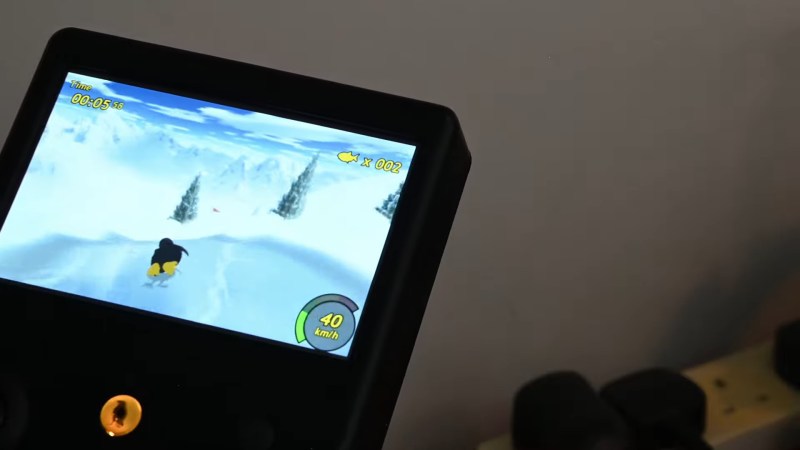
We do sometimes go on about how absurdly powerful microcontrollers are these days, but this time it’s technically a microprocessor, not a microcontroller, at the heart of the build — specifically, an STM32MP2. Still, you know you’re living in the future when an STM32 of any sort can not only run [John Cronin]’s gk handheld game console, but provide 3D acceleration to boot.

Full disclosure: you’ve seen this handheld here before — sorta. That was version 3, which was an STM32-based handheld.  V3 used the much less powerful STM32H7S7L8, with a single Cortex-M7 clocked at 600 MHz and a 2D NeoChrom GPU. The STM32MP2, by contrast, has dual Cortex-A35 cores running 1.5 GHz and a bonus Cortex-M33. It’s running a custom OS called gkos, which is mostly POSIX-compliant and boasts nigh-instantaneous boot times.

As with the last version, you can run a bevy of emulators from the 8-bit to the 32-bit era, but the added power and OpenGL support mean this handheld also runs N64 games via a fork of mupen64. There are also emulators for ‘real’ computers, namely Atari ST and XL, and a little-known thing known as a “PC”. DOSBox gets the equivalent performance of a 50 MHz 486, which means you can run all the classics, including DOOM, though that will be more performant running the native-running port of sdl-DOOM.

You also get extra inputs to play with and a bigger screen compared to the last version. Oh, and WiFi. There are accelerometers for tilt control, and did we mention the screen’s touch input is supported? If it weren’t for the form-factor, we’d call this a capable little computer. The GK handheld looks like an awesome handheld console, check it out in the demo video below.

Continue reading “STM32 Handheld Has OpenGL And All The Classics”

It’s Another Pi Handheld. But It’s A Really Good One

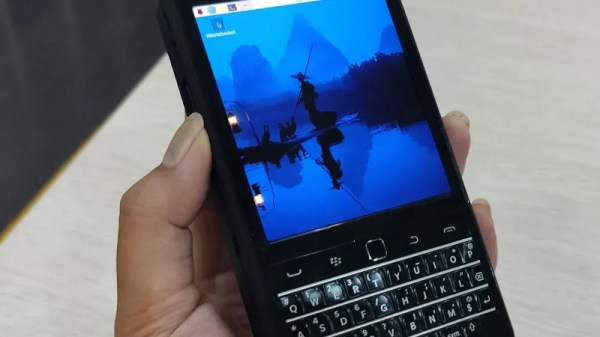
Ever since the first Linux capable single-board computers came out, there have been projects turning them into handhelds. The Raspberry Pi Zero and in particular the Compute Modules are ideally suited to this. While there are more common projects that find their way into our feed we’ve certainly seen a few of them in our time, enough now that a new one has to be special to really catch our eye. Which brings us to the PiBrick from [Ahmad Amarullah], which sets the bar pretty high.

The device is a Compute Module 5 smartphone sized computer with a 3.92″ OLED touch display and the ubiquitous BlackBerry-derived keyboard. It’s drawn together with a PCB that holds all components and peripherals, and this and the 5000 mAH battery fit in a 3D printed shell that gives it the form factor of a chunky smartphone. You can see it at the link above, and also find it in a GitHub repository.

Handheld computers always represent something of a compromise as they can only ever offer relatively small screens and keyboards. But they live or die on their versatility and robustness, both of which this one has in spades. We like it, a lot.

Thanks [Nick] for the tip.

Building A (Not Very) Portable Xbox

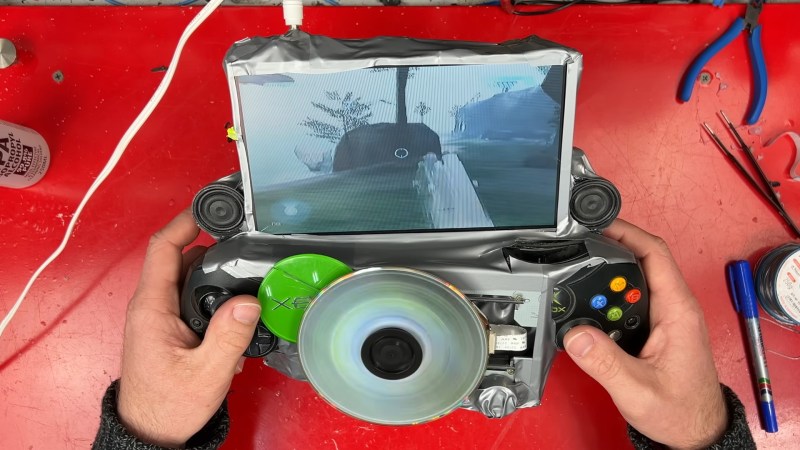
Modern handheld game consoles are impressive feats of engineering, featuring full fledged computers in near pocket-sized packages. So what happens if you take an original Xbox and sprinkle on some modern electronics and create a handheld? Well, if you’re [James] of James Channel, you end up with this sandwich of PCBs held together with hot glue and duck tape. 

The first order of miniaturization in this Xbox was replacing the hard drive. Because a CompactFlash card uses parallel ATA, that could be a simple drop in replacement. However, the Xbox locks the hard drive to the system requiring a mod chip for the CF card to work. Fortunately, the sacrificial Xbox came with a mod chip installed. After using an arcade machine to flash the card and copy over the contents of the drive, the CF card install was a breeze. 

For the screen and batteries, a portable DVD player that had remained unused since 2006 was repurposed. The battery cells were rather unhappy, but managed to get resurrected with some careful charging. As it turns out, the iPod 30 pin connector inside the portable screen contains an S-Video line. By tapping into that and adding in some power management for the batteries, the Xbox became a pile of PCBs that could maybe be taken places.

Continue reading “Building A (Not Very) Portable Xbox”

GK STM32 MCU-Based Handheld Game System

These days even a lowly microcontroller can easily trade blows with – or surpass – desktop systems of yesteryear, so it is little wonder that DIY handheld gaming systems based around an MCU are more capable than ever. A case in point is the GK handheld gaming system by [John Cronin], which uses an MCU from relatively new and very capable STM32H7S7 series, specifically the 225-pin STM32H7S7L8 in TFBGA package with a single Cortex-M7 clocked at 600 MHz and a 2D NeoChrom GPU.

Coupled with this MCU are 128 MB of XSPI (hexa-SPI) SDRAM, a 640×480 color touch screen, gyrometer, WiFi network support and the custom gkOS in the firmware for loading games off an internal SD card. A USB-C port is provided to both access said SD card’s contents and for recharging the internal Li-ion battery.

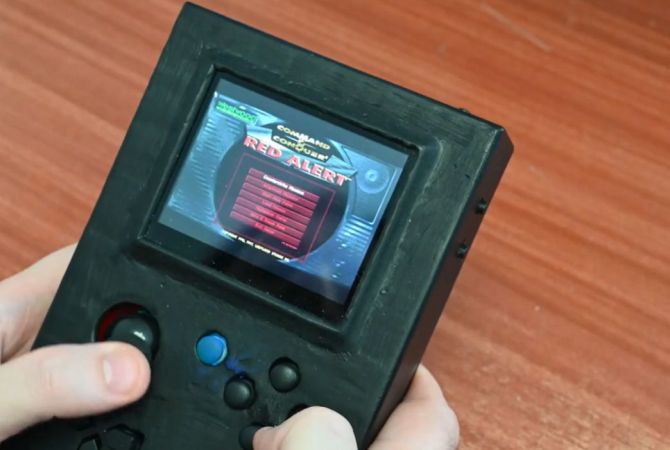
As can be seen in the demonstration video, it runs a wide variety of games, ranging from DOOM (of course), Quake, as well as Command and Conquer: Red Alert and emulators for many consoles, with the Mednafen project used to emulate Game Boy, Super Nintendo and other systems at 20+ FPS. Although there aren’t a lot of details on how optimized the current firmware is, it seems to be pretty capable already.

Continue reading “GK STM32 MCU-Based Handheld Game System”

BlackBerry Keyboard Makes This Handheld Pi Stand Out

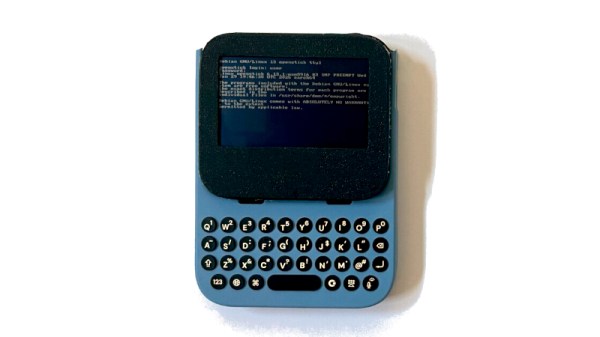
In the decade or more since small inexpensive Linux-capable single board computers such as the Raspberry Pi came to the mainstream, many a hardware hacker has turned their attention to making a portable computer using one. With such a plethora of devices having been made one might think that the Pi handheld was a done deal, but every so often along comes a new one of such quality to re-ignite the genre. So it is with [Taylor Hay]’s BlackberryPi Handheld. As you might guess from the name, it uses a BlackBerry keyboard along with a square LCD screen to create a beautifully executed Pi handheld in an almost GameBoy-like form factor.

It starts with a beautifully designed and executed case that holds a Pi and a Pimoroni HyperPixel screen. Unexpectedly this is a full-size Pi, we think a Pi 4. The keyboard is a USB enhanced Blackberry module which also has the famous trackpad, and there’s a bezel on the front to protect the screen. The power meanwhile comes from three 18650 cells inside the back of the case, with a power bank PCB. The surprise here is how simple he’s made it by careful choice of modules, the usual rats-nest of wires is missing.

The files are available so you can make your own, and he’s actively encouraging people to remix and improve it. We like this project, a lot, and after you’ve seen the video below the break, we think you will too. Oddly, this isn’t the first time we’ve seen someone try this combination.

Continue reading “BlackBerry Keyboard Makes This Handheld Pi Stand Out”

A Handheld Replica Sound Voltex Game

Sound Voltex is a music game from Konami; in fact, it’s a whole series of arcade games! [Luke] is a big fan, so decided to build a hardware handheld to play the Unnamed Sound Voltex Clone.  No—Voltex is not a typo, that’s the name.

If you’re unfamiliar, the Unnamed SDVX Clone is basically a community-built game that’s inspired by the original Konami titles. [Luke] decided to build a handheld console for playing the game, which is more akin to the arcade experience versus playing it on a desktop computer.

[Luke’s] build relies on a Raspberry Pi 4B, which donates its considerable processing power and buckets of RAM to the project. The Pi was installed into a 3D-printed case with a battery pack, touchscreen, and speakers, along with multiple arcade buttons  and rotary encoders for controlling the game. Booting the Pi and clicking the icon on the desktop starts up the Unnamed Sound Voltex Clone. The game itself will be fairly familiar to any rhythm game player, though it’s a tough more sophisticated than Audiosurf. [Luke] demonstrates the gameplay on YouTube, and the finished project looks great.

We always love seeing handheld hacks, from PlayStations that never were to retro DIY creations. Video after the break.

Continue reading “A Handheld Replica Sound Voltex Game”