Making Effective, Affordable Water Level Monitors

Water wells are simple things, but that doesn’t mean they are maintenance-free. It can be important to monitor water levels in a well, and that gets complicated when the well is remote. Commercial solutions exist, of course, but tend to be expensive and even impractical in some cases. That’s where [Hans Gaensbauer]’s low-cost, buoyancy-based well monitor comes in. An Engineers Without Border project, it not only cleverly measures water level in a simple way — logging to a text file on a USB stick in the process — but it’s so low-power that a single battery can run it for years.
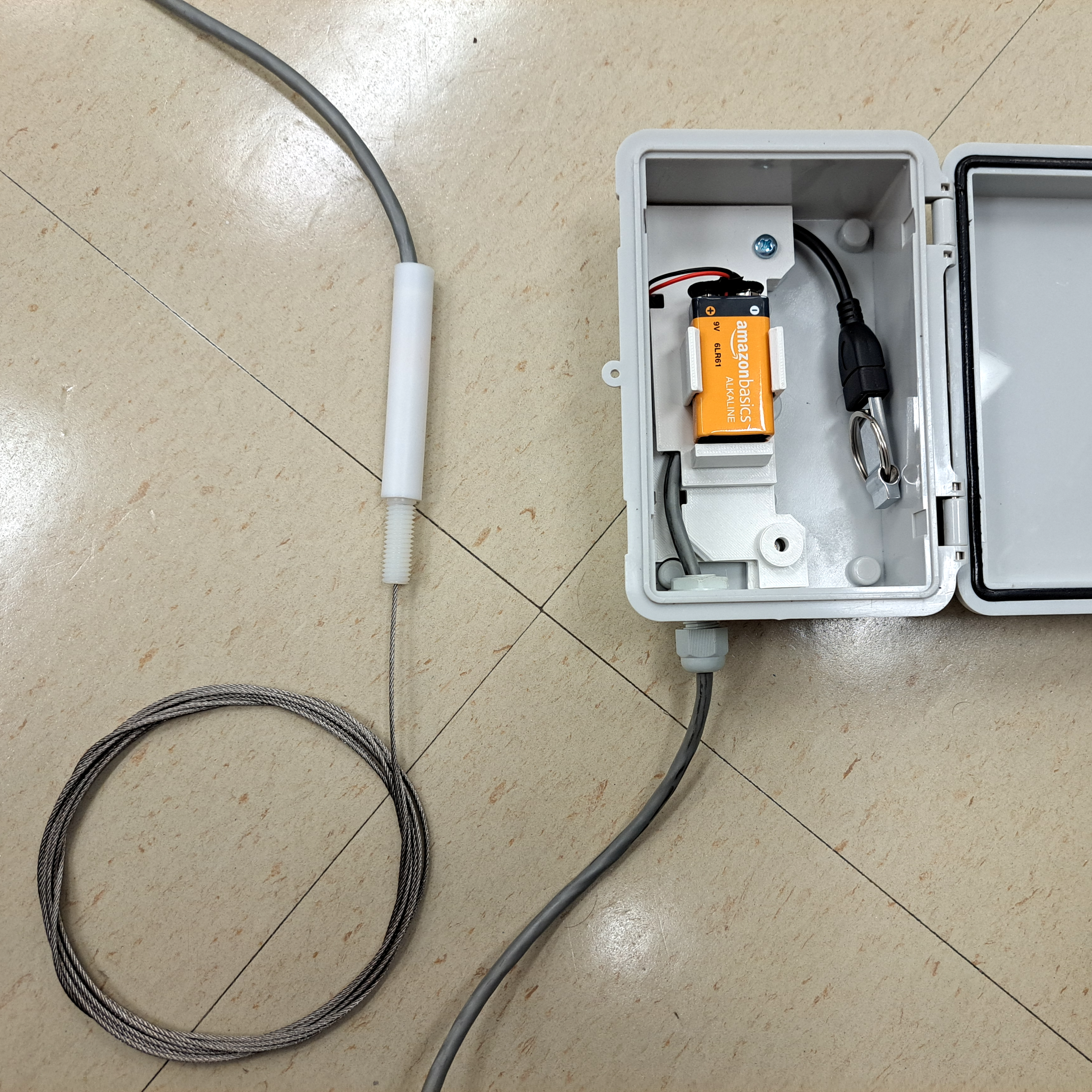
The steel cable (bottom left) is attached to a submerged length of pipe, and inside the cylinder is a custom load cell. The lower the water level, the higher the apparent weight of the submerged pipe.

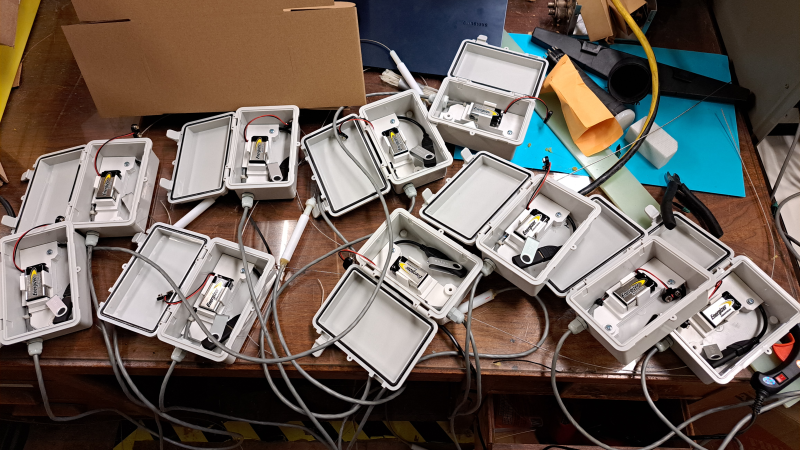
The monitor [Hans] designed works in the following way: suspend a length of pipe inside the well, and attach that pipe to a load cell. The apparent weight of the pipe will be directly proportional to how much of the pipe is above water. The fuller the well, the less the pipe will seem to weigh. It’s very clever, requires nothing to be in the well that isn’t already water-safe, and was designed so that the electronics sit outside in a weatherproof enclosure. Cost comes out to about $25 each, which compares pretty favorably to the $1000+ range of industrial sensors.

The concept is clever, but it took more that that to create a workable solution. For one thing, space was an issue. The entire well cap was only six inches in diameter, most of which was already occupied. [Hans] figured he had only about an inch to work with, but he made it work by designing a custom load cell out of a piece of aluminum with four strain gauges bonded to it. The resulting sensor is narrow, and sits within a nylon and PTFE tube that mounts vertically to the top of the well cap. Out from the bottom comes a steel cable that attaches to the submerged tube, and out the top comes a cable that brings the signals to the rest of the electronics in a separate enclosure. More details on the well monitor are in the project’s GitHub repository.

All one has to do after it’s installed is swap out the USB stick to retrieve readings, and every once in a long while change the battery. It sure beats taking manual sensor readings constantly, like meteorologists did back in WWII.
2025 Component Abuse Challenge: Weigh With A TL074

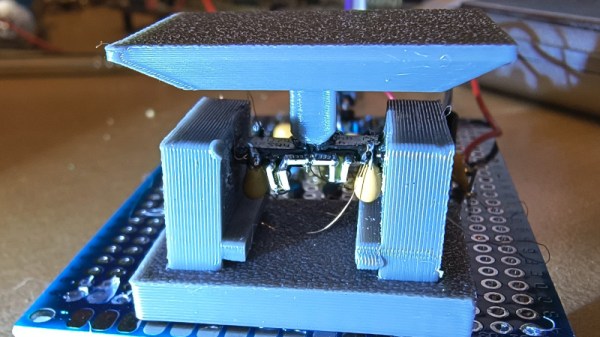
The late and lamented [Bob Pease] was one of a select band of engineers, each of whose authority in the field of analogue integrated circuit design was at the peak of the art. So when he remarks on something in his books, it’s worth taking notice. It was just such an observation that caught the eye of [Trashtronic]; that the pressure on a precision op-amp from curing resin could be enough to change the device’s offset voltage. Could this property be used for something? The op-amp as a load cell was born!

The result is something of an op-amp torture device, resembling a small weighing machine with a couple of DIP-8 packages bearing the load. Surprisingly modest weights will change the offset voltage, though it was found that the value will drift over time.

This is clearly an experimental project and not a practical load cell, but it captures the essence of the 2025 Component Abuse Challenge of which it forms a part. Finding completely unexpected properties of components doesn’t always have to lead to useful results, and we’re glad someone had done this one just to find out whether or not it works. You still just about have time for an entry yourself if you fancy giving it a go.

Trio Of Mods Makes Delta Printer More Responsive, Easier To Use

Just about any 3D printer can be satisfying to watch as it works, but delta-style printers are especially hypnotic. There’s just something about the way that three linear motions add up to all kinds of complex shapes; it’s mesmerizing. Deltas aren’t without their problems, though, which led [Bruno Schwander] to undertake a trio of interesting mods on his Anycubic Kossel.

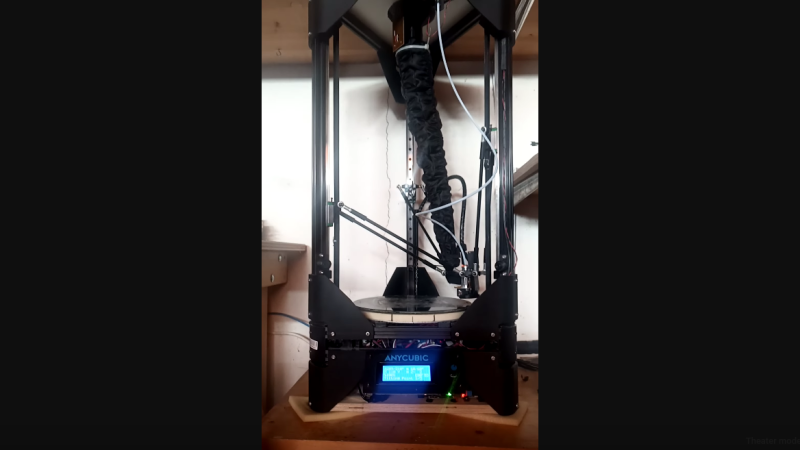
First up was an effort to reduce the mass of the business end of the printer, which can help positional accuracy and repeatability. This started with replacing the stock hot-end with a smaller, lighter MQ Mozzie, but that led to cooling problems that [Bruno] addressed with a ridiculously overpowered brushless hairdryer fan. The fan expects a 0 to 5-VDC signal for the BLDC controller, which meant he had to build an adapter to allow Marlin’s 12-volt PWM signal to control the fan.

Once the beast of a fan was tamed, [Bruno] came up with a clever remote mount for it. A 3D-printed shroud allowed him to mount the fan and adapter to the frame of the printer, with a flexible duct connecting it to the hot-end. The duct is made from lightweight nylon fabric with elastic material sewn into it to keep it from taut as the printhead moves around, looking a bit like an elephant’s trunk.

Finally, to solve his pet peeve of setting up and using the stock Z-probe, [Bruno] turned the entire print bed into a strain-gauge sensor. This took some doing, which the blog post details nicely, but it required building a composite spacer ring for the glass print bed to mount twelve strain gauges that are read by the venerable HX711 amplifier and an Arduino, which sends a signal to Marlin when the head touches the bed. The video below shows it and the remote fan in action.

Continue reading “Trio Of Mods Makes Delta Printer More Responsive, Easier To Use”

Making A Unique Type Of Wind Gauge For Home Assistant Use

Sometimes, it’s nice to know how windy it is outside. Knowing the direction of the wind can be a plus, too. To that end, [Sebastian Sokołowski] built himself an unusual anemometer—a wind gauge—to feed into his smart home system.

[Sebastian’s] build is able to tell both wind speed and direction—and with no moving parts! Sort of, anyway. That makes the design altogether different from the usual cup type anemometers with wind vanes that you might be used to seeing on home weather stations. [Sebastian] wanted to go a different route—he wanted a sensor that wouldn’t be so subject to physical wear over time.

The build relies on strain gauges. Basically, [Sebastian] 3D printed a sail-like structure that will flex under the influence of the wind. With multiple strain gauges mounted on the structure, it’s possible to determine the strength of the wind making it flex and in what direction. [Sebastian] explains how this is achieved, particularly involving the way the device compensates for typical expansion and contraction due to temperature changes.

It’s a really unique way to measure wind speed and direction; we’d love to learn more about how it performs in terms of precision, accuracy, and longevity—particularly with regards to regular mechanical and ultrasonic designs. We’ll be keeping a close eye on [Sebastian’s] work going forward. Video after the break.

Continue reading “Making A Unique Type Of Wind Gauge For Home Assistant Use”

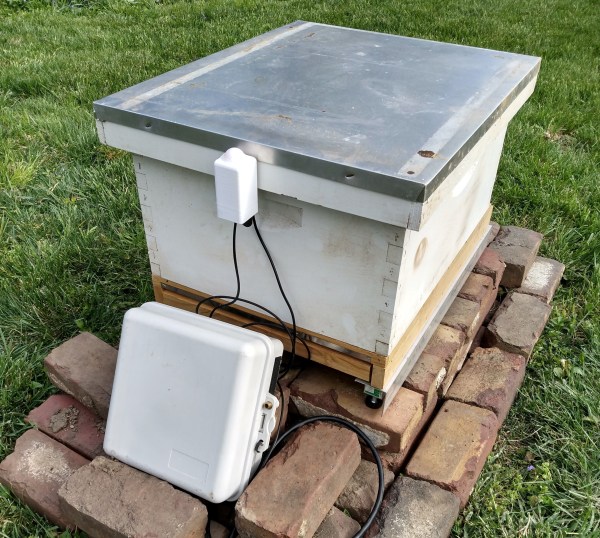
A beehive sits on bricks with an outdoor-rated box full of electronics to monitor the hive.

Hive Monitor Is The Bee’s Knees

Beekeeping is quite the rewarding hobby. There’s delicious honey and useful wax to be had, plus you get the honor of knowing that you’re helping to keep the bee population surviving and thriving. [Ben Brooks] likes to keep tabs on the hive, but doesn’t like the idea of opening it up more often than necessary. After a couple of beekeeping rodeos, [Ben] decided to build his own tracker to get reports on the health and the activity of the hive through Home Assistant.

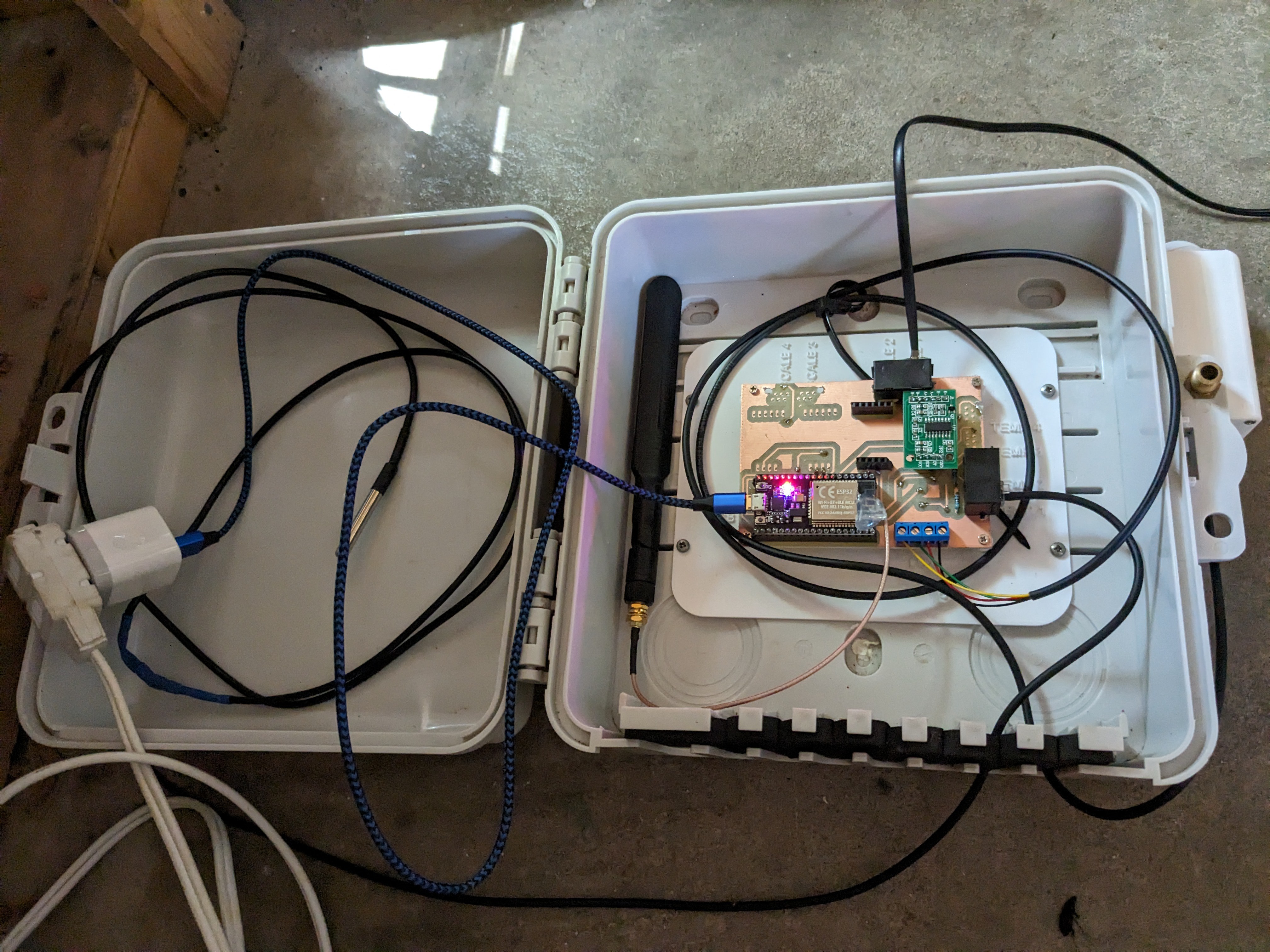
A white outdoor-rated box opened to reveal electronics to monitor a beehive.This hive tracker features a light sensor, a temperature sensor, and three strain gauges to measure the weight. There would be four, but a mouse decided to take a bite of the wires in the most nightmarish place to repair.

Everything runs off of an ESP32, and there’s an external antenna involved because the hive is nearly out of Wi-Fi range. The strain gauges are the affordable bathroom-scale type, and [Ben] has extras for if and when the number of hives goes up.

We like the combination of hard work and simplicity going on here — [Ben] milled and drilled the PCB himself, and used phone plugs to connect the temperature and weight sensors. Unfortunately, the plugs make the strain gauges a little finicky, so [Ben] says he would probably use screw terminals next time, or might be soldering the wires sooner rather than later. Consider this one a work in progress, and keep watching for updates as [Ben] works out the kinks.

Interested in beekeeping, but don’t want to build a traditional hive? Check out this beehive in a bottle.

Weird Things To Do With FPGAs

There’s an old joke about how can you find the height of a building using a barometer. One of the punchlines is to drop the barometer from the roof and time how long it takes to hit the ground. We wonder if [Alexlao512] had that in mind when he wrote a post about unconventional uses of FPGAs. Granted, he isn’t dropping any of them off a roof, but still. The list takes advantage of things we usually try to avoid such as temperature variation, metastability, and the effects of propagation delays.

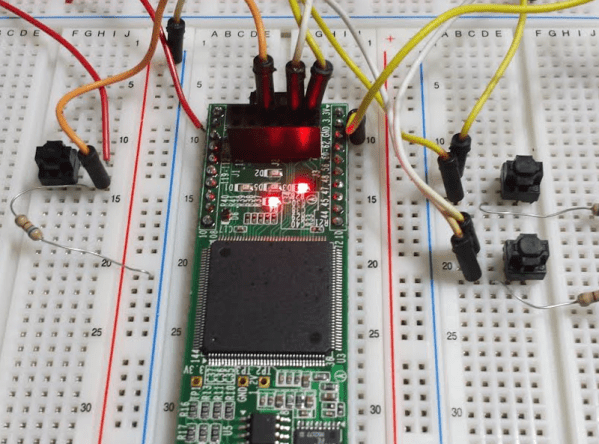
For example, you probably know that hooking up an odd number of inverters into a loop forms an oscillator—the so-called ring oscillator. The post discusses how you can use an oscillator like that to measure propagation delay or even as a strain gauge. If you put pressure on the FPGA chip, the frequency of the ring oscillator will subtly vary.

Continue reading “Weird Things To Do With FPGAs”