Chumby Gets New Kernel… Soon

If you missed the Chumby, we’re sorry.  They were relatively inexpensive Linux appliances that acted as a clock, Internet radio, and feed reader. The company went belly up, although there was some functionality remaining thanks to one of the founders and now, for a subscription fee, you can still keep your Chumby operating. However, [Doug Brown] bought one with the goal of using it for his own applications. But the 2.6.28 kernel is showing its age. So he decided to push a new kernel on the device.

If you are a Chumby enthusiast, don’t get too excited. The goal isn’t to provide the existing Chumby apps with a new kernel, [Doug] says that’s probably impossible. Instead, he wants a modern booting infrastructure and kernel on the device for his own software.

Continue reading “Chumby Gets New Kernel… Soon”

Sliding Wrench Leaves A Little To Be Desired

[Ben Conrad] received an interesting tool as a gift that purported to be a better mousetrap. It was a crescent wrench (made by the Crescent company, even) that didn’t have a tiny adjusting wheel like a traditional wrench. Instead, it had a slide running down the length of the handle. The idea is that you would push the slide to snug the wrench jaws against the bolt or nut, and that would be fast and easy compared to a conventional wrench. As [Ben] notes, though, it doesn’t work very well. Most of us would have just dumped it in the back of the tool chest or regifted it. [Ben] tore his apart to find out what was wrong with it.

A typical adjustable wrench has four parts. This one has 19 parts and looks like a conventional wrench with an extra slide and screw running down the length of the handle. [Ben] found the parts were poorly made, but that wasn’t the main problem.

Continue reading “Sliding Wrench Leaves A Little To Be Desired”

Arc Overhangs Make “Impossible” 3D Prints

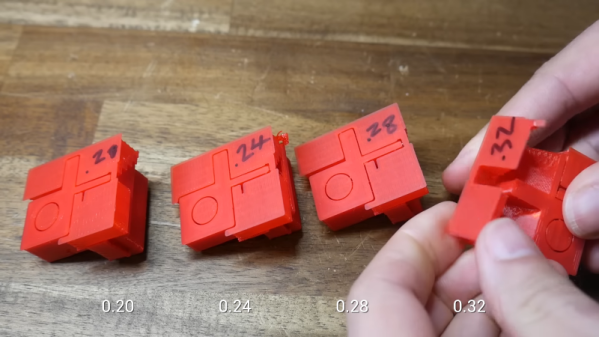
An accidental discovery by [3DQue] allows overhangs on FDM printers that seem impossible at first glance. The key is to build the overhang area with concentric arcs. It also helps to print at a cool temperature with plenty of fan and a slow print speed. In addition to the video from [3DQue], there’s also a video from [CNC Kitchen] below that covers the technique.

If you want a quick overview, you might want to start with the [CNC Kitchen] video first. The basic idea is that you build surfaces “in the air” by making small arcs that overlap and get further and further away from the main body of the part. Because the arcs overlap, they support the next arc. The results are spectacular. There’s a third video below that shows some recent updates to the tool.

We’ve seen a similar technique handcrafted with fullcontrol.xyz, but this is a Python script that semi-automatically generates the necessary arcs that overlap. We admit the surface looks a little odd but depending on why you need to print overhangs, this might be just the ticket. There can also be a bit of warping if features are on top of the overhang.

You don’t need any special hardware other than good cooling. Like [CNC Kitchen], we hope this gets picked up by mainstream slicers. It probably will never be a default setting, but it would be a nice option for parts that can benefit from the technique. Since the code is on GitHub, maybe people familiar with the mainstream slicers will jump in and help make the algorithm more widely available and automatic.

What will you build with this tool? If you don’t like arcs, check out conical slicing or non-planar slicing instead.

Continue reading “Arc Overhangs Make “Impossible” 3D Prints”

The Gallium Nitride Revolution

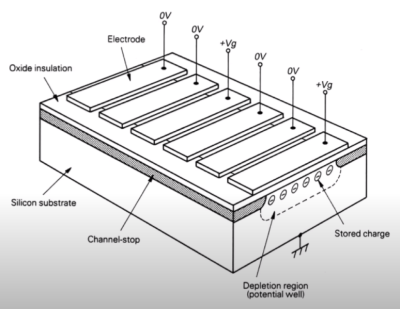
[Asianometry] has been learning about gallium nitride semiconductors and shares what he knows in an informative video you can see below. This semiconductor material has a much higher bandgap voltage than the more common silicon. This makes it useful for applications that need higher efficiency and less heating.

The original use of the material was for LEDs, but we are seeing increasing use of the material in high-power applications like chargers. Phone chargers are especially common using this technology. This isn’t surprising when your think about how many phone chargers are needed worldwide every day.

Other places that need power-efficient devices are data centers, electric vehicles, and battery-operated equipment. It isn’t clear, though, that we can make enough of the material to meet global demand if it becomes extremely popular. This is especially true because the machinery and processes used to create silicon devices don’t work with gallium nitride. Silicon carbide is a competitor, and it could be easier to create, even though it isn’t as efficient as gallium nitride.

We’ve looked at gallium nitride before, and we are sure we are going to be seeing it again. Silicon carbide may one day operate on the surface of Venus. You can even use it to make homemade LEDs.

Continue reading “The Gallium Nitride Revolution”

Single Photon Detection With Photomultipliers

Unless you are an audiophile, you likely think of tubes as mostly relegated to people who work on old technology. However, photomultiplier tubes are still useful compared to more modern sensors, and [Jaynes Network] has a look into how they work, especially with scintillating detectors.

The RCA photomultiplier he examines has ten stages and can detect even a single photon. Combined with a scintillating detector, they make good radiation detectors.

We can’t help but smile when we hear someone obviously in love with the engineering behind a tube like this. We get it. The inside of the tube is crowded, so it is hard to identify the dynodes and other portions, but some diagrams make it readily apparent how the tube does its job.

We were impressed with how good the documentation that came with the tube looked, considering its age. We mean the condition it was in. The document itself was obviously a reproduction of a typewritten document with hand-drawn figures and graphs.

We were hoping for some footage of the tube in action, but we’ll have to wait for a future video. We are betting that is coming, though. Although there are some solid-state detectors, they are not suitable for all applications. There was a time, though, when the tubes were in many applications, including X-ray scanners and photography equipment.

Continue reading “Single Photon Detection With Photomultipliers”

Z8000 Trump Card Needs Your Help

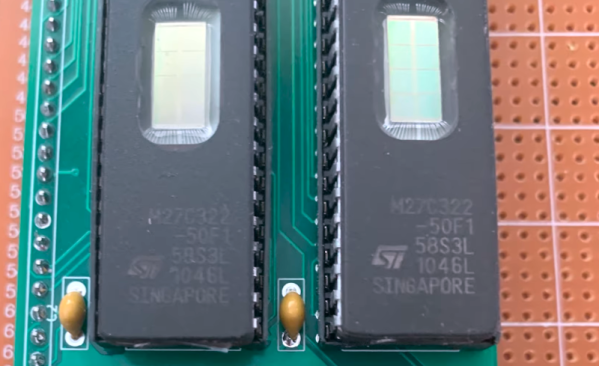
[Smbakeryt] needs your help. He bought a 1984-vintage Z8000 coprocessor card for the PC, but the software is missing in action. Apparently, the co-processor — called a Trump Card — appeared in Byte magazine courtesy of the famous [Steve Ciarcia]. The schematics were published, and if you sent [Steve] proof that you built it, he’d send you the software. The product was later commercialized, but no one seems to have the software, so [Smbakeryt] is on the lookout for it.

The board itself was pretty amazing for its day. It added a 16-bit Zilog Z8000 CPU with 512 K of RAM. Big iron for 1984 and a good bit more performance than a stock IBM PC of the era.

We miss the days when computer gear came with big binders of documentation. These days, you are more likely to get a sticker with a URL. The Z8000 was a nice processor and could emulate the Z80, but it never became hugely popular. In addition to Zilog’s System 8000, the CPU found its way into some Unix computers including the Onyx C8002 and several Olivetti computers. Commodore planned to use the CPU in a canceled project. The Z8000 was famous for not using microcode and, thus, it fit on a relatively small die with 17,500 transistors (compared to the 8086’s 29,000 transistors).

We hope someone can help out with the software. If you want your own Z8000 system, you might be better off with Clover. Or, stick with a Z80 on the cheap.

Continue reading “Z8000 Trump Card Needs Your Help”

Solar Cell Fabric Makes Anything Solar

MIT has been working on very thin solar cells made of a film just a few microns thick. The problem? The cells are so thin that they’re hard to work with. You could make a small solar cell on top of, say, a glass slide, but that’s not all that interesting since you can make perfectly good solar cells that are as fragile as glass using conventional techniques. But in a new paper, MIT researchers describe creating 50-micron-thin fabrics that can generate electricity from solar.

The process still involves using chemical vapor deposition to produce the solar cell on glass. However, the cells are removed from the glass, prepared with electrodes, and then transferred to a piece of fabric which acts as a new substrate.

The fabric used in the paper is a composite fabric known as Dyneema composite fabric. It uses ultra-high molecular weight polyethylene fibers and sheets of Mylar. This material has low weight but a very high strength. A UV cure adhesive bonds the fabric and solar cells.

Honestly, we doubt anyone will be making these in their garages anytime soon. But we would love to see what you could do with a roll of this fabric. Wearables, self-charging laptop bags, or solar-powered instruments in an airborne drone could all take advantage of the material’s flexibility and low weight.