ESP32 Keeps Tabs On Your Local Airspace

We know, we know. Despite being called ESP32-Plane-Radar, this project from [Mateusz Juszczyk] isn’t actually using radar. But thanks to the round LCD this desktop gadget does a fantastic job of recreating a classic radar display, and by pulling in Automatic Dependent Surveillance–Broadcast (ADS-B) data, the visuals even match nearby real-world aircraft.

Perhaps the best part of this project is just how easy it is for others to get in on the action. Although the presentation certainly looks professional — and expensive, if we’re being honest — there’s nothing particularly exotic going on here. Specifically, there’s ESP32-C3 Super Mini behind the scenes cranking through the ADS-B data and pushing it out to a circular GC9A01 display. A minimalistic 3D printed enclosure holds both components, and while it’s undeniably slick as-is, we can’t help but think there’s potential here for more elaborate designs.

As you probably guessed from the lack of a radio in the parts list, the code [Mateusz] provides doesn’t actually sniff ADS-B out of the air. It connects to the local network over WiFi, and then hits adsb.fi to pull in crowdsourced flight data. Since the device has to connect to the network anyway, the code also offers up a web-based configuration interface which puts a little more polish on what’s already an impressive presentation.

We used a round GC9A01 display on the Vectorscope back in 2023, so if anyone ports this over to their old Supercon badge we’d love to see it in action.

Thanks to [Mauricio] for the tip.

An EInk, ESP32-based Game Boy

This is one of those projects that was both inspired and made possible by the absolute embarrassment of dev boards available to the modern hacker. In this case, the dev board was the M5Stack PaperS3, which as the name implies combines an ESP32-S3 with an e-ink panel. [Wenting Zhang] picked one up and was immediately inspired to try and make an e-ink Game Boy.

The M5Stack PaperS3 made this project possible by exposing the display with row/column control — parallel, some would call it, as opposed to the usual serial interface of SPI. That allowed [Wenting] to work some of the same e-ink magic he perfected on his Modos monitors to allow partial refresh at up to 60 Hz. That the ESP32-S3 is capable of emulating a Game Boy while driving the screen should surprise no one, since it can emulate an MSX while outputting VGA or even Windows 95 on a 386. In this case, he’s basing the actual Game Boy emulation on Crank Boy.

Of course the e-ink screen on the M5Stack is far larger and has a much higher resolution than what the Game Boy shipped with, which lets him implement touch controls and scale the image up 3X so he can fake a couple of shades of grayscale while actually outputting black and white. Even better, if he was actually playing this thing on the regular, once the high-refresh portion of the screen starts to wear out, he can flip the orientation and keep gaming on the virtually-unrefreshed control portion of the screen — doubling the lifetime of the system, something many of you raised as a concern when we last looked at a his e-ink monitor project.

The only real shortcoming of this hack is the sound. With one-bit beeps coming out of the M5Stack buzzer, it’s got nothing on Nintendo’s hardware. Of course, that’s partially down to using the hardware as-is. With the addition of an I2S sound chip like the one used in the MOD player project we featured recently, you’d just need to squeeze out enough processor cycles to make this sound as good as it looks.

Continue reading “An EInk, ESP32-based Game Boy”

A GUI Solution For ESP32 Web Development

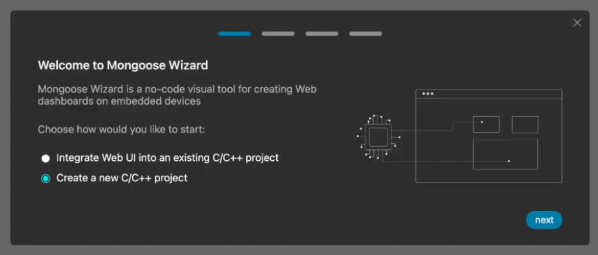
These days, a lot of embedded projects feature some sort of screen, and a screen often creates a desire for a nice user interface. [Geoffrey Wells] has created a tool for developing web interfaces for the ESP32, named ESP-GenUI.

The aim was to make UI development as easy as possible for this platform. ESP-GenUI allows the creation of a website by dragging various nodes on to a canvas and linking them up to create the desired web interface. There are nodes for GPIO control, camera feeds, gauges, and all sorts of other common elements for quickly putting together dashboards and control panels. All this is done from within the browser, and the code generated by the tool can even be flashed without having to open any external tools. Alternatively, it can spit out Arduino code that you can open and flash from within the IDE. You can try the tool out yourself right here.

We’ve featured some other great resources for developing embedded user interfaces, like this highly-flexible display library for the ESP32. Feel free to espouse on your own favorite tools and techniques in the comments.

Continue reading “A GUI Solution For ESP32 Web Development”

CSS On The ESP32

There are lots of graphics libraries available for the ESP32, and lots of ways to program one to boot. Even still, most of us wouldn’t immediately think to CSS when it comes to embedded products — yet that’s now a thing on the Espressif platform, apparently.

The Gea stack allows one to compose CSS and TypeScript code that is then turned into generated C++ code that compiles to native firmware. The team behind Gea have demoed this ability by running a 3D cube animation on an ESP32 at up to 60 FPS. This isn’t some ugly, low-res wireframe demo, either. It’s a full-color animation running on a 410×502 AMOLED screen. It’s very fluid, and can even handle transparency on the cube faces (albeit with a performance penalty).

It’s worth noting that this isn’t a full browser engine. As you might expect, some concessions had to be made to get it running on the ESP32. Namely, it doesn’t handle “:hover” states because it’s designed for touchscreen use, fonts are rasterized, and the UI tree is limited to just 512 nodes. Regardless, it shows that using CSS and TypeScript to develop for the ESP32 is entirely possible without some crazy loss of performance. If you want to build easy interfaces on an ESP32 while leaning on web dev experience, this could be very useful indeed.

There are lots of fun ways to write code for the ESP32; you can even try MicroPython if you like.

Continue reading “CSS On The ESP32”

A BIOS For Your ESP32-C6

An old-style PC BIOS served the function of a bootloader in loading the operating system kernel, and of an API in providing a set of standard system calls through which software could interact with the hardware. Though it as been long-ago superseded by operating system level calls and UEFI bootloaders, it was a simple and easy-to-understand firmware for the PCs of the day.

Microcontrollers usually don’t have anything quite like a BIOS because their software is more often compiled as-is without the need for one. But here’s [Rompass] who has bucked that trend, with a BIOS for the ESP32-C6.

Of course this isn’t the PC BIOS we all know, and you’ll not be running DOS on it. Instead it’s a subsystem that serves the purposes outlined above and provides an environment for dynamically loaded executables from RAM rather than an operating system kernel. The executables are compiled in the normal way for the ESP32, and can be loaded over the network if necessary.

We don’t know how popular a firmware like this one will become, but for us it’s symptomatic of how the line between a microcontroller and a microprocessor is becoming blurred. The next few years are going to continue this trend, as inexpensive microcontroller application processors such as the C6’s P4 bigger brother move into the mainstream.


Header image: Popolon, CC BY-SA 4.0.

Deeply Optimized MSX Emulation On ESP32-S3 With VGA Output

ESP32-S3 board with VGA and audio output during development. (Credit: Ivan Svarkovsky)

The ESP32-S3 is by many metrics quite the powerful little computer, which has led to it being used even for things like emulating retro consoles and similar. Here [Ivan Svarkovsky]’s S3-MSX-PC project pushes the envelope by taking the multi-system Retro-Go project’s MSX component and optimizing it for the ESP32-S3’s Xtensa Lx7 CPU cores.

The project involves an ESP32-S3 as the core, requiring at least 8 MB of PSRAM (N16R8 configuration) to match the tested configuration. Any software is loaded into PSRAM before it’s executed, with the MSX1, MSX2 and MSX2+ supported.

For audio you have to wire up your own PDM filters to connect to the two GPIO pins that are used for audio output, while VGA output is handled by a basic 2-bit R-2R RGB222 DAC. For input devices you can use any USB keyboard, while software is added via the web interface or directly onto an SD card.

The Technical Deep Dive section goes into more detail as to what exactly got changed – with the blessing of the fMSX author – in the original fMSX core, such as targeting the Lx7 core’s cache dimensions and optimizing hot paths to avoid bottlenecks. Memory accesses were aligned for Xtensa and moving certain data from Flash to RAM was another change, along with the prevention of pipeline flushing due to certain branching decisions.

Considering that MSX specifications are based on a Z80 core, it’s not so crazy that one of these ESP32-S3 MCUs can effectively emulate them. The Retro-Go project itself claims to cover a whole swath of Nintendo and Sega consoles, as well as others, making it almost too easy to do some retrogaming without even having to drag out a Raspberry Pi SBC or so.

Bring Back Your Bose With An ESP32

It’s become a familiar theme over the last couple of decades — hardware is rendered useless when its manufacturer pulls the cloud service on which it depends. This is particularly annoying when the device is something which shouldn’t need a cloud service to run in the first place, and several manufacturers have found themselves in hot water because of this.

Somewhere in between is the Bose SoundTouch speaker system, which includes a set of six internet radio preset buttons. In early May the service behind them was shuttered, and now here’s [Tostmann] with an ESP32 firmware to bring them back.

As you might imagine, it’s a device that emulates just enough of the now-defunct Bose cloud service to keep the speaker happy, but it has a clever trick up its sleeve. Normally these hacks rely on DNS redirects at the router, but this one avoids that thanks to a diagnostic interface on the Bose unit that allows the rewriting of the server address. The ESP32 does this with its own address, and the speaker is none the wiser.

We like this hack, because of its ingenuity, and because it saves yet another orphaned cloud product from becoming e-waste. This isn’t the first time we’ve seen a manufacturer on the naughty step for these practices.


Header image: TAKA@P.P.R.S, CC BY-SA 2.0.