The MiniITX Retro System

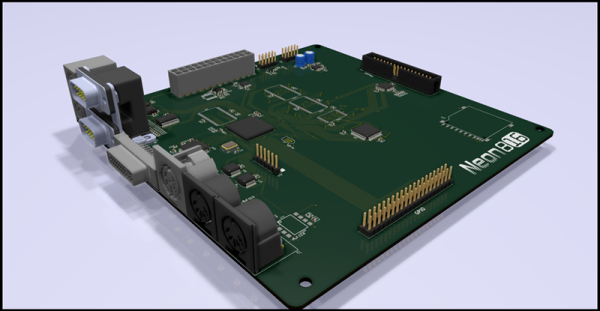
There are hundreds of modern, retrocomputing projects out there that put ancient CPUs and chips in a modern context. The Neon816 from [Lenore] is perhaps one of the most impressive projects like this we’ve seen. It’s a classic system in a modern form factor, with modern video output, mashed together into a MiniITX motherboard.

The powerhouse of this computer is the Western Design Center W65C816 CPU. This is the second generation of the venerable 6502 CPU, the same chip found in everything from the Commodore 64 to the Apple II to the Nintendo Entertainment System. The 65816 is a 6502 at start-up until you flip a bit in a register, at which time the signalling on the address bus becomes much weirder. We’ve seen some single board computers based on the 65816 before and The 8-Bit Guy has a few ideas to build a computer around this CPU, but for the foreseeable future work on that will be trapped in development hell.

Of note, the Neon816 will feature DVI output (I guess technically you can just run the analog signals through the connector), a PS/2 Joystick input, two Atari / Sega joystick ports, MIDI in and out, a PC-style floppy disc connector, and a Commodore serial bus. It’s a hodge-podge of classic retrotainment, all in a single MiniITX motherboard.

The key other feature of the Neon816 is an FPGA, specifically a Lattice XP2 8000 LUT chip that is used for video and audio. This is combined with 1MB of main RAM (looks like a simple SRAM) and 128k of Flash storage for the ROM. There’s also an SD card in there for storage.

Right now, [Lenore] is populating the first prototype board, and we can’t wait to see some video generated with this impressive little system.

Home Brewing Rig Gets A Particle Upgrade

Home brewing is a pastime that can be as much an art or a science as you make it, depending on your predilections. [Brandon Satrom] is one who leans very much towards the science side. There’s plenty that can be done to monitor and control a brew, and [Brandon] is one of many who have built custom hardware to help get the best possible results. Now, that hardware was due for an upgrade.

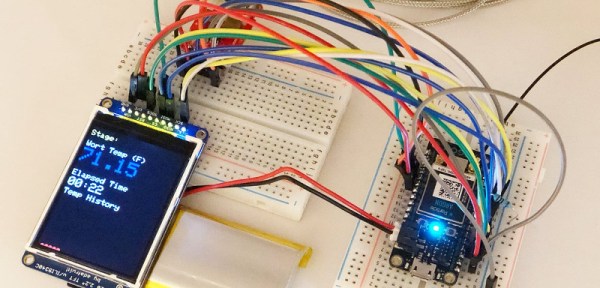
[Brandon]’s original BrewBuddy system relied on the Particle Photon, a useful platform that was nonetheless getting on in years. With the launch of the new Particle Argon, [Brandon] set his sights on new features that were possible with the added horsepower available. Graphics were added to the LCD screen, and a piezo sensor to detect the start of the fermentation process. This is in addition to the original temperature monitoring and plotting features of the first build.

The upgrade from one microcontroller platform to another can be fraught with headaches, but in this case, only minor changes were needed. 3 lines of code were changed to account for different pin assignments, and the rest fell neatly into place. It’s a testament to the compatibility of the Particle platforms that this upgrade was so easy.

We’ve talked about the 3rd generation Particle boards before, and we expect to see them turning up in many more builds to come. Video after the break.

[Thanks to dcschelt for the tip!]

Continue reading “Home Brewing Rig Gets A Particle Upgrade”

Emulating An Altair 8800 On An Apple II

The Altair 8800 was, to its creators, a surprise hit. Despite looking nothing like what we would today consider to be a computer, it sold thousands of units almost immediately upon its launch, way back in 1975. A few years later, the Apple II burst onto the scene, and the home computer revolution began in earnest.

Emulating older machines on newer hardware has always been a thing, and [option8] has coded an Altair 8800 emulator for the Apple II. Of course, if you don’t have one lying around, you can run this emulator on an Apple II emulator right in your browser. Honestly, it’s emulators all the way down.

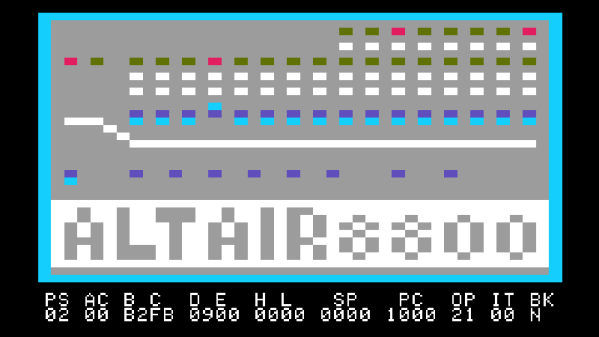
As far as emulators go, this is a particularly charming one, with the Altair’s front panel displayed in glorious color on the Apple’s 40 column screen. Replete with a full set of switches and blinking LEDs, it’s a tidy low-resolution replica of the real thing. Instructions to drive it are available, along with those for another similar emulator known as Apple80.

If that still hasn’t quenched your thirst, check out this Game Boy emulator that lives inside emacs.

ATtiny Gets A Tiny Software UART

Modern microcontroller platforms spoil us with their performance and expansive spec sheets. These days it’s not uncommon to be developing for a cheap micro that has a clock rate well in excess of 100MHz, with all manner of peripherals baked in. DACs, WiFi, you name it – it’s in there, with a bunch of libraries to boot. It wasn’t always this way, and sometimes you would even find yourself lacking hardware serial support. In these cases, the bitbanged software UART is your friend, and [MarcelMG] decided to document just how it’s done.

The amateur programmer’s first recourse may be to use delays to properly time the output data stream. This has the drawback of wasting processor cycles and doesn’t let the microcontroller do much else useful. Instead, [Marcel] discusses the proper way to do things, through the use of interrupt service routines and hardware timers.

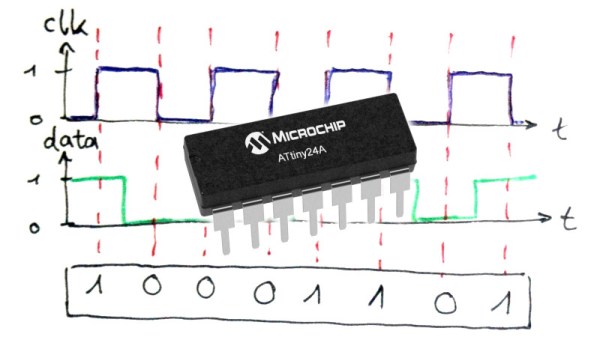
[Marcel]’s implementation is for the ATtiny24A, though it should be easily portable to other AVR8 processors. Taking up just 2 bytes of RAM and 276 bytes of program space, it’s compact – which is key on resource-limited 8-bit devices. The code is available on Github if you fancy trying it out yourself.

It’s a technique that is more than familiar to the old hands, but useful to those new to the art. It can be particularly useful if you need to get data out of a legacy platform with limited options. As times change, it’s important to pass on the techniques of yesteryear to the new generation. Of course, if things are really tight, you can even do a half-duplex UART on a single pin.


Old Meets New In 3D Printed Telegraph

We often think of 3D printing as a way to create specific components in our builds, everything from some hard-to-find little sprocket to a custom enclosure. More and more of the projects that grace the pages of Hackaday utilize at least a few 3D printed parts, even if the overall build itself is not something we’d necessarily consider a “printed” project. It’s the natural progression of a technology which at one time was expensive and complex becoming increasingly available to the maker and hacker.

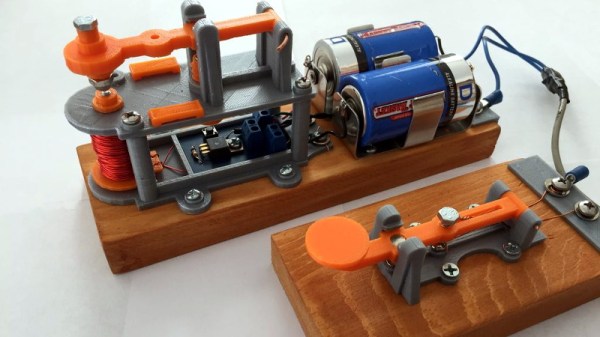
But occasionally we see 3D printing used not to create new devices, but recreate old ones. A perfect example is the almost entirely 3D printed telegraph system created by [Matt]. Projects like this help bring antiquated technology back to a modern audience, and can be an excellent educational tool. Showing someone a diagram of how the telegraph worked is one thing, but being able to run off a copy on your 3D printer and putting a working model in their hands is quite another.

[Matt] acknowledges that he’s hardly the first person to 3D print a telegraph key, but says that he’d never seen the complete system done before. The key is perhaps the component most people are familiar with from film and old images, but alone it’s really nothing more than a momentary switch. To actually put it to use, you need a telegraph sounder on the receiving end to “play” the messages.

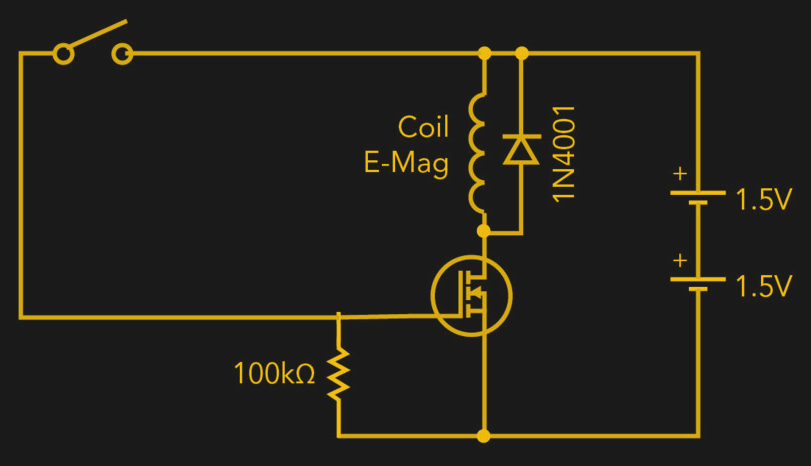
The sounder is a somewhat more complex device than the key, and uses an electromagnet to pull down a lever and produce an audible clicking noise. In the most basic case, the coil is directly connected to the key, but in a modern twist [Matt] has added a MOSFET into the circuit so the electromagnet is triggered locally within the sounder. This prevents sparks from eroding the contacts in the key, and alleviates problems associated with current loss over long wire runs.

We’ve previously seen 3D printing used to revive vintage games which are no longer available such as “The Amazing Dr. Nim”, and how modern techniques such as additive manufacturing can help put World War II aircraft back in the air. While there was never much question that 3D printing would be a big part of our future, it would seem to be taking a fairly active role in preserving our past as well.

Driving A Controllerless LCD With The Humble Arduino Uno

These days, you could be forgiven for thinking driving an LCD from a microcontroller is easy. Cheap displays have proliferated, ready to go on breakout boards with controllers already baked in. Load up the right libraries and you’re up and running in a matter of minutes. However, turn your attention to trying to drive a random LCD you’ve yanked out of a piece of old equipment, and suddenly things get harder. [Ivan Kostoski] was in just such a position and decided to get down to work.

[Ivan]’s LCD was a 320×240 STN device salvaged from an old tape library. The display featured no onboard controller, and the original driver wasn’t easily repurposed. Instead, [Ivan] decided to drive it directly from an Arduino Uno.

This is easier said than done. There are stringent timing requirements that push the limits of the 8-bit platform, let alone the need for a negative voltage to drive the screen and further hardware to drive the backlight. These are all tackled in turn, with [Ivan] sharing his tips to get the most flexibility out of the display. Graphics and text modes are discussed, along with optimizations that could be possible through the varied use of available RAM and flash.

The code is available on Github. If you need inspiration for your own controllerless LCD driver. [Ben Heck] has done similar work too, using FPGA grunt to get the job done.

Component Video For The Commodore 64

Of all the retro systems, the Commodore 64 had the best video system. The VIC-II chip in the C64 was the best example of why Commodore was the best, but in terms of video output, the C64 was still a consumer device: the only output was S-video, or composite video, or something like it. The professional stuff uses YPbPr, an RGB video signal that separates the red, green, and blue colors. On a modern LCD, the difference between composite and YPbPr is noticeable, and if you’re going to run your C64 on the big screen, it would be very helpful to use a professional video standard.

In an effort to bring the C64 into the future, [c0pperdragon] created an FPGA-based modification for the VIC-II chip. The end result is getting YPbPr signals directly from the computer, and outputting it to a TV in glorious 480p.

Inside the Commodore 64, the VIC-II creates the chrominance signal in a way that is impossible to convert it back to any form of RGB. The solution to get RGB out of this information is to listen in to 22 pins of the VIC-II to determine what signals it intends to generate. This is done with a smallish Altera FPGA connected to the VIC-II through a ribbon cable. On the FPGA, the luminescence and all the color information is generated, then converted into true YPbPr. For the complete mod, the RF modulator is removed, and the original A/V jack is still functional. This is effectively a very in-depth mod that rids the C64 of the TV connector and channel selector (that no one uses anymore) and replaces it with a professional-grade video output.

When it comes to C64 mods, we thought we’ve seen it all. We’ve seen C64s resurrected from the dead, and we’ve seen drop-in replacements for the SID that still don’t have working filters oh my god. This is on another level. This is using FPGAs to drag the C64 into the modern era, and if you don’t care about the rusting RF box, it’s a reversible mod.