Building A Tape Recorder In 1949

tape

After telling a few stories about how he built a tape recorder as a 16-year-old boy in post-war Germany, [Hans] was finally cajoled into retelling this story in a proper form, giving the Internet one more example of how clever old-school tinkerers could be.

In 1949, [Hans] was but a wee lad of 16 and having built a crystal and tube radio set at 13 and 14 respectively desperately wanted a tour of the local radio station in Hamburg. A kind engineer responded to a letter and a month after requesting a tour [Hans] and his friend found themselves being guided around a proper radio station. One of the most impressive pieces of technology at the time was a tape recorder, which the engineer demonstrated by recording and playing back the voices of [Hans] and his friend. This was the first time [Hans] had ever heard his voice played back and instantly knew he needed to build one of these for himself.

Technical details on the theory and operation of a tape recorder were sparse, but [Hans] managed to come up with an amplifier, tape transport mechanism, a recording and playback head, and homemade magnetic tape made from a reel of iron filings glued to a reel of 8mm film stock.

Testing the equipment, [Hans] and his friend found the device simply wouldn’t work; the homemade magnetic tape was simply too thick, and you couldn’t just go out and buy a reel of magnetic tape. Undeterred, they mailed BASF, the only manufacturer of magnetic tape, and after a month received a 1000m reel of tape.

With tape that worked, [Hans] set about improving his recorder with a tape transport mechanism built from a turntable and a new recording head. This time, his tape recorder worked. When word got around of this amazing machine that could record music, [Hans] was invited to record the local symphony and the speeches for a senior group.

The first commercial reel to reel recorders were released in Germany a little more than a year after [Hans] completed his project, making this one of the more impressive DIY projects we’ve seen.

RasPi Powered ADM-3A Dumb Terminal

ADM3A

[Andrew Curtin] tipped us off to another excellent resurrected vintage one piece ADM-3A dumb terminal. [Andrew] not only resurrected this sexy machine by breathing life into her once more after 37 years but he also got it connected online to retro.hackaday.com for those coveted retro Super Nerd bonus points.

As with other ADM-3A terminals we have seen on Hackaday, the terminal screen can be interfaced over an RS-232 serial connector to a laptop, however, [Andrew] didn’t have a laptop to sacrifice so he utilized the now popular laptop stand-in RasPi. It’s a clever form factor solution which makes it appear more like a standalone computer for the first time in its life.

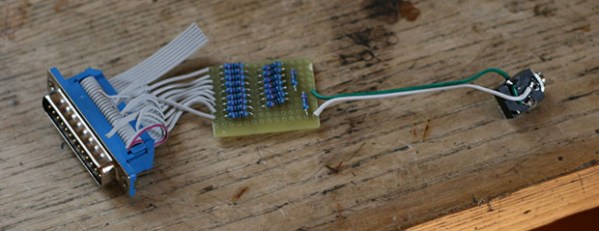
To make the hack work he needed a serial adapter to link the ADM-3A terminal to the Ras-PI so he constructed one for himself. It’s another clever solution but he didn’t share much information on this build. Maybe he’ll comment below or elaborate on his site with more details on the construction and utilization of the adapter board from the Ras-PI so others could easily repeat this fun hack.

Hackaday Retro Edition: Retro Roundup

retro

We’ve rebooted the Hackaday Retro Edition and again we’re getting a few submissions for retro successes – old computers that somehow managed to load our crappy, pure-HTML, no-javascript edition.


Inspired by the Palm Lifedrive in the previous retro roundup, [Bobby] dug out his Palm TX and loaded up the retro edition with the Blazer browser. Given this device has WiFi and a browser, it’s not much, but [Bobby] did run in to a bit of a problem: Palm never released WPA2 for personal use, and this device’s WPA abilities are buried away in a server somewhere. Interesting that a device that’s relatively young could run into problems so easily.

How about another Palm? [nezb]’s first smartphone, back in 2003, was a Treo 600. He dug it out, got it activated (no WiFi), and was able to load the retro edition. Even the Palm-optimized edition of Slashdot works!

How about some Xenix action? [Lorenzo] had an Olivetti 386 box with 4MB of RAM with Xenix – Microsoft Unix – as the operating system. The connection was over Ethernet using a thinnet card. Here’s a video of it booting.

[Eugenio] sent in a twofer. The first is a Thinkpad 600, a neat little laptop that would make for a great portable DOS gaming rig. It’s running Mandrake Linux 9, his very first Linux. Next up is the venerable Mac SE/30 with a Kinetics Etherport network card. It’s using a telnet client to talk to a Debian box.

Here’s one that was cool enough for its own post: [Hudson] over at NYC Resistor salvaged an old Mac SE with a BeagleBone Black connected to the CRT. This effectively turns the SE into a modern (if low powered) ARM Linux box. Emulators are always an option, though, as is loading our retro edition in xterm.

Links to the pics below, and you’re always welcome to dust off your old boxxen, fire it up, and load up the retro edition. It’s new and improved! Every half hour or so, five classic hacks from the first 10,000 Hackaday posts are converted to pure HTML. Take a pic and send it in.

Continue reading “Hackaday Retro Edition: Retro Roundup”

The 30th Anniversary Macintosh

It’s been just over thirty years since the original Macintosh was released, and [hudson] over at NYC Resistor thought it would be a good time to put some old hardware to use. He had found an all-in-one Mac SE “on the side of a road” a while ago (where exactly are these roads, we wonder), and the recent diamond anniversary for the original mac platform convinced him to do some major hardware hacking.

Inspired by a six-year-old project from a NYC Resistor founder aptly named the 24th anniversary Mac, [hudson] decided to replace the old hardware with more powerful components – in this case, a BeagleBone Black. Unlike the earlier build, though, the original CRT would be salvaged; the analog board on the Mac SE has pins for video, hsync, vsync, and power.

To get a picture on the old CRT, [hudson] needed to write a software video card that used the BeagleBone’s PRU. The CRT isn’t exactly “modern” tech, and everything must be clocked at exactly 60.1 Hz lest the CRT emit a terrible buzzing sound.

With a software video card written for the old CRT, the BeagleBone becomes the new brains of this beige box. It runs all the classic Linux GUI apps including XEyes and XScreenSaver, although flying toasters might be out of the question. He also managed to load up the Hackaday retro site with xterm, making this one of the best ways to make an old Mac SE useful.

DUO Portable: A Homebrew Computer With Keyboard And Display

duo

[Jack] is famous ’round these parts for his modern reinterpretations of very early computers. He’s created a computer entirely out of logic chips, a microcontroller-powered multicore box, and even a very odd one-instruction computer. For his latest project, he’s stepped up his game and made something that’s actually fairly useful: a microcontroller-powered system with an integrated keyboard and display.

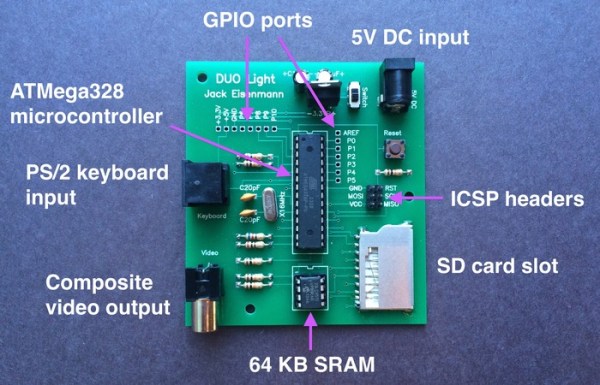
The DUO Portable, as [Jack] calls his new toy, is built around an ATMega1284P microcontroller. Also on this board is a serial EEPROM that acts as a very small drive, a 102×64 pixel graphic display, and enough tact switches to create a QWERTY keyboard.

The DUO Portable boots to a primitive operating system where files can be created, edited, and saved. The programming language for this computer  is called DCPL – the DUO Portable Command Language – and can be used to create anything from a simple ‘Hello World’ program to a block-building game.

Like all of [Jack]’s homebrew computer projects, he’s written an emulator that can be run in a browser. There’s also video of [Jack] playing around with the DUO Portable available below.

Continue reading “DUO Portable: A Homebrew Computer With Keyboard And Display”

Ball Bearing Motor Rolls For Reasons Unknown

[RimstarOrg] has brought us an oldie but goodie this week. He’s built a ball bearing motor, a design which has been causing engineers and scientists to squabble for decades. [RimstarOrg] used a microwave oven transformer with a 70 turn primary coil and a single turn secondary coil to create a low voltage, high current AC power supply. Needless to say, there’s a real risk of fire or electrocution with a setup like this, so be careful if you try this one at home. [RimstarOrg] then built the motor itself. He de-greased two ball bearings then installed them on a metal shaft along with a wooden flywheel. The entire assembly was then mounted on a board so the wheel could spin freely. Two copper straps hold the bearings to the board. Finally, the transformer is wired into the copper straps. In this configuration, the current will flow through the outer race of one bearing, through the balls, and into the inner race. The current then passes down the axle and passes through the other bearing. There is very little resistance in this circuit, so it can only be powered on for a few seconds at a time before things start to melt down.

Continue reading “Ball Bearing Motor Rolls For Reasons Unknown”

A Deep Dive Into NES Tetris

Tetris AI

Back in 1989, Nintendo released Tetris for the NES. This detailed article first explains the mechanics of how Tetris works, then builds an AI to play the game.

To understand the mechanics of the game, the ROM source was explored. Since the NES was based of the MOS 6502 microprocessor, this involves looking at the 6502 assembly. The article details how the blocks (called Tetriminos) are created and how they move across the screen. The linear feedback shift register used for random number generation is examined. Even details of the legal screen and demo mode are explained.

After the tour through how Tetris works, an algorithm for the AI is presented. This AI is implemented in Lua inside of the FCEUX NES/Famicom emulator. It works by evaluating all of the possible places to put each new Tetrimino, and choosing the best based on a number of criteria. The weighting for each criterion was determined by using a particle swarm optimization.

The source for both the Lua version and a Java version of the code is available with the article. Everything you need to run the AI is available for free, except the Tetris ROM. If you’re interested in how 8 bit games were built, this dissection is a great read.

[via Reddit]