Fubarino Contest: Game Boy Printer

fubarino-contest-gameboy-printer

[Dave] has a Game Boy Printer and loves the Mario-themed Easter egg that prints while holding the feed button during power-up. When he heard that Microchip gave us some Fubarino boards for our Easter Egg Contest, this hardware immediately came to mind and he set out to add a Hackaday Easter egg to the printer.

To tinker with the hardware, [Dave] built on the work of [Furrtek]—featured here a few years ago—which simplified the process of printing directly from an Arduino board. Connecting the TX and RX lines of the Arduino triggers the new Easter egg. He demonstrates printing both of the hidden messages in the video below.

Continue reading “Fubarino Contest: Game Boy Printer”

Fubarino Contest: Battery Capacity Tester

fubarino-contest-battery-capacity-tester

Here’s a project that we sadly let slip through the cracks a couple of years ago. Luckily [Brian] dusted it off and added an Easter Egg to the firmware in order to include it in the Fubarino Contest. The device is a rechargeable battery capacity tester. It discharges NiMH or NiCad batteries through a load resistor at about 1 Watt. [Brian] includes a discussion in his write-up about the hardware’s inability to work with 14500 Li-Ion cells. He includes enough info for you to figure out how to make changes to the circuit if you want to enable this option.

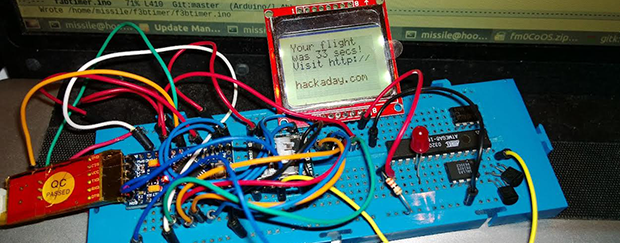
There is a MOSFET for switching each of the three battery positions. The ATmega168 takes readings from the cells once per second. It displays status information on a Nokia 5510 cellphone screen. This is where he chose to inject the Hackaday URL. When a cell’s discharge is complete, the image above scrolls onto the screen and remains there for a short time. See for yourself after the break.

Continue reading “Fubarino Contest: Battery Capacity Tester”

Fubarino Contest: A Shifter With An Easter Egg

shifter

A few months years ago [Wes] shared a project of his on the Hackaday Forums (yes, we do have a forum and you should check it out). He created a shifter for some sim racing, greatly improving on any system that uses a keyboard.

The shifter is made out of some scrap wood, a cutting board cut with an H-gate shape, and a few arcade microswitches. A giant bolt locks into a few cabinet clasps for each gear position, and the set of microswitches connected to a USB game pad tell [Wes’s] virtual car what gear he should be in.

It’s a great build, but because this is an entry for our Fubarino contest, [Wes] needed to put an easter egg with the Hackaday URL in there somewhere. To solve this problem, [Wes] upgraded the electronics with a Teensy 2.0. When the gears are shifted into 1st, 3rd, 3rd, and 7th, the Teensy blinks the URL in Morse and opens up a web browser that loads up Hackaday.

Not only is it a great build, it’s also a very, very subtle easter egg for our favorite website. Demo of the egg below.

Continue reading “Fubarino Contest: A Shifter With An Easter Egg”

Fubarino Contest: Simon Says Hackaday

When [Scott] saw our announcement of a contest to win a Fubarino, he had the remarkable insight that designing new hardware wasn’t required. Instead, he took a Simon soldering kit and added a Hackaday easter egg that beeps our favorite URL in Morse code.

[Scott]’s entry began with a Sparkfun Simon Says Soldering Kit. It’s a great kit featuring an ATMega328, four buttons and LEDs, and a speaker. Stock, this board comes programmed with a run-of-the-mill Simon game, but it also includes a serial bootloader and a set of serial pins for reprogramming.

The new firmware for [Scott]’s Simon uses Morse code for ‘hackaday.com’ to determine the time in between the button flashes for each round. Compared to the old-school Simon toy from the 70s, [Scott’s] version seems just slightly more difficult; the game is basically the same, but trying to remember the pattern when the buttons don’t light up in a regular pattern is more challenging than usual.

Because [Scott] isn’t the greatest at Simon, he added another method to generate the full Morse for ‘hackaday.com’. While pressing one button starts a new game, holding down two buttons simultaneously will write out the full Morse of ‘hackaday.com’ on the upper left-hand button: a great easter egg that also adds some difficulty to a classic game.


This is an entry in the Fubarino Contest. Submit your entry before 12/19/13 for a chance at one of the 20 Fubarino SD boards which Microchip has put up as prizes!

Fubarino Contest: VFD Clock

hackad

The entries for our Fubarino contest are slowly yet surely coming in. [James] already had an awesome VFD clock under his belt, and figured adding a Hackaday easter egg to his project would be simple enough.

[James’] clock is based on the TI Stellaris LaunchPad with six beautiful seven-segment VFD display tubes. The clock’s time is controlled by a DS1307 RTC chip, and a small switch-mode power supply controlled by the Stellaris boosts the power from 5 Volts to 50 Volts for the tubes. The tubes are controlled with a Max6921 VFD driver chip.

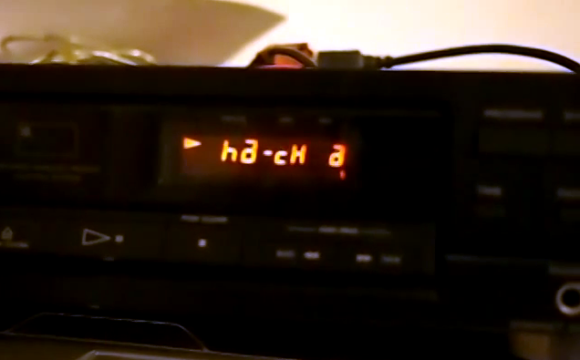
The easter egg for this project – displaying the Hackaday URL – is only shown when you power up the clock when the seconds display shows 37. That’s extremely subtle for an easter egg and just the way we like it.

All the code for [James]’ project is up on GitHub along with the designs for the tube clock’s enclosure. Really an awesome project, and a great way for [James] to earn himself a Fubarino.

What are you waiting for? We still haven’t passed twenty entries which means your chances of winning are pretty good!

Continue reading “Fubarino Contest: VFD Clock”

Fubarino Contest: Morse Code Transmitter

fubarino-contest-morse-code-keyer

The Fubarino Contest entries are slowing streaming in. Here’s the first one that we’re featuring, sent in by [Nathanael Wilson]. He dusted off a project from some time ago, which is just fine with us. It’s a Morse Code transmitter which he designed for use during a fox hunt (locating a hidden transmitter using radio direction finding).

For the project he revised his old code, adding in a Morse look-up table so that the Arduino Mega 2560 can convert plain text into dots and dashes. It uses the tone library to output signals to the radio seem above. The easter egg is unlocked when shorting pin 10 at power-up. It then broadcasts a slightly altered message as interpreted above.

One of the reasons we chose to feature [Nathanael’s] entry first is that he presented it very well. Watch his video after the break to see for yourself. Then go back and check out the contest rules to get your own project submission in. After all, you can win a free Fubarino board from Microchip if you’re in the top twenty!

Continue reading “Fubarino Contest: Morse Code Transmitter”

Fubarino Contest Example: A Sneaky IRC Bot

adam-fubar

You may have heard about Hackaday’s contest to win one of 20 Fubarino boards. We included an example entry from [Mike]. Here’s my example entry for the contest: An IRC search Bot powered by a Wicked Device WildFire board. We’ve all seen IRC bot’s before, but how many have you seen that can turn on an LED while running off a cell phone battery?

The IRC bot’s operation is fairly straightforward. It enters a channel and can be commanded to search.  The first two searches will return links to Google searches for the strings given.  Every third search however, will return a link to Hackaday’s search page. In the example below, “SedAwk” is an unsuspecting user, and “SearchRobot” is our bot.

SedAwk: SearchRobot: SEARCH Unicorns
SearchRobot: Search Complete! https://www.google.com/#q=Unicorns
SedAwk: SearchRobot: SEARCH Rainbows
SearchRobot: Search Complete! https://www.google.com/#q=Rainbows
SedAwk: SearchRobot: SEARCH Quadcopters
SearchRobot: Search Complete! http://hackaday.com/?s=Quadcopters
SedAwk: What the heck?

Follow along after the break to see what other tricks the bot has up its sleeve…

Continue reading “Fubarino Contest Example: A Sneaky IRC Bot”