Workbench Overhead Camera Boom Made From PVC

pvc_overhead_camera_ boom

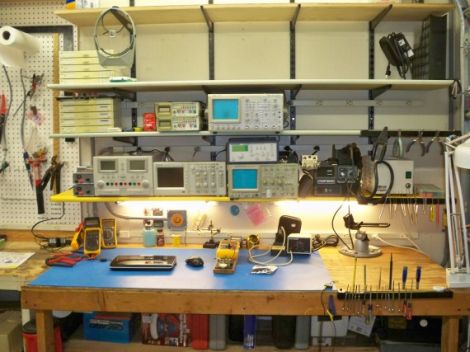
It looks like [Dino] is getting settled into his new digs, and while the moving process has kept him pretty busy, he’s slowly but surely getting his workshop area set up. One thing that he really wanted from his new bench was a better way to record video, for both his Hack a Week series as well as broadcasting over Ustream.

He bought a nice little Hi-Def web cam for making videos and set out to build a camera boom for his bench. The boom is constructed mostly from PVC piping along with some other odds and ends for mounting. In the video below, he walks through the construction step by step, making it easy for anyone to follow along and build one of their own.

The boom looks like it works very well, and is a bargain at under $40. It articulates every which way giving him complete coverage of his workbench, and makes it easy to film whatever he’s working on – big or small.

Continue reading “Workbench Overhead Camera Boom Made From PVC”

ATTiny Hacks: Run Your Arduino Project On An ATTiny!

Yup. We have all been there. You throw together a really elaborate Arduino project that only really needs a couple pins, far fewer than the Arduino’s native microcontrollers have to offer. Well fear not, [Thatcher] has solved just this problem by adding some ATTtiny cores to the Arduino IDE. His blog details the process from grabbing the MIT developed core files and loading them up in your Arduino software directories. The modification looks simple and although [Thatcher] shows the whole process on a Mac it only involves unzipping and tossing files into a folder. With ATTiny chips only a few bucks each this is perfect for those simple software driven hacks that don’t require an entire Uno duct taped to the outside of an enclosure.  Nice work [Thatcher]!

Glass PCBs


Our friend [Jeri] tipped us off about this cool video on youtube where the author makes his own “transparent” PCB’s using some nontraditional materials. One ounce copper foil is found online along with some clear glass microscope slides, from there it is just a matter of cementing the foil onto the glass slides with some thin UV curing glue. Once the 2 parts are mated the entire thing is popped into an eeprom eraser for its intense UV light, then excess is trimmed.

The normal routine of toner transfer is used to copy a circuit pattern onto the copper clad glass and it’s etched in standard ferric chloride. The copper is removed but the UV glue that was holding it is still left, some special care needs be followed as this stuff is pretty weak against even mild solvents, and you do not want your traces peeling up. Next no clean solder paste is applied and parts are soldered down with a heat gun, keeping the glass evenly heated to prevent it from cracking.
This leaves you with a board that looks like frosted glass, and in order to protect the glue while clearing up the frosted effect, some polyurethane is applied which fills in all the little bumps and smoothes the surface bout out to almost 100% clear.
The end application in this video is a touch sensitive board which works fine though the back side of the glass and presents a nice smooth interface for the user. Join us after the break for the video.

Continue reading “Glass PCBs”

Video: Learning Eagle CAD Part 2

This week we are continuing on with our multi-part series where [Jack] shows you how to use Eagle CAD. This video continues where last week’s video left off by showing how to create a custom part and how to use the schematic editor. If you haven’t seen last week’s video, you can find it here. Also, check out our youtube channel where we have uploaded several supplementary videos that go into further detail about many of the tools that are commonly used in the schematic editor. After watching these videos, you should have all of the knowledge that you need to start designing the schematic portion of a circuit board.

This is a fairly long video, clocking in at about 25 minutes, so be prepared to dedicate a chunk of time.

arduino_bootloader_burner

A Beginner’s Guide To Burning Arduino Bootloaders

When it comes to learning about microcontrollers, everyone has to start somewhere. [Lady Ada] recently posted a tutorial on burning the Arduino bootloader to standalone chips for those just getting started with the micro.

The tutorial cites a common situation, where someone is working on a project using an Arduino chip but they don’t want to sacrifice their dev board when just the micro and a few other components would do just fine. A short list of supplies is required, including an Arduino, a proto shield kit, a ZIF socket, and a blank ATmega chip.

The process is probably pretty straightforward and likely familiar to many of you out there. The ZIF socket is soldered to the board and handful of wires are added for powering and programming the new chip. The protoboard is installed on top of the Arduino like any other shield, and using a sketch that [Lady Ada] has made available, the bootloader burning process is a cinch.

It’s a useful tip for newcomers, and definitely a skill that seasoned Arduino users should have under their belts as well.

High Voltage Hacks: All About Electroluminescence

Although many might not know it, electroluminescent materials use high voltage, and thus qualify for our featured topic. Many may assume that these sheets work in the same way as LED lights, using low-voltage DC power.  This, however, is not the case, as they need around 100 volts of AC current to allow them to light up.

For a battery-powered solution, this means converting the battery’s DC power to AC. Adafruit has a good tutorial about working with EL wire and powering it up using a portable inverter. One should obviously be careful to properly insulate any clothing using this material as being shocked is generally not fun.

The video after the break is pretty long, but is well produced and will give you a good background of EL use. If you don’t have 30 minutes to dedicate to this, be sure to at least skip to 2:43 to see one of the coolest EL shirts we’ve seen. Continue reading “High Voltage Hacks: All About Electroluminescence”

High Voltage: Lightning Simulator Can’t Send You Back To The Future

Continuing on with our high-voltage theme, today we have a page describing Marx generators by [Grenadier]. Marx generators are devices that produce pulses of very high voltage with fast rise times. For most of us, that means that they can make neat sparks. For the more serious types out there, that also means that they are great for driving some high-powered lasers, simulating lightning strikes, and even igniting the conventional explosives surrounding the core of a nuclear weapon! His page includes a video of his Marx generator producing some pretty sparks for those of us who aren’t so serious.

We have featured several of [Grenadier’s] projects in the past. This one doesn’t deviate from his normal style of taking a subject and clearly describing it with lots of well-taken pictures.

Recently, he has been working on improving one of his projects that deviates from what he normally does. He is calling it “The Junkbox”. The Junkbox is something like a free online swap meet where you can sell your electronic parts.