A Primer On Dynamic Loading

[Graphitemaster] is helping to demystifying the process of tailoring functions for dynamic loading. His tutorial shows how make a dynamic function that prints “Hello World” to the standard output. This is of course rudimentary, but if you have no prior experience with the topic you might be surprised at what actually goes into it.

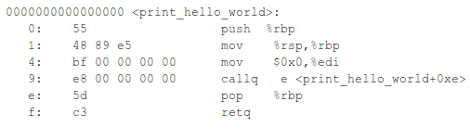
Normally your compiled code has addresses in it that tell the processor where to go next. The point of dynamic loading is that the code can be put anywhere, and so static addresses simply will not work. The code above shows how a simple printf statement normally compiles. The callq line is a system call that needs to be replaced with something that will play nicely in the registers. [Graphitemaster] takes it slow in showing how to do this. Of course a dynamic function alone isn’t going to be much good. So the tutorial finishes by illustrating how to program a dynamic code loader.

Gooseberry Is The Latest ARM Linux Board

It looks like we’re finally seeing the proliferation of single board computers take off. The latest is called the Gooseberry. While it will cost about £40/$62 USD at release, it greatly outperforms the current crop of tiny Linux boards.

As the latest in what will be a long line of these ARM-ified single board computers, the Gooseberry hugely outperforms the VIA APC and Raspberry Pi with a Allwinner A10 CPU running at 1.2 GHz, 512 MB of RAM, and built-in WiFi. Basically, the Gooseberry has all the features you would expect from an Android tablet; the reason for this is because the Gooseberry actually is the board found in a few Chinese tablets.

There’s a few very nice features like an LVDS output to add LCD displays without hogging the HDMI output, and the form factor is incredibly thin making it perfect for building a small portable device.

After the break you can check out a walkthrough of the Gooseberry board along with evidence of it running Ubuntu.

Continue reading “Gooseberry Is The Latest ARM Linux Board”

Cheap ARM Netbooks Have Linux Forced Upon Them

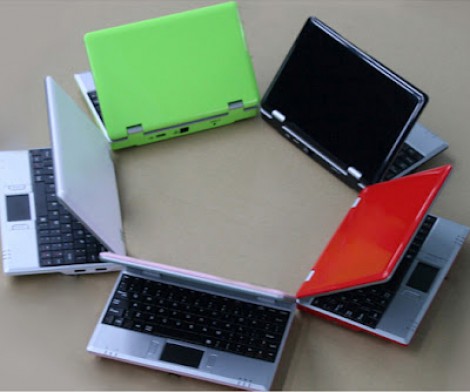
[Doragasu] got his hands on one of these WM8650 Netbooks for around 50 euros (~$63.50) delivered. They come with a version of Android preinstalled, but he wanted to use them more like a computer and less like an Android device. So he set out to load Arch Linux on the ARM-based Netbook.

This is possible because the hardware inside is actually pretty good. The 800 MHz SoC is accompanied by 256 megs of RAM. There’s 2 gigs of internal storage, a 7″ display, USB, Ethernet, WiFi, and an audio system. This is comparable to what you’d get with a Raspberry Pi (without video acceleration) but also includes all of those peripherals, a case, a touchpad and keyboard… you get the point. There are several patches that need to be applied to the kernel to get it working with the hardware. [Doragasu] covers each of them in the post linked above. You can also hear his presentation in the video after the break.

Continue reading “Cheap ARM Netbooks Have Linux Forced Upon Them”

Getting Root On A Sony TV

The Sony Bravia series of HDTVs are a great piece of kit; they’re nice displays that usually have enough inputs for the craziest home theatre setups. These TVs also run Linux, but until now we haven’t seen anything that capitalizes on the fact these displays are wall-mounted Linux boxen. [Sam] sent in an exploit to root any Bravia TV – hopefully the first step towards replacing our home media server.

The exploit itself is a regular buffer overflow initialized by a Python script. The script sets up a Telnet server on any Sony Bravia with a USB port, and provides complete root access. [Sam] was able to get a Debian install running off a USB drive and all the Debian programs run correctly.

If you have a Bravia you’d like to test [Sam]’s script on, you’ll need a USB network adapter for the TV and a Telnet client to explore your TV’s file system. Right now there’s not much to do with a rooted Bravia, but at least now running XMBC or other media server on a TV is possible.

If anyone would like to start porting XMBC to a Bravia TV, [Sam] says he’s more than willing to help out. We’re not aware of any HDTV modding communities on the Internet, so if you’re part of one post a link in the comments.

Embedded Linux Meets Arduino With The Rascal Micro

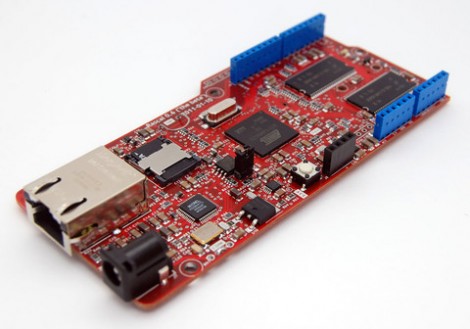
Behold the Rascal Micro. It’s running embedded Linux and has a dual-row of pin headers which probably seem pretty familiar. The idea here is to bring Arduino hardware (ie: shields) to a party with a powerful web server.

The image above is the beta version of the hardware. What’s being shown off in a recent Engadget demo is a version that slides two USB ports in between the barrel jack and the NIC. This makes it easy to jump over to wireless with the use of a USB dongle, or you can figure out what other peripherals you want to include in your project.

The novelty here is that the web server included a built-in editor. So not only can it serve you a webpage to control hardware or display sensor status, but it will let you edit the interface without needing to reflash anything.

The price rings in somewhere around $100-150, and like the popular Raspberry Pi board, you can’t get your hands on it right now.

Free Linux Computer From A Printer’s WiFi Card

Whether it’s building a 3D scanning system with a Kinect, or using a USB TV tuner dongle for software defined radio, there are a lot of interesting off-schedule uses for commodity hardware. The latest comes from the fruitful mind of [sjMoquin] and a Lexmark N2050 WiFi card that runs Linux.

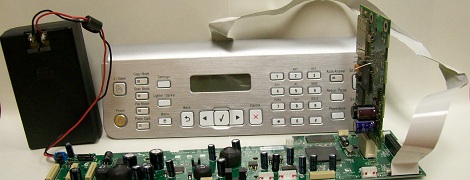
This build started off with a Lexmark X6570 all-in-one printer available for about $100 USD on eBay. This printer comes packaged with a Lexmark N2050 WiFi card running BusyBox. After soldering a few wires to the USB/UART pins on the N2050, [sjMoquin] had a very cheap but highly useful single board computer running Linux.

There is still a little more work to be done – the WiFi and USB on the N2050 aren’t currently supported. [sjMoquin] and [Julia Longtin] are working on that, so a fully functional embedded Linux board based on a printer’s WiFi card should be available soon. It might be time to hit up eBay for a few of these cards, you know.

Teaching BeagleBone To Play With LIDD Displays

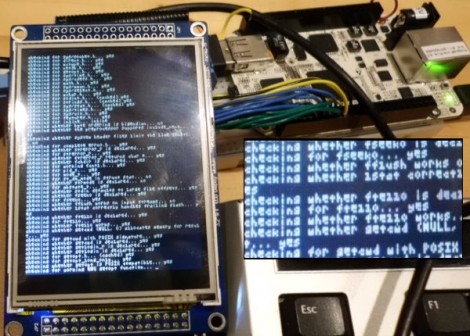
[Chris] hasn’t managed to get his hands on a Raspberry Pi yet, so he ordered a BeagleBone and got down to business. He was surprised to find that there isn’t much info out there about using LIDD type displays with the hardware. This protocol is used in many of the 320×240 smart LCD modules on the market, so he hammered out his own drivers and is sharing the details.

The system is designed to run a Linux kernel and [Chris] has chosen to go with Angstrom. His journey started by working out how to compile and patch the kernel himself. From there it was just a matter of getting the pin mapping right, and compiling a driver (it sounds way too simple when put like that).

Apparently he’s pretty close to getting the X desktop environment up and running. No idea what he plans for the hardware, but we’re all for people sharing their work to make it easier for others. Thanks!