Illustrated Kristina with an IBM Model M keyboard floating between her hands.

Keebin’ With Kristina: The One With The Beginner’s Guide To Split Keyboards

Curious about split keyboards, but overwhelmed by the myriad options for every little thing? You should start with [thehaikuza]’s excellent Beginner’s Guide to Split Keyboards.
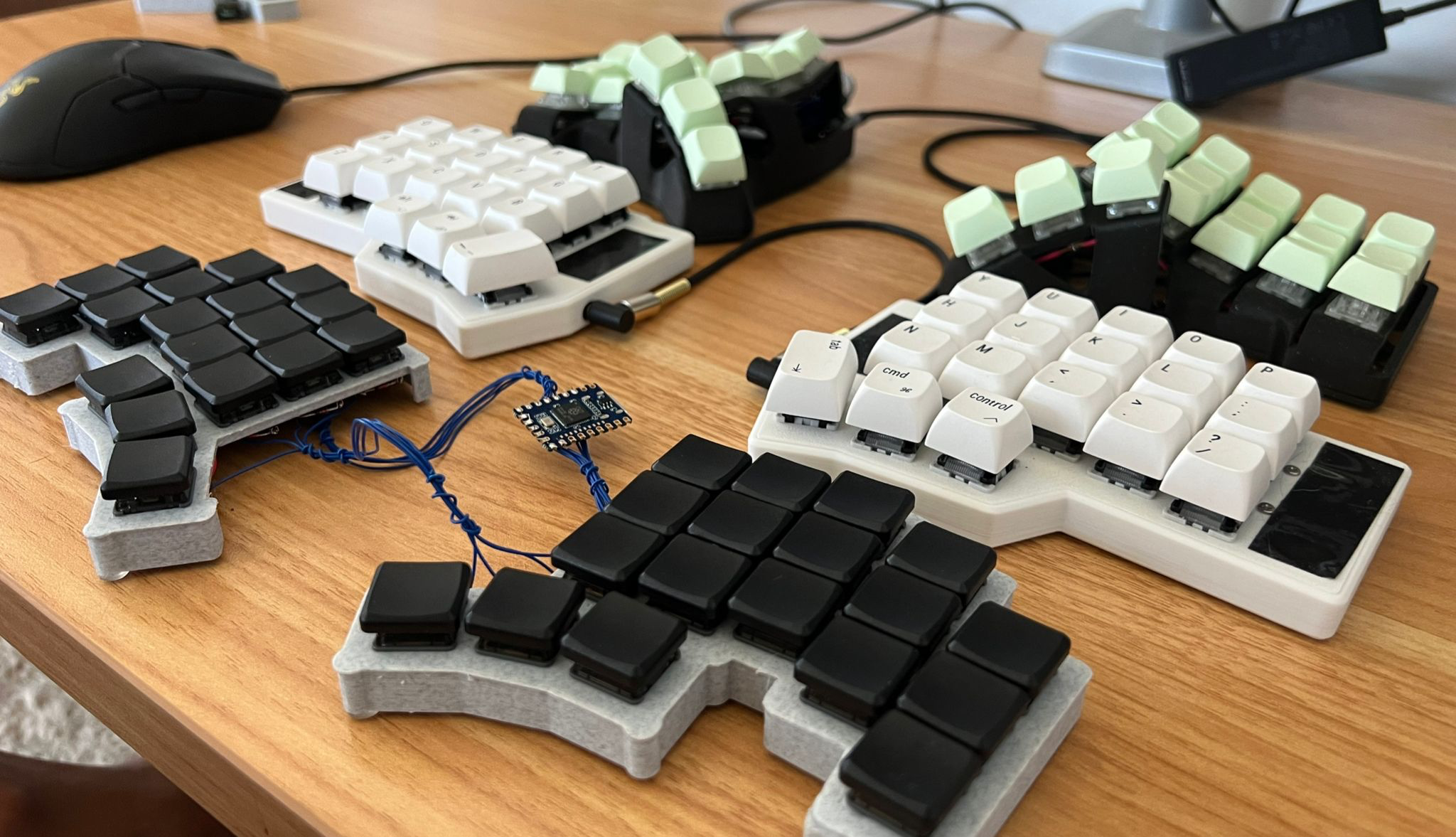
Three different split keyboards.
Image by [thehaikuza] via reddit
Your education begins with the why, so you can skip that if you must, but the visuals are a nice refresher on that front.

He then gets into the types of keyboards — you got your standard row-staggered rectangles that we all grew up on, column-staggered, and straight-up ortholinear, which no longer enjoy the popularity they once did.

At this point, the guide becomes a bit of a Choose Your Own Adventure story. If you want a split but don’t want to learn to change much if at all about your typing style, keep reading, because there are definitely options.

But if you’re ready to commit to typing correctly for the sake of ergonomics, you can skip the Alice and other baby ergo choices and get your membership to the light side. First are features — you must decide what you need to get various jobs done. Then you learn a bit about key map customization, including using a non-QWERTY layout. Finally, there’s the question of buying versus DIYing. All the choices are yours, so go for it!

Via reddit

Continue reading “Keebin’ With Kristina: The One With The Beginner’s Guide To Split Keyboards”
LED Printers: The Quiet Achievers You May Not Have Heard Of

Many different types of printers have entered the market over the years. Most of us are intimately familiar with the common inkjet and laser, both of which can be found in homes and offices all over the world. Then there are those old dot matrix printers that were so noisy in use, thermal printers, and even solid ink printers that occupied a weird niche for a time.

However, very little attention is ever paid to the LED printer. They’re not actually that uncommon, and they work in a very familiar way. It’s just that because these printers are so similar to an existing technology, they largely escaped any real notability in the marketplace. Let’s explore the inner workings of the printer tech that the world forgot.

Continue reading “LED Printers: The Quiet Achievers You May Not Have Heard Of”

Illustrated Kristina with an IBM Model M keyboard floating between her hands.

Keebin’ With Kristina: The One With The Uni-body That Does The Splits

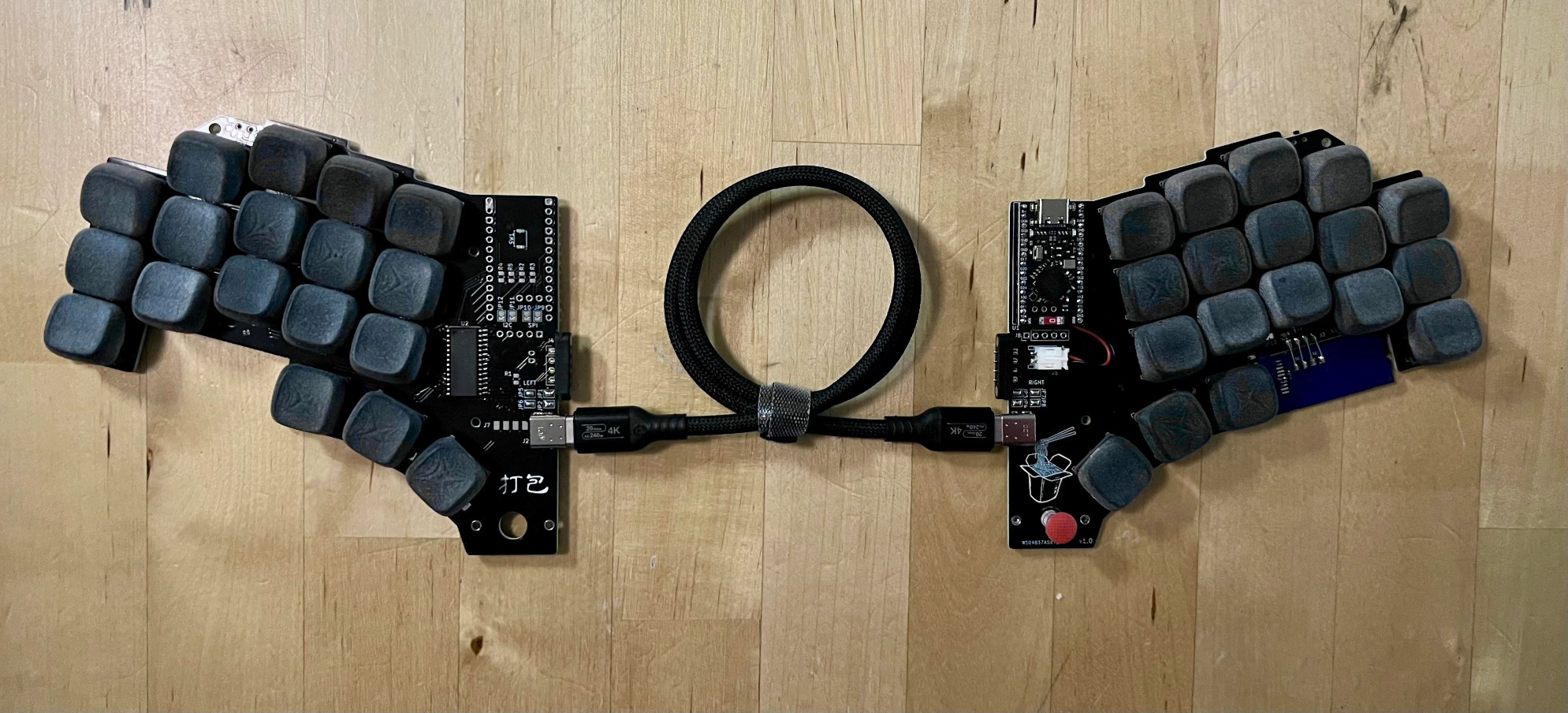
Personally, I love a monoblock or uni-body split. You’ll pry this Kinesis Advantage from under my cold, dead hands. But on the go, I really like the Glove 80, a true split that can be completely wireless in case you want to put the halves really far apart.

A triple-black split keyboard without a case, for now.
Image by [thehaikuza] via reddit
[thehaikuza] is the opposite, preferring a full split at the desk, but finding it troublesome when using it on the couch or at a cafe or co-working space, and so created dǎ bāo (打包) — a uni-body split that can also be a distant split. And this best-of-both worlds creation is remarkably [thehaikuza]’s first keyboard.

The name means to take out food, and if you click the picture you can see a cute little take-out container on the silkscreen of the right half. Directly below it, there’s a track point nubbin to be used with the thumb.

It does its split-in-half trick via a magnetic four-pin connector for when you want the halves stuck together. When the halves are separated, they can instead talk over a USB-C cable. One half has the microcontroller, and the other has a GPIO expander.

Continue reading “Keebin’ With Kristina: The One With The Uni-body That Does The Splits”

Illustrated Kristina with an IBM Model M keyboard floating between her hands.

Keebin’ With Kristina: The One With The NEO With The Typewriter Shell

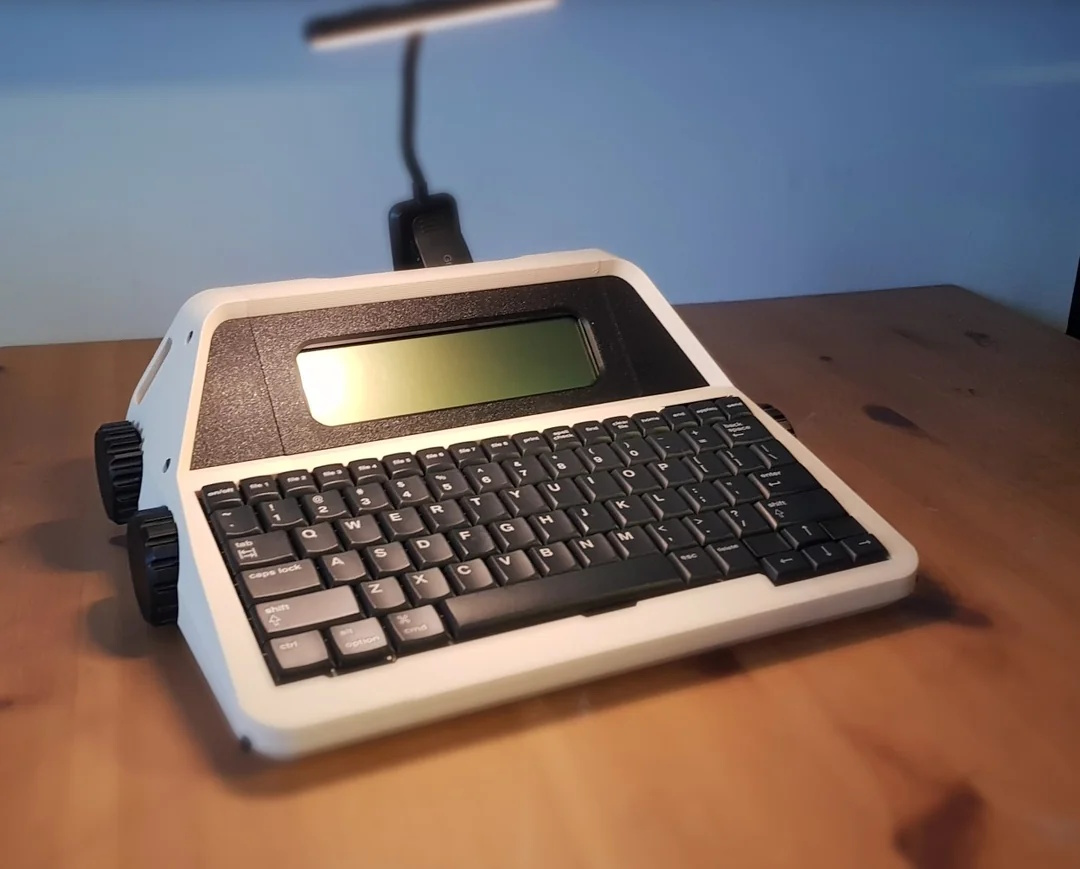
Isn’t this glorious? If you don’t recognize what this is right away (or from the post title), it’s an AlphaSmart NEO word processor, repackaged in a 3D-printed typewriter-esque shell, meticulously designed by the renowned [Un Kyu Lee] of Micro Journal fame.

An AlphaSmart NEO in a 3D-printed, typewriter-esque enclosure, complete with big knobs.
Image by [Un Kyu Lee] via GitHub
If you don’t want to spend roughly 40 hours printing ~1 kg of filament in order to make your own, you can join the wait-list on Tindie like I did. Go here to figure out which color you want, and email [Un Kyu Lee] when you order. In the meantime, you can watch the assembly video and then check out this playlist that shows the available colors.

Assembly looks easy enough; there’s no soldering, but you do have to disconnect and reconnect the fiddly ribbon cables. After that, it’s just screws.

This design happened by accident. A friend named [Hook] who happens to manage the AlphaSmart Flickr community had given [Un Kyu Lee] a NEO2 to try out, but before he could, it fell from a shelf and the enclosure suffered a nasty hole near the screen. But the internals seemed fine, so he got the idea to design a new enclosure.

I don’t believe the knobs do anything, but they sure do look nice. There’s an area along the top where you can clip a light, since the NEO has no backlight. There are also two smaller slots on the sides if your light won’t clip to the top.

I’d really like to do this to one of my NEOs. I have two NEO regulars, but reviewers on Tindie report that it works just as well with those as the NEO2.

Continue reading “Keebin’ With Kristina: The One With The NEO With The Typewriter Shell”

Vintage Film Editor Becomes HDMI Monitor

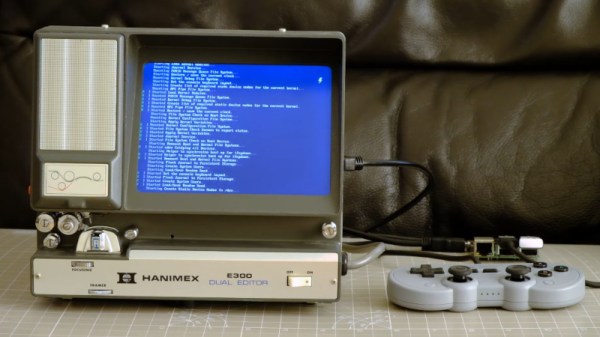
With the convenience of digital cameras and editing software, shooting video today is so easy. But fifty years ago it wasn’t electronics that stored the picture but film, and for many that meant Super 8. Editing Super 8 involved a razor blade and glue, and an editing station, like a small projector and screen, was an essential accessory. Today these are a relatively useless curio, so [Endpoint101] picked one up for not a lot and converted it into an HDMI monitor.

Inside these devices there’s a film transport mechanism and a projection path usually folded with a couple of mirrors. In this case the glass screen and much of the internals have been removed, and an appropriate LCD screen fitted. It’s USB powered, and incorporates a plug-in USB power supply mounted in a UK trailing socket for which there’s plenty of space.

There’s always some discussion whenever a vintage device like this is torn apart as to whether that’s appropriate. These film editors really are ten a penny though, so even those of us who are 8 mm enthusiasts can see beyond this one. The result is a pleasingly retro monitor, which if we’re honest we could find space for ourselves. The full video is below the break. Meanwhile it’s not the first conversion we’ve seen, here’s another Hanimex packing a Raspberry Pi.

Continue reading “Vintage Film Editor Becomes HDMI Monitor”

The Best USB To VGA Converter For The Job

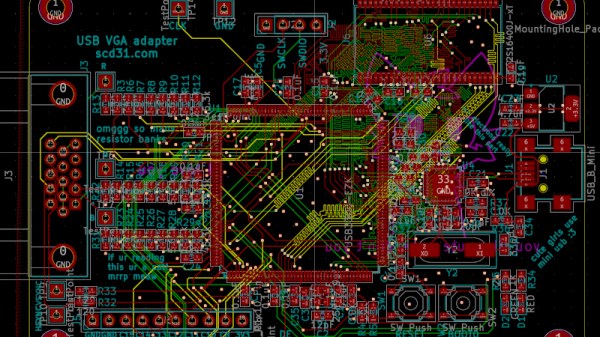
There are many adapters, dongles, and cables designed for interfacing display standards, and no doubt some of you have them in the glue of your entertainment system or work space. They’re great for standards, but what about something that’s not quite standard? [Stephen] has an arcade cabinet with a CRT that runs at an unusual 336 by 262 pixel resolution. It can be driven as 320 by 240 but doesn’t look great, and even that “standard” resolution isn’t supported by many dongles. He’s shared the story of his path to a unique USB to VGA converter which may have application far beyond this arcade machine.

We follow him on a path of discovery, through RP2040 PIOs, simple resistor ladder DACs, and home-made kernel modules, before he arrives at GUD, a USB display protocol with its own upstreamed Linux kernel driver. It’s designed to be used with a Raspberry PI deriving an LCD or HDMI display, but for his task he implemented the protocol on one of the more expensive STM32 series microcontrollers. The result after several false starts and some fiendish PCB routing is a standalone GUD-based USB-to-VGA converter that delivers perfect 34-bit colour at this unusual resolution, and also presumably others if required. It’s a worthwhile read for the many hints it gives on the subject of driving displays, even if you’re not driving an odd cabinet monitor.

Illustrated Kristina with an IBM Model M keyboard floating between her hands.

Keebin’ With Kristina: The One With The Height-Adjustable Key Caps

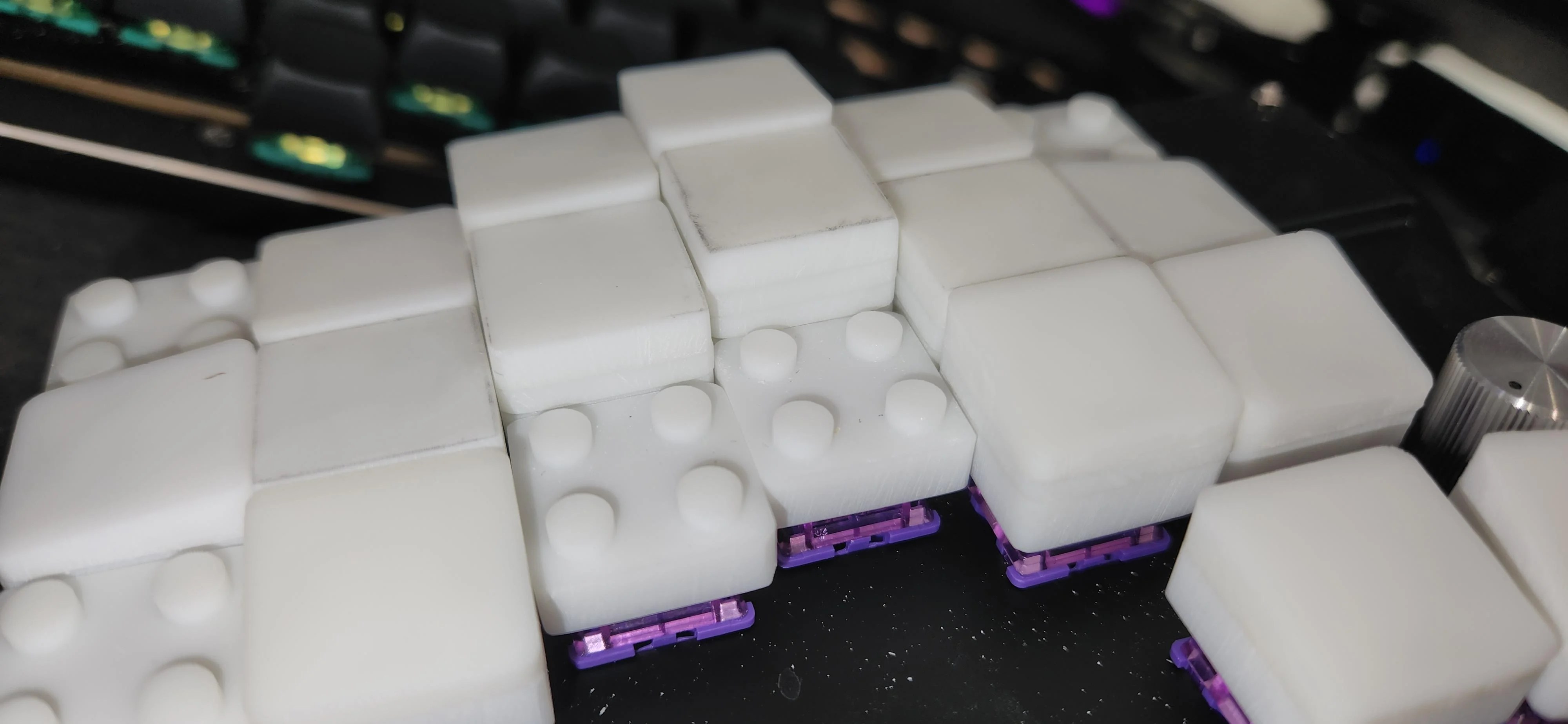
Now, we can’t call these LEGO key caps for obvious reasons, but also because they don’t actually work with standard LEGO. But that’s just fine and dandy, because they’re height-adjustable key caps that use the building block principle.

Height-adjustable keycaps in white, with tops removed to show the LEGO-like middles.
Image by [paper5963] via reddit
Now you could just as easily build wells as the dome shape pictured here, and I’d really like to see that one of these days.

In the caption of the gallery, [paper5963] mentions foam. As far as I’ve studied the pictures, it seems to be all 3D-printed material. If they were foam, they would likely be porous and would attract and hold all kinds of nastiness. Right?

[paper5963] says that there are various parts that add on to these, not just flat tops. There are slopes and curves, too. They are also designing these for narrow pitch, and say they are planning to release the files. Exciting!

Continue reading “Keebin’ With Kristina: The One With The Height-Adjustable Key Caps”