

The FPGA Chronicles: Ready To Probe

In the last few installments, we looked at using the Tang Nano 20K with both the GOWIN tools and some open-source tools. The open-source tools certainly had the advantage of letting you simulate and debug your design before sending it to the actual chip. However, as we’ll see, the GOWIN tools include a very easy-to-use, capable logic analyzer.

Setup

First, you’ll need a GAO config file. When you create one in the editor, you are given a number of complex options. With an active GAO file, the tool builds a logic analyzer into your design, and the file sets the trigger conditions.

Here’s a tip. You can only have one active GAO file. Sometimes you don’t want the logic analyzer. Other times you might want an alternate configuration. If you right-click almost any file in the IDE’s Design tab, you’ll see you can disable it. That gives it a big red X and excludes it from future builds. Well, at least until you enable it again. This lets you pick between multiple GAO files, or even multiple Verilog files, for a particular build (e.g., one for tests and another for production).

If you create a GAO file from scratch, it will ask you if you want “Lite Mode.” As far as I can tell, you will never want this mode. Always use Standard Mode. In addition, you nearly always want RTL mode, which shows you (mostly) the symbols you’ve defined and not the ones added during processing.

You can find the entire manual online, of course. However, the video below and the rest of the post will get you started quickly.

GAO Basics

To set up probing, we need to understand the design, so the rest of this post covers the Verilog we’ll use to test the logic analyzer feature, and you’ll see how the analyzer works in a video. Here are a few sneak peeks at what the analyzer output we’ll see at the end looks like:
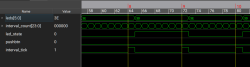
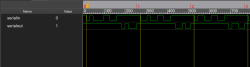
The left-hand image shows the pulse that flips the LEDs, which is tricky because the sampling clock is 27 MHz. The right-hand side shows serial data and uses a slower clock specifically used for debugging.

Continue reading “The FPGA Chronicles: Ready To Probe” →

The FPGA Chronicles: Open Source It

Last time, we looked at getting started with the GOWIN tools and a Tang Nano 20K FPGA. The software from GOWIN isn’t bad, but it isn’t open source, and there are a few oddities about it. In addition, simulation is through a third-party simulation package that has undergone some changes since an acquisition. There are tons of free simulation programs that are extremely good, and there is an open-source toolchain for the FPGA.

You could go grab everything you need piece by piece. But you don’t have to. There are several efforts to produce a toolchain from all the different pieces. We’re going to look at APIO.

APIO

APIO isn’t so much an FPGA toolchain project as it is an aggregator of toolchain projects. It reminded us of PlatformIO, and notes that it was inspired by it. It updates the tools you need, includes its own libraries, and gives you a common workflow across the FPGAs it supports.

You can download it for the command line, but you can also install it as a Visual Studio Code extension, which is what I did. You have to create a simple file that describes your project, and that’s about it.

Install Problems

Since APIO has its own libraries, it is possible that you will find some conflicts with your system libraries. In my case, the libreadline.so.8 file (in ~/.apio/bin/_internal) was causing problems that prevented anything from working. I simply renamed it out of the way, or you can just delete it. That took care of the problem.

Keep in mind that APIO just orchestrates a bunch of other tools like Yosys and GTKWave. Even if you have your own versions, APIO expects to use its private copies. For example, GTKWave on my system is a different version than the APIO copy, and if I try to read wave files without using APIO, I get error messages. You can, however, open a shell from the Tools/Misc menu of the APIO panel in Visual Studio Code.

Continue reading “The FPGA Chronicles: Open Source It” →

The FPGA Chronicles: Exploring The Tang Nano 20K

FPGAs used to be mysterious, expensive devices, but these days you can buy surprisingly capable boards for very little money. Some years ago, I did an FPGA Bootcamp over on Hackaday.io. Much of that material still applies, but the hardware is dated. So I decided it was time to update it, using the inexpensive Tang Nano 20K and its GOWIN GW2AR-18 FPGA as the main platform, with perhaps a few excursions into other FPGAs.

History and Motivation

Once upon a time, if you wanted to have a custom IC, you went with a wheelbarrow full of money to a semiconductor company. However, some smart person at a semiconductor fab eventually realized they could make a chip with a lot of uncommitted blocks on it and then, for a custom chip, only design the wiring that connected them together. This still required a wheelbarrow full of money, but it was a smaller wheelbarrow.

Then one day, someone realized they could do the same thing but make the electrical connections between the blocks configurable. Maybe have fuses you can blow, or use EEPROM or RAM cells to remember which blocks are connected to which. It is complicated, sure, but then you can make many of these chips and sell them to people who could, in theory, make their own custom chips without your help.

When do you need an FPGA? A classic classroom exercise for an FPGA, for example, is a traffic light because it shows off how to do state machines, which are important for some kinds of FPGA designs. But other than as a learning example, why would you do this? Even a simple 8-bit CPU can handle a traffic light.

Suppose instead that you have hundreds of digital sensors on a rocket, and any one of them must raise an alarm within a few microseconds. A processor has to sample inputs in groups, service interrupts, or rely on extra hardware. An FPGA can simply implement the equivalent of one enormous OR gate. It watches every input continuously, and unrelated logic elsewhere in the FPGA does not steal execution time from it. Can you do it with a microcontroller? Probably, but not easily. For some classes of problems, an FPGA is the better answer.

Of course, you can also build a CPU on your FPGA and some FPGAs have CPUs in the same package. This is often a sweet spot because then things that are easy to do in software, you do in software. Things that are easier to do in hardware, you do in the FPGA.

Continue reading “The FPGA Chronicles: Exploring The Tang Nano 20K” →








