Arduino Notebook Cover Makes It Easy To Tinker Anywhere

arduino-notebook-cover

[Erv] was putting his holiday shopping list together and decided that instead of buying his friends something from the store, he would give them something a bit more useful. A former Electrical Engineer by trade, [Erv] typically prefers PIC microcontrollers, but he says that Arduinos are just so convenient to use for prototyping that he likes to always have one on hand.

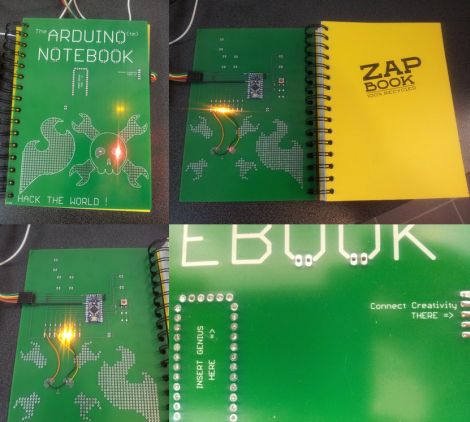
He figured that his friends might enjoy having easy access to an Arduino as well, so he made them some slick ZapBook covers which enable them to have a prototyping platform on hand at all times. The cover is made from a PCB and includes a socket for an Arduino Pro Mini, along with a handful of built-in LEDs. He has extended a few other I/O pins from the Arduino as well, but he says that the small solder bridges connecting the LEDs can be removed in a pinch, freeing up 8 additional pins with ease. We are pretty keen on the idea of an easily portable prototyping setup, though it doesn’t hurt that [Erv] incorporated a Hack a Day skull with light up eyes into his design either!

We’re not sure if he’s planning on releasing the schematics for the board, but the notebooks would be pretty useful for any hackerspaces hosting beginner Arduino programming classes.

This CheerLights Display Has A Mind Of Its Own

cheeriobot

[Axel] wanted to participate in the CheerLights project this holiday season, but not one to always follow the rules he decided to make his display a bit different than most others out there. While the lights at his house are synchronized with the CheerLights project, he programmed his Cheeriobot with a little added personality.

Normally, Cheeriobot is happy to follow the rest of the world, changing its colors whenever the Twitter feed dictates. If things are a bit slow however, Cheeriobot gets impatient and will send a tweet to @CheerLights on its own to ensure that it doesn’t display a single color for too long.

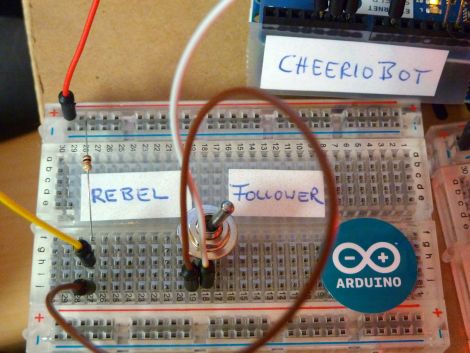
[Axel] also created a mode that turns Cheeriobot into a bit of a contrarian. The display’s “Rebel Mode” causes it to change colors when someone tweets, but it selects a random color instead of following the rest of the pack.

It’s definitely an interesting twist on the CheerLights project, and we really like the fact that it keeps things moving if the stream of tweets ever slows down.

Head-mounted Light Display Takes Holiday Cheer On The Go

hat-mounted-light-display

Most holiday light displays we see this time of year are stationary, or at least confined to somebody’s home. [Marco Guardigli] wanted to take his lights on the go, and thought that a light up winter hat would be perfect for showing off his holiday spirit.

In the winter he sports a sturdy wool felt hat, which was ideal for mounting LEDs. He picked up a basic LilyPad Arduino that uses a small LiPo battery as its power source, mounting it inside the hat with a bit of glue. He wired up a series of SMD LEDs around the perimeter of the hat which blend in quite well in the felt, leaving them nearly invisible to the naked eye when powered off. When he flips the LilyPad on however, there’s no missing the bright blue LEDs nor the music emanating from the tiny speaker he also mounted in the hat.

We think that [Marco’s] display is great, and if we were to build one, we would likely include a copious amount of red and green LEDs in ours. Do any of you take your Christmas light display on the go? We’d love to see them, so be sure to let us know in the comments.

Stick around to see a short video of [Marco’s] hat in action.

Continue reading “Head-mounted Light Display Takes Holiday Cheer On The Go”

Controlling Your Christmas Lights Without Ever Getting Off The Couch

remote-xmas-tree-light-switch

14 year-old [Connor Smith] has been busy this holiday season, thinking up ways to improve the lighting situation at home.

A few weeks ago he put together this 3-channel light controller to toggle his parents’ external lights, incorporating an Arduino for control. The Arduino was used to switch the channels on and off at specified intervals in order to create a simple light show on the house’s exterior. Not satisfied with just a few strings of blinky lights, he took his controller back inside for some additional modifications.

He had grown tired of crawling behind the Christmas tree to plug and unplug it every day, and decided to make things easier on himself. He stripped the IR receiver out of an old VCR and interfaced it with the Arduino in his light controller using the IRremote library. After taking a bit of time to decode the values for two infrequently used buttons on his TV remote, he had himself a Christmas tree light switch that he could activate from across the room.

Check out the short video below to see his remote switch in action.

Continue reading “Controlling Your Christmas Lights Without Ever Getting Off The Couch”

SMS Remote Start Gives New Life To Your Old Smartphone

iphone-sms-remote-start

Hack a Day alum [Will O’Brien] recently upgraded his phone, and was trying to find a use for his old one. He always wanted a remote starter for his Subaru Outback, but wasn’t interested in paying for an off the shelf kit. Since he had this old smartphone kicking around, he thought that it would be the perfect starting point for an SMS-triggered remote start system.

He started off by jailbreaking his phone, which allows him to run some Perl scripts that are used to listen for incoming texts. Using a PodBreakout mini from Sparkfun he connected the phone to an Arduino, which is responsible for triggering the car’s ignition. Now, a simple text message containing the start command and a password can start his car from a anywhere in the world.

While [Will] is quite happy with his setup he already has improvements in mind, including a way for the Arduino to send a message back to him via SMS confirming that the car has been successfully started. He’s thinking about putting together a kit for others looking to add the same functionality to their own car, so be sure to check his site periodically for project updates.

MIDI Synth Arduino Shield

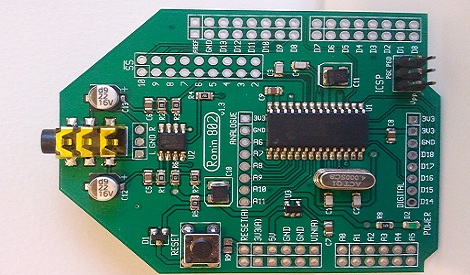
There’s a million and one ways to play around with MIDI and an Arduino. It’s trivial to have a ‘duino spit out a scale to a MIDI keyboard, or even respond to SysEx messages to change a lighting or effects rig. There’s one thing that has eluded MIDI-duino builders, though: implementing a MIDI synthesizer with a DIY shield. It’s a good thing, then, that [Keith] put up a Kickstarter for his AvecSynth project.

[Keith]’s AvecSynth is based around the Dream.fr SAM2195 single chip MIDI synthesizer. It’s a neat little IC that takes in MIDI messages from a sequencer or keyboard and spits out stereo audio. The AvecSynth takes this IC and puts it in a standard Arduino-sized package so building a gigantic light-up, foot-operated piano is now well within the purview of the weekend solder junkie.

While the SAM2195 and AvecSynth doesn’t have fancy subtractive or FM synthesis, it does have the full set of 128 voices in the General MIDI spec. It’s a great project to play around with MIDI, and the price for the DIY kit is right up our alley.

EDIT: [Keith] changed the $20 reward for his Kickstarter to PCB or two SAM2195 chips

CheerLights: Synchronizing Christmas Lights Around The Globe

cheerlights-synchronized-christmas-lights

They say that the holidays are a time to gather with others, which usually translates into spending time with friends and family. The folks at ioBridge Labs thought that while friends and family certainly are a big part of the holidays, it would be pretty cool to gather together flocks of strangers by using the Internet to synchronize their Christmas lights.

Participation in CheerLights is pretty easy, requiring little more than an Internet connection, some GE G-35 Color Effects lights, an Arduino, and an ioBridge. While those are the recommended components, an Arduino Ethernet shield will handle networking just as well. There really are no restrictions when it comes to hardware, so if you are so inclined, it should be relatively easy to roll your own display using simple RGB LEDs and a µC of your choosing.

The colors are dictated by the group’s Twitter feed, which can be found at http://twitter.com/#!/@cheerlights. Whenever a message is sent to @cheerlights along with a color, all of the light displays listening in will change simultaneously.

We really like the idea, and think it would be pretty cool to see this sort of program rolled out on a neighborhood or street-wide level, so you could see dozens of strings changing colors all at once.

If you’re interested in checking out CheerLights’ current color, be sure to take a gander at their live stream here.

[via BuildLounge]