Nano Sumo Robot Takes On All Comers

nano_sumo_bot

While most Sumo-style robots are fairly sizable, there is a subsection of the Sumo robot movement that focuses on making small robots. Really small robots.

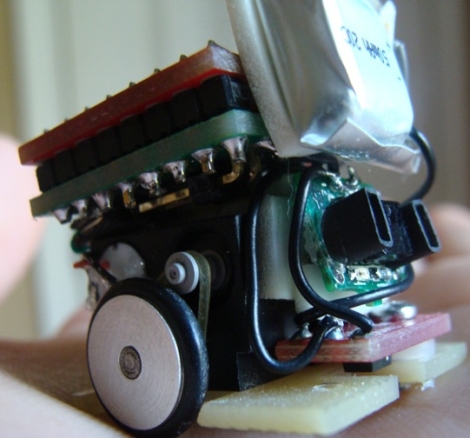
[Patrick] wrote in to share his latest creation, a Nano Sumo robot measuring a scant 1 in. x 1 in. The Nano Sumo is operated by an ATMega 328 micro controller housed on a custom-built PCB. The board was designed to interface directly with the 1A Dual Motor Driver from SparkFun, which provides all of the PWM signaling to the motors for speed control and braking. A small 50mAh Li-poly battery is attached to the robot, which can be charged using 4 AA batteries via a custom charging circuit. The mechanical components of the bot were handled by his friend [Gary], which you can read about here.

As you can see in the video below, the bot does its job pretty well. It does seem like the object detection gets confused every once in awhile, but that can likely be remedied with a few software tweaks.

Check out his page for additional build videos, including the PCB construction and programming processes.

If you’re interested in learning more about Sumo bots, check out this slightly larger robot we covered a short while back.

Continue reading “Nano Sumo Robot Takes On All Comers”

Motion Sensing Minecraft Creeper Will Scare The Pickaxe Offa’ya

[Chris] Writes in to tell us about his motion sensing, Arduino powered Creeper.  As if these buggers were not frightening enough in game, [Chris] had to go and make the closest (legal) real world facsimile.  The Creeper utilizes an Arduino Uno with a wave shield to playback creeper noises, PIR sensor to detect victims, and an RC car as a motorized cart. The creeper sits and waits for a signal from the PIR detector, when it sees motion the RC remote is triggered, Creeper noises played and (we assume) panic ensues.

We might have forgone the entire RC part of the toy car and found the H-bridge motor controller, but using the RC remote has potential. The whole triggering mechanism can be placed remotely allowing the Creeper to jump out from some kind of cover.

Not enough Minecraft? Check out some our other Minecraft projects if you are interested in more tree-punching goodness.

A video of the creeper in action is available after the jump!

Continue reading “Motion Sensing Minecraft Creeper Will Scare The Pickaxe Offa’ya”

HIDUINO: Your Arduino Is Now A MIDI Interface

[Dimitri Diakopoulos] dropped into our tip line to let us know his HIDUINO project. The HIDUINO is a set of firmware for the ATmega8u2 used in the new revisions of the Arduino  (Uno, and Mega2560 for example).  Once the HIDUINO is loaded your Arduino can show up as any HID compliant device you wish, no extra drivers necessary. This means that using this firmware, music software such as Max, Ableton, Reaktor etc can read and write MIDI directly to/from the Arduino. Currently the project is for direct USB-MIDI communication but could be altered to act as a variety of HID devices.

Flashing the ATmega8u2 with your own device type or name requires a bit of work on the developers part like owning an ISP programmer, soldering header pins to the board, and re-flashing the ATmega8u2 every time you want to load new code into the Arduino. Users without an ISP can still flash HIDUINO using Atmel’s FLIP software (Windows) or the DFU programmer (Mac OS X and Linux) and a precompiled HIDUINO firmware. They still have to solder a jumper on the underside of the board to use the DFU bootloader.

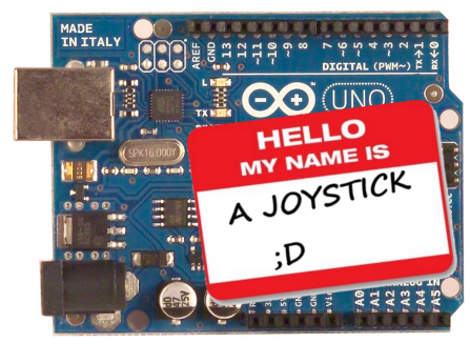
This firmware could certainly benefit anyone building an Arduinome , Joystick, or any variety of devices that users simply want to interface to a PC without additional software.

A guide for ISP flashing can be found at [Dimitri]’s site.

Interactive Dice Game Pits Man Against Machine

dice_game

While most dice games are based on luck and chance more than anything else, [Mike] decided he wanted to create a dice game that took a little more skill to play. He built a replica of a game found in Ian Stewart’s “The Cow Maze”, a book of mathematical stories and puzzles.

The theory behind the game is as follows:

A number is randomly drawn and is considered the “heap”. Players take turns reducing the heap, using the die to represent the number they would like to remove. The only restrictions placed on moves are that you cannot re-use the same number chosen by your opponent in the preceding move, nor can you use the number on the die face opposite that number. The winner of the game is the individual reducing the heap to exactly zero, though you can also lose the game automatically if you reduce the heap to a negative number.

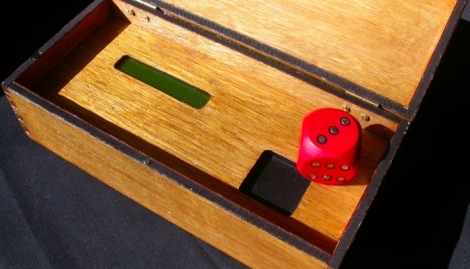
The game operates using a magnet-loaded wooden die and hall sensors built into the playing surface. The sensors relay the value of the die’s face to the ATmega chip he used to run the game. His code provides the logic for your computer opponent as well as for keeping score.

The whole project is wrapped up in a nice-looking wooden box that gives it a bit of old time-y charm, micro controller and LCD aside.

Be sure to check out the video below to see a few rounds of the game being played, and swing by his site for more details.

[via SparkFun]

Continue reading “Interactive Dice Game Pits Man Against Machine”

Laptop Touchpad-based LED Lighting Control

touchpad_lighting

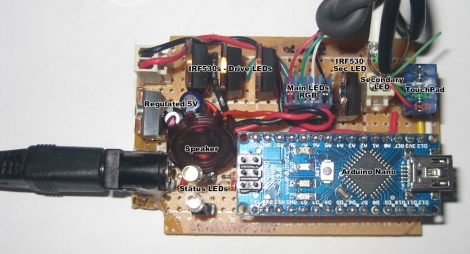
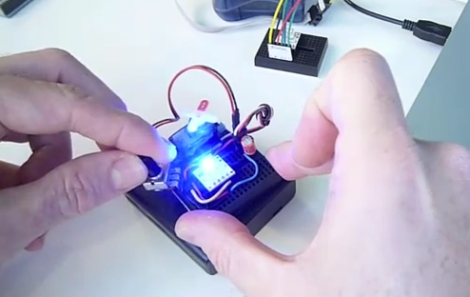
[Dave] needed some extra light above his desk/workbench area and decided to wire up some RGB LED light strips to brighten the place up a bit. He wasn’t content with using a standard switch to toggle them on and off, and after some brainstorming, he decided to build a capacitive touch circuit using a pair of copper tubes mounted in a project box. Just as he was putting the finishing touches on his switch, he saw a project online where a Synaptics touchpad was used in conjunction with an Arduino for lighting control. The copper tube switch was pitched, and he got busy working with his Arduino.

When connected to an Arduino, the touchpads can be used in two modes – relative and absolute. Relative mode is familiar to most people because it is used to guide the mouse cursor around on a laptop’s screen. Absolute mode however, relays coordinate information back to the Arduino, allowing the user to map specific areas of the pad to specific functions. [Dave] enabled his touchpad to use absolute mode, and mapped a handful of different functions on the Arduino. He can now fade his lights on and off or light the room on a timer, as well as use a sliding function to tweak the LEDs’ brightness.

It’s a neat, yet simple hack and a great way to repurpose old laptop touchpads.

Continue reading for a quick demo video he put together, and swing by his site if you want to take a look at the source code he used to get this working.

Continue reading “Laptop Touchpad-based LED Lighting Control”

Geiger Counter A/D Conversion For Radiation Level Crowdsourcing

arduino_geiger_counter

[Akiba] and the crew at Tokyo Hakerspace are still hard at work trying to help out their fellow countrymen after the recent earthquake, tsunami, and ongoing nuclear crisis in Japan. You may remember the group as they are behind the Kimono Lantern project we featured last week. This time around, their efforts are focused on getting usable information out to those who need it.

With all of the talk about nuclear fallout, they wanted to see what sort of measurements they could get in Tokyo, however they could not locate a Geiger counter anywhere nearby. Luckily, they were eventually able to source two old counters from the Reuseum in Idaho. One is being lent out to individuals in order to check if their home’s radiation levels are safe, but it was decided that the other would reside outdoors in order to collect radiation readings from the air.

[Akiba] wanted to put the results from the external Geiger counter up on Pachube, however these old units are all analog. He figured that a quick and dirty way to do analog to digital conversion would be to monitor the chirps coming off the counter’s speaker. This was done by wiring up an Arduino to the speaker leads, and keeping track of each time the speaker was activated. This resulted in an accurate digital radiation reading, matching that of the counter’s analog display. The Arduinio wirelessly sends the information to another Arduino stationed inside his apartment, which then uploads the data to Pachube.

A walkthrough of his conversion as well as the source code for both the Arduino counter and the Pachube uploader are available on his site, in case anyone else in the Tokyo area has a Geiger counter handy and wishes to do the same.

GPS-enabled Bag Allows For Carefree City Roaming

mapbag_lilypad

[Josh] was looking for a way to enjoy exploring the city of Chicago safely, and hacked together a messenger bag navigation system to ensure he always knew where he was going.

While riding, he wanted to embrace the idea of Dérive, but he felt that he was being too overly conscious of time as well as his location, which took all the fun out of his unplanned excursions. Having recently been “doored” by a car, he was also looking for a way to help him navigate the city streets without being overly distracted with finding his way around.

His “Map Bag” solves both of these problems for him, without being obtrusive. He fit a messenger bag with a LilyPad Arduino and a GPS receiver for keeping track of his location. The Arduino can constantly monitor speed, heading, and location, directing [Josh] to his destination by vibrating one of 8 shaftless motors that are installed throughout the bag’s chest strap. Now while he rides, he can take in the city’s atmosphere while also knowing that he will get exactly where he needs to – on time.

He does not have any source code or schematics on his site as of yet, but we hope to see some in the near future. If you are interested, check out the videos of the bag’s construction embedded below.

Continue reading “GPS-enabled Bag Allows For Carefree City Roaming”