Use FPGAs The Easy Way With Alien Cortex AV

alien_cortex_av_fpga_board

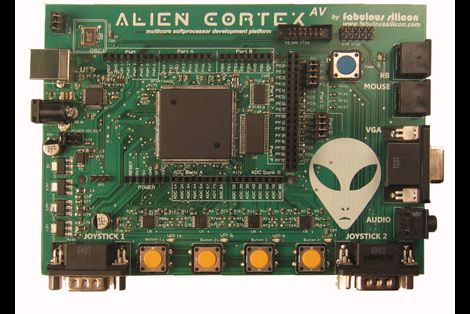
Hackaday reader [Louis] wrote in to call our attention to a neat project over at Kickstarter that he thought would interest his fellow readers. The AlienCortex AV is a pre-built FPGA board from [Bryan Pape] with gobs of ports and a ton of potential. At the heart of the board is an Xilinx PQ208 Spartan 3e 500k FPGA, which can be configured to perform any number of functions. The board sports a healthy dose of analog and digital I/O pins as you would expect, along with PS/2 inputs, VGA outputs, and even a pair of Atari-compatible joystick ports.

The AlienCortex software package allows users to easily load projects into the FPGA, which can run up to four different emulated microcontrollers at once. The software comes with half a dozen pre-configured cores out of the box, with others available for download as they are built. The default set of cores includes everything from a 32-channel logic analyzer, to a quad processor Arduino-sketch compatible machine.

Now, before you cry foul at the fact that he’s emulating Arduinos on a powerful and expensive FPGA, there’s nothing stopping you from creating an army of whatever microcontrollers you happen to prefer instead. We’re guessing that if you can run four Arduinos on this board at once, a good number of PICs could be emulated simultaneously alongside whatever other uC you might need in your next robotics project. A single board incorporating several different microcontrollers at once doesn’t sound half bad to us.

Disco Isn’t Dead: Diy Dance Floor Spotted At Student Parties

Your party is lame if it doesn’t include interactive blinking lights on the dance floor. [Mario] and [Lukas] didn’t want to have lame parties, so they enlisted some fellow students to build an interactive dance floor (translated). The finished party-piece is 4 meters by 2.5 meters (that’s about 13’x8′ for us yanks) and includes 160 lighted squares. But it’s the electronics that really make this a heavy project.

Milled into the underside of the pressboard base are a series of pockets and channels to hold various components. If you look hard enough, you’re going to find eight AVR microcontrollers which control the LEDs, 8 CPLDs to manage the weight sensors which make the floor interactive, and an FPGA and embedded computer to tie everything together. It’s movable, a hit at parties, and so far it seems to hold up to the occasional spilled beverage.

You can’t share a project like this without some video. See it after the break.

Continue reading “Disco Isn’t Dead: Diy Dance Floor Spotted At Student Parties”

FPGA Mandelbrot Fractal Engine

fpga_mandelbrot

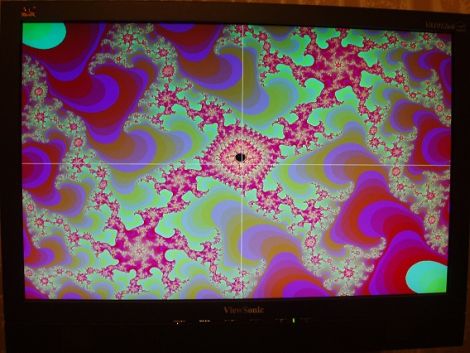
[Mike Field] has always been interested in the Mandelbrot Set since he first read about it back in the ‘80s. Having coded it on a Commodore VIC20 back int he day, he always returned to the Mandelbrot set when he wanted to try out some new programming technology.

He wanted to delve deeper into the world of FPGAs, so [Mike] figured the best way to do so would be to use one to program a Mandelbrot fractal engine. He started out with a goal of creating a 640×480 Mandelbrot display, but over time, he found that he could push his Nexus 2 FPGA to 800×600. He didn’t stop there, and after tweaking a few things, he was amazed to find that he could push a 1024×768 display from the small board.

He kept a pretty detailed log as he went along, should you be interested in trying your hand at the process as well. Though there is no video of the FPGA in action, there are a few cool pictures showing off his handiwork.

Simple VGA Interface For Tiny FPGA Boards

fpga_vga_adapter

[devb] has been playing around with XESS FPGA boards for ages, and as long as he can remember, they have had built-in VGA interfaces. His newest acquisition, a XuLA FPGA board, doesn’t have any external parts or ports aside from a USB connector. He needed to get video output from the board, so he decided to build a VGA interface himself.

He prototyped a 512-color VGA interface board which worked just fine, but he thought it would be way too cumbersome to use for each and every project. To keep life simple, he designed a small PCB that integrates a VGA connector and all of the resistors he needed to get the signal from the FPGA. His boards plug directly into a breadboard, so only a handful of wires is needed to connect the FPGA to a monitor.

As you can see on his site, the adapter works quite well, allowing the FPGA to put out a crisp 800×600 image with little fuss. [devb] has also posted all of his design files on his site in Eagle format for anyone interested in replicating his work.

turbografx_clone

FPGA-based Turbografx 16 Clone

[Gregory] wrote in to share his most recent project, an FPGA clone of the PC Engine/Turbografx 16 console. You may remember him from last year, when we talked about his SEGA Genesis FPGA clone. He just couldn’t leave well enough alone, and decided to resurrect yet another 16-bit machine in FPGA form.

He has been working on the project for about three months now, but he has been making very quick work of getting everything up and running. As of a few weeks ago, the project was in a pretty unstable alpha stage, but after pounding away at some bugs, he is now able to render any game he pleases.

The clone uses an Altera DE1 board just like his previous builds, and he has been able to emulate all three if the main chips that make up the Turbografx logic board. He has yet to work on the Programmable Sound Generator, but that is slated for the near future. While the FPGA currently stores ROMS in its flash memory, he has plans to add the ability to load games from an SD card.

Keep reading to see a pair of videos showing his console clone in action, it’s impressive.

Continue reading “FPGA-based Turbografx 16 Clone”

Sequencer Built On A Cycle II FPGA Board

[Matt’s] finishing up his computer science degree. As part of a class assignment he programmed his own sequencer which runs on a Cyclone-II FPGA development board. We’ve embedded a video below the fold that shows you what it can do. The buttons and LEDs offered on the board actually allowed him to create a nice user interface. Each slide switch has a surface mount LED above it, giving feedback for which beats in the loop are on and off. There’s also a bank of momentary-push buttons seen in blue above. [Matt] uses these to tweak settings like the pitch that is stored for each slide switch. He even puts on a light show with the VGA output.

We’ve seen this Altera board before, used to drive a falling sands game. The hardware will run you around $200 but that’s not bad considering all of the fun things you can do with it.

Continue reading “Sequencer Built On A Cycle II FPGA Board”

Simulating VHDL Of An AVR8 Soft Processor

Okay, now we’re beginning to feel a bit like [Alice]. This tutorial shows you how to simulate VHDL code. This code is intended to run on an FPGA and includes a software-only version of the AVR 8-bit microcontroller core. Essentially, you’ll simulate VHDL code that simulates AVR hardware. Wrap your mind around that!

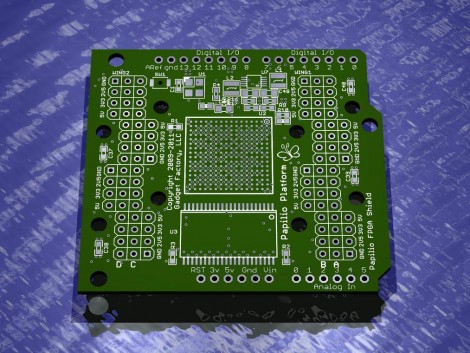
The code is intended to run on a Papilio Field Programmable Gate Array development board. We saw an early version of this board running the AVR8 core about a year ago. However, you don’t need to have any hardware to follow along and recreate this simulation yourself. It might be a great way to get your feet wet with FPGA programming before making that first hardware buy. Five different screencasts take you through the process of getting the AVR8 code, using an altered Arduino IDE for it, setting up a free version of Xilinx ISE to run the simulation, then setting it free and interpreting the data that the simulator spits out the other end.