Google Chrome Roundup

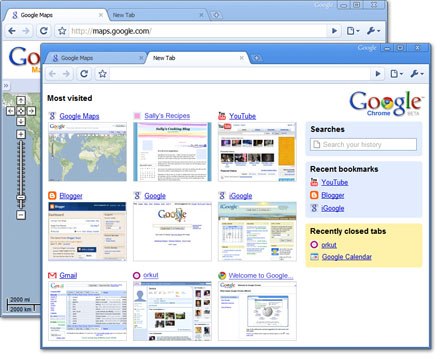
Google Chrome made a huge splash in the past week, but will it really change the way you browse, and convince you to switch from your current browser? For those who want to play with it but don’t want Google to completely take over their lives, Chromium is the open source project behind Google Chrome. Linux and OS X users can also run Chrome using WINE, although success is not guaranteed. To make an educated choice, read Scott McCloud’s comic which explains the underpinnings. Make sure you’re aware of Chrome’s security vulnerabilities, and take advantage of Lifehacker’s guide to make your browsing experience as convenient and useful as possible. There are some great features, including the ability to log into multiple Google accounts using its much-lauded Incognito mode, which prevents Google Chrome from logging information on your browsing and downloading habits (websites you browse can still track your information). For convenience, you can also install Chrome on a USB drive, and take it anywhere with you. Explore the many Google Chrome blogs that have popped up to provide advice on hacking and tweaking the browser. Or you could just get all your information from 4chan.

MySQLgame, Playing With Database Queries


mySQLgame is a quirky App Engine game that has decided to forgo flashy UIs and just stick with the core of the system: a database. You start the game by creating your own row in the shared game database. Game time increments your fuel and money resources every ten seconds. Fuel is spent on scanning other rows and for attacking. Money is used for upgrades and building units. Build up resources and attack your neighbors using database queries, just like any other game. Like a bit more gloss on your internet metagames? Have a look at trolling simulator Forumwarz.

[via Waxy]

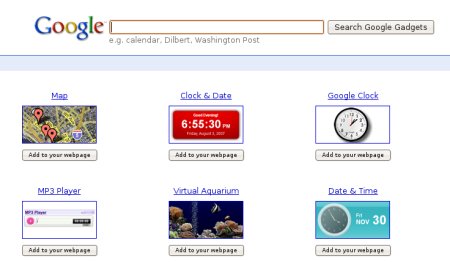
Black Hat 2008: Google Gadgets Insecurity


Black Hat presenters [Robert “RSnake” Hansen], CEO of SecTheory, and [Tom Stracener], security analyst at Cenzic, criticized Google in their presentation “Xploiting Google Gadgets”. [Hansen] and [Stracener] say that there’s currently no way for Google to confirm whether Google Gadget creations contain malicious content or not; this leaves the application vulnerable to a wide range of hacking ugliness such as data poisoning, worms, and theft of data. [Hansen] himself isn’t exactly on the friendliest terms with Google. He’s got a bit of a contentious history and he claims that Google has threatened legal action against him. Nevertheless, if what was presented is true and accurate, then Google has a huge security issue that needs to be addressed sooner rather than later. Google has not yet commented on the situation.

Exposing Poorly Redacted PDFs


Privacy watchdog group, National Legal and Policy Center has released a PDF detailing Google founder Larry Page’s home (dowload PDF here). They used Google’s Maps and Street View to assemble all of the information. Google is currently involved in a lawsuit resulting from a Street View vehicle traveling and documenting a private road. This PDF was released in response to Google stating that “complete privacy does not exist”.

For some reason the PDF is redacted with black boxes. We threw together a simple screencast (click through for HiDef) to show how to easily bypass the boxes using free tools. You can simply cut and paste the hidden text and images can be copied as well-no need to break out Illustrator. This sort of redaction may seem trivial, but the US military has fallen victim to it in the past.

Lively, Google’s Stab At Second Life


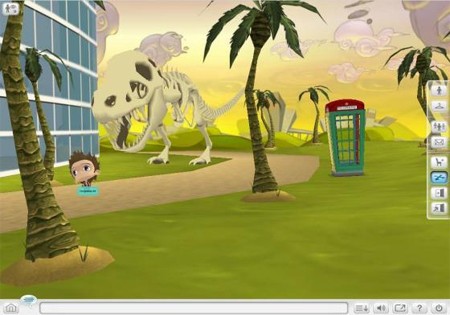
Google has just released their own avatar based social arena a la Second Life, which is called Lively. It will require a client download and install like the popular MUD, but after that it can be accessed via IE and Firefox.

Lively allows user to create their own online spaces that can include natural or human-built settings and customize their avatars (which are relatively cartoonish in comparison to SL avatars). Google’s engineering manager for Lively [Niniane Wang] explains that they wanted to create a more socially rich environment than was possible with emotes and other chatroom features.

Lively’s core functions are not particularly novel, but it does innovate with various web integration features. Videos and images from the internet are viewable from within Lively, and users can embed their own personal Lively areas into their blogs or websites (hello VRML).

Lively is not nearly as expansive as Second Life yet, with no form of currency included and only stock items, clothes, avatars, and geometry to choose from. What’s more, it is only available for Windows XP and Vista, with no other OS support announced. We can see this getting better in the future, but those of you who’s lives are so great that you need a second one (or a third) will probably want to jump on this now.

Continue reading “Lively, Google’s Stab At Second Life”