EMC Tutorial Puts You In The Loop

A student once asked his lab instructor why his amplifier was oscillating. After looking at it and noting the wild construction, the instructor remarked, “A better question would be why shouldn’t it oscillate?” The truth of it is, our circuits generate noise and especially if they are oscillating anyway. Distortion and nonlinearities generate harmonics and other component imperfections also contribute.

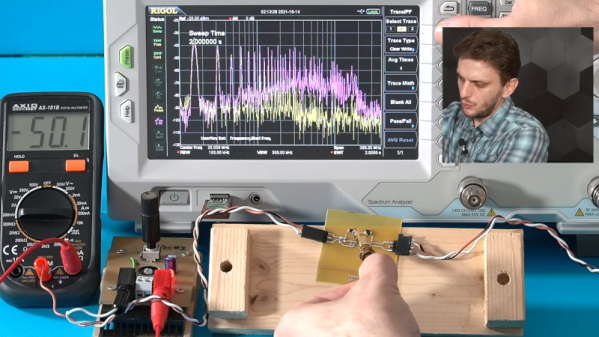
[FesZ Electronics] has a great video series about noise in switching power supplies and the latest talks about the hot loop. If you want to improve the noise performance of your next design, these videos are well worth watching. You can see the hot loop video below.

We really liked the homebrew noise probes. In addition to real-world probing. The video also observes circuit operation under simulation. Even if you don’t care about noise performance, there’s a lot of good information about basic switching power supply design here.

You can see the difference in a PCB that has a small hot loop versus a very small hot loop. Something to think about next time you are laying out a power supply board.

If you want to dive deeper into noise simulation, we have a good read on that for you. Or ditch simulation, and make your own cheap probe with an SDR dongle.
Continue reading “EMC Tutorial Puts You In The Loop”

Phasors In LTSpice

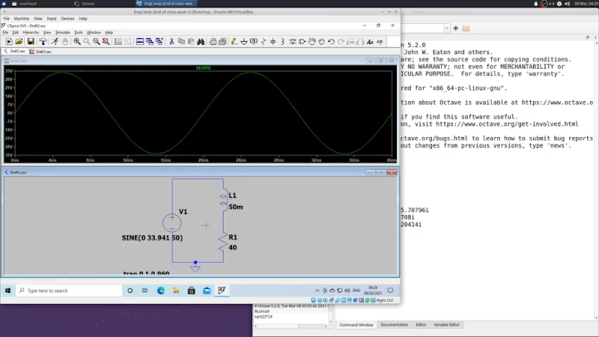
[Ted] recently demonstrated the analysis of an RL circuit using a piece of paper, Octave, and LTSpice. If you prefer, the Octave code should work fine in MATLAB, as well. If you are looking to get serious about electronic theory this is a reasonably simple case and is a good chance to get a workout with some of the tools.

We like the approach because too often it is easy to just use the computer and not pick up the understanding that you get when working through a problem by hand. You do need to understand complex numbers, but, overall, the math isn’t too hairy.

Continue reading “Phasors In LTSpice”

Custom Components In LTSpice

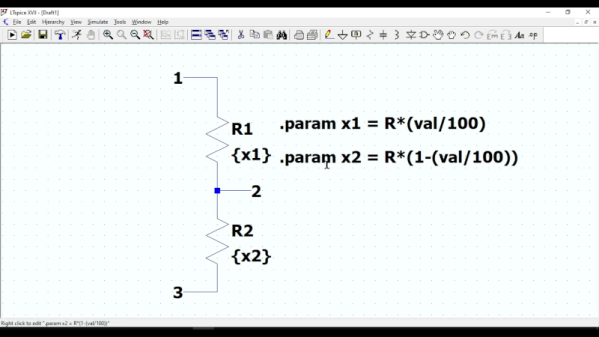
If you enjoy simulating circuits, you’ve probably used LTSpice. The program has a lot of powerful features we tend to not use, including the ability to make custom components that are quite complex. To illustrate how it works, [asa pro] builds a potentiometer component that is not only a good illustration but also a useful component.

The component is, of course, just two resistors. However, using parameters, the component gets two values, a total resistance and a percentage. Then the actual resistance values adjust themselves.

Continue reading “Custom Components In LTSpice”

Make Some Noise Or Simulate It, At Least

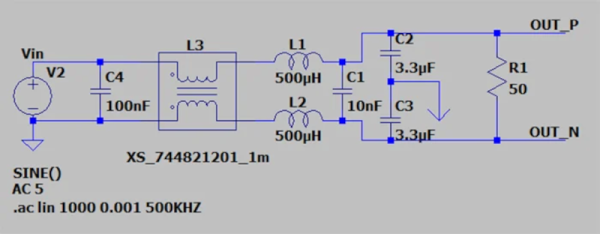
Noise is a fact of life, especially in electronic circuits. But on our paper schematics and just as often our simulations, there is no noise. If you are blinking an LED on a breadboard, you probably don’t care. But if you are working on something meatier, handling electrical noise gracefully is important and simulation can help you. [Ignacio de Mendizábal] has a great piece on simulating EMC filters using LTSpice that can get you started.

There are many ways of classifying noise and [Ignacio] starts with common-mode versus differential noise, where common-mode is noise with current flowing in the same direction without regard to the circuit’s normal operation, and differential noise having currents that flow in the opposite direction of normal current flow.

Continue reading “Make Some Noise Or Simulate It, At Least”

Rockin’ Out In LTSpice: Simulating Classic Guitar Pedals

Musicians have a fantastic language to describe signals. A sound can be fat, dark, crunchy, punchy — the list goes on. These aren’t very technical terms, but they get the job done. After all, it’s much easier to ask to guitarist for a crisper sound than to ask them to sharpen the edges of the waveform, while amplifying the high-frequency components and attenuating the low-frequency components. Of course, it’s fun to look at signals this way as well, especially when you can correlate shifts in sound quality to changes in the waveform and, ideally, the circuit that produces it.

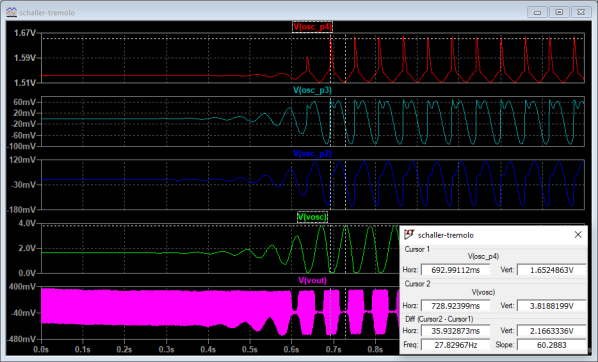
To undergo such an investigation, [Nash Reilly] has been simulating guitar effects pedals in LTSpice. Able to find most of the schematics he needs online, [Nash] breaks down the function of each part of the circuit and builds a simulation of the entire system. His write-up clearly explains, and often demonstrates, what’s going on inside the box. On the surface, it’s an interesting tour of the inner workings of your favorite effects pedals. Beyond that, it’s an excellent survey of analog design that is well-worth the read for anybody interested in audio, electronics, or audio electronics.

For those interested in taking the physical route rather than the simulated one, we’ve taken a look at pedal design before. Anybody who wants to try their hand at creating simulations can grab a copy of LTSpice, or check out a package called LiveSpice, which lets you simulate circuits in realtime and use them to process live audio — pretty useful for prototyping guitar effects.

TI And Cadence Make PSpice Free

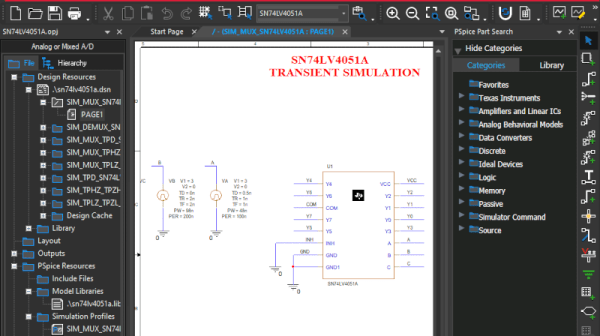
We like simulation software. Texas Instruments long offered TINA, but recently they’ve joined with Cadence to make OrCAD PSpice available for free with some restrictions. You’ve probably heard of PSpice — it’s widely used in academia and industry, but is usually quite costly. You can see a promotional overview video below.

The program requires registration and an approval step to get a license key. The downloaded program has TI models along with other standard models. There seem to be few limits as long as you stick to the supplied library. According to the datasheet, there are no size or simulation complexity limitations in that case. If you want to use other models, you can, but that’s where the limitations hit you:

There is no limitation of how many 3rd party models can be imported into the design. However, if 3rd party models are imported, a user will be able to plot a maximum of 3 signals at a time of their choice when any 3rd party model is imported from web.

We aren’t completely sure what “from web” means there, but presumably they just mean from other sources. In any event, you still get AC, DC, and transient analysis with plenty of options like worst-case timing analysis. Mixed signal designs are supported and there is a wealth of data plotting options, as you would expect.

This is a great opportunity to drive some serious software that is widely used in the industry. The only thing that bummed us out? It runs under Windows. We couldn’t get it to work under Wine, but a Windows 10 VM handled it fine, although we really hate running a VM if we don’t have to.

Still, the price is right and it is a great piece of software. We also liked the recent Micro-Cap 12 release, but we don’t expect any updates for that. Of course, LTSpice is quite capable, too.

Continue reading “TI And Cadence Make PSpice Free”

Solid State Relay Simulation, Explained

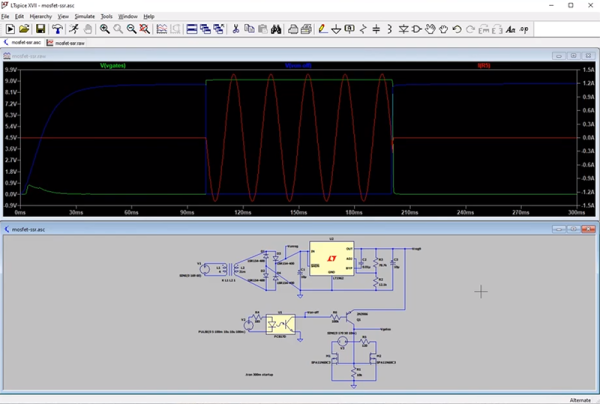
[SaltyPuglord] needed a solid state relay for a project. We’d have just bought one, but he decided to design his own in LTSpice. Along the way he made the video below, which is pretty informative and a good example of a non-trivial design in LTSpice.

MOSFETs have made designs like this a lot easier, to the extent that it should be as easy as putting a pair of beefy fets in-line with the AC source and load. However, that has a few ramifications that [Salty] covers in the video.

The biggest concern comes in isolating the DC supply from ground. He used a transformer which is tricky to simulate in LTSpice. Beyond that the design of the power supply is quite simple, and as he mentions in the video, you don’t really need this complex of a regulator just to feed the gates of the MOSFETs.

Continue reading “Solid State Relay Simulation, Explained”