DIY Scratch Controller

[youtube=http://www.youtube.com/watch?v=eHI2q-x0ke0]

There’s something viscerally pleasing about simple solutions. [Kip] came up with one in the form of a scratch controller. The spindle from an optical drive is used to hold a CD in place, which acts as the LP for scratching. The sensor from an optical mouse is mounted upside down below the CD and detects the rotation of the disc. From there it’s just a matter of setting up your software to get the reading from that mouse. He’s had some trouble finding disc surfaces that the mouse sensor will read reliably.  We’d recommend trying some of those stick-on inkjet CD labels.

This is similar to a scratch controller we saw in 2008. That one was actually repurposing the IR encoding from inside of a mouse. We’re not sure which method would work better, but either controller will make a nice addition to a Flexi Knob setup.

Will This Mouse Get Me Kicked Out Of The Coffee Shop?

This [Dwight Shrute]-esque project will let you try out your taxidermy skills. Apparently you can acquire a ‘wetware’ mouse fresh or frozen from pet stores. We just need to wait until fall when our pantry is visited by the less-domesticated variety.

A travel-sized optical mouse acts as the replacement guts. Some creative dremeling brings the plastic housing down to a more acceptable shape. The furry bits need to be processed using the mouse taxidermy guide before they are fit over the electronics. What you end up with is a creepy peripheral that nobody wants to use.

Python IR Tracking For The Handicapped

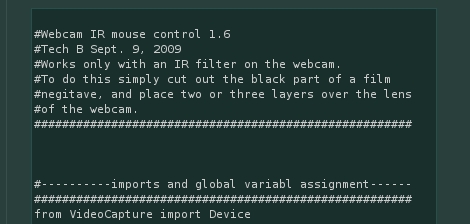
[Techb] had a friend who was paralyzed after an accident and could no long use a computer. He rigged up an amazingly simple mouse interface using python to implement infrared tracking. The controller was built from an old hat by adding an IR LED and wireless mouse modified so that the button could be clicked by the user’s mouth. A webcam with exposed film used as a filter can track the IR LED and take input from the wireless mouse buttons.

This setup, which draws inspiration from Wii Remote white boards,  is much simpler than the Eyewriter (and doesn’t shine an IR LED into your eye). Although [Techb] wants to add facial recognition to the system, there’s something to be said for such a simple implementation.

[Thanks Wolfmankurd]

Flexi Knobs

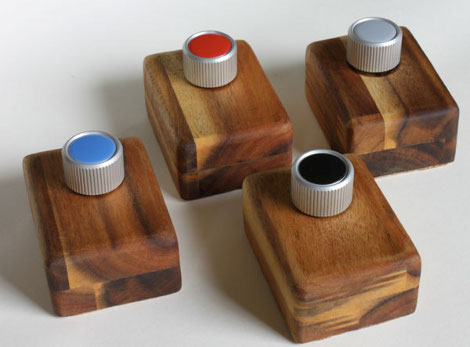
These boxes, called Flexi Knobs, work like a wireless Atari paddle and mouse rolled into one. Each has a rotary encoder that can also be clicked like a button. On the inside is a wireless optical mouse which controls an on-screen cursor which matches the color of the knob. In the video after the break you can see these are being used as midi controls. Each cursor can be locked onto a virtual knob, giving it a physical interface. Because there are several units being used on one machine this creates something of an abstract multi-touch system. This would make a nice interface for other applications with a plethora of settings, like Blender.

Continue reading “Flexi Knobs”

Glove Mouse

[youtube=http://www.youtube.com/watch?v=UZB2K1wlaZo]

[thetanktheory] sent us his glove mouse modification.  He has gutted his mouse and mounted the parts on a glove. This is interesting, as he doesn’t have to place his hand on the mouse any more, he just plops it down on any surface and starts mousing.  He claims that it is helping his twitch reactions in gaming as somehow it requires less force, but we still see the circuit and batteries mounted on the back of his hand, so we’re not sure how it is helping. Maybe if he moved the laser to his finger tips, he’d be more accurate.

Hackaday Links: January 17th, 2010

Apple Magic Mouse on Windows

Looks like some folks snooped around the latest Bluetooth update from Apple and managed to extract the Magic Mouse drivers. Now you can use them to take this complex peripheral for a spin on Windows. [Thanks Juan]

Component jewelry: From geeky to gross

[Nikolaus] made a pair of 300k Ohm earrings for his wife. That’s three Brown-Black-Yellow resistors per ear. It’s geeky but in a subtle way. Much more refined than the gross outcome of this other guy’s crass nipple experiments. Need to get the image of nipple-jewelry out of your head? [Nikolaus] has you covered with some 3d printed earrings.
GTK GPS

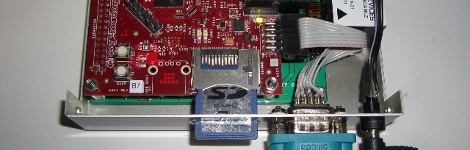
Need your GPS data to be accurate within a centimeter? We don’t either but if you ever do, Real Time Kinematic GPS is what you need. Now you can build one yourself using the RTLIB package. This is based around the powerful and powerfully-inexpensive Beagleboard. [Thanks Jan]


Messy music

It warmed up here a bit this week and things got slushy. Our Galoshes are nice and water-tight but [David’s] have a big hole in the side and are filled with a mini-keyboard. He’s chosen a rubber boot as the housing for a circuit-bending project. It’s a nice touch that the hidden keys are still playable through the flexible rubber.

How To Use Wiimotes W/ Linux

[Sprite_tm] has whipped up yet another interesting tutorial – software-based this time. He basically describes how he connected his Wiimotes to an HTPC. A USB Bluetooth receiver, and a little bit of Linux scripting,  was all that was necessary to get the system up and running. To add to the fun, [Sprite_tm] configured a the controllers to work with MAME (an arcade machine emulator), allowing one to play Duck Hunt on a computer in its full glory!