“Alexa, Stop Listening To Me Or I’ll Cut Your Ears Off”

Since we’ve started inviting them into our homes, many of us have began casting a wary eye at our smart speakers. What exactly are they doing with the constant stream of audio we generate, some of it coming from the most intimate and private of moments? Sure, the big companies behind these devices claim they’re being good, but do any of us actually buy that?

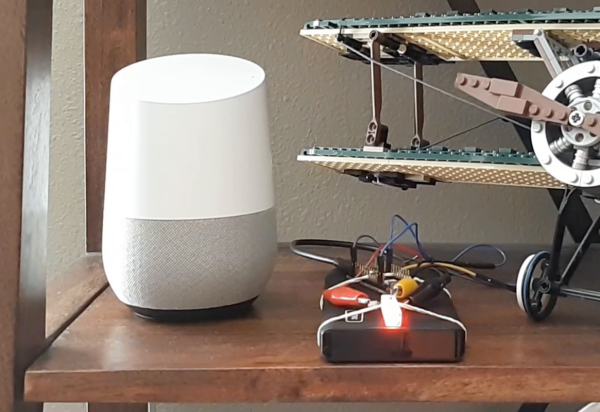
It seems like the most prudent path is to not have one of these devices, but they are pretty useful tools. So this hardware mute switch for an Amazon Echo represents a middle ground between digital Luddism and ignoring the possible privacy risks of smart speakers.  Yes, these devices all have software options for disabling their microphone arrays, but as [Andrew Peters] relates it, his concern is mainly to thwart exotic attacks on smart speakers, some of which, like laser-induced photoacoustic attacks, we’ve previously discussed. And for that job, only a hardware-level disconnect of the microphones will do.

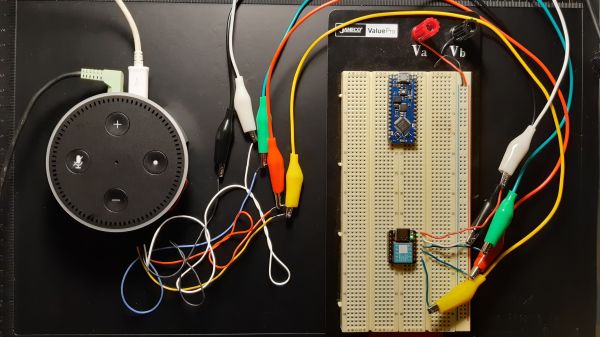
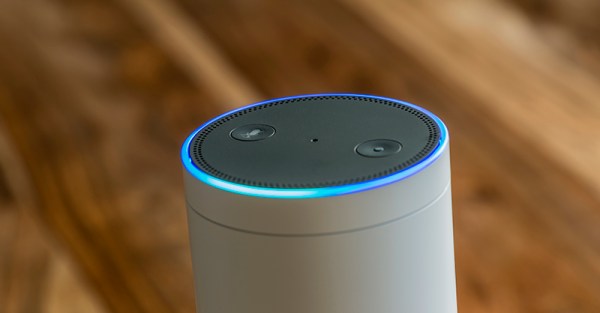
To achieve this, [Andrew] embedded a Seeeduino Xiao inside his Echo Dot Gen 2. The tiny microcontroller grounds the common I²S data line shared by the seven (!) microphones in the smart speaker, effective disabling them. Enabling and disabling the mics is done via the existing Dot keys, with feedback provided by tones sent through the Dot speaker. It’s a really slick mod, and the amount of documentation [Andrew] did while researching this is impressive. The video below and the accompanying GitHub repo should prove invaluable to other smart speaker hackers.

Continue reading ““Alexa, Stop Listening To Me Or I’ll Cut Your Ears Off””

Teardown: Tap Trapper

The modern consumer is not overly concerned with their phone conversations being monitored. For one thing, Google and Amazon have done a tremendous job of conditioning them to believe that electronic gadgets listening to their every word isn’t just acceptable, but a near necessity in the 21st century. After all, if there was a better way to turn on the kitchen light than having a recording of your voice uploaded to Amazon so they can run it through their speech analysis software, somebody would have surely thought of it by now.

But perhaps more importantly, there’s a general understanding that the nature of telephony has changed to the point that few outside of three letter agencies can realistically intercept a phone call. Sure we’ve seen the occasional spoofed GSM network pop up at hacker cons, and there’s a troubling number of StingRays floating around out there, but it’s still a far cry from how things were back when folks still used phones that plugged into the wall. In those days, the neighborhood creep needed little more than a pair of wire strippers to listen in on your every word.

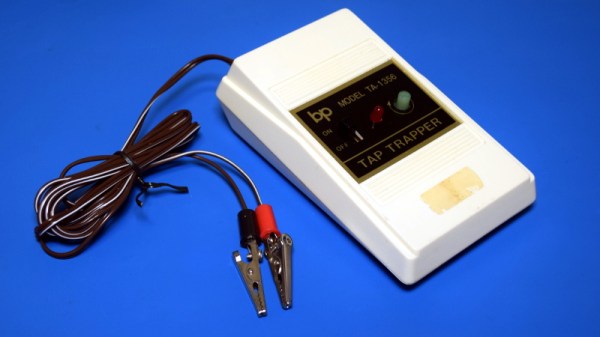
Which is precisely why products like the TA-1356 Tap Trapper were made. It was advertised as being able to scan your home’s phone line to alert you when somebody else might be listening in, whether it was a tape recorder spliced in on the pole or somebody in another room lifting the handset. You just had to clip it onto the phone distribution panel and feed it a fresh battery once and awhile.

If the red light came on, you’d know something had changed since the Tap Trapper was installed and calibrated. But how did this futuristic defender of communications privacy work? Let’s open it up and take a look.

Continue reading “Teardown: Tap Trapper”

Careful Drilling Keeps Stadia From Listening In

Google’s fledgling Stadia service leverages the Chrome ecosystem to deliver streamed PC games on mobile devices, web browsers, and TVs. While not strictly required, the company even offers a dedicated Stadia controller that connects directly to the streaming servers over its own WiFi connection to reduce overall system latency. Of course, being a Google product, the controller has a tiny microphone that’s always listening in for interacting with the voice assistant.

[Heikki Juva] didn’t like the privacy implications of this, but unfortunately, there appears to be no way to turn off this “feature” in software. He decided the most expedient solution would be to simply remove the microphone from the controller, but it turns out there was a problem. By researching previous teardowns, he found out that it’s nearly impossible to take the controller apart without damaging it.

Getting close to the target.

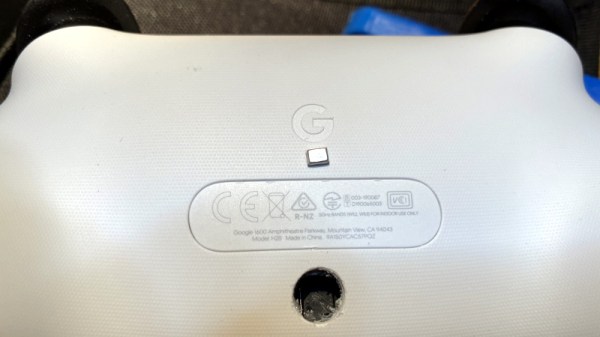
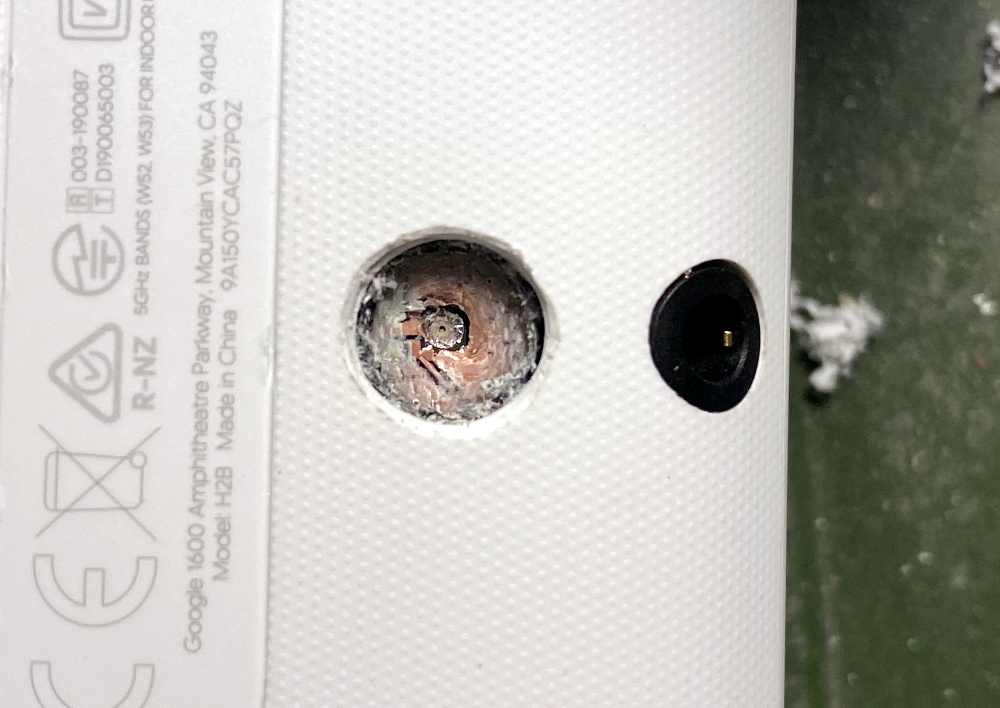
So [Heikki] came up with a bold idea. Knowing roughly the position of the microphone, he would simply drill through the controller’s case to expose and ultimately remove the device. The operation was complicated by the fact that, from the teardown video he saw, he knew he’d also have to drill through the PCB to get to the microphone mounted to the opposite side. The only bright spot was that the microphone was on its own separate PCB, so physically destroying it probably wouldn’t take the whole controller out with it.

Now we don’t have to explain why drilling into a gadget powered by an internal lithium-ion battery is dangerous, and we’re not necessarily vouching for the technique [Heikki] used here. But when presented with a sealed unit like this, we admit there weren’t a lot of good options. The fact that the user should have to go to such ridiculous lengths to disable the microphone in a game controller is a perfect example of why we should try to avoid these adversarially designed devices, but that’s a discussion for another time.

In the end, with a steady and and increasingly larger bits, [Heikki] was able to put a 7 mm hole in the back of the Stadia controller that allowed him to extract the microphone in one piece. Removing the microphone seems to have had no adverse effect on the device as, surprisingly enough, it turns out that a game controller doesn’t actually need to listen to the player. Who knew?

As our devices get smarter, hidden microphones and cameras are unfortunately becoming more common. Thankfully a few manufacturers out there are taking the hint and including hardware kill switches for these intrusive features, but until that becomes the norm, hackers will have to come up with their own solutions.

Update 1/10/21: This article originally indicated that the microphone is always listening. While there is no hardware switch to disable the mic, there is a button which must be pressed to trigger the voice assistant functions. We have used strike through above to indicate the change to what was originally published.

Continue reading “Careful Drilling Keeps Stadia From Listening In”

Speaker Snitch Tattles On Privacy Leaks

A wise senator once noted that democracy dies with thunderous applause. Similarly, it’s also how privacy dies, as we invite more and more smart devices willingly into our homes that are built by companies that don’t tend to have our best interests in mind. If you’re not willing to toss all of these admittedly useful devices out of the house but still want to keep an eye on what they’re doing, though, [Nick Bild] has a handy project that lets you keep an eye on them when they try to access the network.

The device is built on a Raspberry Pi that acts as a middle man for these devices on his home network. Any traffic they attempt to send gets sent through the Pi which sniffs the traffic via a Python script and is able to detect when they are accessing their cloud services. From there, the Pi sends an alert to an IoT Arduino connected to an LED which illuminates during the time in which the smart devices are active.

The build is an interesting one because many smart devices are known to listen in to day-to-day conversation even without speaking the code phrase (i.e. “Hey Google” etc.) and this is a great way to have some peace-of-mind that a device is inactive at any particular moment. However, it’s not a foolproof way of guaranteeing privacy, as plenty of devices might be accessing other services, and still other devices have  even been known to ship with hidden hardware.

Continue reading “Speaker Snitch Tattles On Privacy Leaks”

Amazon Sidewalk: Should You Be Co-Opted Into A Private Neighbourhood LoRa Network?

WiFi just isn’t very good at going through buildings. It’s fine for the main living areas of an average home, but once we venture towards the periphery of our domains it starts to become less reliable.  For connected devices outside the core of a home, this presents a problem, and it’s one Amazon hope to solve with their Sidewalk product.

It’s a low-bandwidth networking system that uses capability already built into some Echo and Ring devices, plus a portion of the owner’s broadband connection to the Internet.  The idea is to provide basic connectivity over longer distances to compatible devices even when the WiFi network is not available, but of most interest and concern is that it will also expose itself to devices owned by other people. If your Internet connection goes down, then your Ring devices will still provide a basic version of their functionality via a local low-bandwidth wide-area wireless network provided by the Amazon devices owned by your neighbours. Continue reading “Amazon Sidewalk: Should You Be Co-Opted Into A Private Neighbourhood LoRa Network?”

Keep Your YouTube Habits To Yourself With FreeTube

If your usual YouTube viewing selection covers a wild and random variety of music, tech subjects, cooking, history, and anything in-between, you will sooner or later be baffled by some of the “Recommended for you” videos showing up. When it features a ten-hour mix of Soviet propaganda choir music, you might start wondering what a world taken over by an artificial intelligence might actually look like, and realize that your browser’s incognito / private mode really isn’t just for shopping birthday presents in secret. Things get a bit tricky if you actually enjoy or even rely on the whole subscribing-to-channels concept though, which is naturally difficult to bring in line with privacy in today’s world of user-data-driven business models.

Entering the conversation: the FreeTube project, a cross-platform application whose mission is to regain privacy and put the control of one’s data back into the user’s hands. Bypassing YouTube and its player, the watch history and subscriptions — which are still possible — are kept only locally on your own computer, and you can import either of them from YouTube and export them to use within FreeTube on another device (or back to YouTube). Even better, it won’t load a video’s comments without explicitly telling it to, and of course it keeps out the ads as well.

Originally, the Invidious API was used to get the content, and is still supported as fallback option, but FreeTube comes with its own extractor API nowadays. All source code is available from the project’s GitHub repository, along with pre-built packages for Linux (including ARM), Windows, and Mac. The application itself is created using Electron, which might raise a few eyebrows as it packs an entire browser rendering engine and essentially just disguises a website as standalone application. But as the FAQ addresses, this allows easy cross-platform support and helps the project, which would have otherwise been Linux-only, to reach as many people as possible. That’s a valid point in our book.

Keep in mind though, FreeTube is only a player, and more of a wrapper around YouTube itself, so YouTube will still see your IP and interaction with the service. If you want to be fully anonymous, this isn’t a silver bullet and will require additional steps like using a VPN. Unlike other services that you could replace with a local alternative to avoid tracking and profiling, content services are just a bit trickier if you want to actually have a useful selection. So this is a great compromise that also just works out of the box for everyone regardless of their technical background. Let’s just hope it won’t break too much next time some API changes.

ESP8266 Turned Secretive WiFi Probe Request Sniffer

When a Wi-Fi device is switched on, it starts spewing out probe requests to try and find a familiar access point. These probe requests contain the device’s MAC address and the SSID of the hotspot it’s looking for, which can potentially be used to identify a specific device and where it’s been. After experimenting with these probe requests, [Amine Mehdi Mansouri] has created OpenMAC, a tiny ESP8266 based sniffer that could be hidden anywhere.

The device consists of an ESP-07S module, a regulator circuit for getting power from a USB-C connector, and a button for power cycling. An external antenna is required for the module, which can be selected based on the size or gain requirements for a specific deployment. [Amine] tested the OpenMAC at a local library (with permission), in combination with a number of his own little Wi-Fi repeaters to expand the reach of the network. All the recorded MAC addresses were logged to a server, where the data can be used for traffic analysis in and around the library, or even for tracking and locating specific devices.

This is nothing new, and is relatively common technique used for gathering information in retail locations, and could be also be used for more nefarious purposes. Newer versions of iOS, Android, and Windows 10 feature MAC address randomization which can limit the ability to track devices in this manner, but it isn’t always activated.

We’ve seen a number of projects that exploit probe requests. FIND-LF can be used for locating devices in your home, and Linger fools probe requests sniffers by replaying previously recorded requests.