Encrypting Encrypted Traffic To Get Around VPN Bans

VPNs, Virtual Private Networks, aren’t just a good idea to keep your data secure: for millions of people living under restrictive regimes they’re the only way to ensure full access to the internet. What do you do when your government orders ISPs to ban VPNs, like Russia has done recently?  [LaserHelix] shows us one way you can cope, which is to use a ShadowSocks proxy.

If you’re not deep into network traffic, you might be wondering: how can an ISP block VPN traffic? Isn’t that stuff encrypted? Yes, but while the traffic going over the VPN is encrypted, you still need to connect to your VPN’s servers– and those handshake packets are easy enough to detect. You can do it at home with Wireshark, a tool that shows up fairly often on these pages. Of course if they can ID those packets, they can block them.

So, you just need a way to obfuscate what exactly the encrypted traffic you’re sending is. Luckily that’s a solved problem: Chinese hackers came up with something called Shadowsocks back in 2012 to help get around the Great Firewall, and have been in an arms-race with their authorities ever since.

Shadowsocks is not, in fact, a sibling of Gandalf’s horse as the name might suggest, but a tool to obfuscate the traffic going to your VPN. To invert a meme, you’re telling the authorities: we heard you don’t like encrypted traffic, so we put encryption in your encrypted traffic so you have to decrypt the packets before you recognize the encrypted packets.

What about the VPN? Well, some run their own shadowsocks service, while others will need to be accessed via a shadowsocks bridge: in effect, a proxy that then connects to the VPN for you. That means of course you’re bouncing through two servers you need to trust not to glow in the dark, but if you have to trust someone– otherwise it’s off to a shack in the woods, which never ends well.

Don’t forget that while VPNs can get you around government censorship, they do not provide anonymity on their own. If, like tipster [Keith Olson] –thanks for the tip, [Keith]!– you’re looking side-eyed at your government’s “think of the children!” rhetoric but don’t know where to start, we had a discussion about which VPNs to use last year.


AI Face Anonymizer Masks Human Identity In Images

We’re all pretty familiar with AI’s ability to create realistic-looking images of people that don’t exist, but here’s an unusual implementation of using that technology for a different purpose: masking people’s identity without altering the substance of the image itself. The result is the photo’s content and “purpose” (for lack of a better term) of the image remains unchanged, while at the same time becoming impossible to identify the actual person in it. This invites some interesting privacy-related applications.

Originals on left, anonymized versions on the right. The substance of the images has not changed.

The paper for Face Anonymization Made Simple has all the details, but the method boils down to using diffusion models to take an input image, automatically pick out identity-related features, and alter them in a way that looks more or less natural. For this purpose, identity-related features essentially means key parts of a human face. Other elements of the photo (background, expression, pose, clothing) are left unchanged. As a concept it’s been explored before, but researchers show that this versatile method is both simpler and better-performing than others.

Diffusion models are the essence of AI image generators like Stable Diffusion. The fact that they can be run locally on personal hardware has opened the doors to all kinds of interesting experimentation, like this haunted mirror and other interactive experiments. Forget tweaking dull sliders like “brightness” and “contrast” for an image. How about altering the level of “moss”, “fire”, or “cookie” instead?

Linux For The Paranoid Does The Work For You

We all know that our activity on the Internet is not that hard to track. It just annoys some people more than others. If you are really hardcore, you’ll learn all the ins and outs of networking to help cover your tracks, but what if you don’t want to invest that kind of time? Maybe, as [TechRepublic] suggests, try Kodachi Linux.

You could, of course, start with your own live image. Then when you boot, you could take the following steps:

  • Randomize your MAC Address
  • Establish a TOR connection through a VPN
  • Route all internet traffic through TOR and use DNS encryption
  • Set up a scheduled task to scramble your MAC address periodically

But that’s what Kodachi does without any real effort on your part.

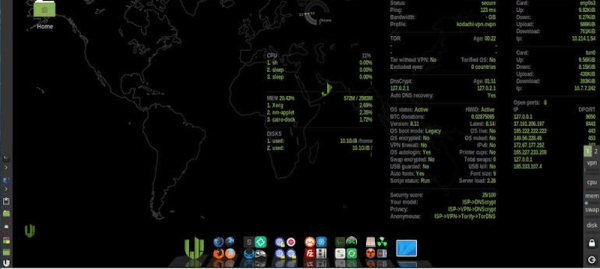
The distribution is based on Ubuntu, so all the familiar tools are there. There are also a few security and privacy tools included like KeePass, Tox, OnionShare, i2p, and more. The desktop shows a summary of secure network information

Do you need Kodachi? Probably not, if you are a Linux guru. Plus, most people aren’t doing anything that’s that interesting. But if you want to protect your privacy or you are up to something, give Kodachi a try. Then again, if you are that paranoid, maybe that’s just what THEY want you to do. Make your own decisions. You can also check out the video review from [eBuzz Central] below.

Looking for more conventional Linux? Why not Rocky Linux? If you just want a VPN, you can always just use ssh.

Continue reading “Linux For The Paranoid Does The Work For You”

Keep Your YouTube Habits To Yourself With FreeTube

If your usual YouTube viewing selection covers a wild and random variety of music, tech subjects, cooking, history, and anything in-between, you will sooner or later be baffled by some of the “Recommended for you” videos showing up. When it features a ten-hour mix of Soviet propaganda choir music, you might start wondering what a world taken over by an artificial intelligence might actually look like, and realize that your browser’s incognito / private mode really isn’t just for shopping birthday presents in secret. Things get a bit tricky if you actually enjoy or even rely on the whole subscribing-to-channels concept though, which is naturally difficult to bring in line with privacy in today’s world of user-data-driven business models.

Entering the conversation: the FreeTube project, a cross-platform application whose mission is to regain privacy and put the control of one’s data back into the user’s hands. Bypassing YouTube and its player, the watch history and subscriptions — which are still possible — are kept only locally on your own computer, and you can import either of them from YouTube and export them to use within FreeTube on another device (or back to YouTube). Even better, it won’t load a video’s comments without explicitly telling it to, and of course it keeps out the ads as well.

Originally, the Invidious API was used to get the content, and is still supported as fallback option, but FreeTube comes with its own extractor API nowadays. All source code is available from the project’s GitHub repository, along with pre-built packages for Linux (including ARM), Windows, and Mac. The application itself is created using Electron, which might raise a few eyebrows as it packs an entire browser rendering engine and essentially just disguises a website as standalone application. But as the FAQ addresses, this allows easy cross-platform support and helps the project, which would have otherwise been Linux-only, to reach as many people as possible. That’s a valid point in our book.

Keep in mind though, FreeTube is only a player, and more of a wrapper around YouTube itself, so YouTube will still see your IP and interaction with the service. If you want to be fully anonymous, this isn’t a silver bullet and will require additional steps like using a VPN. Unlike other services that you could replace with a local alternative to avoid tracking and profiling, content services are just a bit trickier if you want to actually have a useful selection. So this is a great compromise that also just works out of the box for everyone regardless of their technical background. Let’s just hope it won’t break too much next time some API changes.

The Dark Arts: Anonymity

Love him or hate him, Edward Snowden knew a thing or two about anonymity. In June of 2013, he blew the whistle on the NSA’s out-of-control programs that can target virtually anyone plugged into the digital age. The former CIA employee was working as a contractor for the NSA, where he had access to highly classified documents for many of these general populace surveillance programs. He eventually took off to Hong Kong and released the documents to a handful of reporters. One of these documents was a power point presentation of the NSA complaining about how the TAILS operating system was a major thorn in their side. Naturally, Snowden insisted that the reporters and himself only communicate via the TAILS O/S. He used PGP, which is an encryption method with the highly sophisticated title of “Pretty Good Privacy”, and asked not to be quoted at length for fear of identification via stylometry.

In this article, we’re going to go over the basics of anonymity, and introduce you to methods of staying anonymous while online.

Continue reading “The Dark Arts: Anonymity”

A Better Anonabox With The Beaglebone Black

A few weeks ago, Anonabox, the ill-conceived router with custom firmware that would protect you from ‘hackers’ and ‘legitimate governments’ drew the ire of tech media. It was discovered that this was simply an off-the-shelf router with an installation of OpenWrt, and the single common thread in the controversy was that, ‘anyone can build that. This guy isn’t doing anything new.’

Finally, someone who didn’t have the terrible idea of grabbing another off the shelf router and putting it up on Kickstarter is doing just that. [Adam] didn’t like the shortcomings of the Anonabox and looked at the best practices of staying anonymous online. He created a Tor dongle in response to this with a Beaglebone Black.

Instead of using wireless like the Anonabox and dozens of other projects, [Andy] is using the Beaglebone as a dongle/Ethernet adapter with all data passed to the computer through the USB port. No, it doesn’t protect your entire network; only a single device and only when it’s plugged in.

The installation process is as simple as installing all the relevent software, uninstalling all the cruft, and configuring a browser. [Adam] was able to get 7Mb/sec down and 250kb/sec up through his Tor-ified Ethernet adapter while only using 40% of the BBB’s CPU.

Packet Trace Anonymization With PktAnon


If you’re a network researcher or systems administrator, you know that network traces are often necessary, but not easy to share with colleagues and other researchers. To help with both ease of use and handling of sensitive information, the Institute of Telematics has developed PktAnon, a framework that anonymizes network traffic.

It works by using a profile-based scheme that supports various anonymization primitives, making it easy to switch between different network protocols and anonymization methods. New primitives can easily be added, and several pre-defined profiles are bundled into the distro. The profiles are all XML-based.

Essentially, there are two major uses for network traces: anonymizing user traffic in order to research it, and anonymizing in-house usage, thus preventing the leakage of sensitive information. It’s a rather rigid scheme, but using profiles for this was a stroke of genius that made it a lot easier, more flexible, and as a result, more useful and powerful.

[via TaoSecurity]
[photo: mlpoulter]