Rejecting Microsoft’s Phaseout Of The Kinect

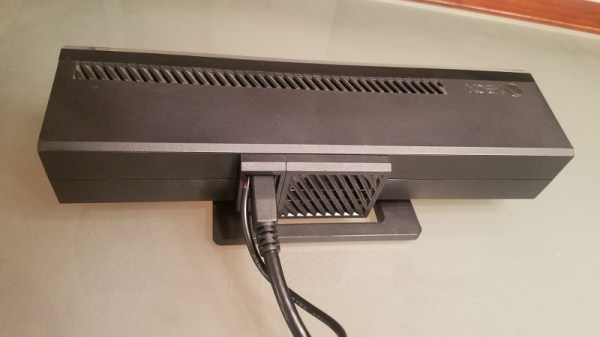
You might not be aware unless you’re up on the latest gaming hardware, but Microsoft is trying to kill the Kinect. While the Xbox One famously included it as a mandatory pack-in accessory at launch (this was later abandoned to get the cost down), the latest versions of the system don’t even have the proprietary port to plug it in. For a while Microsoft was offering an adapter that would let you plug it into one of the console’s USB ports, but now even that has been discontinued. Owners of the latest Xbox One consoles who still want to use the Kinect are left to find an adapter on eBay, where the prices have naturally skyrocketed.

Recently [Eagle115] decided to open up his Kinect and see if he couldn’t figure out a way to hook it up to his new Xbox One. The port on the Kinect is a USB 3.0 B female, but it requires 12V to operate. The official Kinect adapter took the form of a separate AC adapter and a “tap” that provided the Kinect with 12V over USB, so he reasoned he could pop open the device and provide power directly to the pads on the PCB.

[Eagle115] bought a 12V wall adapter and a USB 3.0 B cable and got to work. Once the Kinect was popped open, he found that he needed to supply power on pin 10 (which is helpfully labeled on the PCB). There’s just enough room to snake the cable from the AC adapter through the same hole in the case where the the USB cable connects.

With the Kinect getting 12V from the AC adapter, the Xbox has no problem detecting it as if you were using the official adapter. At least for now, they haven’t removed support for the Kinect in the Xbox’s operating system.

The Kinect has always been extremely popular with hackers (it even has its own category here on Hackaday), so it’s definitely sad to see that Microsoft is walking away from the product. The community will no doubt continue pulling off awesome hacks with it; but it’s looking increasingly likely we won’t be getting a next generation Kinect.

[via /r/DIY]
Xbox PS4 Laptop

Enter The PlayBox, Where Microsoft And Sony Get Along

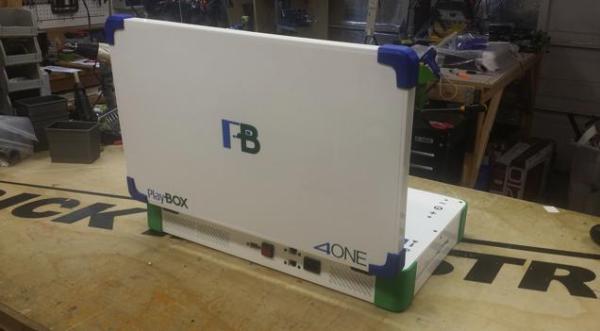
[Eddie Zarick] is a pretty eccentric case modder. So when a customer asked him for an Xbox One / Playstation 4 combo unit, he got excited. He calls it the PlayBOX 4ONE. Cute.

He has managed to cram the guts of both the PS4 and Xbox One into a 22″ laptop-like shape — it is pretty chunky though. The power supply is internal, but obviously you can only turn on one system at a time. Surprisingly he was even able to keep the cooling systems intact! Both consoles still have full use of WiFi and have dedicated LAN ports available on the back of the system. Unfortunately, the Xbox USB ports weren’t so lucky — looks like you’re stuck with wireless Microsoft accessories only.

To see how he did it, check out the following video.

Continue reading “Enter The PlayBox, Where Microsoft And Sony Get Along”

The Homebrew XBox 360 And PS3 Portable

Cross

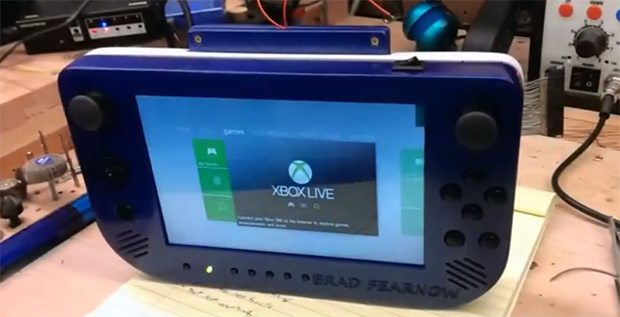
For the past few years now, [Downing] has been working on the dream of all console modders – a console made in the last ten years made portable. He’s spend a lot of time on the effort, and now thanks to a commission, he’s finally done it. Not just one console, either: this thing makes both the Xbox 360 and PS3 a handheld, battery-powered device thanks to some awesome wireless tech and a great deal of skill.

A few months ago, [Downing] and friends [Hailrazer] and [RDC] started a Kickstarter for the Cross Plane, a portable device that uses a wireless HDMI transmitter to offload the heavy and hot parts of running a game to a console, while the display and controls are kept portable. That Kickstarter didn’t see the success [Downing] was looking for, but that didn’t stop one enthusiastic supporter from commissioning a piece.

The display in the Cross Plane is a 7″ HD display, and the latency on the WHDMI transmitter is just about 1ms – basically unnoticeable. The controls on the front of the portable are wired to ‘controller packs’ that plug into the back, one for Xbox and one for PS3. The build quality is immaculate, and if you’ve ever wanted to know how to expertly finish a 3D printed part so it looks like it came off an assembly line, you should probably check out the build log.

Video walkthrough below.

Continue reading “The Homebrew XBox 360 And PS3 Portable”

Dr. Frankenstein’s Wireless Xbox One Steering Wheel

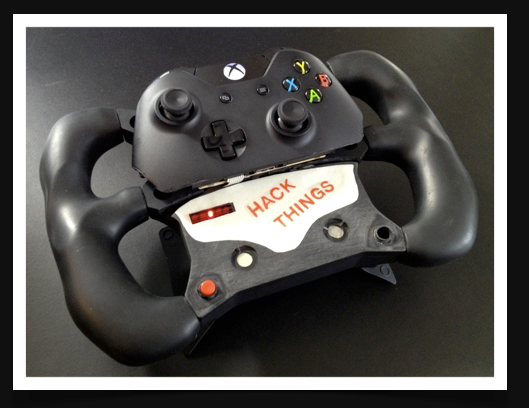
Buy an Xbox One controller and hack it immediately? That’s exactly what [tEEonE] did so he could merge it with a Simraceway SRW-S1 steering wheel. He loves racing games and was psyched to play Forza 5. He already had the steering wheel, but it’s strictly a PC peripheral. [tEEonE] wanted the wheel to control the steering, gas, and brakes and found both the XB1 controller and the SRW-S1 well-suited to the hack.
For steering, [tEEonE] substituted the SRW-S1’s accelerometer for the XB1’s left joystick pot. He connected the X and Y to analog pins on an Arduino Pro. Then he mapped the rotation angles to voltage levels using a DAC and wired that to the XB1 joystick output. The XB1 controller uses Hall effect sensors and magnets on the triggers to control the gas and brake. He removed these and wired the SRW-S1 paddles to their outputs and the XB1 controller is none the wiser.

He also rigged up a 3-point control system to control the sensitivity and calibrate the angles: a button to toggle through menu items and two touch modules to increment and decrement the value. These he wired up to a feedback interface made by reusing a 15-LED strip from the SRW-S1. Finally, he had space left inside the housing for the XB1’s big rumble motors and was able to attach the small motors to the gas and brake paddles with the help of some 3-D printed attachments. Check out this awesome hack in action after the break.


Continue reading “Dr. Frankenstein’s Wireless Xbox One Steering Wheel”

Xbox One Headset 2.5 Mm Plug Adapter

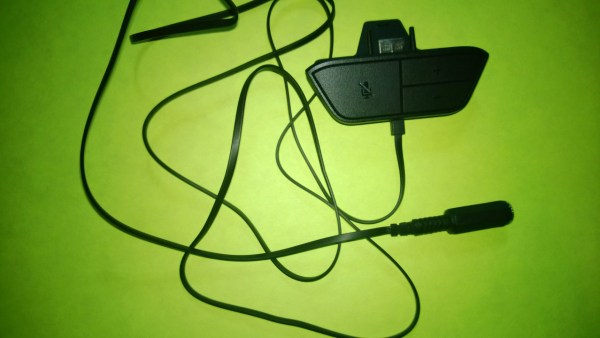
In all of Microsoft’s grand wisdom they found it necessary to make the new Xbox One headset adapter without a standard 2.5 mm headset jack. People have invested great amounts of money in quality headsets for previous game platforms that now cannot jack into the Xbox One controllers. This may seem like a déjà vu hack from a week ago but it is different and adds more solutions for the annoying Xbox One headset compatibility problem.

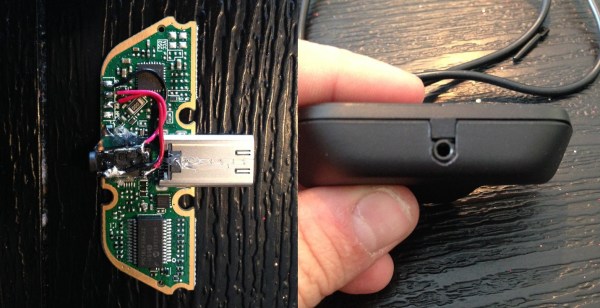
[Jon Senkiw] A.K.A [Xandrel] wasn’t having any of this Microsoft nonsense so he cracked open the headset adapter case that plugs into the Xbox One controller. He photographed the PCB and wiring and realized he could fit a 2.5 mm headset jack from an old donor cellphone into the case. A dap of hot glue, some AWG 30 jumper wires and a bit of plastic trimming was all it took to get a jack inside the headset adapter just the way Microsoft should have done from the factory.

Previously when [octanechicken] added a 2.5 mm female phone adapter at the end of the cable he did not connect the black wire to anything being it was the 2nd side of a push-pull speaker. However, from looking at [Jon’s] photos he connected the speaker output wire to a solder pad on the PCB where the black wire originally connected, marked HPL, and he had nothing connected to the HPR pad. This seemed to work for [Jon] just fine, but is the opposite of what [octanechicken] did last week when he connected the blue wire to the speaker output which would have traced back to the HPR pad on the PCB.

This hack makes these controllers backwards compatible without too much issue being reported. If you have issues please report here or on [Jon’s] SE7ENSINS thread. He has also made comments on the thread that he is willing to help mod headsets, so if you’re not able to hack this yourself [Jon] might be willing to help.

Using XBox One And PS4 Controllers With Everything

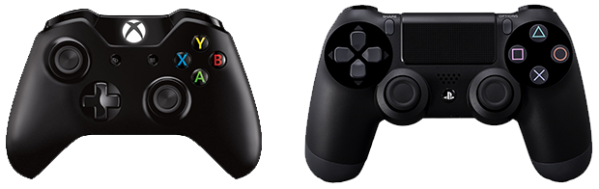
The controllers from the last generation of consoles served their purpose well. They were there for us when we wanted to experiment with an I2C bus, and they stood by when we wanted to build a quadcopter out of parts just lying around. A new generation of consoles is now upon us, and with them come new controllers. Controllers for which Arduino libraries haven’t been written yet. The horror.

Until those libraries are developed, there’s ChronusMAX, a USB dongle that allows you to use XBox One controllers on a PS4, PS4 controllers on the XBox, mice and keyboards on both systems, and both types of controllers on your PC.

The folks behind ChronusMAX put up a video demoing the XBox One controller working on the 360, PS3, and PC, with another video showing the same for the PS4 controller. As far as what we can see from the PC demos, everything on these controllers can be read, right down to the accelerometer data on the DualShock 4.

Although this is a commercial product, we’re surprised we haven’t seen a more open version by now. From the looks of it, it’s a very small device with two USB ports and a firmware upload utility. Microcontrollers with two native USB ports are usually encased in large packages, so there might be some very clever engineering in this device. Let us know when someone does a teardown of one of these.

Thanks [Josh] for sending this one in.

2.5 Mm Jack Adapter For The Xbox One Headset

As most everyone knows the Xbox One came out last week and if you were one of the lucky few to get one you might have noticed the headset is quite uncomfortable and covers only one ear. [octanechicken] has a possible adapter solution that lets you plug-in an older more comfortable chat headset like a Turtle Beach. It is being reported as a functional hack by others in the comments; however it may still be questionable. We say questionable because the first release of this Instructable clearly had a flaw in the wiring, but updated text seems to have fixed that problem. Using a female 2.5 mm stereo inline jack [octanechicken] was able to get the Xbox One headset controller to work with older Xbox 360 chat headsets having a male 2.5 mm plug.

The photos on the instructable are still incorrect so following the text instructions one simply unsolders the wires from within the ear piece and then solders the white wire to the tip connector, blue wire to the middle ring connector and the bare wire to the rear sleeve connector of the female 2.5 mm stereo inline jack. Remember to leave the black wire disconnected and covered with a bit of tape. If you cut the wires instead of unsoldering them, remember to scrape any varnish off before soldering. But what about that black wire?

Continue reading “2.5 Mm Jack Adapter For The Xbox One Headset”