Thunderbolt Strikes Windows98

If there’s one thing everyone hated about Windows 98, was the lack of USB4.0 support. We remember vividly the cries of anguish at the launch party when we found out that 21 years in the future, the operating system wouldn’t support the then-undreamt of speeds of the thunderbolt-based fastest USB protocol. After two decades of living with this crushing disappointment, [Yeo Kheng Meng] has delivered the goods: the most modern of USB interfaces on some very much not modern versions of windows.

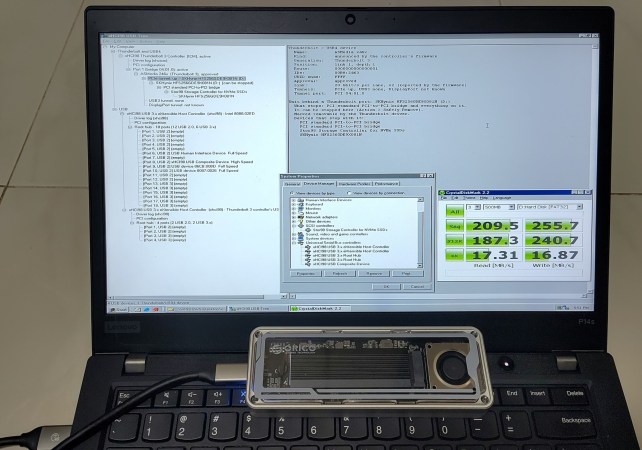
This builds on [Yeo Kheng Meng]’s work on xHCI drivers for USB2.0 support, which we covered at the time. Like that hack, this one applies to Windows 98 through 7, and has a similar level of LLM-wrangling involved. There are actually a few parts to it– one is a USB3.0 driver, which replaces the old xHCI98 driver and is available on GitHub. On Windows98, USB3.0 speed caps out around 200 MB/s, likely restricted by Windows98’s maximum request limit of 64kB on USB transfers. Even with the faster bus in action, it can only gobble those tiny blocks of data so fast.

There’s also experimental USB4.0/Thunderbolt support, as stated above. While not as stable as the USB3.0 portion, we’re kind of impressed it runs at all. Thunderbolt is more than just a faster data bus, after all– you have to support multiple protocols. To handle all that you can install xhcicm.sys and have the surreal experience of accessing an docked NVMe drive from the last century’s best Windows via his Stor98 driver. That’s based largely on [SweetLow]’s NVMe9x project, which he forked but is going to be bundled into the main repo.

What might be more helpful to the community than these drivers is [Yeo Kheng Meng]’s fork of QEMU11 that emulates USB4/Thunderbolt hosts and devices. Having a working emulator seems like it would be a huge boon for this sort of semi-automated development. That’s available in its own repo.

Aside from the already-linked USB2.0 drivers, [Yao Kheng Meng] has an impressive retro-computing record, that includes Swift on the Apple II and turning DOS into llama.c habitat. It should be noted that that llama.c’s TinyStories is not the LLM that assisted with this project.

Thanks to [Yeo Kheng Meng] for the tip!
Modern USB Controllers On Win98 (and Up)

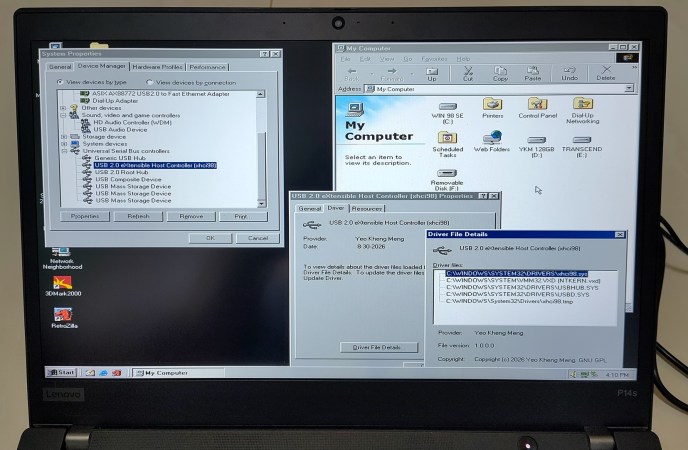
[Yeo Kheng Meng] has a problem: he likes Windows 98, but he also likes his 2020 ThinkPad, which only has an xHCI USB controller– you know, the kind needed for USB 3.0, something that post-dates Windows 98 by a full decade. Drivers? Finding none existed, he decided to do it himself, or at least guide the process of using  LLMs to produce drivers for Windows 98 and up.

Some of you just stopped reading, but can you blame him for making a demonic pact for this project? Driver development isn’t really a one-man show, especially as a part-time hobby project you’re not sure anyone else will ever use. If you do want to use it, you can find the code on GitHub.

It does work, though, he admits it might be buggy. Unlike purely vibe-coded projects, [Meng] intends to address bugs put forth in the repo, at least. If you want to know how he did it, check out the link to [Meng]’s blog– which is human-authored, we can tell– and the videos embedded therein. He demonstrates it working on a 2020 ThinkPad, which should be usable even with Windows 11, and another model from 2016– neither of which have any old-style USB ports. Older laptops might, while any desktop can just use a PCI card with a USB2.0 controller– or you can do like [Meng] did prior to this project, and use the PCI card via adapters. 

[Yeo Kheng Meng] evidently gets as much of a kick out of joining old and new as we do, like running DOS a modern ThinkPad X13, and running Slack on Windows 3.11 For Workgroups on a slightly-less-modern but still 21st Century Thinkpad T400.

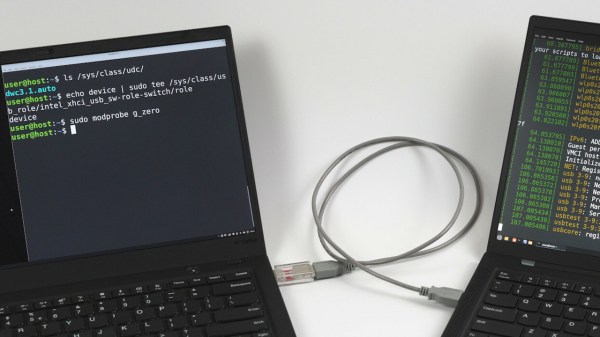
The Thinkpad in question, with a Linux shell open on its screen, showing that the device mode has been successfully enabled

ThinkPad X1 Carbon Turned USB Device Through Relentless Digging

In what’s perhaps one of the most impressive laptop reverse engineering posts in recent memory, [Andrey Konovalov] brings us an incredibly detailed story of how he’s discovered and successfully enabled a USB device controller in a ThinkPad X1 Carbon equipped with a 6th gen Intel CPU.

If you ever wanted to peek at the dirty secrets of a somewhat modern-day Intel CPU-based system, this write-up spares you no detail, and spans dozens of abstraction layers — from Linux drivers and modifying NVRAM to custom USB cable building and BIOS chip flashing, digging deep into undocumented PCH registers for the dessert.

All [Andrey] wanted was to avoid tinkering with an extra Raspberry Pi. While using a PCIe connected device controller, he’s found a reference to intel_xhci_usb_sw-role-switch in Linux sysfs, and dove into a rabbit hole, where he discovered that the IP core used for the laptop’s USB ports has a ‘device’ mode that can be enabled. A dig through ACPI tables confirmed this, but also highlighted that the device is disabled in BIOS. What’s more, it turned out to be locked away behind a hidden menu. Experiments in unlocking that menu ensued, in particular when it comes to bypassing Intel Boot Guard, a mechanism that checks BIOS image signatures before boot.

Continue reading “ThinkPad X1 Carbon Turned USB Device Through Relentless Digging” →