
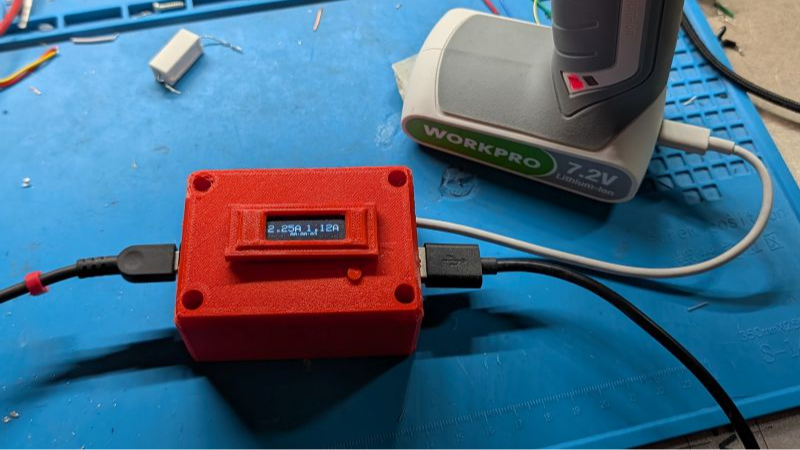
If you want to maximize the life of your lithium-ion batteries, proper storage voltage is critical. That is, don’t store them empty, and don’t store them completely full either. “Almost fully charged” is a sweet spot for occasional-use devices. Sadly, this is easier said than done. While many devices use integrated rechargeable batteries these days, most provide no method of limiting charge level. That’s where [DaverDavid]’s ChargeCap comes in.
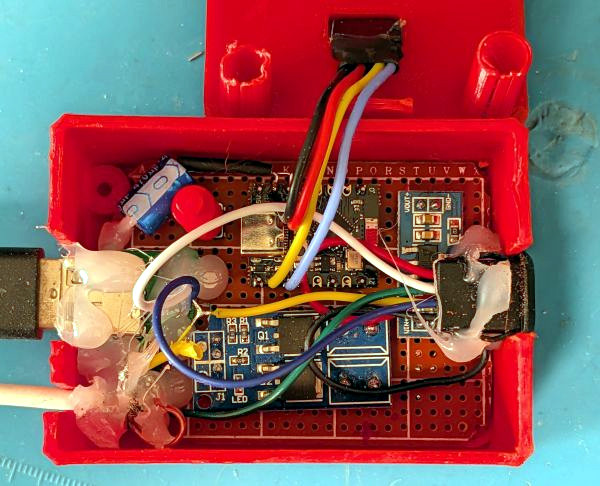
ChargeCap sits between a USB charger and target device, disconnecting when it detects that recharging is 80 to 90 percent complete. This is particularly useful for maximizing the cell life of devices that see only intermittent use.
The way ChargeCap does this is clever, and relies on the fact that all lithium-ion charging curves look the same regardless of cell capacity or cell count. Charge current remains at pretty much the same level for most of the charging process, but tapers off quickly (and in a linear fashion) as cells approach their maximum capacity. That’s because charging a battery is a lot like blowing up a balloon: the first breaths are easy, but once the balloon fills out, every breath needs to push harder than the last.
ChargeCap works by sampling the peak charge current at the beginning of the charge cycle, then detecting when it drops below 50 percent of peak, at which point charging is stopped. The result is a device that reliably charges to 80 to 90 percent of capacity, and no more. ChargeCap uses an ESP32-C3 and a small OLED display that, as a nice touch, inverts colors to signal charge completion. Design files and code are at the GitHub repository.
Lithium-ion cells are fantastic devices, so flesh out your knowledge by reading [Arya Voronova]’s primer on designing them into your own projects, or a more in-depth explanation of how they work.












My phone has USB-C fast charging but I (almost) always charge it using a 500mW USB-A charger, charging it almost every night. It is almost 5 years old (so having had close to 1800 charges) and I notice hardly any degradation on the battery, I can still walk a full day (±9 hours) with GPS recording on on one charge, provided I disable Wifi and one of the two sim cards.
Yup, newer Samsungs (possibly all Androids?) have a settings toggle for “Fast charging” – i think it flips between 10W and 25W. I have fast charging disabled (use it about once a month when i need it) and after 22 months my phone reports 100% battery lifespan and 623 charge cycles.
If you charge your phone overnight, iPhones charge to ~80% and then hold until just before you get up.
MacBooks only charge to ~80% if you leave them plugged in. If you want to totally fill them up, there’s an option on the battery menu.
Thinkpads have adjustable charging thresholds. On Linux you can use TLP to set them. I usually set mine to start charging at 70% and stop at 80%. They do need an occasional full charge to keep the BMS calibrated though.
Non-thinkpads also have charge limiters but it’s set at 60% or 100% only.
I don’t know about keeping BMS calibration but I do know it slowly loses charge over time.
There is actually more to check but there is no human friendly docs for ideapad-laptop module. The best thing you can do is check archwiki by searching your laptop’s full model or the “class” if the full model does not have a page; and then checking what ideapad-laptop capabilities have been noted.
Mine has an older quick charging of 2A input on 5V but yeah, I also just connect it to my PC and pick it up at morning. I play videos and music on it and gets a good 80%->20% in 4-5 hours. Keep in mind this was originally a 5000mAh battery but it’s probably near 70% health now.
Phones can get suprisingly efficient, especially if you turn off most of the wakeup sensors.
P.S: how tf did you find a 100 mA charger!? even connecting to my pc limits to 500mA and that makes 2500mW
Sorry, I meant a 100mA charger, for 500mW.
I work with batteries on a bigger scale, we never use mA but always MW (yes, not a typo, megawatt) or kW or sometimes KVA.
I work in a bus company, our biggest (double-articulated, 24m) buses have 830kWh battery onboard and the fastest chargers are 450kW, but we have on-site batteries of 4MWh now, to reduce grid load in peak hours.
Your experience seems atypical.
Until the last few generations of phones(2022ish) phones didn’t have integrated controls to disconnect from charging at 80% nor the ability to fast/slow charge via software.
Prior to that we needed software to do it, and I did.
Check battery state of charge every 10 minutes while charging and send Home assistant that data.
Home assistant turns off the outlet when charge is 80%.
Slow charge only.
Once every 6 months recalibrate the BMS by charging to 100%, leaving it charging for another hour, discharge it until it turns completely off(all low-power options disabled.)
Keep it cool while discharging by sitting it on a fat heatsink with a thermal pad.
I don’t use a case, phone stays cool.
I don’t use the phone for much. Calls, a handful of texts, and GPS navigation for maybe 30 minutes once a week.
My dev phones got the same battery treatment and even less use.
Across a dozen phones in the last 8ish years I have never gotten more than 3 years before the battery was noticably lower capacity.
The biggest problem with replacing the battery is OEM batteries will never be in ‘new’ condition 3+ years later, and 3rd party ones are either trash or insanely priced (and also maybe trash).
It’s 2026 and I JUST switched from a perfectly usable Pixel 2 to a Pixel 9a because the 4th battery I put in it was already going bad 9 months later.
On the one hand having integrated battery health management and a brand new battery is fantastic. It also gets security updates, has USB display port alt mode with the Pixel having built-in desktop mode, and the real Android Linux terminal running in a VM with semi-official support will mean this doesn’t get stuffed in a drawer when I eventually have to downgrade to another phone when batteries become available.
Everything else isworse than my old phone.
It’s so slippery I HAD to put a case on it. (Grip tape refuses to stick more than a week.)
The awul thumb print reader behind the screen is way worse than the dedicated one you could feel in your pocket. It fails 50% of the time even with clean dry fingers. (Don’t use JUST a fingerprint. Most jurisdictions don’t consider it a real lock for searching and you can be physically forced to unlock the phone with just a face or fingerprint.)
The flash/light on the back is only about 60% as bright, which is a crazy thing to downgrade.
It’s CRAMMED full of ‘AI’ garbage that is impossible to completely disable, and some things that need disabling bundle important functions in. The process/battery management behavior is the same application that does screen reading and telemetry. Hard nope. But disabling it made my daily sitting-on-a-desk-doing-nothing battery usage go from 8-10% to 18-25%.
I have a banged up 9a coming my way to be a test bed for a de-Googled LineageOS.
Maybe all the family phones will be migrated away from G this year…
this is a neat idea. i really wish there was a way to do something like this on retired cellphones by configuring the built-in battery monitor. when it’s in daily use i enjoy charging it all the way (i suppose), but when i retire them, they sometimes wind up sitting on the charger 24/7 and instead of providing a brilliant battery backup for power outages, eventually it winds up cooking the battery one way or the other.
A few years back there was a spate of charge controllers that used Bluetooth to talk to a module that shut off the charge when it hit 80%.
The module sat between the charge and phone, and the phone toggled that on and off when needed.
Of course most phone will do that for you these days. I suppose you could set up a smart plug to switch the charge on and off based on phone battery level.
This is a great little inline solution. Before my phone had the ability to stop at 80%, I just used a wifi enabled smart plug running Tasmota and a Node-RED script that did the same thing– when the power output of the outlet went down, just turn off the outlet entirely. The outlet was re-energized 8h later for the next night. The same thing would work for charging anything, and now with Tasmota’s rules this can all be done right on the smart outlet itself.
I use Home Assistant to turn outlets on when the phone is <40% and off when it gets >80‰.
Phone reports state of charge every 10 minutes to the server.
Strictly slow charge only. 5v @ 250-500mw.
But the problem is my phone’s only fer GET retired when I can’t get decent battery replacements anymore.
I just retired my Pixel 2 in 2026 and downgraded to a Pixel 9a.
The Pixel 2 was still plenty fast. It just didn’t get security updates anymore and the 4th replacement battery was already going bad.
The device in the article seems like a great way to manage non-smart devices.
The only problem I see is that the logic to stop charging seems to rely on the device having SOME drain for it to detect current draw changes.
This wouldn’t work with a flashlight that you want to keep plugged in, use it outside for 2 minutes, then put it back on the charger. Or other devices you only use in short bursts that live mostly in storage.
“That’s because charging a battery is a lot like blowing up a balloon: the first breaths are easy, but once the balloon fills out, every breath needs to push harder than the last.” What??? Blowing up a balloon is exactly the opposite of that.
Blowing up a balloon is hard, then easy, then hard.
Like a battery. The (Electric bus) batteries I work with have very slow charge speeds (sometimes 15kW, while between 10-80% they can usually charge at 150 or sometimes up to 450kW) for the bottom 5% technical SoC, which is why we (and many manufacturers) set them to never go below 10% technical SoC.
For anything involving a single battery cell (“3.7v”, “4.2v”, etc) this is a brilliantly simple solution. For something with multiple cells, like the 7.2v workpro glue gun(?) in the photo, it’s still probably good, but the benefit is a little less clear-cut.
To maximize the lifespan of multi-cell lithium batteries, proper cell balancing is also important, and devices that use “top balancing” are pretty common. It’s a simple, cost-effective method that uses resistors to bleed off charge to some cells and allow the undercharged ones to catch up. Unfortunately, that means it doesn’t usually kick in until the battery is closer to fully charged than this device will allow.
So, that means you should probably still charge such devices to 100% every once in a while to maximize their lifespan, but unless you have some way to measure the voltage of each cell separately, there’s no good way to know when “once in a while” actually is.
(and if you have a way to measure cell voltage independently, you also probably have a way to implement your own balancing solution that solves this problem)
When they get severely imbalanced, you would notice lower battery life. But not because the cells are harmed. So you’d get all that battery life back if you charged fully (and kept it full so they can balance) at that point.
Personally I think potential cell imbalance is overblown in most devices – especially small battery, low charge current type of devices this is aimed at. Maybe in a year or two I’ll check my glue gun and see if the two cells are out of whack.
If this really works on any device, this is an awesome invention. I’m slightly surprised that lots of devices don’t do weird things though… I guess this relies on the vast majority of the current being charging, and the device not having any clever charge strategies?
You would think that this kind of intelligent lithium battery management would already be built into rechargeable devices by now, wouldn’t you?
(or at least hope that…)
My poor man’s solution has been to run my phone’s charger on an hour and a half time limit, which will generally stop it before (the phone reports) 100% charge.
Of course I also use a lower powered phone with a larger battery, so I don’t have to charge it all the way up for it to be useful all day.
Android phones have a battery protection function built in to provide a few options for… protecting the battery.
I use the most aggressive option that limits charge to 80%, but there is also an option on my phone to allow 100% charge, then stop any charging until the battery falls to 95% to prevent the battery from cooking.
Of course, this isn’t present on other most other devices which still makes the device in the article useful.
Amazing invention. I would love to buy one of these. I babysit lithium ion devices to give them a storage charge all the time.