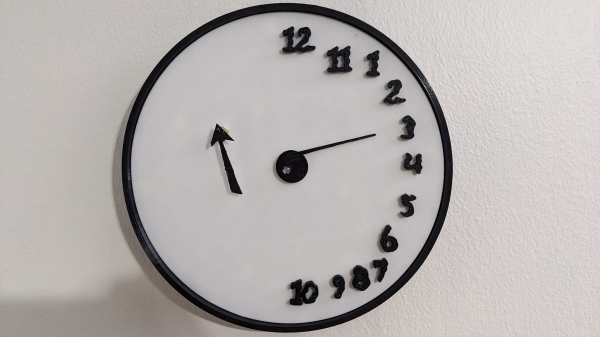
A black-and-white clock face is shown. The numerals are ranged around the right edge of the clock. One pointer extends from the center of the clock, and one is on the left side of the face.

A Clock Inspired By Failed Cognitive Tests

One simple screening tool for cognitive impairment is the clock-drawing test (CDT): the patient is provided with a printed circle and asked to draw a clock face with the hands pointing to a certain time. Depending on how the clock is drawn, this could indicate a variety of different disorders, particularly dementia, with a particular deformity in the drawing sometimes pointing to a specific issue. These failed tests inspired [John Silvia] to create a clock with a unique, disordered face.

The numerals in this clock face are placed exclusively along the right half of the clock (in the test, this can be a sign of damage to the right parietal lobe, or of executive dysfunction caused by dementia), and out of order. The hour hand is controlled by a servo motor, and the minute hand is mounted on a separate, commercially-purchased clock mechanism on the left-hand side of the face.

The frame for the clock and the face are 3D-printed, and the servo motor is controlled by an ESP32-C3 with an RTC module. To minimize power draw, a MOSFET disconnects the servo motor from power except for the once-per-hour position update. Once per month, the ESP32 connects to Wi-Fi to synchronize to NTP time, otherwise remaining in a low-power state – even its indicator LEDs are disconnected to save power. These efforts paid off: when the servo isn’t active, it draws only about 160 µA, and a set of three AA NiMH cells lasts about a year.

Since the servo motor draws most of the power budget, it wouldn’t make much difference, but the ESP32’s co-processor can also be used for ultra-low-power projects. For a happier take on a drawing-related clock, check out one of these projects.

ChargeCap Helps Your Batteries Last Longer By Limiting Charge Level

If you want to maximize the life of your lithium-ion batteries, proper storage voltage is critical. That is, don’t store them empty, and don’t store them completely full either. “Almost fully charged” is a sweet spot for occasional-use devices. Sadly, this is easier said than done. While many devices use integrated rechargeable batteries these days, most provide no method of limiting charge level. That’s where [DaverDavid]’s ChargeCap comes in.

By sampling charge current and disconnecting when it drops to 50 percent of peak, charging is reliably stopped when the target device is 80 to 90 percent charged, regardless of cell count or capacity.

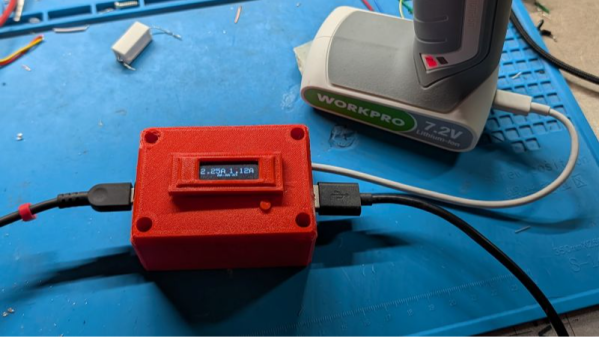
ChargeCap sits between a USB charger and target device, disconnecting when it detects that recharging is 80 to 90 percent complete. This is particularly useful for maximizing the cell life of devices that see only intermittent use.

The way ChargeCap does this is clever, and relies on the fact that all lithium-ion charging curves look the same regardless of cell capacity or cell count. Charge current remains at pretty much the same level for most of the charging process, but tapers off quickly (and in a linear fashion) as cells approach their maximum capacity. That’s because charging a battery is a lot like blowing up a balloon: the first breaths are easy, but once the balloon fills out, every breath needs to push harder than the last.

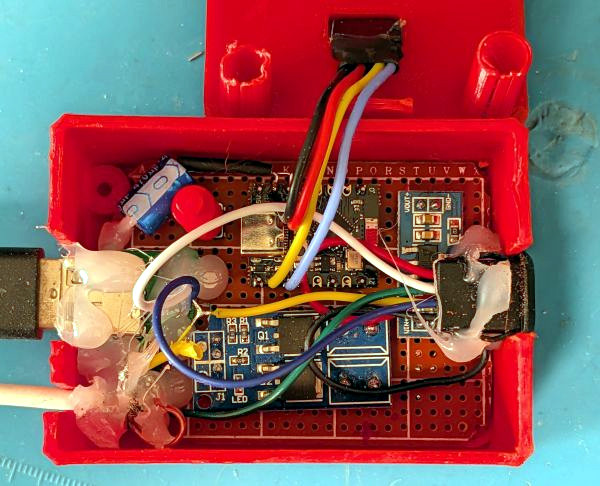
ChargeCap works by sampling the peak charge current at the beginning of the charge cycle, then detecting when it drops below 50 percent of peak, at which point charging is stopped. The result is a device that reliably charges to 80 to 90 percent of capacity, and no more. ChargeCap uses an ESP32-C3 and a small OLED display that, as a nice touch, inverts colors to signal charge completion. Design files and code are at the GitHub repository.

Lithium-ion cells are fantastic devices, so flesh out your knowledge by reading [Arya Voronova]’s primer on designing them into your own projects, or a more in-depth explanation of how they work.

This Credit Card Computer Follows All Dimensions

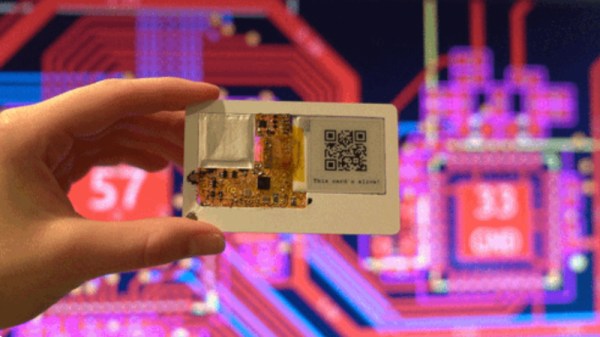
A computer the size of a credit card is nothing new. There have been many single-board computers following the familiar dimensions. [Krauseler]’s credit card computer is different, though. It packs an ESP32-C3, e-paper display, NFC reader, and, incredibly, a Li-Po battery into a credit card form factor in three dimensions rather than two. That’s right, this computer is only 1mm thick.

To ensure perfect compliance with the form factor, the enclosure, if that’s what it can be called, is a real NFC card with the middle cut out to take the electronics. The PCB is flexible, and the battery is the thinnest available. The e-paper display is an ultra-thin, flexible variant. A display connector would have been too thick, so a very fine wire-and-solder job was required.

Continue reading “This Credit Card Computer Follows All Dimensions”

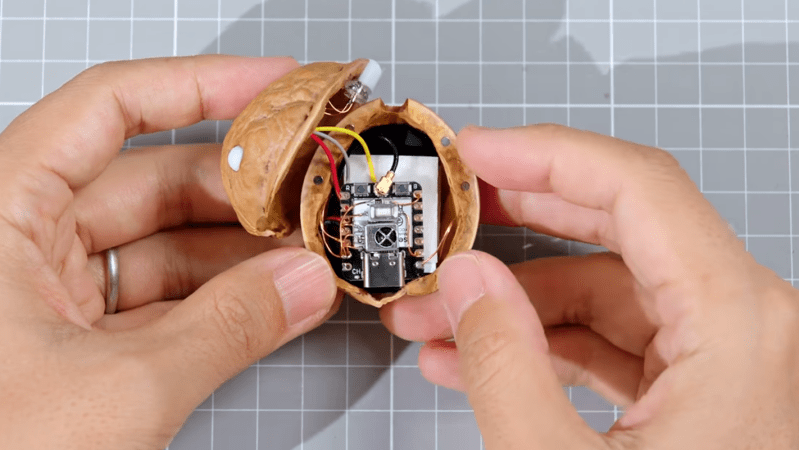
A wearable circuit sculpture in the form of a smart bracelet that shows daily to-dos.

Wearable Circuit Sculpture Is One Smart Bracelet

Well, this might just be a Hackaday first. Certainly not the circuit sculpture part, nor the wearable aspect, but the glorious combination of the two. Behold [CMoz]’s Fashionably on Task: a Smart Bracelet for Forgetfulness. The name may be long, but the intent is concise: to showcase your top five must-dos for the day.

This lovely bracelet uses a tri-color e-paper display, and it’s WiFi enabled in order to receive input from the corresponding phone app. Although the cute pink ESP32-C3 is programmed in PlatformIO, the code will work with the Arduino IDE as well.

To get down to business, just power on the bracelet. If it can’t connect to the network you’ve hard-coded, it will broadcast it’s own access point. Connect with your phone to the custom web page, and Bob’s your uncle. From here, you can enter the tasks, change the colors around, mark tasks as complete, and remove tasks or reset recurring reminders.

The nifty part is that e-paper screen, since it will of course continue to display your list once powered down. Here’s the full code. Then you can deep-dive into the graph theory of circuit sculptures.

Simulating The AVR8 For A Browser-based Arduino Emulator

It’s always nice to simulate a project before soldering a board together. Tools like QUCS run locally and work quite well for analog circuits, but can fall short with programmable logic. Tools like Wokwi handle the programmable side quite well but may have license issues or require the cloud. The Velxio project by [David Montero Crespo] is quite an excellent example of an (online) circuit simulator with programmable logic and local execution!

It’s built largely around Wowki’s AVR8JS library for Arduino simulation. All CPU simulation occurs on the local computer, while sketch compilation happens on the backend using official Arduino tools. But this was certainly not the most impressive aspect of the project. Likewise, Velxio features RP2040 execution using the rp2040js library. It also features the execution of some ESP32 derivative boards built around the RISC-V architecture using the RiscVCore.ts library.

Continue reading “Simulating The AVR8 For A Browser-based Arduino Emulator”

What To Do With A Flash-less ESP32-C3 Super Mini Board?

In an update video by [Hacker University] to an earlier video on ESP32-C3 Super Mini development boards that feature a Flash-less version of this MCU, the question of adding your own Flash IC to these boards is addressed. The short version is that while it is possible, it’s definitely not going to be easy, as pins including SPIHD (19) and SPICLK (22) and SPIQ (24) are not broken out on the board and thus require one to directly solder wires to the QFN pads.

Considering how sketchy it would be to have multiple wires running off to an external Flash IC, this raises many questions about the feasibility, as well as cost-effectiveness. Some in the comments to the video remark that instead you may as well swap the MCU with a version that does contain built-in Flash, but this is countered with the argument that a new ESP32-C3 Super Mini board with the right MCU costs as much as a loose MCU from your favorite purveyor of ICs.

Ultimately this lends some credence to calling these zero Flash Super Mini boards a ‘scam’, as their use cases would seem to be extremely limited and their Flash-less nature very poorly advertised.

Continue reading “What To Do With A Flash-less ESP32-C3 Super Mini Board?”

Be Wary Of Flash-less ESP32-C3 Super Mini Boards

Everyone loves tiny microcontroller boards, and the ESP32-C3 Super Mini boards are no exception. Unfortunately if you just casually stroll over to your nearest online purveyor of such goods to purchase a bunch of them, you’re likely to be disappointed. The reason for this is, as explained in a video by [Hacker University] that these boards are equipped with any of the variants of the ESP32-C3. The worst offender here is probably the version with the ESP32-C3 without further markings, as this one has no built-in Flash for program storage.

Beyond that basic MCU version we can see the other versions clearly listed in the Espressif ESP32-C3 datasheet. Of these, the FN4 is already listed as EOL, the FH4AZ as NRND, leaving only the FH4 and FH4X with the latter as ‘recommended’ as the newest chip revision. Here the F stands for  built-in Flash with the next character for its temperature rating, e.g. H for ‘High’. Next is the amount of Flash in MB, so always 4 MB for all but the Flash-less variant.

Identifying this information from some online listing is anything but easy unless the seller is especially forthcoming. The chip markings show this information on the third row, as can be seen in the top image, but relying solely on a listing’s photos is rather sketchy. If you do end up with a Flash-less variant, you can still wire up an external Flash chip yourself, but obviously this is probably not the intended use case.

As always, caveat emptor.

Continue reading “Be Wary Of Flash-less ESP32-C3 Super Mini Boards”