
If you’re big into retrocomputing, you probably spend a lot of time chasing parts and machines on online classifieds or through local swap meets. But what if there was a different way to build a classic retro PC? What if you could put one together from bare chips, from the ground up?
[Jeroen Domburg] is no stranger to the pages of Hackaday. You might know him by his alias, [sprite_tm], under which he’s shared many projects, from miniaturizing old hardware to unearthing the secrets of undocumented commercial hardware. Now, he’s turning his considerable skills to figuring out how to build a retro PC in today’s world, and came to Hackaday Europe 2026 to show us all how it’s done.
Game On
[Jeroen’s] goal was simple—to build a powerful retro gaming PC from the ground up. The first thing to decide was which era to target, with [Jeroen] deciding that 1995 seemed the most personally relevant to his interests. This was the peak of the MS-DOS gaming era, before things like DirectX came in and the culture shifted to Windows gaming and the domination of 3D over all else.
What does a good 1995 machine look like? It was probably rocking a 486, or maybe a Pentium, with somewhere between 8-16 MB of RAM. You had a simple video card primarily built for 2D graphics, and a sound card that was probably some variant of Sound Blaster or other. [Jeroen] wanted to build such a machine with as much real silicon as possible, rather than just emulating hardware from this era, and he wanted to do this himself at the component level, rather than just plugging in bits and pieces from eBay. Building a vintage-style PC motherboard from scratch and getting it up and running is a bit of a job, but luckily [Jeroen] has the skills to make it possible.
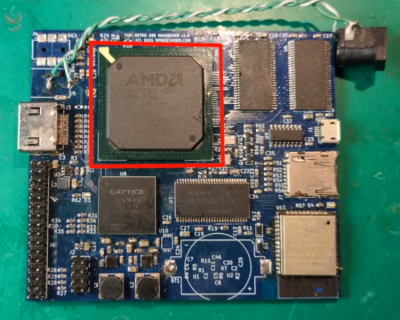
The core of the build was an AMD Elan SC520, running at 133 MHz. This was one of the so-called “586” chips that were spawned following the 486 era, in [Jeroen’s] words, being a “486 but a bit souped up.” This chip came out in 2000, a full six years after Intel curtailed 486 production, a time when the Pentium III was already hitting 1 GHz clock speeds. It’s an anachronistic choice for a 1995 machine, but [Jeroen] picked it for good reason. The Elan SC520 was more of a system-on-chip, integrating lots of supporting low-level hardware onto the CPU itself, like the real-time clock and programmable interval timer (PIT), which would make his build easier. [Jeroen] threw this on a board with an FPGA and an ESP32 and a smattering of support components, and got a general purpose machine up together in a tiny form factor. If you’re thinking of a Raspberry Pi built with a knockoff 486, you’re not far off the money.
This first build had some issues that caused a lot of stress. Namely, the Elan SC520 was a large BGA, and it was difficult to verify if it was perfectly soldered or not. This meant that as [Jeroen] worked on the board and spun up the supporting FPGA and such, it was very difficult to know if things weren’t working because of his own code or because of a missing solder ball or a short. This led him to return to the drawing board.
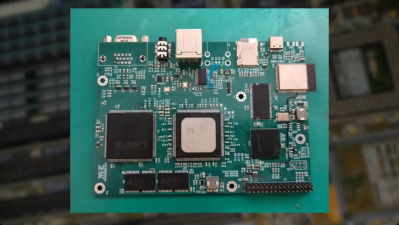
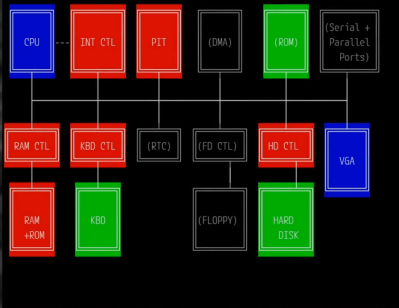
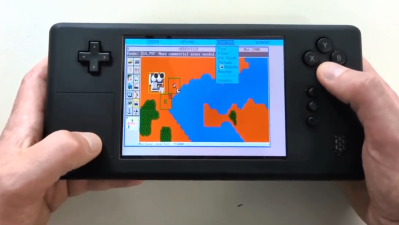
The second attempt involved a regular CPU rather than the difficult-to-wrangle AMD system-on-chip. Namely, a classic i486 DX4-100 and AM486DX5-133 were sourced as potential CPU options. A C&T F65545 VGA chip was enlisted to handle graphical duties, being a laptop chipset that integrated lots of necessary support hardware into the one package. The plan was to throw just about everything else into an ECP5 LFE5UM-45 FPGA chipset, plus an ESP32-S3 to act as a peripheral interface. [Jeroen] decided to use SDRAM, which was much newer than that typically used with a 486, but this was chosen for being easy to integrate with the FPGA. With a goal to just get to a DOS prompt, [Jeroen] eliminated as much extraneous hardware as possible to get the project moving forward quickly. After spinning up a PCB, learning all about what it takes to bring up a 486-based machine, and working up the FPGA-based chipset, things all came together. A bit of cribbing from MiSTer projects helped, too. [Jeroen] eventually had his new old machine displaying a basic BIOS, then running some benchmarks, and then even running games like Commander Keen. The talk goes on to explain all the other little bits and pieces that come together, like storage, MIDI support, sound, and networking. Seeing it then turned into a portable game station named the Vapourdeck is just the icing on the cake.












Aliexpress have 8086 and 386 retro laptop.
“Namely, the Elan SC520 was a large BGA, and it was difficult to verify if it was perfectly soldered or not. This meant that as [Jeroen] worked on the board and spun up the supporting FPGA and such, it was very difficult to know if things weren’t working because of his own code or because of a missing solder ball or a short.”
This is a solved problem: it’s literally what the JTAG boundary-scan test interface is for: you just literally toggle the pins via the JTAG interface and observe them either at test points or at the FPGA.
The other trick, even without JTAG, is to solder the BGA first and use the protection diodes to tell if something’s connected. Then you can always reflow it again if there’s an issue.
Sure, if something 100% did not make contact then JTAG or the protection diodes will show that. The issue I had is that the balls might be (barely) in contact with the pads, but not soldered to them. That means there is an intermittent connection, which is not easy to detect, but will absolutely drive you crazy if you think you’re solving some kind of timing issue.
Yeah, I mean, I’m a bit lucky in that I’ve got a thermal chamber for easy stress testing on things like that – if it keeps contact over like -20 to +50 C it’s not a cold joint. Although one other trick I used to detect a poor joint in a remote situation is to heavily oversample the transition at the FPGA (like, literally as fast as the FPGA can possibly do it) – a poor joint actually shows pretty different edge transitions than a good one due to the capacitance.
Now that I think about it it’s also somewhat harder because for older chips like this the voltages/etc. are so much higher just due to the process. Protection diode thresholds actually turn out to be really sensitive to cold joints on modern chips.
Btw, you can quote with
> quote text
yeah but then it’s huge
Every time someone builds a retrocomputer that runs DOS I ask myself, “But can it run Terminal Velocity?” :D
Based on the Doom performance I think it would run it somewhat decently. It would be interesting to try modern DOS variants or retrocomputer OSes on it and see how close you can get it to modern usability too!
Oh, I have a worse reaction than that. These people should be using FreeDOS, or DR-DOS or SvarDOS(branched from FreeDOS) from the start, just to shout out to Open Source. Linux otherwise. Or why not CP/M? The only answer I can come up with is they were brainwashed by Microsoft from a very early age and suffer brain damage from it. It’s not even as if one has to learn a different commands of a different operating system, if you know DOS, you can use FreeDOS.
Btw, there’s a small but important distinction between “retro PC” and “vintage PC”.
First one is a PC assembled from various parts that mimics the look and feel of a classic PC.
Example: An Socket 939 system running DOS and using a PCI soundcard with an SB Pro TSR (or SBEmu) to enable legacy sound support.
It maybe has an USB gaming mouse and a modern USB flat keyboard.
Screen is a flat screen with some 3dfx stickers on the frame.
The A: drive is a Gotek floppy emulator, a BD ROM drive is the CD-ROM drive replacement.
Fun, no question. And very retro.
The second one is being assembled using the real parts/real technology of its time.
Example: A 486DX2-66 system with VLB slots running MS-DOS 6.22
or OS/2 Warp and using an SB16 ISA soundcard with a single or double speed CD-ROM drive.
Graphics card is an Tseng ET-4000, a 14″ VGA CRT monitor is the screen.
Mouse is a two or three button serial ball mouse on COM port.
Keyboard is an PC/AT compatible model, say IBM Model M or Cherry G83 (RS 3000), without Win95 keys.
Modem is a Creatix 28k8 external modem. Network card is an Novell NE 2000 or Etherlink III.
And what is this then? An old CPU with a custom/new FPGA support? Neither? Half/half? I mean, that’s the point of his hack, and the talk.
Good question, I’m not certain. Something in-between, I guess? 🤷♂️
I just thought I should mention that there are at least these two terms,
because nowadays anything old is quickly being referenced as “retro”.
And while, say, NES Mini (that emulator box) rightfully is “retro”,
a real old Nintendo simply is a piece of vintage/classic hardware.
Because it simply is what it is, in all its honesty.
It’s not the result of a trend or a wave of nostalgia or something along these lines.
Somewhere inbetween are replicas and clones, which are more recent but mimic the vintage hardware very closely.
Such as an replica of an 1990 AdLib card.
It looks same by 99%, sounds the same and is functionally same, too.
It also uses same technology of the original (same parts).
So all in all, it’s almost same as the original.
I guess that such a replica can be seen as neither retro/vintage or as both same time, depending on someone’s point of view.
Or it doesn’t really fit the categories, maybe. It’s simply its own thing (a replica) maybe.
(“Retro” used to mean backwards-looking, backwards-turned.
Something new that tries to resemble something from the past.)
Modern remakes of Pacman, Space Invaders etc can be considered “retro” games, for example.
Or let’s take an early Atari Flashback console which had a NOAC (NES on a chip) running re-makes of popular Atari 2600 games.
That wasn’t vintage but rather retro (and a masquerade).
(Another use of retro: If something is “retro-fitted”, it means that something new was added to an older device retroactively.)
So it’s Not a retro PC but a chimera PC?
Good question. It’s an “IBM compatible PC”, at very least.
Or more precisely an “PC/AT compatible”.
Btw, in late 80s, after the Compaq Deskpro 386 was released, the term “AT 386” was occasionally used for a while, too.
In ads in PC magazines there had been PC, PC/XT, AT and AT 386.
That’s because ATs normally still used 80286 CPU.
By late 1989, the 486 was very new, still, and so the 386 remained high-end.
I’m not sure what’s the point. There’s a few 8086 + DOS emulators out there. Used one not long ago to run the original Prince of Persian and the J-bird games… :)
I still miss my ZX Spectrum since I’m from Europe. This one would be easy to build using some Arduino though.
Oof! It’s different to each one, I suppose. Hard to explain.
Personally, I think that emulation was very fascinating in the 90s and still is.
But after working primarily decades with emulators, it’s nice to see something real again. For a change.
And FPGAs are programmable function blocks that can be used to simulate hardware circuits.
It’s an in-between of real hardware and emulation.
Some describe it as hardware emulation as opposed to software emulation.
The FPGAs are often contain a microchip, too. Such as an ARM core.
This blurries the lines a bit, unfortunately.
Good choices! 🙂👍
They look best on a CRT or a good emulation of it, I think.
The unfiltered raw output doesn’t really do justice, IMHO.
It’s like playing modern video games without anti-aliasing.
That’s why older or simpler emulators without filtering nolonger do justice.
We nolonger have the PCs with CRT monitors these emulators were written for.
Because when they were written, sophisticated CRT emulation wasn’t much needed yet because CRT monitors were still in use, after all.
A simple bilinear filtering and some scan line effects was all there was.
This is nolonger enough, unfortunately. Unless there’s external CRT emulation (a box between PC and TFT).
That would be cool! 😎 I recommend using composite output and a b/w TV set.
The same display config like for the ZX 80/81, basically. That’d be a good match, IMHO!
Here in Europe, I think, old b/w TVs are still available in a greater number.
At least compared to VGA monitors and video monitors.
Plus, b/w TVs were very long-lived. The models from 1970s onwards, at least.
That’s when DC power supplies and circuits using reliable ICs were used in portable TVs.
They were quite reliable, also due to their simplicity.
Will someone just lmk when I can get a 486 motherboard with soundblaster Pro and ET4000 video emulated in FPGA? kthxbye
I’ve got a small preference for something with an FPU. My old DOS box was a Dell Pentium 90 board stashed in an old AT case after my last upgrade before I lost it in moves. It was much faster than the AM386-40 that was previously in that case. I assumed at least some of that was FPU. But maybe that only got used for Doom and similar?
Why the FPU and not a combination of higher CPU speed and IPC, presence of internal L1 cache, big L2 cache, faster RAM, system bus, graphics, and hard drive?