Particle System Busy Box Keeps Baby Occupied

Busybox

Any child born today has a bright future ahead of them—mostly consisting of watching glowing rectangles for 80 or 90 years. To give his progeny a jump-start on a lifetime of watching LEDs flicker, [Dan] created a busy box. It’s really just an Arduino, RGB LED matrix, and a programmed particle system, but if we’re fascinated by it, it will probably blow an infant’s mind.

The idea for this busy box originated with an earlier Hackaday post that used an 8×8 matrix of RGB LEDs to create a moving color cloud. [Dan] took this project as a jumping off point and created an infant’s busy box with four modes that are sure to be entertaining.

Inside the is a Rainboduino: an Arduino compatible board capable of driving an 8×8 RGB LED matrix. Also stuffed inside the busy box is a 9V battery, rocker switch for the power, and four arcade buttons that cycle through each mode. The first mode is some sort of ‘plasma cloud’ simulation, the next is a ‘painter’ light display. The final two modes spell out [Dan]’s spawn’s name, and all the numbers and letters of the alphabet.

Continue reading “Particle System Busy Box Keeps Baby Occupied”
Fubarino Contest: A Shifter With An Easter Egg

shifter

A few months years ago [Wes] shared a project of his on the Hackaday Forums (yes, we do have a forum and you should check it out). He created a shifter for some sim racing, greatly improving on any system that uses a keyboard.

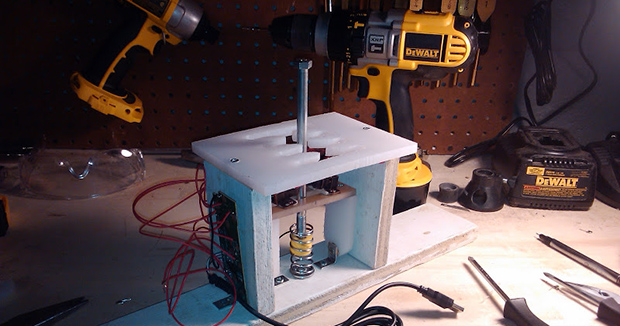
The shifter is made out of some scrap wood, a cutting board cut with an H-gate shape, and a few arcade microswitches. A giant bolt locks into a few cabinet clasps for each gear position, and the set of microswitches connected to a USB game pad tell [Wes’s] virtual car what gear he should be in.

It’s a great build, but because this is an entry for our Fubarino contest, [Wes] needed to put an easter egg with the Hackaday URL in there somewhere. To solve this problem, [Wes] upgraded the electronics with a Teensy 2.0. When the gears are shifted into 1st, 3rd, 3rd, and 7th, the Teensy blinks the URL in Morse and opens up a web browser that loads up Hackaday.

Not only is it a great build, it’s also a very, very subtle easter egg for our favorite website. Demo of the egg below.

Continue reading “Fubarino Contest: A Shifter With An Easter Egg”

Testing Six Hundred Fish

fish

That’s the best and most obtuse title you’ll ever see for a Hackaday post, but surprisingly it’s pretty accurate. [Bob] over at the Sector67 hackerspace took part in a 111-day accelerator program in Shenzhen last year to improve his manufacturing skills. He’s just about ready to release his first product, a Bluetooth device that connects to an ice fishing tip-up. The blog for the device recounts the challenges of taking a project from a circuit to a finished product, and illustrates the difference between building something with an Arduino and selling thousands of devices.

The circuit boards for BlueTipz come in panels of eight, but what’s the best way to populate and solder five thousand devices in a reasonably short amount of time? [Bob] hired a few students from the local college to help him out in assembling all these devices. The plastic enclosures were made at a local plastics manufacturer, but the molds were made in China. The manufacturer needed to modify the molds a bit, but after a few days, [Bob] had five thousand enclosures ready to stuff full of electronics.

With the devices assembled, it’s time for programming, and that means building a programmer. [Bob] put all the guts for the device into a plastic box and 3D-printed a mount for the bare BlueTipz board. Put a board on the mount, press a button, and the tech now has a functioning device in his hands.

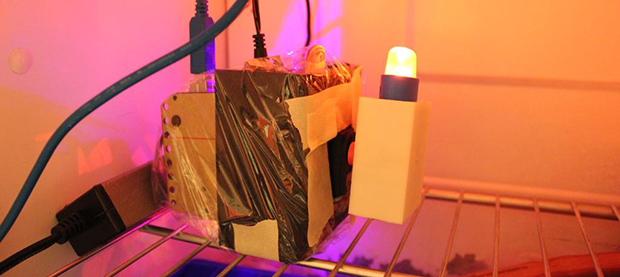
Besides manufacturing, there’s also a whole lot of testing that went into the design of BlueTipz. Because this is a device for ice fishing—a cold and potentially windy operating environment—[Bob] built a test rig in a freezer. The test rig triggers the device’s sensor, waits two minutes (the amount of time it would take for an ice fisherman to check the tip-up) and resets. They claim the battery life is good for 600 fish, and with this testing rig they were able to verify their calculated battery life with real-world data: without actually catching six hundred fish, of course.

Not only does [Bob] have a good bit of product development under his belt, he was also kind enough to go over the stuff everyday electronic design just doesn’t cover. Developing a product is something you can only learn by doing, and we’re glad [Bob] chose to share his experiences with us.

Fubarino Contest: Simon Says Hackaday

When [Scott] saw our announcement of a contest to win a Fubarino, he had the remarkable insight that designing new hardware wasn’t required. Instead, he took a Simon soldering kit and added a Hackaday easter egg that beeps our favorite URL in Morse code.

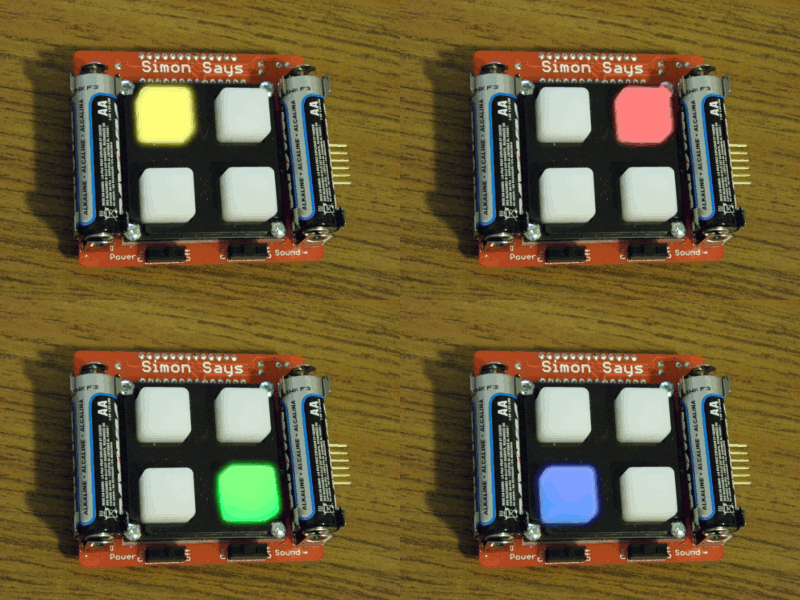
[Scott]’s entry began with a Sparkfun Simon Says Soldering Kit. It’s a great kit featuring an ATMega328, four buttons and LEDs, and a speaker. Stock, this board comes programmed with a run-of-the-mill Simon game, but it also includes a serial bootloader and a set of serial pins for reprogramming.

The new firmware for [Scott]’s Simon uses Morse code for ‘hackaday.com’ to determine the time in between the button flashes for each round. Compared to the old-school Simon toy from the 70s, [Scott’s] version seems just slightly more difficult; the game is basically the same, but trying to remember the pattern when the buttons don’t light up in a regular pattern is more challenging than usual.

Because [Scott] isn’t the greatest at Simon, he added another method to generate the full Morse for ‘hackaday.com’. While pressing one button starts a new game, holding down two buttons simultaneously will write out the full Morse of ‘hackaday.com’ on the upper left-hand button: a great easter egg that also adds some difficulty to a classic game.


This is an entry in the Fubarino Contest. Submit your entry before 12/19/13 for a chance at one of the 20 Fubarino SD boards which Microchip has put up as prizes!

UsbXlater For PS4 Keyboard And Mouse Action

USB

[Frank Zhao]—an awesome guy, an inadvertent Hackaday contributor, and an Adafrut fellow—has come up with a device to use a keyboard and mouse with Playstation 4 games. He calls it the UsbXlater, and even if [Frank] can’t get it working with his PS4, it’s still going to be an awesome tool.

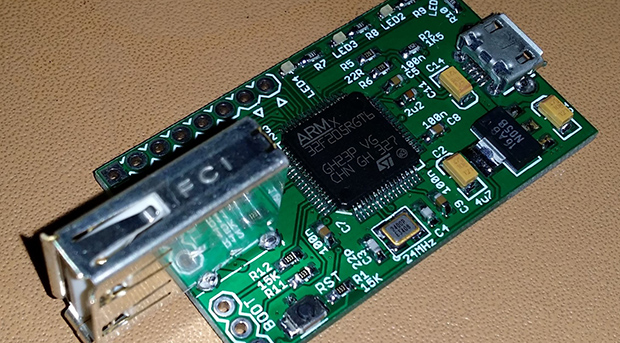
On the board are two USB ports and an STM32F2 microcontroller. The micro provides a USB host interface and a USB device interface, enabling it to translate mouse movements and keystrokes into something a PS4 can understand.  While this project was originally designed to use a keyboard and mouse on [Frank]’s shiny new PS4, it’s not quite working just yet. He’s looking for a few gamer/dev folks to help him suss out the communication between a keyboard/mouse, the UsbXlater, and a PS4.

Of course, even if this device is never used for what it’s designed for, it’s still a very, very interesting tool. With two USB ports, the UsbXlater could act as a signal generator for USB devices and hosts, analyze USB traffic, or provide other applications that haven’t even been thought of yet.

[Frank] is hitting his head against the wall trying to figure out the PS4 protocol, so if you have some USB skills, feel free to hit him up for a blank PCB, though preference falls to people who will game with it and to those with a USB traffic analyzer. If you lack the skills for USB development, [Frank] is still looking for a better name for his device.

Hacking A Reader For Medical Test Strips

med

[Rahul] works at a startup that produces cutting edge diagnostic test cards. These simple cards can test for enzymes, antibodies, and diseases quickly and easily. For one test, this greatly speeds up the process of testing and diagnosis, but since these tests can now be administered en masse, health services the world over now have the problem of reading, categorizing, and logging thousands of these diagnostic test cards.

The normal solution to this problem is a dedicated card scanner, but these cost tens of thousands of dollars. At a 24-hour hackathon, [Rahul] decided to bring down the cost of the card scanners by whipping up his own, built from a CD drive and an Arduino.

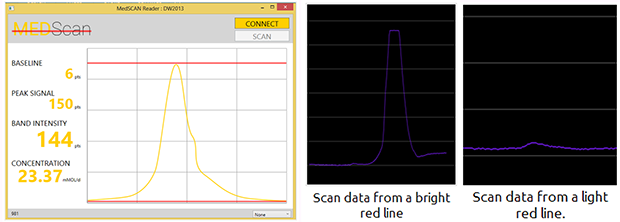
The card [Rahul] used, an A1c card that tests for glucose bound to hemoglobin, has a few lines on the card that fluoresce with different intensify depending on the test results. This can be easily read with a photodiode connected to an Arduino. The mechanical part of the build consisted of an old CD drive with a 3D printed test strip adapter. Operation is very simple – just put the test strip in the test strip holder, press a button, and the results of the test are transmitted over Bluetooth.

Not only is [Rahul]’s build extremely simple, it’s also extremely useful and was enough to net him the ‘Most Innovative Project’ prize at the hackathon in his native Singapore.

Raspi Notifies You Of Space Station Passes

ISS

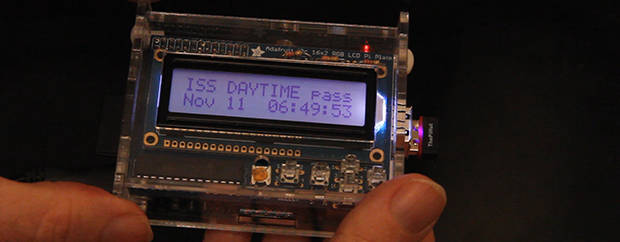
A few months years ago, [Liam] funded a Kickstarter for a small desk toy that would tell him when the International Space Station was overhead. [Liam] got a little tired of waiting, so he decided to build his own with a Raspberry Pi and an astronomical computation Python library.

The impressive part of this build is computing where an orbiting object is in the sky given the ISS’ orbital elements. For this, [Liam] is using PiEphem, a library that can compute the positions of the sun, moon, planets, asteroids, and Earth-orbiting satellites given a location and a time. Since the ISS orbital elements change every so often, his software is set up to download an update every week or so.

[Liam] developed a few versions of his space station detector, each with a different display. The simplest uses a few LEDs, either through a LedBorg, Blinkstick, or PiGlow to serve as a notification of when the ISS is overhead. Two more complicated versions use an LCD display or LED matrix to signal when the next ISS pass will occur.

Video demo below.

Continue reading “Raspi Notifies You Of Space Station Passes”