3D Printed Prosthetic Hand

hand

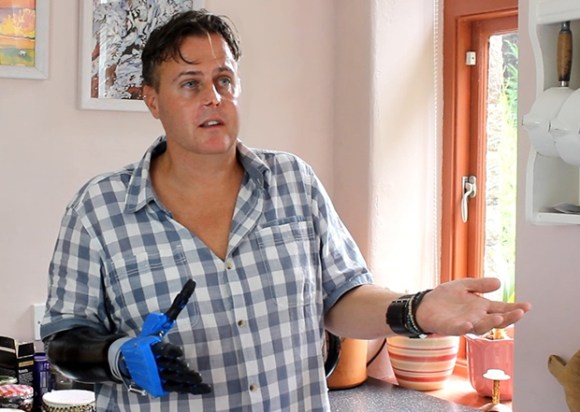
3D printing – with the promise of low-scale manufacturing and custom parts – is ideal for the prosthetic industry, but so far prosthetic hands have been a very, very hard nut to crack. [Joel] has been working on the Open Hands Project, a project that aims to make robotic prosthetics accessible to makers, researchers, and amputees alike.

Even though the mechanisms inside the hand are fairly simple – DC gear motors retracting steel cable ‘tendons’ – [Joel] was able to pack all this equipment into a very small volume that isn’t much bigger than real, meat-based hands. To actuate the mechanical muscles in the hand, the user simply flexes a few muscles in their forearm. These electrical signals are picked up by a suite of custom electronics and tell the Open Hand what to do

In [Joel]’s Indiegogo video, he goes over what makes his robohands work with a little help from [Liam Corbett], hand amputee. Aesthetically, the Open Hand is a big improvement over [Liam]’s two-pronged hook, and with the dexterity demonstrated in the video, possibly a lot more capable.
Continue reading “3D Printed Prosthetic Hand”

Putting Every Game Console In The Palm Of Your Hand

SNES

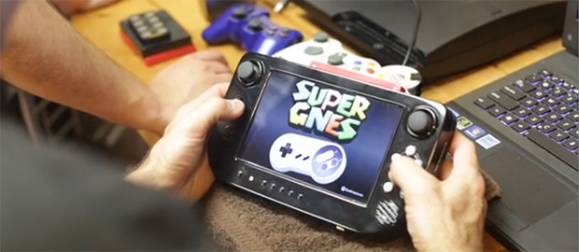
Casemodders extraordinaire [Downing] and [Hailrazer] are known for their fabulous builds that put just about every gaming console into a portable hand-held format. Everything from a Game Cube to N64s and a Sega Genesis have been conquered by the two, and for the last year they’ve been putting their heads together to make the best solution to portabalizing console gaming forever. It’s called the Cross Plane, and puts just about everything with an HDMI connection in the palm of your hand.

The build began as one of [Downing]’s more ambitious projects. He imagined a system that could play nearly every retro game on a small handheld device. After finishing this build, he set up a Kickstarter and called up his friend [Hailrazer] to get some feedback. Just hours before the Kickstarter launched, [Hailrazer] suggested making a device for modern consoles. [Downing]’s pride and joy was scrapped, but out of its ashes arose the Cross Plane.

Inside the Cross Plane is a wireless HDMI receiver and a 7″ 720p display. This, along with a few buttons and analog controls, allow the Cross Plane to serve as a remote display and controller for an XBox 360, Playstation 3, and even a PC, for all that retro emulator goodness.

It’s a really, really cool project, and since the dream of an open Wii U controller seem to have died, we’re thinking this could be a great controller for an FPV quadcopter or other remotely operated vehicle.

3D Printering: Electronics Boards

If you’re gearing up to build a 3D printer, one of the first things you’ll need to look at is your options for electronics boards. Whether you decide to optimize for cost or capability, the choices you make during the planning stages of your build will drastically affect what the final project will look like and how it will behave.

There are a ton of electronics boards out there, so for this installation of 3D Printering, we’re going to take a look at what’s available. Hit the link below to give Hackaday more pageviews read the rest.

Continue reading “3D Printering: Electronics Boards”

My First Brainf*ck

fuck

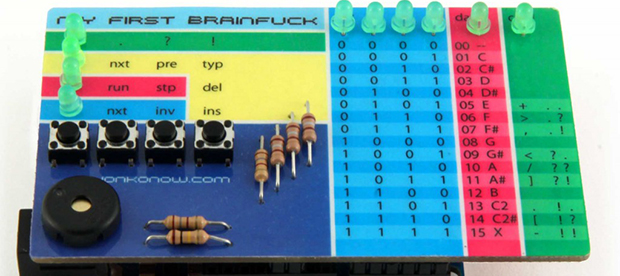
There was a time – not too long ago – that a ‘my first computer’ required the use of machine code and an understanding of binary. While an introduction to computers is now just how to put a Raspberry Pi image on an SD card, a few people are keeping the dream of memorizing opcodes alive. One such person is [Johan von Konow], creator of My First Brainfuck, an ultra small, low-cost programmable computer.

My First Brainfuck is an Arduino shield designed to have all the features of a normal computer, but without all those messy mnemonics that make assembly programming so easy. This computer is programmed in Brainfuck, a purposely obtuse programming language that, while being incredibly esoteric and difficult to program in, can be very, very rewarding.

[Johan] has a short tutorial showing how his computer works and how the Brainfuck language operates. There are only eight commands in Brainfuck, perfect for such a minimal user interface, but with enough patience, nearly anything can be written in this difficult language.

Right now there are a few examples showing how to play a scale on the on-board buzzer, displaying a Larson scanner on the LEDs, and a few more programs will be published in the future.

A Really, Really Tiny Microcontroller Board

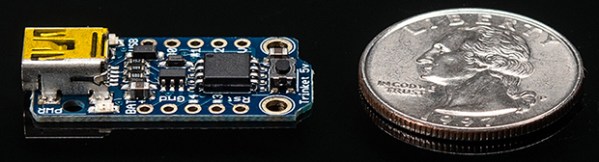
Here’s something very cool from the wonderful world of Adafruit: The Trinket, an Arduino compatible microcontroller platform that’s not only small enough to fit in your pocket, it’s small enough to lose in your pocket.

Like the similarly specced Digispark, the Trinket features an ATTiny85 microcontroller with 5 IO pins. Unlike the Digispark, the Trinket is a bit more substantial, featuring 3.3 and 5 Volt regulators along with a real USB port and mounting holes. As this is based on the ‘tiny85, it’s possible to connect this up to I2C and SPI sensors and peripherals

One thing to note about the Trinket is the fact that it’s so cheap. Either version of the Trinket goes for about $8, inexpensive enough to simply leave in a project when you’re done with it. Given the cool stuff we’ve already seen created with the Digispark, including a homebrew stepper motor and an Internet meme and lame pun assessment tool, we can’t wait to see what’s made with the Trinket,

Jack The DVD Ripping Robot

[Andy] had a fairly large problem on his hands. For the last 15 years, he’s been collecting DVDs, and since he began, he’s run out of space on his shelves for these miraculous plastic discs. Everything’s going to the cloud now, so he decided to build a media server, replete with rips of all his DVDs. As anyone who has ever tried to rip a movie knows, this can be a very long and tedious process. His solution to this should be something near and dear to all of us – he decided to build a robot to rip all his DVDs automatically.

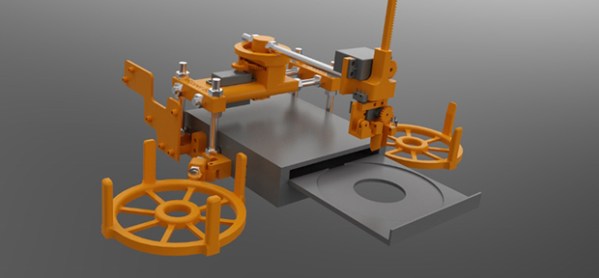
With a brand new 3D printer, [Andy] set to work on designing Jack the Ripper Bot. The design has two trays mounted to a standard computer DVD drive, an ‘in’ tray and an ‘out’ tray. The frame of the machine bolts directly to the drive, and the entire contraption is driven by only three standard hobby servos.

The robot is driven by a Raspberry Pi, but the ripping actually takes place on an old laptop. [Andy] says it takes about an hour and a quarter to rip a DVD, so a full ‘in’ tray of 24 discs means about 28 hours of ripping time. Feeding the machine once a day is a lot better than returning to the computer every hour or so, we think.

All the STLs for the printed parts and the software for the Raspi and computer are up on [Andy]’s github, should anyone want to upgrade this to a Blu Ray ripper.

Thanks [Stephen] for sending this one in.

Continue reading “Jack The DVD Ripping Robot”

Making Asteroids Miniature

Asteroids

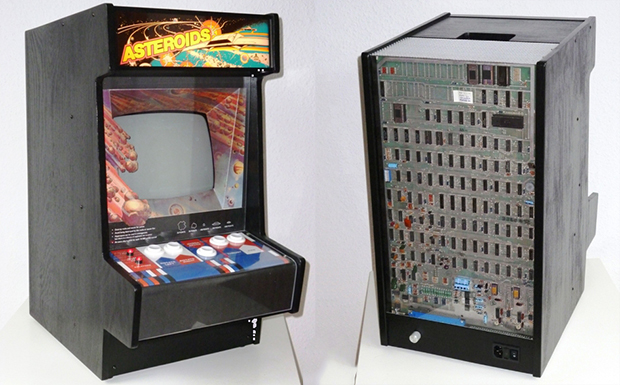
Mini arcade cabinet builds are fairly common, but we’ve never seen anything like [Jurgen]’s mini vector Asteroids cabinet that takes an original Asteroids circuit board and a true vector monitor and shrinks it down to table top size.

Unlike the raster monitors of a later generation’s arcade games, the original Asteroids cabinet used a vector monitor just like one would find in an oscilloscope. [Jurgen] found the perfect CRT in, of all places, a broken Vectrex console. The video circuitry in the Vectrex was rather primitive and the beam deflection was far too slow for the video signals generated by the Asteroids PCB. To get around this, [Jurgen] added a custom XY driver board. While the Asteroids game – and other vector Atari games – were designed for a screen with 1 MHz of bandwidth, [Jurgen] found that 300 kHz was ‘good enough’ to display proper Asteroids graphics.

While the cabinet isn’t a miniaturized version of any proper cabinet, [Jurgen] did manage to build a rather nice looking case for his luggable version of Asteroids. The exposed PCB on the back is a great touch, and an awesome project for any ancient video game aficionado.