Raspi Bitcoin Miner May Just Pay For Itself Eventually

We’re sure a lot of people out there have a Raspberry Pi or two lying around waiting for a project to come to mind.  [Dave] has an interesting solution to this orphaned hardware – use it to mine Bitcoins and perhaps put a few extra bucks in your pocket at the end of the year.

[Dave] is using a Raspberry Pi, powered USB hub, and an ASICMiner Block Erupter to do Bitcoin mining at 330 Megahashes per second. There are a few ancillary items such as a case and USB fan, but if you already have a Raspberry Pi, you’re only looking at a $50 USD investment to have a dedicated Bitcoin miner.

According to this Bitcoin mining profitability calculator, with a $50 investment that can mine at 330 MH/s, you’re looking at a hardware break even point of about 120 days. You could cut that down to just a few months if you overclock your ASICMiner, but it’s still relatively late in the game for amateur Bitcoin miners to make a substantial amount of money. Think of Bitcoin mining as more of hobby, and you’ll hopefully be more realistic about your goals.

Swapping The Sensor In A DSLR

OLYMPUS DIGITAL CAMERA

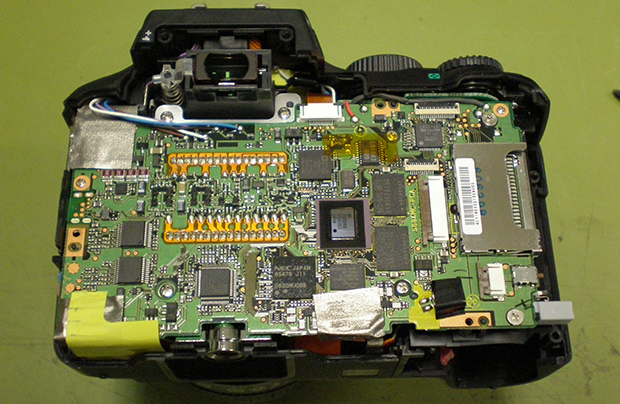
To take a color image, modern digicams have something called a Bayer pattern – small red green and blue filters, one color for each pixel – that drastically reduce the resolution if all you’re doing is taking black and white pictures. [Lasse] is an astrophotographer, and doesn’t exactly need color pictures, so he decided to swap the color sensor in his camera with a monochrome CCD.

Most DSLRs have CCD sensors on strange surface mount packages or put everything on flex PCBs. [Lasse]’s Olympus E-500, though, features an 8 Megapixel CCD on a ceramic DIP that is actually fairly easy to remove given the right tools and just a little bit of mechanical encouragement.

After putting in a new monochrome CCD, [Lasse] had a much more sensitive sensor in his camera, and processing the RAW files off the camera gives him a great improvement for his astrophotography.

This isn’t [Lasse]’s first adventure in tearing apart DSLRs for astrophotography. Earlier, he uncovered the secrets of the Four Thirds lens format with a logic analyzer, making his Olympus camera a wonderful tool for looking into the heavens.

0x10c Becomes A Community-developed Game

0x10c

It’s official. [Notch], creator of Minecraft, has confirmed he’s shelved plans for 0x10c, the space-based block building and exploration MMO that features assembly programming as a core game component.

Over the last year or so since 0x10c was announced, a whole lot of programmers have picked up the in-game fictional CPU – the DCPU – by writing emulators and even emulating this CPU that only exists as a design document on an AVR. Needless to say, there are a lot of very skilled programmers that want this game to exist. Now, it seems, this community is forging ahead with this project without [Notch].

This is a truly massive undertaking by the community. Not only are the current plans to build an open world, procedurally generated, space-based MMO, it looks like these new developers will also be writing their own engine from scratch. If this were a commercial endeavour, it would require millions of dollars and many years to get to a rough alpha build, and the 0x10c community is doing this for free.

If you have experience in C++, OpenGL, and 3D game programming, the official signup thread is over on the 0x10c subreddit. Even if you’re not a programmer and only have experience in modeling, writing, your experience would be greatly appreciated.

Hackaday Links: August 11, 2013

While we’re not much for fashion hacks, we’re reasonably impressed with [Karolina]’s faux Chanel bag made of chips. Apparently a grid of black squares is one of Chanel’s trademark looks, and a thousand or so QFP chips makes for a reasonable substitution.

News of the death of our retro edition has been greatly exaggerated. [Brandon] got an old Apple IIe up on the Internet and loaded up our retro edition, so we’re sort of obliged to mention him. He’s using a Super Serial Card connected to an OS X box running lynx. With getty running, he can shoot the output of lynx over to the Apple. Awesome.

Take an old Yamaha organ, convert the keyboard to MIDI, throw in a few Arduinos, thousands of LEDs, and a handful of bubble machines. What you end up with is the bubble organ, as seen at the Bass Coast Festival last weekend. If you want a hands on, you can also check it out at the Rifflandia festival in BC, Canada this September.

Some guy over on reddit created the smallest Arduino in the world. We’re looking at a rank amateur here, though. I’ve been working on this little guy for the last 18 months and have even created an open source cloud based github design for the production model. It’s less than half the size of a Digispark, and also Internet of Things 3D interactive education buzzword buzzword.

[Moogle] found an old Super 8 camera at an estate sale. No big deal right? Well, this one is clear, and it uses light-sensitive film. Your guess is as good as ours on this one, but if you know what’s up, drop a note in the comments.

One day [John] decided he would put a PC inside an old G3 iMac. After a year, it’s finally done. He took out the CRT and replaced it with a 15″ Dell monitor. The G3 was discarded for an AMD, and the internal speakers and slot-load CD drive still work. It’s a really, really cool piece of work.

Bitbanging I2C By Hand

I2C

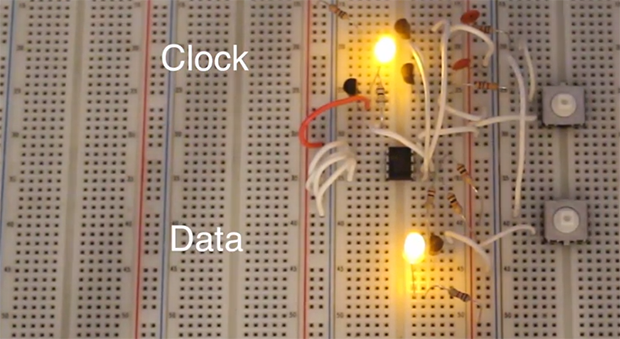
Play around with electronics long enough, and eventually you’ll run into I2C devices. These chips – everything from sensors and memory to DACs and ADCs – use a standardized interface that consists of only two wires. Interacting with these devices is usually done with a microcontroller and an I2C library, but [Kevin] wanted to take that one step further. He’s bitbanging I2C devices by hand and getting a great education in the I2C protocol in the process.

Every I2C device is controlled by two connections to a microcontroller, a data line and a clock line. [Kevin] connected these lines to tact switches through a pair of transistors, allowing him to manually key in I2C commands one bit at a time.

[Kevin] is using a 24LC256 EEPROM for this demonstration, and by entering a control byte and two address bytes, he can enter a single byte of data by hand that will be saved for many, many years in this tiny chip.

Of course getting data into a chip is only half of the problem. By altering the control byte at the beginning of an I2C message by one bit, [Kevin] can also read data out of the chip.

This isn’t [Kevin]’s first experimentation in controlling chips solely with buttons. Earlier, we saw him play around with a 595 shift register using five push buttons. It’s a great way to intuit how these chips actually work, and would be an exceptional learning exercise for tinkerers young and old,

Continue reading “Bitbanging I2C By Hand”

Defeating Reddit’s CAPTCHA

cap

Here’s something we’re sure SEO specialists, PR reps, and other marketeers already know: how to write a script to game reddit.

The course of upvotes and downvotes controls which submission makes it to the front page of reddit. These submissions are voted on by users, and new accounts must log in and complete a CAPTCHA to vote. [Ian] discovered that reddit’s CAPTCHA is not really state-of-the-art, and figured out how to get a bot to solve it

The method exploits the 8-bit nature of the distorted grid in the CAPTCHA. Because this grid isn’t pure black or pure white, it’s at a lower intensity than the letters in the CAPTCHA. Putting the CAPTCHA through a threshold filter, deleting any blocks of pixels smaller than 20 pixels, and running it through a classifier (PDF there), a bot can guess what the letters of the CAPTCHA should be.

Out of the 489 CAPTCHAs [Ian] fed into his algorithm, only 28 – or 5.73% – were guessed correctly. However, because he knows which CAPTCHAs had failed segmentation, ignoring those can increase the success rate to 10%. Theoretically, by requesting new CAPTCHAs, [Ian] can get the accuracy of his CAPTCHA bot up to about 30%.

Combine this with a brilliant auto voting script that only requires someone to enter CAPTCHAs, and you’ve got the recipe for getting anything you want directly to the front page of reddit. Of course you could do the same with a few memes and pictures of cats, but you knew that already.

Making Vector Arcade Games With An FPGA

3d

While we’re sure most Hackaday readers were raised by arcade games featuring sprites, pixels, and other shiny brightly colored squares, this was not always so. Many classic arcade games – Lunar Lander, Gravitar, and Asteroids in particular – used vector displays. Instead of drawing individual pixels, these games functioned more like an oscilloscope, drawing lines. When [Todd] and [Andrew] got their hands on a monitor from an old Asteroids cabinet, they knew what they had to do: build their own vector arcade game.

The guys made their own DAC and Amplifier board that plugs right in to a Nexys2 FPGA dev board. This was after they tested out some 3D drawing code with a gnarly handmade R2R DAC they used to draw and rotate a cube on an oscilloscope screen.

Not only did the guys build a vector video card, they also connected the FPGA’s VGA out to a monochrome monitor for an in-game HUD. Awesome work that blows away anything available in the golden days of vector arcade games. It’s a beautiful piece of engineering that certainly deserves its own cabinet.

Video of the game available below.

Continue reading “Making Vector Arcade Games With An FPGA”