Rolling Digit Clock Is A Wonderful Piece Of Engineering

A long time ago and on a scrounging trip he barely remembers, [Victor] bought a quartet of digits from an old Dutch Railways clock. These antique displays used a strip of plastic coated cloth that rolls around itself with the help of a motor to display the digits 0 through 9. It’s been many years, but [Victor] finally got around to building a clock out of these single digit displays and we’re loving the results.

Because these displays were manufactured in a time when mechanical devices were king, [Victor] had to slightly modify each digit so they could display numbers with the help of a continuous rotation servo. The four servos are controlled by an Arduino – each digit changing one at a time to reduce current consumption – and a magnet and reed switch was added to each digit so the numbers could be repeatedly displayed.

Before [Victor] replaced the plastic servo gears with metal cogs, the clock was quite noisy. He’s since put each digit underneath a bell jar (actually a vase turned upside down), and we’ve got to say that [Victor] has a nice clock on his hands. Check out the videos of the clock changing digits to display the time after the break.

Continue reading “Rolling Digit Clock Is A Wonderful Piece Of Engineering”

Hackaday Links: Leap Day, 2012

The Earth orbits the Sun every 365.256 days. Because this number isn’t a whole number, an extra day is tacked onto February every four years, unless the year is evenly divisible by 100, except in cases where the year is divisible by 400, or something like that. To commemorate this calendar hack, here’s some stuff that has rolled in over the last week or so.

Marble sequencer

[Brian] sent in this marble-based sequencer that sounds like someone is running MIDI into an Atari 2600. There are photoresistors in there somewhere, and it really reminds us of those thingamagoop robots.

YouTube CLI

[Mike] uses YouTube as his music library. While this is a perfectly acceptable way to listen to music, the user interface is terrible. To solve this problem, [Mike] is downloading videos from the command line, automagically converting them to MP3, and playing them over speakers. It works well with SSH, so we’ll call this a win.

Key card lock

[valenitn] just joined the MIT Media Lab, but something was terribly wrong with his keys – an ID card was required to get into the building, but a key was necessary to get into his office. He doesn’t need the key anymore, at least since he modded his office door. Check out the video.

Pop Tart Cat is everywhere

[skywodd] saw our writeup on the Maximite Basic computer and figured he could send in a project he’s been working on. He programmed his Maximite to sing the nyan cat song and then created a BASIC music player. Nice job, [skywodd].

Not sure if brilliant or insane

[Vikash] ran across a forum post where a user named [I Shooter] describes his setup to dual-boot Windows and Linux: [I Shooter] connected data cables to a pair of SATA hard drives, one loaded up with Windows, the other with Linux. The power cables are switched using relays so only one drive is powered at a time. [I Shooter] gets a ton of points for creativity, but there’s a reason this brute force hardware dual-boot setup isn’t more common. We wish there were pictures of this one.

Raspberry Pi Launched

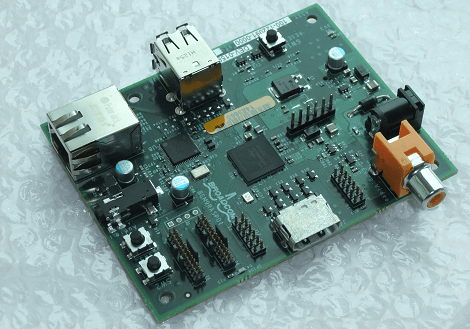
The Raspberry Pi has been launched. When we first heard of this board nearly a year ago, the idea of a $25 computer that displays 1080p video, runs Linux, and has enough ports to the outside world to do some  very interesting stuff, we were cautiously optimistic. Now that the guys behind the Raspberry Pi are getting units out to the masses, we’re a little excited and also thinking about all the cool stuff we’re going to build.

The Raspberry Pi foundation is going with a licensed manufacturing setup with RS Components and Premier Farnell signing up to manufacture and distribute the boards. Right now it’s a strictly one-per-customer situation, but within a month or so you’ll be able to order as many as you would like.

Right now the foundation is focusing on the slightly more expensive ‘B’ model Raspberry Pi that includes Ethernet and USB over the $25 base unit. The ‘A’ model was originally slated to come with 128 MB of RAM, but due to some clever cost saving strategies, the team increased the base RAM to  256 MB.

Right now the only question we have is if an American distributor has signed on to sell this board; we’re sure something awesome will be built with this awesome little board. Commentors pointed out that Newark was selling Raspis for the US market, but they’re out of stock. The best advice may be to wait a few months for production to catch up to demand.

Python PIC Useful When Attached To A Computer

[Richard] sent in a link to the Python controlled microcontroller he’s been working on. Unlike the previous portable Python boards we’ve seen, [Richard] thinks his pyMCU isn’t best used autonomously. This board is meant to be used only when connected to a computer and to serve as a bridge between the digital world of computers and our analog world.

We’ve seen boards running lightweight Python interpreters, but we’re fairly intrigued by the idea of this board only being useful when plugged into a computer. The on-board PIC 16F chip has enough digital, analog and PWM pins to just about any task imaginable, and there’s also a 16-pin LCD display header if you’d like some output with your microcontrollers.

[Richard] says he’s been working with PICs for longer than the Arduino is around, but depending on the level of interest he’ll consider developing an Arduino version of the pyMCU. All we know is that the pyMCU would be awesome to teach electronics and programming to the younglings, and we could certainly find a few more uses for the board when they’re done with it.

Display Twitter On An Arduino

If you ever wanted your name out on the Internet, now is your time to shine. [Chris] hooked up an Arduino to the Internet and is streaming the results of combing through Twitter live to the entire world.

The SocialBot9000, as [Chris] calls his build, is an Arduino Uno connected to an Ethernet shield and an LCD character display. The firmware uses the Twitter API to search for recent posts containing the phrase, ‘socialbot9000.’ A PHP script on the Arduino does all the heavy lifting and with the great Bildr tutorial on getting the Ethernet shield up and running, [Chris] was off to the races.

Because it’s extremely doubtful that everyone on the Internet could manage typing a message into Twitter that would be correctly parsed by the SocialBot9000, [Chris] put a small form up on the build log that will correctly generate the message and take you to your Twitter account for posting. After all that was done, [Chris] decided to have some fun and set up a live feed from a camera in front of the LCD display for the world to watch.

Cheap And Easy Logic Signal Generator

While function generators or analog signal generators are ubiquitous in their utility, we haven’t seen much of logic function generators on Hack a Day. Luckily, [Dilshan] sent in a really neat 8-channel signal injector that is amazingly simple to build and comes with a great front end for editing patterns from your computer.

The hardware portion of the build is kept to a minimum with a PIC18F chip, USB socket, and header pins as the only major components. This board serves as the hardware output for the Kidogo software. This software provides a very nice interface to generate 5 volt logic signals on eight separate channels that will immensely help exploring your digital world.

With a great interface and very easy to build hardware, we can easily see the Kidogo hardware finding its way onto workbenches around the world. We’re tempted to build our own version using an AVR, but we would hate to ruin such a simple but useful tool.

Tethering A Kindle For Free 3G

[Excelangue] just posted a guide to using the free 3G connection in your Amazon Kindle to browse the Internet on your computer.

The hack requires a Kindle Keyboard 3G and the free worldwide Internet access that comes along with the purchase price. After jailbreaking the Kindle and applying a USB network hack, [Excelangue] managed to connect his laptop to the Internet through his computer. The process of tethering the Kindle’s 3G is remarkably easy, but we expect a one-click solution will pop up on the web sometime this week.

Of course we have to note here that tethering a Kindle is against the Amazon terms & conditions, and the data going through your Kindle is tied to a unique ID. If you do this, Amazon knows who you are and is more than likely willing to brick your device. [Excelangue] is looking into tethering to the Kindle over WiFi so Android and iOS devices can get in on the action, but he’s still in the process of experimenting with his build.