Press Button, Receive Hackspace WiFi Code

When you are running a hackspace, network security presents a particular problem. All your users will expect a wireless network, but given the people your space will attract, some of them are inevitably going to be curious enough to push at its edges. Simply plugging in a home WiFi router isn’t going to cut it.

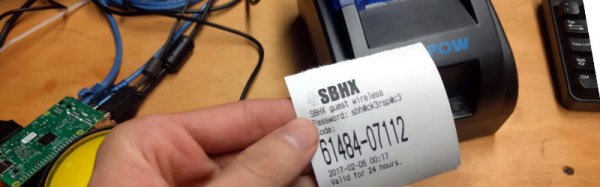
At Santa Barbara Hackerspace they use Unifi access points on their wireless network, and their guest network has a system of single-use codes to grant a user 24-hour access. The system has the ability to print a full sheet of codes that can be cut individually, but it’s inconvenient and messy. So the enterprising hackspace members have used a Raspberry Pi and a receipt printer to deliver a single code on-demand at the press of a button.

The hardware is simple enough, just a pull-up and a button to a GPIO on the Pi. Meanwhile the software side of the equation has a component on both client and server. At the server end is a Python script that accesses the Unifi MongoDB database and extracts a single code, while at the client end is another Python script that reacts to a button press by calling the server script and printing the result.  It’s a simple arrangement that was put together in an evening, but it’s an effective solution to their one-time WiFi access needs.

It’s a temptation as a hackspace to view all of your problems as solvable in one go with the One Piece Of Software To Rule Them All, and as a result some spaces spend a lot of time trying to hack another space’s effort to fit their needs or even to write their own. But in reality it is the small things like this one that make things work for members, and in a hackspace that’s important.

Does your space have any quick and simple projects that have automated a hackspace process? Let us know in the comments.

Thanks [Swiss] for the tip.

Iron Man, In IRON!

Sometimes a project comes our way which has so much information contained in it as to be overwhelming, and on which it is difficult to know where to start. A good example is [Barry Armstead]’s Iron Man suit, to which we were introduced through a very long forum thread that spans several years.

Home-made armour is a staple of the cosplay world, with many astoundingly good creations being produced by fans. What makes [Barry]’s Iron Man suit stand out from the crowd is its construction; instead of fiberglass or vacuum-formed plastic he’s used real metal. (It’s steel. But steel contains iron, right? We’re calling poetic license.)

The best place to follow progress on the suit is probably [Barry]’s YouTube feed, in which he has so far racked up 44 build logs. We see joint articulation tests, early test walks, the iconic helmet taking shape, and the repulsor simulated with a nano sprayer. With so many videos to watch, you’ll be there quite a while. The one we’ll leave you with below the break is fairly straightforward, the first look at the entire exoskeleton in bare metal.

Continue reading “Iron Man, In IRON!”

Coding As A Foreign Language

How many of you speak more than one language? Since Hackaday is an English-language site whose readership is world-wide, we are guessing quite a lot of you are not monoglots. Did you learn your second or third languages at school, and was it an experience you found valuable? How about your path into software? If you are a coder, were you self-taught or was your school responsible for that as well?

It’s been a constant of the last few decades, officials and politicians in charge of education worrying that tech-illiterate children are being churned out of schools ill-equipped for the Jobs Of Tomorrow, and instituting schemes to address the issue. One of the latest of these ideas has come our way from Florida, and it’s one that has sparked some controversy. It sounds simple enough, make coding equivalent to language learning when it comes to credits in Floridian high schools.

You might think that this idea would be welcome, but instead it has attracted criticism from those concerned that it will become an either-or choice in cash-strapped school districts. This could lead to kids without an extra language being at a disadvantage when it comes to applying for higher education. There are also concerns that the two subjects are not equivalent, and should not be conflated.

It’s difficult from the perspective of an adult technical journalist without a background in education to speculate on the relative benefits to young minds of either approach. It is very likely though that just as with previous generations the schools will discover that there is limited benefit in pushing coding at kids with little aptitude or interest in it, and that the benefits in terms of broader outlook and intellectual exercise gained by learning another language might be lost.

Which was more valuable to you at school, coding or learning a language? Were you of the generation that learned coding through BASIC from the manual that came with your home computer, and should today’s kids be doing the same with Scratch and Python on boards like the Raspberry Pi? Let us know in the comments.

Child at computer image: Nevit Dilmen [CC-BY-SA-3.0], via Wikimedia Commons.

LoRaWAN And Raspberry Pi Compute Module For A Remote Display

We see a lot of Raspberry Pi projects on these pages featuring all variants of the little board from Cambridge, but with one notable exception. Surprisingly few of them have featured its industrial embedded cousin, the Raspberry Pi Compute Module. The Pi-on-a-SODIMM form factor is a neat idea, but we are guessing that the high price of the development board relative to that of a Model B or a Pi Zero has pushed most people in our community towards the latter choice.

[Andrew Back] has put up a straightforward demonstration project on the RS DesignSpark site that provides an introduction to the Compute Module 3, using it to run a remotely operated display. In addition it uses an RN2483 LoRaWan radio module and The Things Network for communication, which makes it worth a look even if the Compute Module wasn’t of interest. Continue reading “LoRaWAN And Raspberry Pi Compute Module For A Remote Display”

How Commercial Printed Circuit Boards Are Made

Most of us who have dabbled a little in electronics will have made our own printed circuit boards at some point. We’ll have rubbed on sticky transfers, laser-printed onto acetate, covered our clothing with ferric chloride stains, and applied ourselves to the many complex and tricky processes involved. And after all that, there’s a chance we’ll have ended up with boards that were over or under-etched, and had faults. For many the arrival of affordable online small-run professional PCB production from those mostly-overseas suppliers has been a step-change to our electronic construction abilities.

[Fran Blanche] used to make her own boards for her Frantone effects pedals, but as she admits it was a process that could at times be tedious. With increased production she had to move to using a board house, and for her that means a very high-quality local operation rather than one on the other side of the world. In the video below the break she takes us through each step of the PCB production process as it’s done by the professionals with a human input rather than by robots or ferric-stained dilettantes.

Though it’s twenty minutes or so long it’s an extremely interesting watch, as while we’re all used to casually specifying the parameters of the different layers and holes in our CAD packages we may not have seen how they translate to the real-world processes that deliver our finished boards. Some operations are very different from those you’d do at home, for example the holes are drilled as a first step rather than at the end because as you might imagine the through-plating process needs a hole to plate. The etching is a negative process rather than a positive one, because it serves to expose the tracks for the plating process before etching, and the plating becomes the etch resist.

If you’re used to packages from far afield containing your prototype PCBs landing on your doorstep as if by magic, take a look. It’s as well to know a little more detail about how they were made.

Continue reading “How Commercial Printed Circuit Boards Are Made”

Will Your CAD Software Company Own Your Files, Too?

We’re used to the relationship between the commercial software companies from whom we’ve bought whichever of the programs we use on our computers, and ourselves as end users. We pay them money, and they give us a licence to use the software. We then go away and do our work on it, create our Microsoft Word documents or whatever, and those are our work, to do whatever we want with.

There are plenty of arguments against this arrangement from the world of free software, indeed many of us choose to heed them and run open source alternatives to the paid-for packages or operating systems. But for the majority of individuals and organisations the commercial model is how they consume software. Pay for the product, use it for whatever you want.

What might happen were that commercial model to change? For instance, if the output of your commercial software retained some ownership on the part of the developer, so for example maybe a word processor company could legally prevent you opening a document in anything but their word processor or viewer. It sounds rather unreasonable, and maybe even far-fetched, but there is an interesting case in California’s Ninth Circuit court that could make that a possibility. Continue reading “Will Your CAD Software Company Own Your Files, Too?”

Gliding To Underwater Filming Success

If you are a fan of nature documentaries you will no doubt have been wowed by their spectacular underwater sequences. So when you buy a GoPro or similar camera and put it in a waterproof case accessory, of course you take it with you when you go swimming. Amazing footage and international documentary stardom awaits!

Of course, your results are disappointing. The professionals have years of experience and acquired skill plus the best equipment money can buy, and you just have your hand, and a GoPro. The picture is all over the place, and if there is a subject it’s extremely difficult to follow.

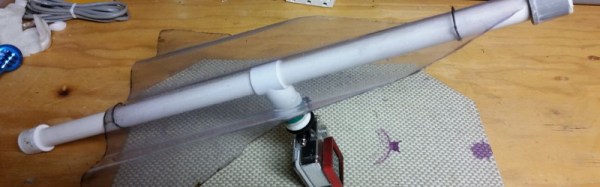
[Steve Schmitt] has an answer to this problem, and it’s a refreshingly simple one. He’s built an underwater glider to which he attaches his camera and launches across the submerged vista he wishes to film. Attached to a long piece of line for retrieval, it is set to glide gently downwards at a rate set by the position of the camera on its boom.

Construction is extremely simple. The wing is a delta-shaped piece of corrugated plastic roofing sheet, while the fuselage is a piece of plastic pipe. A T-connector has the camera mount on it, and this can slide along the fuselage for pre-launch adjustments. It’s that simple, but of course sometimes the best builds are the simple ones. He’s put up a video which you can see below the break, showing remarkable footage of a test flight through a cold-water spring.

Continue reading “Gliding To Underwater Filming Success”