Trying To Fix A GoPro Hero 10 With A No Camera Input Issue

In the search for more exciting broken electronics to repair, [Hugh Jeffreys] bought a GoPro Hero 10 for US$100 with an apparently rather common issue of no camera input, along with a cracked display. This particular camera issue is rather obvious, with just darkness where the camera’s input should appear on the display. Since [Hugh] already needed a spare display, he figured that he might as well get an even more broken GoPro Hero 10 for parts.

Another US$40 later, [Hugh] found himself the proud owner of a second GoPro, this one being water damaged and no longer turning on. Getting to the internals requires removing the glued-in display, which is even trickier than with a smartphone. By inserting a thin blade, adding solvents and not prying, you can slowly work it loose.

With two disassembled GoPros it was now possible to swap modules. After a factory reset and firmware update had failed to fix the first GoPro, the camera module from the donor unit was inserted, but this made no difference. Amusingly, after cleaning the water-damaged unit’s PCBs, it was found to be in good working condition, so ultimately the second GoPro was repaired, leaving the ‘no camera input’ issue undiagnosed.

It’s possible that a board-level repair on the first unit can address the original issue, but without schematics this would likely entail a lot of blindly poking around, in the hope of finding a damaged MLCC or other obvious fault. There is also the possibility that this is a firmware issue, with some reporting luck mashing the record button, but others disagree.

Since [Hugh] did do the firmware reset and updating steps, and even inserted a whole new working camera module, it would seem to narrow the problem down to a board-level issue. Whatever the case may be, it’s a frustrating issue with a rather expensive device.

Continue reading “Trying To Fix A GoPro Hero 10 With A No Camera Input Issue”

Photographing Rocket Chute Deployment At 10 Km

For those who haven’t been following along, [BPS.space] aka [Joe] is on a journey to launch a home-built rocket past the Kármán line where it will officially reach outer space. But one does not simply launch a rocket to outer space on the first try. The process is long and involves not only building a series of rockets, but designing and building propellant mixtures, solving aerodynamic problems, gaining several model rocket certifications along the way, and a whole host of other steps. He’s also documenting the entire process on video as well, which involves some custom camera work like this rocket selfie camera which will take an image of his rockets at apogee.

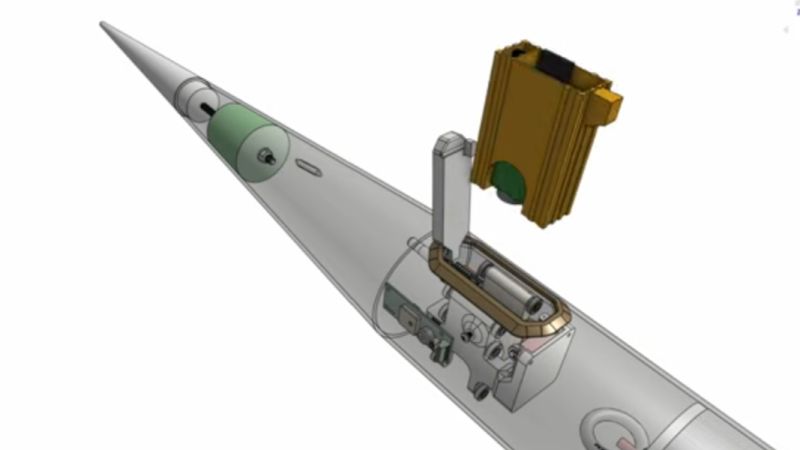
Like most problems in high-power rocketry, extremely tiny problems have a way of causing catastrophic failure, so every detail needs to be considered and planned for in the final design. For a camera that needs to jettison itself from the rocket at a precise moment after experiencing an incredible amount of forces, this is a complicated problem to solve. The initial design involves building a sled for a small deconstructed GoPro which uses springs and a servo to launch itself out of the rocket. The major problem with the design is that even the smallest torque on the sled will cause the camera to point in a random direction by the time it’s far enough from the rocket to take a picture. [Joe] tried a number of design iterations but could not get these torques to vanish.

One of the design limitations with this camera is that it won’t have any sort of parachute or tether itself to the rocket, so it will hit the ground at its terminal velocity. To keep that velocity down and improve survivability chances of the footage, the mass has to stay low. Eventually he settled on a semi-active control system by mounting a brass weight on a small motor, giving the camera module enough stability to stay pointed at the rocket long enough to take the video. Even though it hasn’t flown yet, admitting his first design wasn’t working at compromising on this solution which adds a bit of mass seems to be a good design change. We’ve been following along with his entire process so be sure to check out his actual rocket motor builds and teardowns as well.

Continue reading “Photographing Rocket Chute Deployment At 10 Km”

Catching The View From The Edge Of Space

Does “Pix or it didn’t happen” apply to traveling to the edge of space on a balloon-lofted solar observatory? Yes, it absolutely does.

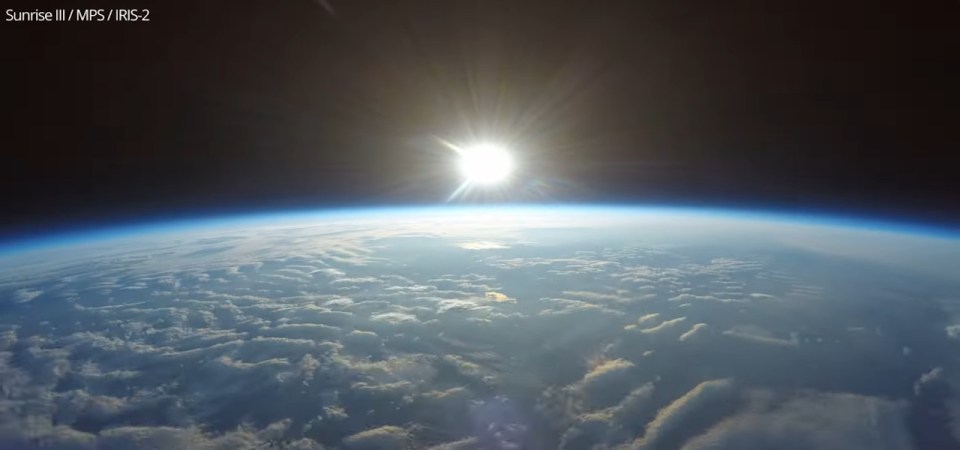
The breathtaking views on this page come courtesy of IRIS-2, a compact imaging package that creators [Ramón García], [Miguel Angel Gomez], [David Mayo], and [Aitor Conde] recently decided to release as open source hardware. It rode to the edge of space aboard Sunrise III, a balloon-borne solar observatory designed to study solar magnetic fields and atmospheric plasma flows.

Continue reading “Catching The View From The Edge Of Space”

Stripping GoPros To The Bone For Model Rocketry

The small size of action cameras has made them a great solution for getting high-quality experimental footage where other cameras don’t fit. GoPros are [Joe Barnard]’s camera of choice for his increasingly advanced rockets, but even the smallest models don’t quite fit where he needs them. They also overheat quickly, so in the video after the break, he demonstrates how he strips and customizes them to fit his required form factor.

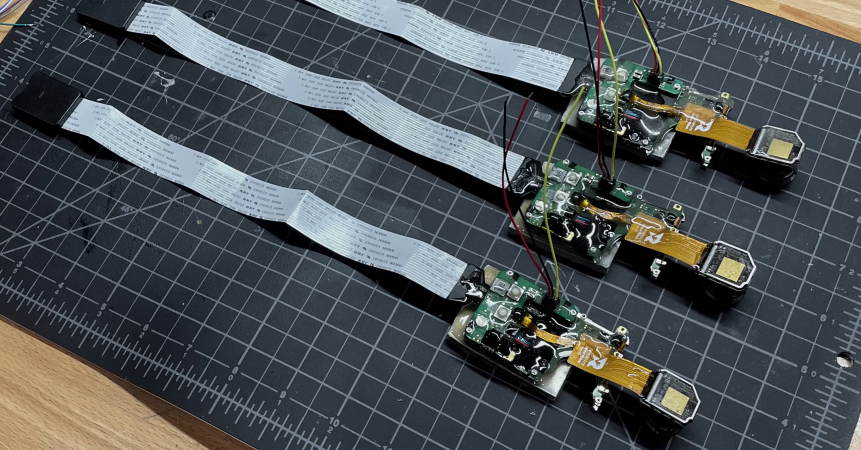
[Joe] starts out with a GoPro HERO10 Bones, which is a minimalist version intended for FPV drones. He likes the quality of the 4K 120 FPS video and the fact that he can update the settings by simply holding up a QR code in front of the camera. The case appears to be ultrasonically welded, so careful work with a Dremel is required to get it open. The reveals the control board with an aluminum heat sink plate, and the sensor module on a short ribbon cable. For minimal drag[Joe] wants just the lens to poke out through the side of the rocket, so he uses slightly longer aftermarket ribbon cables to make this easier.

The camera’s original cooling design, optimized for drone airflow, meant the device would overheat within 5 minutes when stationary. To increase the run time without the need for an external heat sink, [Joe] opts to increase the thermal mass by adding thick aluminum to the existing cooling plate with a large amount of thermal paste. In an attempt to increase heat transfer from the PCB, he also covers the entire PCB with a thick layer of thermal paste. Many of the video’s commenters pointed out that this may hurt more than it helps because the thermal paste is really intended to be used as a thin layer to increase the contact surface to a heat sink. It’s possible that [Joe] might get better results with just a form-fitting thermal block and minimal thermal paste.

[Joe] is permanently epoxying three of these modified cameras into his latest rocket, which is intended to fly at Mach 3, and touch space. This may look like a waste of three relatively expensive cameras, but it’s just a drop in the bucket of a very expensive rocket build.

We’ve seen GoPros get (ab)used in plenty of creative ways, including getting shot from a giant slingshot, and reaching the edge of space on a rocket and a balloon.

Continue reading “Stripping GoPros To The Bone For Model Rocketry”

Livestreaming Backpack Takes Streaming On-The-Go

Anyone who’s anyone on the internet these days occasionally streams content online. Whether that’s the occasional livestream on YouTube or an every day video game session on Twitch, it’s definitely a trend that’s here to stay. If you want to take your streaming session on the go, though, you’ll need some specialized hardware like [Melissa] built into this livestreaming backpack.

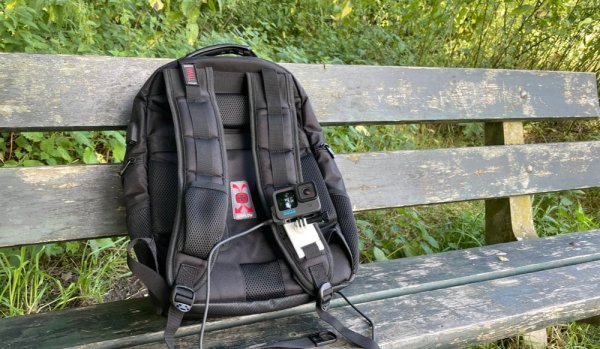
[Melissa] isn’t actually much of a streamer but built this project just to see if it could be done. The backpack hosts a GoPro camera with a USB interface, mounted on one of the straps of the pack with some 3D printed parts, allowing it to act as a webcam. It is plugged into a Raspberry Pi which is set up inside the backpack, and includes a large heat sink to prevent it from overheating in its low-ventilation environment. There’s also a 4G modem included along with a USB battery pack to keep everything powered up.

The build doesn’t stop at compiling hardware inside a backpack, though. [Melissa] goes into detail on the project’s page about how to get all of the hardware to talk amongst themselves and where the livestream is setup as well. If you’d like a more permanently-located streaming setup with less expensive hardware, we have seen plenty of builds like this which will get the job done as well.

Borehole Camera Rig Makes Life Easier In Mining

Much of mining involves digging and drilling holes in the ground. Often, these holes need inspecting, but [Dean Harty] found that existing borehole inspection solutions weren’t up to snuff. Resolution was poor, and often live-view devices made recording footage a pain. Instead, he set about the development of the Sneaky Peaky, going through several revisions in the process.

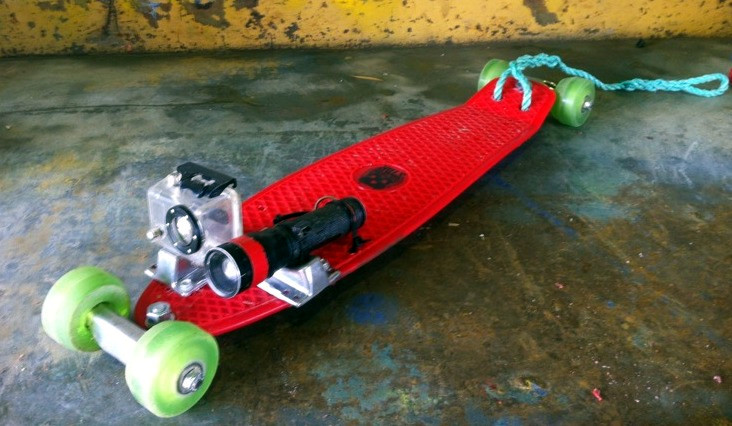
The first revision was nothing more than a GoPro strapped to a small penny board, paired with a bright flashlight. The 4K resolution of the GoPro provided useful footage, and the assembly could be lowered into boreholes on a rope and retrieved easily. Rugged and water resistant, the gear worked well, and was remarkably cheap compared to more obscure mining industry hardware.

An early version of the Sneaky Peaky

Later revisions ditched the skateboard, replacing it with a pipe-style housing instead. Key to the design was that the device could readily be destroyed and flushed out of a borehole with an air blast in the event it got stuck.

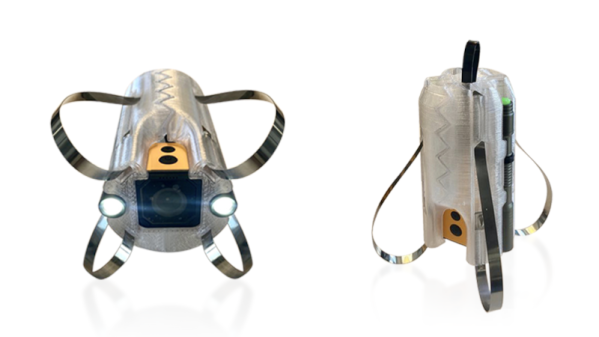
Eventually, mining outfit Metrologi got involved, having worked with [Dean] on several borehole backfill operations. A 3D-printed chassis was developed to hold an action camera and twin torches, held together with plastic zip ties. These are attached to the pull rope, and if the camera becomes jammed, a sharp pull will snap the ties and cause the device to fall apart. Steel cable ties are then used to create flexible guides to center the assembly in a variety of pipe diameters.

It’s a great example of people on the ground hacking together the tools they need, combined with iterative design to integrate improvements over time. We don’t talk about boreholes much around here, but they can be musical if properly employed, as it turns out. If you’ve got your own great mining hacks, however, do drop us a line!

Hackaday Links Column Banner

Hackaday Links: September 13, 2020

Like pretty much every other big conference, the Chaos Communication Conference is going virtual this year. What was supposed to be 37C3 has been rebranded as rC3, the remote Chaos Experience. It’s understandable, as a 17,000 person live event would have not only been illegal but a bit irresponsible in the current environment. The event appears to be a hybrid of small local events hosted in hackerspaces linked with streamed talks and a program of workshops and “online togetherness.” rC3 is slated to run in the week between Christmas and New Year, and it seems like a great way to wrap up 2020.

Speaking of remote conferences, don’t forget about our own Remoticon. While it won’t be quite the same as everyone getting together in sunny — historically, at least — Pasadena for a weekend of actual togetherness, it’s still going to be a great time. The event runs November 6 to 8; we’ve had a sneak peek at the list of proposed workshops and there’s some really cool stuff. Prepare to be dazzled, and make sure you keep up on the Remoticon announcements — you really don’t want to miss this.

Continue reading “Hackaday Links: September 13, 2020”