Ender V2 Layer Shift Problem Rectified With Cooling

Released in early 2020, the Creality Ender V2 is a popular desktop 3D printer in the maker market. However, some users began having problems with machines ordered in the latter half of the year, with repeated layer shifts occuring during long prints. After much investigation, it appears a fix has been found.

After much experimentation by [Fountain_of_Wisdom], it was determined that layer shifts were occuring at the same time as loud thumps or knocks from the printer. This was often during long X or Y traversals, and when these noises occurred, the print head would shift slightly, perpendicular to the axis of travel. Further investigation led to suspicion of the drive signals to the stepper motors, and it was then determined that the driver chips were becoming excessively hot during long prints. The solution landed upon was to install a fan and improve venting to cool the driver electronics, which curtailed the layer shift problem entirely.

However, such problems aren’t the norm, and since then, owners of the affected units with version 4.2.2 motherboards have been advised to upgrade to version 4.2.7. The exact root cause of the problem is not clear, but we’ve seen earlier Ender models upgraded with newer stepper drivers before; perhaps a similar fix is what makes the later revision motherboard a winner in the V2. If you’ve got insight into the problem, sound off in the comments!

[Thanks to Prodigity for the tip!]
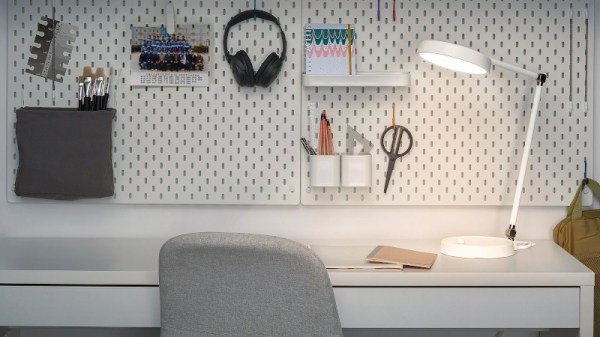
Custom Firmware For IKEA’s ORSALA Lamp

These days, home appliances are equally as likely to have soft buttons and rotary encoders as they are to have a simple old clunk/clunk power switch and an analog knob for controls. This is all well and good if the device aligns with your personal philosophy about how such controls should work; otherwise, it’s absolutely maddening. [j-zero] ran into this problem with their ORSALA lamp from IKEA, and set about rectifying the problem with some custom firmware.

The ORSALA lamp uses a rotary encoder for setting both brightness and color temperature, with a button to toggle modes. A long press is required to switch the lamp off. The custom firmware modifies this behaviour, such that the lamp can be switched on and off with a simple button press. Turning the encoder modifies brightness, and turning it to minimum switches the lamp off too. Meanwhile, the less commonly used color temperature setting can be modified by using the button while adjusting the encoder.

The hack was executed by reprogramming the ORSALA’s onboard microcontroller, the STM8S003F3P6, via its SWIM interface. The pads for the interface are easily located on the board, making the hack easy. Other than the inputs, the lamp packs separate TTP932 LED drivers for the warm white and cool white LEDs, making it easy to code a custom firmware to handle all the necessary functions.

It’s a great example of a hacker taking control of their own device and remaking it to suit their needs. Of course, if you want to go for another hacker trope, just stuff a Raspberry Pi in there instead!

Arduino Announces Board Based On Raspberry Silicon

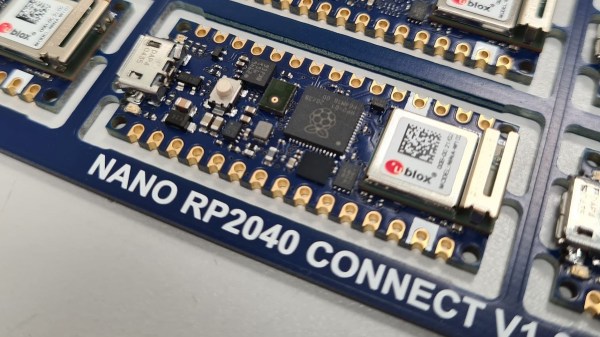
The Raspberry Pi Pico burst onto the microcontroller scene last month with much fanfare, and is already popping up in projects left, right and center. Notable for its high clock speed and exciting IO features, it’s a breath of fresh air in a market slowly weaning itself onto ARM architectures and away from 8-bit staples. Not one to miss out on a slice of the action, Arduino have announced their own upcoming board based on the Pico’s RP2040 chip.

The board is named the Arduino Nano RP2040 Connect, a moniker that’s not just a mouthful but likely to be confused with existing Arduino Nano products. It sports several differences to the Raspberry Pi Pico, namely packing WiFi, Bluetooth, and an IMU on board which should make developing motion-sensitive and IoT projects easier, particularly in cases where the Pico’s flexible IO could be useful.

Naturally, Arduino IDE integration will be a major plus point that gets many makers on board, and we can imagine there will be swift development of libraries leveraging the RP2040’s PIO subsystem. If you still haven’t gotten the low down on the Raspberry Pi Pico yet, though, never fear – our own [Elliot Williams] can tell you everything you need to know!

[Thanks to Darrell Flenniken for the tip, via Tom’s Hardware]

Making A Toothbrush From Scratch, Right Down To The Bristles

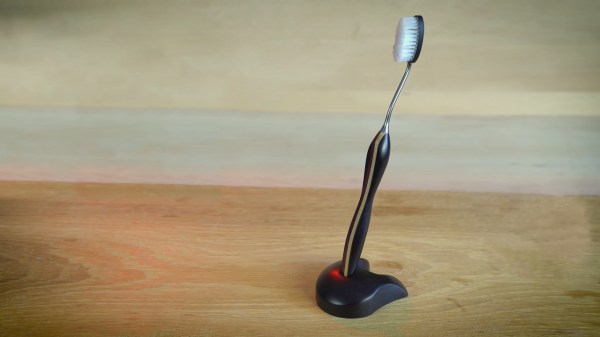
Most of us probably get by with a toothbrush costing a couple dollars at most, made of injection-moulded plastic for delicate, tender mouths. Maybe if you’re a real cleantooth, you have a fancy buzzy electric one. We’d wager few are machining their own bespoke toothbrushes from scratch, but if you want some inspiration, [W&M Levsha] is doing just that.

Much of the work will be familiar to die hard machining enthusiasts. There’s careful crafting of the wood handle, involving a stackup of multiple stained and varnished woods – in this case, hornbeam being the paler of the two, and amaranth providing that rich red color. The stem is a stylish stainless steel piece, elegantly bent to a tasteful curve. Finally, the assembly of the brush head alone is worth the watch. It’s custom made – with a steel backing plate and fishing wire bristles custom cut with an automated jig using stepper motors.  We’re suspect fishing wire is not rated for dental use, but the nylon strands are at least in the ballpark of what regular toothbrushes use.

While we probably wouldn’t slide this one betwixt our lips without consulting a dental professional first, it’s a great video for learning about what it takes to make beautiful bespoke objects in the workshop. We’ve seen elegant work from [W&M Levsha] before, too – in the form of a delightfully eclectic cap gun lighter. Video after the break.

Continue reading “Making A Toothbrush From Scratch, Right Down To The Bristles”

How To Bake Brownies With A Perfect Glossy Skin

If you’re anything at all like this writer, you don’t spend a lot of time inspecting brownies past the initial object identification phase, preferring to insert them directly into the mouth post-haste. But those with more of an aesthetic focus take great care to produce brownies with a glossy, attractive skin. [Adam Ragusea] decided to find out what it takes to get a perfect brownie skin, time after time.

After many, many trays of brownies, [Adam], with the assistance of [Dr. Pia Sörensen], determined that the key seems to be making a brownie mixture with very finely dissolved sugar, in sucrose form, with a carefully controlled amount of water in the mixture. This produces a thick mixture which can hold together against the gases bubbling out during the cooking process, and produces a nice glossy skin. Too much water, and the mixture isn’t viscous enough to hold up, leading to brownies full of pock marks, while alternative sugars like fructose and glucose likely disrupt the ordered structure of sucrose molecules necessary for a shiny surface.

Together, [Adam] and [Pia] do a great job of exploring the molecular chemistry behind the process, as well as ruling out several myths that have been perpetuated in the viciously insular brownie subculture. All they’re missing is a set of standardised reflectivity tests executed with an Arduino and some photodiodes, but we’ll assume that was just cut for time. We’ve seen other hacks in the realm of molecular gastronomy before, like this homebrew kitchen centrifuge. Video after the break.

Continue reading “How To Bake Brownies With A Perfect Glossy Skin”

RFID Music Player Gets The Whole House Pumping

RFID tags are normally used for pedestrian tasks like tracking shipping crates or opening doors to workplaces we’d rather be absent from, but they can also be cool and fun. [hoveeman] demonstrates this ably with a tidy jukebox project.

The build is based on a Raspberry Pi Zero, secreted away underneath a table with a USB RFID reader attached. Atop the table are a series of RFID cards upon which [hoveeman] printed the artwork from his favorite albums using a special caddy in an inkjet printer. Through some Python code and shell scripts, when scanning a card, the Pi Zero is able to trigger all the Google Home compatible devices in the house to play the album selected at the same time.

It’s a visually enjoyable way to cue up some music, and likely more reliable than most voice assistants, too. We can see this being particularly useful for Weezer fans; with the band’s many self-titled releases, Siri and the Google Assistant typically fail to play the right album on request. We’ve seen other beautiful RFID jukeboxes before, but one player that really sticks out ditched the RF and just uses computer vision with vinyl albums as the ID.

Continue reading “RFID Music Player Gets The Whole House Pumping”

Experiment With SFP Modules With This Handy Breakout

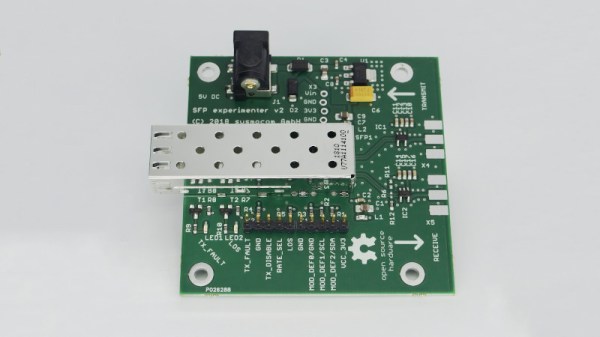
While most home networking hardware comes with network ports baked in from the factory, industrial grade gear is typically more versatile. Using standards like Small Form-factor Pluggable, or SFP, network switches can be used with a variety of transport mediums by simply swapping tranceivers in and out. These network devices typically handle the nitty gritty of transmitting Ethernet over fiber optics, and for those keen to experiment, this breakout may come in handy.

The board design comes complete with an SFP receptacle, allowing a variety of compatible receivers to be plugged in for experimentation. With the standard using differential signalling, the board carries hardware to allow the transceiver to be fed with single-ended signals instead, though a differential version is available too. The board can be used for transmitting different signals over fiber, outside just Ethernet, or used as a simple way to reprogram SFP modules via I2C. The latter can be useful to get around DRM in network switches that attempt to lock out generic transceiver modules.

It’s a useful piece of hardware for the fiber optic tinkerer and network admin alike. You might also find it useful if you’re building your own 10-gigabit network at home!