Punch Card Controlled Cyberdeck Lives In 80s Toy

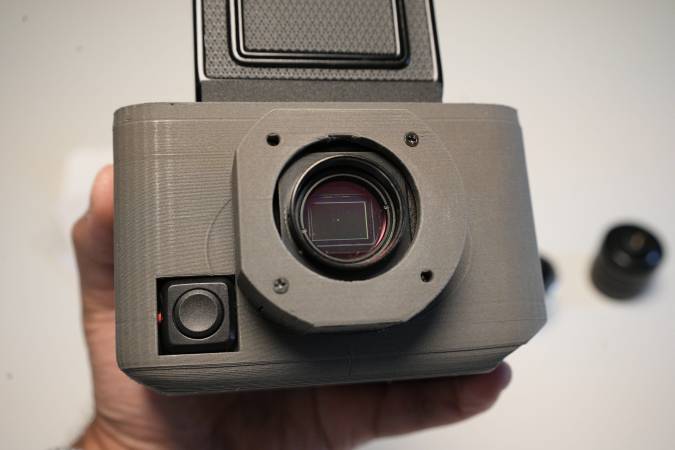
Have you ever seen a toy and said “That wants to be a deck”? [Attoparsec] did, when his eyes fell upon the Little Talking Scholar, a punch card driven toy from the 1980s. It’s now a punch card driven cyberdeck.

The punch card interface on the toy is only six bits, but sixty-four application cards are probably more than parents would have wanted to keep track of in 1989. Originally, they cued up simple matching games on an anonymous epoxy-coated microprocessor; after [Attoparsec]’s surgery, they do the same thing, cuing up custom Python applications on the Raspberry Pi Zero he’s implanted into this thing.

Continue reading “Punch Card Controlled Cyberdeck Lives In 80s Toy”

MR Browser Is The Package Manager Classic Macs Never Had

Homebrew bills itself as the package manager MacOS never had (conveniently ignoring MacPorts) but they leave the PPC crowd criminally under-served, to say nothing of the 68k gang. Enter [that-ben] with MR Browser, a simple utility to fetch software from Macintosh Repository for computers too old to hit up the website.

If you’re not familiar with Macintosh Repository, it is what it says on the tin: a repository of vintage Macintosh software, like Macintosh Garden but apparently less accessible to vintage machines.

MRBrowser sys6 runs nicely on the Macintosh Plus, as you can see.

There are two versions available, depending on the age of your machine. For machines running System 6, the appropriately-named MR Browser sys6 will run on any 68000 Mac in only 157 KB of and MacTCP networking. (So the 128K obviously isn’t going to cut it, but a Plus from ’86 would be fine.)

The other version, called MR Browser 68K, ironically won’t run on the 68000. It needs a newer processor (68020 or newer, up-to and including PPC) and TCP/IP networking. Anything starting from the Macintosh II or newer should be game; it’s looking for System 7.x upto the final release of Mac OS 9, 9.2.2.  You’ll want to give it at least 3 MB of RAM, but can squeak by on 1.6 MB if you aren’t using pictures in the chat.

Chat? Yes, perhaps uniquely for a software store, there’s a chat function. That’s not so weird when you consider that this program is meant to be a stand-alone interface for the Macintosh Repository website, which does, indeed, have a chat feature. It beats an uncaring algorithm for software recommendations, that’s for sure. Check it out in action in the demo video below.

It’s nice to see people still making utilities to keep the old machines going, even if coding on them isn’t always the easiest.  If you want to go online on with vintage hardware (Macintosh or otherwise) anywhere else, you’re virtually locked-out unless you use something like FrogFind.

Thanks to [PlanetFox] for the tip. Submit your own, and you may win fabulous prizes. Not from us, of course, but anything’s possible!

Continue reading “MR Browser Is The Package Manager Classic Macs Never Had”

8-Core ARM Pocket Computer Runs NixOS

What has 8 ARM cores, 8 GB of RAM, fits in a pocket, and runs NixOS? It’s no pi-clone SBC, but [MWLabs]’s smartphone– a OnePlus 6, to be precise.

The video embedded below, and the git link above, are [MWLabs]’s walk-through for loading the mobile version of Nix onto the cell phone, turning it into a tiny-screened Linux computer. He’s using the same flake on the phone as on his desktop, which means he gets all the same applications set up in the same way– talk about convergence. That’s an advantage to Nix in this application, compared to the usual Alpine-based PostMarketOS.

Of course some of the phone-like features of this pocket-computer are lacking: the SIM is detected, and he can text, but 4G is nonfunctional. The rear camera is also not there yet, but given that Mobile-NixOS builds on the work done by well-established PostMarketOS, and PostMarketOS’ testing version can run the camera, it’s only a matter of time before support comes downstream. Depending what you need a tiny Linux device for, the camera functionality may or may not be of particular interest. If you’re like us, the idea of a mobile device running Nix might just intrigue you,

Smartphones can be powerful SBC alternatives, after all.  You can even turn them into SBCs. As long as you don’t need a lot of GPIO, like for a server,a phone in hand might be worth two birds in the raspberry bush.

Continue reading “8-Core ARM Pocket Computer Runs NixOS”

This Service Life Study Really Grinds Our Gears

3D printing is arguably over-used in the maker community. It’s just so easy to run off a quick prototype and then… well, it’s good enough, right? Choosing the right plastic can go a long way to making sure your “good enough” prototype really is good enough for long term use. If you’re producing anything with gearing, you might want to cast your eyes to a study by [Mert Safak Tunalioglu] and [Bekir Volkan Agca] titled: Wear and Service Life of 3-D Printed Polymeric Gears.

Photograph of the test rig used in the study.
No spin doctoring here, spinning gears.

The authors printed simple test gears in ABS, PLA, and PETG, and built a test rig to run them at 900 rpm with a load of 1.5 Nm against a steel drive gear. The gears were pulled off and weighed every 10,000 rotations, and allowed to run to destruction, which occurred in the hundreds-of-thousands of rotations in each case. The verdict? Well, as you can tell from the image, it’s to use PETG.

The authors think that this is down to PETG’s ductility, so we would have liked to see a hard TPU added to the mix, to say nothing of the engineering filaments. On the other hand, this study was aimed at the most common plastics in the 3D printing world and also verified a theoretical model that can be applied to other polymers.

This tip was sent in by [Benjamin], who came across it as part of the research to build his first telescope, which we look forward to seeing. As he points out, it’s quite lucky for the rest of us that the U.S. government provides funding to make such basic research available, in a way his nation of France does not. All politics aside, we’re grateful both to receive your tips and for the generosity of the US taxpayer.

We’ve seen similar tests done by the community — like this one using worm gears — but it’s also neat to see how institutional science approaches the same problem. If you need oodles of cycles but not a lot of torque, maybe skip the spurs and print a magnetic gearbox. Alternatively you break out the grog and the sea shanties and print yourself a capstan.

2025 One Hertz Challenge: Metronalmost Is Gunning For Last Place

We’ve just begun to receive entries to the One Hertz Challenge, but we already have an entry by [Mike Coats] that explicitly demands to be awarded last place: the Metronalmost, a metronome that will never, ever, tick at One Hertz.

Unlike a real metronome that has to rely on worldly imperfections to potentially vary the lengths of its ticks, the metronoalmost leaves nothing to chance: it’s driven by a common hobby servo wired directly to a NodeMCU ESP-12E, carefully programmed so that the sweep will never take exactly one second.

This is the distribution. The gap is around the value we explicitly asked for.

The mathematics required to aggressively subvert our contest are actually kind of interesting: start with a gaussian distribution, such as you can expect from a random number generator. Then subtract a second, narrower distribution centered on one (the value we, the judges want to see) to create a notch function. This disribution can be flipped into a mapping function, but rather than compute this on the MCU, it looks like [Mike] has written a lookup table to map values from his random number generator. The output values range from 0.5 to 1.5, but never, ever, ever 1.0.

The whole thing goes into a cardboard box, because you can’t hit last place with a masterfully-crafted enclosure. On the other hand, he did print out and glue on some fake woodgrain that looks as good as some 1970s objects we’ve owned, so there might be room for (un)improvement there.

While we can’t think of a better subversion of this contest’s goals, there’s still time to come up with something that misses the point even more dramatically if you want to compete with [Mike] for last place: the contest deadline is 9:00 AM Pacific time on August 19th.

Or, you know, if you wanted to actually try and win. Whatever ticks your tock.

A Chip8 Emulator For 68000-based Macs

Among this crowd, it’s safe to say that the original 68000 Macintosh computers need no introduction, but it’s possible some of you aren’t familiar with Chip8. It was an interpreted virtual machine originally created for the COSMAC VIP microcomputer by [Joe Weisbecker] way back in 1977. It enabled coding simple games on the COSMAC VIP without getting into machine code on the VIP’s CDP1802 processor. For the obvious reason of “Why not?” [KenDesigns] decided to put the two together with Chip4Mac68000, a Chip8 emulator for the original Macintosh.

Chip4Mac68000 is not actually a Macintosh program; it doesn’t run in the System Software. Instead, it is a bootdisk that runs bare-metal on the 68000 processor, bypassing Apple’s ROM completely. Doing that is probably more impressive than emulating Chip8 — anyone who wants to get into writing emulators starts with Chip8. That’s not to knock on anyone who goes to the effort of writing an emulator, it’s just that given its origins in a 1970s micro, it’s understandably a very simple system. Not many people do bare-metal coding on this sort of hardware anymore; it’s not like there’s an SDK you can go grab.

Or there wasn’t, anyway, because in order to get this emulator to work, [KenDesigns] wrote a bare-metal SDK for 68000-based Macs. Note that when he says 68000, he does mean 68000 — anything newer than a Macintosh Classic is out. It’s 68000, not 680xx. It was not a trivial endeavour. In the demo video embedded below, you can see his 512k Macintosh in pieces because he’s been poking at it with a logic analyzer to verify the hardware does what he thinks it’s being told.

If you want to try it out, apparently you don’t need real hardware: [KenDesigns] says MAME is accurate enough to make it all work, but miniVmac is not. No word if it would work on the RP2040-based PicoMac; if you try it, let us know how it works out.

This isn’t the first time we’ve seen people writing new software for old Macs of late. If you’re working new magic on very old machines, drop us a line. We’d love to hear about it.

Continue reading “A Chip8 Emulator For 68000-based Macs”

2025 One Hertz Challenge: Valvano Clock Makes The Seconds Count

A man named [Jim Valvano] once said “There are 86,400 seconds in a day. It’s up to you to decide what to do with them.” — while we couldn’t tell you who [Jim Valvano] was without a google search*, his math checks out. The quote was sufficiently inspirational to inspire [danjovic] to create a clock count those seconds precisely.

It’s a simple project, both conceptually and electrically. All it does is keep time and count the seconds in the day– a button press switches between counting down, counting up, and HH:MM:SS. In every mode, though, the number displayed will change at one Hertz, which we appreciate as being in the spirit of the challenge. There are only four components:  an Arduino Nano, a DS3231 RTC module, a SSD1306 128×64 OLED module, and a momentary pushbutton. At the moment it appears this project is only on breadboard, which is a shame– we think it deserves to have a fancy enclosure and pride of place on the wall. Wouldn’t you be more productive if you could watch those 86,400 seconds ticking away in real time? We think it would be motivating.

Perhaps it will motivate you to create something for our One Hertz Challenge. Plenty of seconds to go until the deadline on August 19th, after all. If you’d rather while away the time reading, you can check out some of [danjovic]’s other projects, like this Cistertian-inspired clock, or this equally-inscruitable timekeeper that uses binary-coded octal.


*Following a google search, he was an American college basketball coach in the mid-20th century.