Judge Spotlight: Dave Jones

judge-spotlight-dave-jones

This week’s Judge Spotlight features [Dave Jones] who posted a video reponse to our slate of questions. If you’ve spent much time around here chances are you know of [Dave] quite well. He is the man behind the EEVblog and also hosts The Amp Hour podcast along with [Chris Gammell].

It’s great to pick [Dave’s] brain a bit. He’s seen a lot during his career, with insights on professional engineering from the point of view of job seeker, employer, job interviewer, and more. His time with the EEVblog and Amp Hour have furthered his experience with looks inside of all manner of equipment, adventures in crowd funding, and interactions with a multitude of hardware start-ups. Check out his video, as well as a list of the questions with timestamps, after the jump.

We’re sure you know by now, he’s judging The Hackaday Prize which will award a trip to space and hundreds of other prizes for showing off your connected device built using Open Design.

Continue reading “Judge Spotlight: Dave Jones”

Magic In The Midwest: Maker Faire Kansas City

What did you do over the weekend? I spent both days at Maker Faire Kansas City and it was awesome. This is the fourth year the Faire has been held in Union Station, a stunning Kansas City landmark that celebrates its centennial this fall.

The Things

As you might imagine, there were 3D printers galore. One of my favorites was the One Up family from Q3D. These acrylic beauties start at $199 and offer a heated bed plate option.

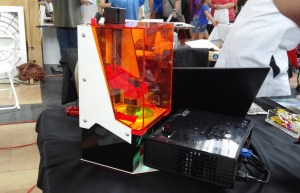
Maker Juice Labs, purveyors of 3D printing inks for SLA brought a LittleSLA printer which they demonstrated by making some very nice key chains.

Little SLA does it stereolithographically.

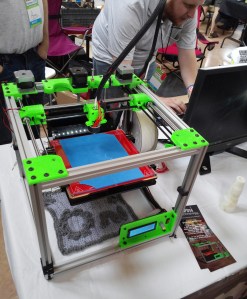
SeeMeCNC had their Rostock Max V2 printer cooking up some huge prints, and Oni Technology, a local KC company, had their H Bot cranking.

Locally-made Oni H Bot.

At the Modio booth, my companion and I constructed heroes and monsters from a rainbow-colored pile of 3D-printed body parts and weapons. With Modio’s iPad app, you can create characters from the existing parts library, modify those parts, and print them on any 3D printer. All of the parts are designed to snap together. Modio recently teamed up with MakerBot and hopes to port their app from the iPad to the iPhone and Android in the near future.

I managed to resist the inexplicable Hostess booth and their free piles of Twinkies, Cup Cakes, and Coffee Cakes. They had a display that promised banana Twinkies and some Greek yogurt oddities, but only had the regular stuff on hand. On Sunday, I saw many people lugging around entire boxes of free Donettes and other goodies.

Continue reading “Magic In The Midwest: Maker Faire Kansas City”

Press Button Get Party Mode

partymode2_2 If you’re looking to do something awesome with a graphing calculator, [Chris] is the guy to go to. He’s literally written the book on the subject. His PartyMode project, however, has absolutely nothing to do with calculators. It’s a fantastic display of lights, colors, and sounds that has been rebuilt again and again over the years, and something [Chris] has finally gotten around to documenting.

The idea for [Chris]’ PartyMode is a single button that will transform a room from a boring computer lab or dorm room into a disco with 22.4 channel sound, and computer displays used as panels of color. The first version began in the lab in his school’s EE department that included ten CRT monitors. There were a few VUFans featured on the good ‘ol Hackaday, but a few problems with regulations and politics brought this version of PartyMode to a premature end.

The second version is a miniaturized, ‘press a button, get a party’ setup with a crazy number of RGB LEDs, a few more of those computer fan VU meters, and a Bluetooth app to control everything. Unlike the first version, the PartyMode 2.0 is fully independent from a computer, instead relying on an ATMega to do the audio processing and handling the Bluetooth interface. Judging from the videos below, it’s quite the site, and if you need an instant party, you could do much worse.

Continue reading “Press Button Get Party Mode”

Deadbugged LED Strobe

89201403972533359 [Steel 9] was looking around for a LED strobe light for reasons unknown. He couldn’t find any that he liked, and when that happened, he did what any normal person would do – make one himself.

[Steel] based this build around a Harbor Freight 27 LED flashlight. This flashlight is just that – a simple switch to turn the LEDs on and off, a button, and from the looks of things, not even a single current limiting resistor. A masterstroke of engineering, surely,

The added circuitry consists only of a pair of transistors, a few resistors, a capacitor, and a pot. Yes, [Steel] is too cool for a 555 chip, It’s just a simple multivibrator circuit and none of the component values are very sensitive.

[Steel] got exactly what he wanted without even having to break out a breadboard. Since he just deadbugged all the circuitry, he’s also reusing the plastic enclosure of the flashlight. That’s a win in any book.

A Tiny Bubble Display Alarm Clock

For one reason or another, we’re starting to see a lot of projects featuring some old seven-segment HP bubble displays. Yes, those displays once relegated to ancient electronic calculators are making a comeback for reasons we can’t understand why, other than speculation that someone found a bunch of NOS displays. [Markus] picked up a few of these olde tymie displays and built a very nice bubble display alarm clock.

To keep things simple, [Markus] didn’t go the usual ATMega with RTC route. Instead, he’s using an MSP430, a 32kHz crystal, and a few buttons to construct this tiny alarm clock. It’s powered by a single AAA battery, and in a nice change of pace from fancy, professionally made boards, [Markus] built this on some perfboard with a little bit of enameled wire.

It’s a neat little clock, and with the speaker and most likely extreme battery life thanks to the MSP430, a wonderful portable, classic-looking alarm clock. Video of [Markus] manipulating the time below.

Continue reading “A Tiny Bubble Display Alarm Clock”

Extending EagleCAD With Python

eagleAlthough it’s derided for not being open source, EagleCAD is an extremely popular piece of schematic and PCB layout software. Most of the popularity is probably due to the incredible amount of part libraries – it’s certainly not the features Eagle has to offer or its horrible scripting capabilities. [Rob] had enough of the lack of good scripting support in Eagle, so he’s been spending his time making Eagle’s ULP work with Python. He’s only been at it a short time, but already it’s much more usable than the usual Eagle scripts.

Below you can check out a pair of videos of [Rob]’s Python tools for Eagle in action. The first video goes through aligning a few symbols and creating a board outline (with proper curves!) from a DXF file. The second video shows exactly how valuable these tools are when laying out a board: imagine hundreds of LEDs and resistors automatically aligned to each other with a single click of a mouse. Beautiful.

All the PyEagle stuff is available on [Rob]’s github, with a DXF importer, group manager, and alignment tool included. Now that everything’s Python, it’s easy to build your own tools without relying on Eagle’s odd ULP language.

Continue reading “Extending EagleCAD With Python”

THP Entry: All Yarns Are Beautiful

170

There are a lot of builds out there that retrofit modern electronics into ancient knitting machines. The ability to print in yarn is very cool, but when you look at the total costs of these projects – especially the ancient Brother KH-930 knitting machines – these projects start getting very expensive. A much cheaper solution to these $700 knitting machines is the Brother KH-910 model, the first of its kind, and a machine that can be purchased for about $100. For their entry into The Hackaday Prize, [chris007] and [andz] put modern electronics into this slightly less capable knitting machine, turning what was once old junk into something with the same capabilities of a much more expensive machine.

The more expensive KH-930 and -940 knitting machines are fairly impressive pieces of technology, controlled with a floppy drive, and can be retrofitted with a serial cable to upload patterns. This is the basis of the Electro-knit and Knitic, but they simply don’t work with the Brother KH-910, a machine programmed with a primitive scanner and semi-transparent picture cards. It’s like the difference between punch cards and a disk drive, really.

[chris] and [andz]’s new controller for the Brother KH-910 is based on the Arduino, acting as a connection between a PC and the 200 solenoids and pins inside the knitting machine. That in itself is impressive – now, instead of being limited to 60-pixel wide yarn prints, the Brother KH-910 can use its full width, limited only by your arm strength and amount of yarn.


SpaceWrencherThe project featured in this post is an entry in The Hackaday Prize. Build something awesome and win a trip to space or hundreds of other prizes.

Continue reading “THP Entry: All Yarns Are Beautiful”