Raspberry Pi Backup Scripts

Raspberry Pi

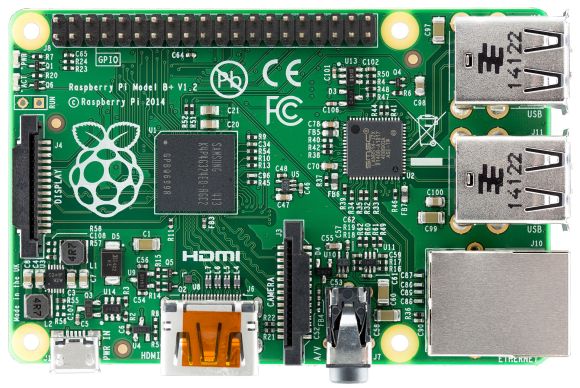
[Matthew’s] recent blog post does a good job explaining the basics of the Raspberry Pi’s file system. The Linux operating system installed on a Pi is generally installed on two different partitions on an SD card. The first partition is a small FAT partition. All of the files on this partition are used for the initial booting of the Pi. This partition also includes the kernel images. The second partition is the root file system and is generally formatted as ext4. This partition contains the rest of the operating system, user files, installed programs, etc.

With that in mind you can deduce that in order to backup your Pi, all you really need to do is backup all of these files. [Matt] has written some scripts to make this a piece of cake (or pie). The first script will simply copy all of the files into a gzipped archive. You can save this to an external SD card, USB drive, or network share.

The second script is perhaps more interesting. This script requires that you have one free USB port and a USB SD card reader. The script will automatically format the extra SD card to contain the two critical partitions. It will then copy the “boot” files to the new boot partition and the root file system files to the new SD card’s root partition. When all is said and done, you will end up with an SD card that is an exact copy of your current running file system.

This can be very handy if you have multiple Pi’s that you want to run the same software, such as in a Pi cluster. Another good example is if you have spent a lot of time tweaking your Pi installation and you want to make a copy for a friend. Of course there are many ways to skin this cat, but it’s always fun to see something custom-built by a creative hacker.

Self-Assembling Origami Robots

orgami-robots-harvard

MIT engineers have developed a technique to address the challenges involved in manufacturing robots at a cheap and accessible level. Like a plant folding out its petals, a protein folding into shape, or an insect unveiling its wings, this autonomous origami design demonstrated the ability for a mechanical creature to assemble itself and walk away. The technique opens up the possibility of unleashing swarms of flat robots into hard to reach places. Once on site, the robots mobilize from the ground up.

The team behind the project used flexible print circuit boards made out of paper and polystyrene, which is a synthetic aromatic polymer typically found in the commercially sold children’s toy Shrinky Dinks™. Each hinge had embedded circuits that were mechanically programmed to fold at certain angles. Heat was applied to the composite structure triggering the folding process. After about four minutes, the hinges would cool allowing the polystyrene to harden. Some issues did arise though during the initial design phase due to the amount of electrical current running the robots, which was ten times that of a regular light bulb. This caused the original prototypes to burn up before the construction operation was completed.

In the long-term, Core Faculty Member [Robert] would like to have a facility that would provide everyday robotic assistance to anyone in the surrounding community. This place would be accessible to everyone in the neighborhood helping to solve whatever problems might arise, which sounds awfully like a hackerspace to us. Whether the person required a device to detect gas leaks or a porch sweeping robot, the facility would be there to aid the members living nearby.

A video of [Robert] and [Sam] describing the project comes up after the break:

Continue reading “Self-Assembling Origami Robots”

Poor Audio Quality Made Great: Listen To Vintage Music Using An Antique Radio Without Removing The Insides

Sometimes it is not how good but how bad your equipment reproduces sound. In a previous hackaday post the circuitry of a vintage transistor radio was removed so that a blue tooth audio source could be installed and wired to the speaker. By contrast, this post will show how to use the existing circuitry of a vintage radio for playing your own audio sources while at the same time preserving the radio’s functionality. You will be able to play your music through the radio’s own audio signal chain then toggle back to AM mode and listen to the ball game. Make a statement – adapt and use vintage electronics.

Pre-1950’s recordings sound noisy when played on a high-fidelity system, but not when played through a Pre-War console radio. An old Bing Crosby tune sounds like he is broadcasting directly into your living room with a booming AM voice. You do not hear the higher frequency ‘pops’ and ‘hiss’ that would be reproduced by high-fidelity equipment when playing a vintage recording. This is likely due to the fact that the audio frequency signal chain and speaker of an antique radio are not capable of reproducing higher frequencies. Similarly, Sam Cooke sounds great playing out of an earlier transistor radio. These recordings were meant to be played on radios from the era in which they were recorded.

Choosing an Antique Radio

Vintage radios can be found at garage sales, estate sales, hamfests, antique shops, antique radio swap meets, and Ebay. Millions of radios have been manufactured. People often give them away. For this reason, antique radios are relatively inexpensive and the vast majority are not rare or valuable.

Generally speaking, tube radios must be serviced and may not even work. Transistor radios often work to some level. Try to find a radio that is clean and uses a power supply transformer or batteries.

Click past the break to learn how to restore these radios to working condition

Continue reading “Poor Audio Quality Made Great: Listen To Vintage Music Using An Antique Radio Without Removing The Insides”

LittleRP, The Latest Of The Resin Printers

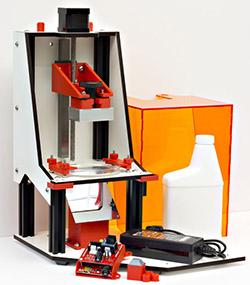
LitleRP Over the last few years, a few resin / stereolithography printers have been made a few headlines due to print quality that cannot be matched by the usual RepRap style filament printers. These used to be extremely expensive machines, but lately there have been a few newcomers to the field. The latest is the LittleRP, an affordable DLP projector-based resin printer that can be put together for under a kilobuck.
Instead of proprietary resins, the LittleRP is designed to use as many different formulations of UV curing resin as possible, including those from MadeSolid and MakerJuice. These resins are cured with a DLP projector, providing a print area of 60x40x100mm with the recommended 1024×768 projector, or 72x40x100mm with the alternative 1080p projector.

This isn’t the only resin printer that’s come out recently; SeeMeCNC recently announced their cleverly named DropLit resin printer kit, going with the same ‘bring your own projector’ idea as the LittleRP. With the price of the printer, both of these kits should cost less than $1000 USD. With the price of UV resin dropping over the last few years, it might be just the time to get in the resin printer game.

A Swamp Cooler For Burning Man

Swamp%20Cooler%20(4)

For those who don’t know, Burning Man is a week-long festival in the middle of the Black Rock Desert in Nevada. The event attracts a wide range of creative people from all over the world.

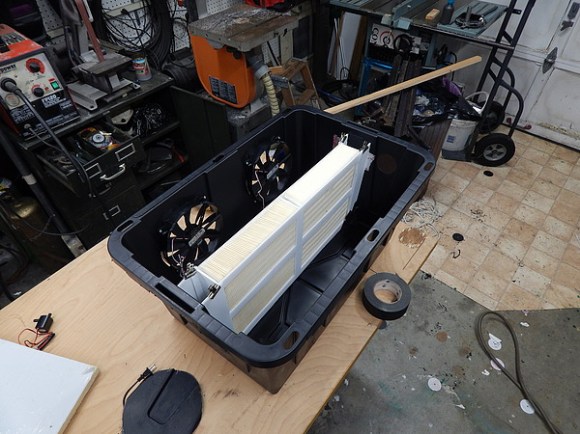
This year, [Jake] is going to bring his homemade evaporative ‘swamp cooler’ to help battle the heat. His design uses a medium-sized shipping container with two large holes cut out of it and two 200mm PC cooling fans embedded into the plastic. The fans blow air from the outside into the bin. Humidifier filters sourced from a local dump are inserted into the middle of the container. The filters acts as an absorbent material to hold melt-water being pumped in from another cooler chest above.

A 30 watt solar panel provides enough power to keep the swamp cooler going while giving enough juice to energize decorative LED interior lights along with some backup batteries for phones and cameras. [Jake]’s system contains a re-purposed A/C computer load center for the solar system. He plans to take temperature and humidity readings at the Burn, bringing back the data from the desert to share with the world.

[Jake] does warn about mold with this system though, but one of the advantages with the filters he chose is that they are pretreated with biocidal compounds. This should help to reduce the chance of mold growth. High humidity conditions are also a disadvantage with this type of cooler, but this is a non-issue in the extremely dry desert of The Playa.

If you plan to go to Burning Man, tell about your energy/cooling preparations. Will you be bringing a system similar to this? If so, let us know.

A Beverage Cooler With A Stereo

Cooler

If you are looking for a way to spice up your summertime parties, try following [Pastryboy’s] lead. After letting the idea rattle around in his head for a few years, he finally built himself the cooler he always dreamed of.

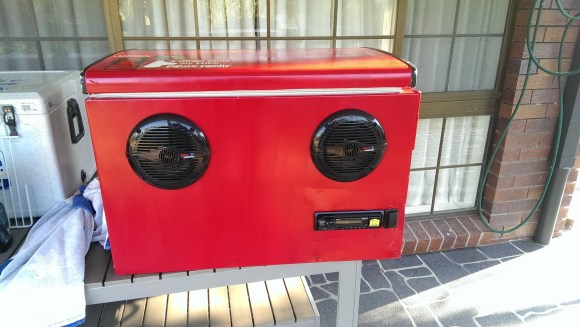
[Pastryboy] was originally inspired by a YouTube video he found a few years ago. He took the basic concept and rolled with it. He started out with a mini fridge he found for $10. He removed the compressor and other plumbing bits. He also removed all of the internal shelving. Any leftover holes were patched up with silicone. Now when the fridge is laid on its back, it’s essentially the same as an ordinary cooler.

Next [Pastryboy] purchased two 6.5″ Boss speakers and an inexpensive head unit. He drilled a few pilot holes in the side of the refrigerator and then used a jigsaw to cut the holes to the proper sizes. Once the speakers were mounted in place, he needed to find a way to waterproof the inside. This was accomplished by using some small plastic bowls. The edges of the bowls were attached to the cooler wall using silicone.

[Pastryboy] was able to run most of the cabling through the inside of the cooler’s walls. The system is powered by a 12V lead acid battery. He chose a specific model of battery that can be stored in any orientation and that can handle being knocked around a little bit.

Next he added a couple of handles to the sides to make it easier to transport. A small bit of ski rope was attached to the inside of the lid, preventing the lid from flopping completely open. [Pastryboy] also added a drain to the bottom to make it easier for one person to empty the cooler. The final touch was to pretty it up a bit. He sanded down the entire thing and gave it several coats of red paint. The end result looks very slick.

[via Reddit]

Homemade Soldering Station for cheap Soldering Irons

Homemade Soldering Stations For Cheapy Irons

Everyone reading this post has had a cheap pencil-style soldering irons that plug straight into the wall at some point in their lives. Even if you’ve upgraded to a professional soldering station, you probably have one of these cheapy irons kicking around that are slow to heat up to an unknown temperature. [Pantelis] thought he could fix the latter problem with his Homemade Soldering Station for those basic soldering irons.

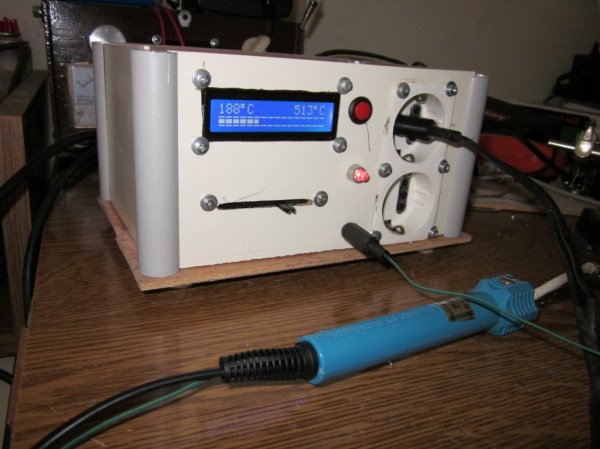
Since the intent of the soldering station was to control the temperature of the iron [Pantelis] had to figure out a way to sense the temperature. He did this by strapping a thermocouple to the iron near the tip. The wires were run back through the handle and then along the power cord.

Homemade Soldering Station for cheap Soldering Irons

Both the stock iron plug and the thermocouple leads plug into a box put together specifically for this project. In the photo you’ll notice the LCD screen that displays both the target and actual temperatures. The linear potentiometer below the LCD screen is used to set the target temperature. The LED to the right alerts the operator that the iron is heating up and when it is at temperature and read to go.

Although there isn’t a lot of schematic or part list information, [Pantelis] did do a good job photo documenting his build. Check it out, it’s worth a gander.